SAP QM Automatic Defect Recording
SAP QM Automatic Defect Recording
Introduction
During Quality control, defect arises when a product fails to satisfy certain test procedures or standards. Defect can occur due to faults in design/manufacturing process, human error, poor quality raw material etc. SAP allows detailed entry of defects, initiate necessary actions to resolve and prevent such issues.
This blog will provide steps to setup and execute automatic defect recording, and further process with Quality Notification.
Customizing Parameters
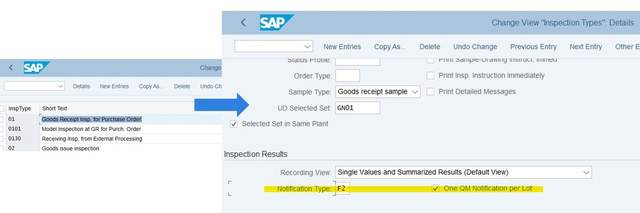
Inspection type – Notification type Assignment
– During result recording, when defect are raised for inspection lot, then quality notification (QN) is created and update as QN items. Based on inspection type, default QN types can be assigned.
IMG Path: Under SPRO > Quality Management > Quality Inspection > Inspection Lot Creation > Maintain Inspection Type
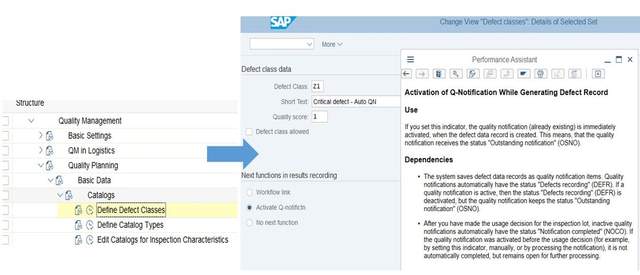
Defect Class with Activate QN and Catalog setup.
– Using Activate Q-notification, QN raised will have OSNO status i.e. QN will remain open after usage decision.
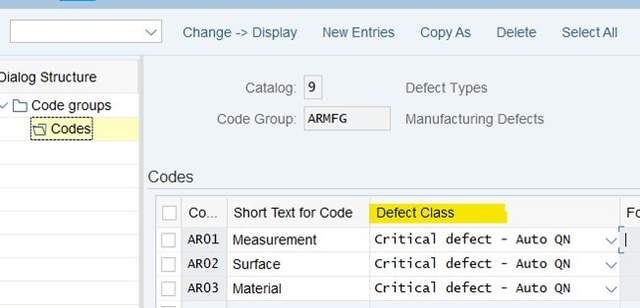
– When used in Catalog setup, enables automatic QN activation during defect recording.
IMG Path: Quality Planning > Basic Data > Catalogs
Setup Catalog,
Catalog Profile
– Setup Catalog profile and assign in notification type

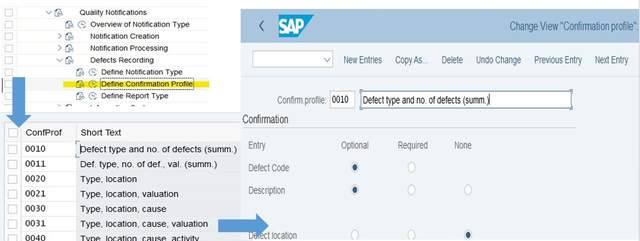
Confirmation Profile
– Specify the type of information or confirmation objects that you can record for a defect.
– For
Summarized
defects recording, conf. objects include – defect type and defect type text.
– For
Individual
defects recording, conf. objects include – defect type, defect type text, defect location, assembly, defect cause, defect cause text, task, activity text, and defect valuation
IMG Path: Quality Notification > Defect Recording > Define Confirmation Profile
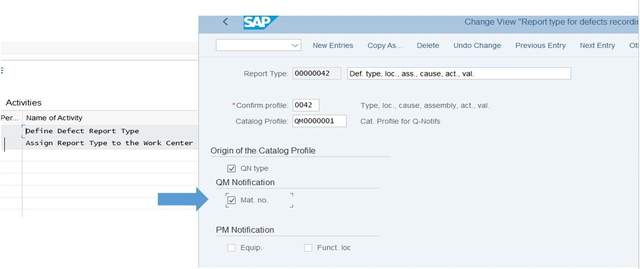
Report type
– Link with Confirmation Profile & Catalog Profile.
–
Setup priority for Catalog profile
(1.Material Master > 2.QN type > 3.Record type).
Note
: With origin option, users will have flexibility over Catalog selection during QN process.
IMG Path: Quality Notification > Defect Recording > Define Report Type
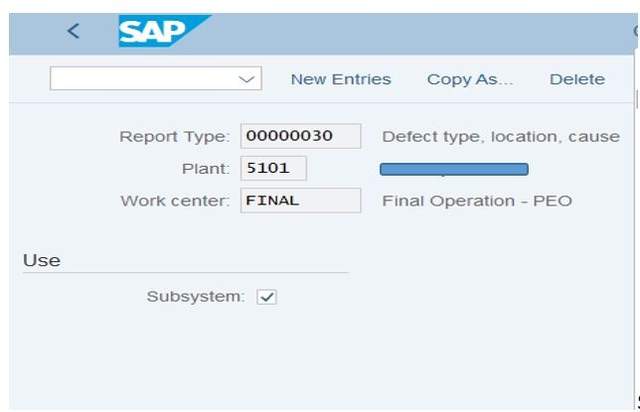
Assign Report type to Work Center
– Setup entries at Work center – Plant level.
–
Setup Priority for Report type
in customizing (Work center > Plant > Report type).
Note : With default report type, user can skip ‘Report type’ input dialog option during defect recording.
Defect Recording Types
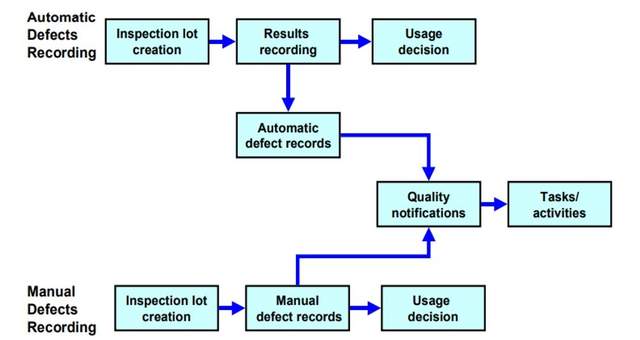
(Source)
- Manual Defect Recording
-
Automatic Defect Recording
Master Data, Tcode: QS23 ,
– MIC, control indicator > enable defect recording (for both types).– MIC > Setup defect code in case characteristics attribute is ‘Rejected’ (for automatic). Note : When characteristics fails, defect record entry will done automatically. Users can skip ‘Create Defect’ option.
Transaction Data, Tcode: QA32 / QA02 ,
Record Defect > Select defect record > Activate Notification (if defect class with Activate-QN option disabled) > Input necessary data > Continue > Save.QN status is changed from ‘OSNO DEFR’ to ‘NOCO’.
Defect Recording Levels
The availability or absence of an inspection plan or material specification determines the assignment level to record defects. Three levels available to record defects.
– Inspection lot
– Inspection operation
– Inspection characteristic
Creation of Defect Records
-
Option1 – During Results recording,
Tcode: QA32 / QA02
Select lot > Create Defect or Select lot > Results > Choose Operation/ Char level > DefectsOn Save, Notification created/changed. Check defects levels in table QMFE. -
Option2 – Before UD, Tcode:
QA32 / QA11
Record UD screen > Defects (Assignment only at Lot level). -
Option3 – Using separate screen, with Tcode,
QF11 – Lot level
QF21 – Operation level
QF31 – Characteristics Level
Processing of Defect Records
- Case1 – Defects are activated (QN status set to OSNO) -> complete UD -> follow further QN process.
- Case2 – Defects are not activated -> after UD, QN status set to ‘NOCO DEFR’ -> QN completed.
Editing Defect Records
- Automatically created defect records are deleted by the system automatically if the valuation of an inspection characteristic is changed during results recording.
- Manually Created Defect Records can be changed or deleted if the inspection has not been completed and the usage decision has not been made.
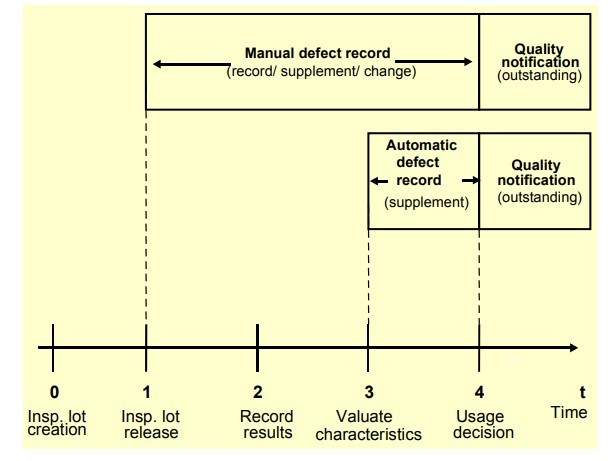
Summary
Using above steps we can setup automatic/manual defect recording and execute further QN process.
SAP Help Reference : https://help.sap.com/viewer/8dae2bea4b2044af9b806665fb2d242b/6.00.31/en-US/34c7b65334e6b54ce10000000a174cb4.html
https://blog.csdn.net/weixin_42137700/article/details/118937441
来自 “ ITPUB博客 ” ,链接:https://blog.itpub.net/69946223/viewspace-2782300/ ,如需转载,请注明出处,否则将追究法律责任。

