准备工具
一台带有Linux系统的主机,这里使用CentOS 7.1 64位系统
一个备案过的域名,这里使用
一台可以访问网络的pc,这里使用的Win7_pro_sp1
步骤
1、解析域名
在域名管理控制台添加对主机ip的解析,如下图


2、Apache安装 启动CentOS系统,安装httpd
# yum install httpd
3、配置Apache环境
# vim /etc/httpd/conf/httpd.conf
添加如下代码至文件末尾

同时修改文件的以下部分,来修改默认的主目录

同时别忘了创建此目录,否则会报错
# cd /var/www/html
# mkdir hellopage
最后重新启动httpd
# /bin/systemctl start httpd.service
4、测试
1.打开浏览器,输入,若出现如下页面,则建立成功
Testing 123..
This page is used to test the proper
http://www.bbqmw.net/
operation of the Apache HTTP server after it has been installed. If you can read this page it means that this site is working properly. This server is powered by CentOS.
2.在刚刚创建的/var/www/html/hellopage/下创建html
# cd /var/www/html/hellopage/
# touch index.html
# vim index.html
添加如下代码
<!DOCTYPE html>
<html>
<head>
<title>God Sacred</title>
</head>
<body>
<p>hello world!</p>
</body>
</html>
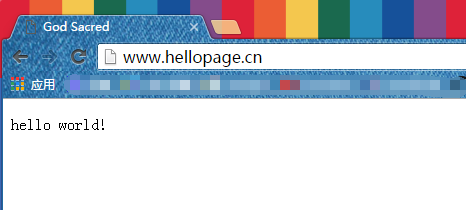
3.重新登录网站
来自 “ ITPUB博客 ” ,链接:https://blog.itpub.net/69926532/viewspace-2648071/ ,如需转载,请注明出处,否则将追究法律责任。
上一篇:
Apache反向代理的设置方法

请登录后发表评论
登录
全部评论
最新文章
- apache下支持asp.net的实现方法
- Apache中Virtual Host虚拟主机配置及rewrite参数说明
- 如何通过其他主机查看Apahce服务器的运行状态
- Nginx 代理转发阿里云OSS上传的实现代码
- Nginx中worker connections问题的解决方法
- Nginx防止流量攻击的配置详解
- CentOS下与Apache连接的PHP多版本共存方案实现详解
- linux平台的office文档转pdf的实例
- Linux初学(CnetOS7 Linux)之切换命令模式和图形模式的方法
- ubuntu下搭建php开发环境(nginx+(cgi)php5fpm+memcached+xdebug
