前言
我们常说 View “绘制不对动”,但真正的问题常常发生在 模算 (onMeasure) 和 布局 (onLayout) 阶段。我通过项目中实际遇到的几个编译后正常,运行时乱七八糟的坑,来分析下 View 为什么会 width = 0,为什么动态设置宽度不生效,为什么模算逻辑反复触发导致布局异常。
一、背景说明
项目需要动态地修改自定义 View 的宽度,并应用一份 XML 中的 UI 布局。
这看似是一件极为简单的事,但实际上却不断跟得 ConstraintLayout 的规则走,这里是一份布局结构:
<!-- 外层 ConstraintLayout -->
<androidx.constraintlayout.widget.ConstraintLayout
    android:id="@+id/outerLayout"
    android:layout_width="170dp"
    android:layout_height="wrap_content">
    <!-- 内层 ConstraintLayout -->
    <androidx.constraintlayout.widget.ConstraintLayout
        android:id="@+id/innerLayout"
        android:layout_width="match_parent"
        android:layout_height="wrap_content"
        app:layout_constraintStart_toStartOf="parent"
        app:layout_constraintTop_toTopOf="parent" />
</androidx.constraintlayout.widget.ConstraintLayout>
然后在 Kotlin 中动态设置宽度:
outerLayout.updateLayoutParams {
    width = (getWidthProportion() * dip(170)).toInt()
}
outerLayout.requestLayout()
二、ConstraintLayout 不加约束 = 宽度为 0
首先要明确: ConstraintLayout 是一个基于约束编解器 (Constraint Solver) 的布局系统,不依赖传统的 match_parent 或 wrap_content 来确定宽度。
当你在 ConstraintLayout 里写上:
android:layout_width="match_parent"
如果
未配合
app:layout_constraintStart_toStartOf
和
app:layout_constraintEnd_toEndOf,则 match_parent 就不能表示“支撑全容器宽度”,而是被规范为 0 或空布局。
正确写法:
android:layout_width="0dp"
app:layout_constraintStart_toStartOf="parent"
app:layout_constraintEnd_toEndOf="parent"
用 0dp (即 match_constraints) + 双向约束,才是 ConstraintLayout 中表示“支撑全容器”的正确方式。
三、wrap_content / dp 固定值看似安全,实际不能动态修改
你可能记得:
outerLayout.updateLayoutParams {
    width = 300
}
却发现视觉上一点变化都没有。
原因:
-
wrap_content以内容为主,自动表现 -
170dp是确定值,系统模算后记录并维持, 如果你后期再改 layoutParams,没有侦測到应该重新 measure,那么是不会生效的。
解决方案:
-
在
post {}中调用 updateLayoutParams
tv.post {
    tv.updateLayoutParams {
        width = 300
    }
    tv.requestLayout()
}
-
或者在自定义 View 中重写
onMeasure(),强制 setMeasuredDimension()
四、频繁布局刷新 = measure 重复触发,最终宽度为 0
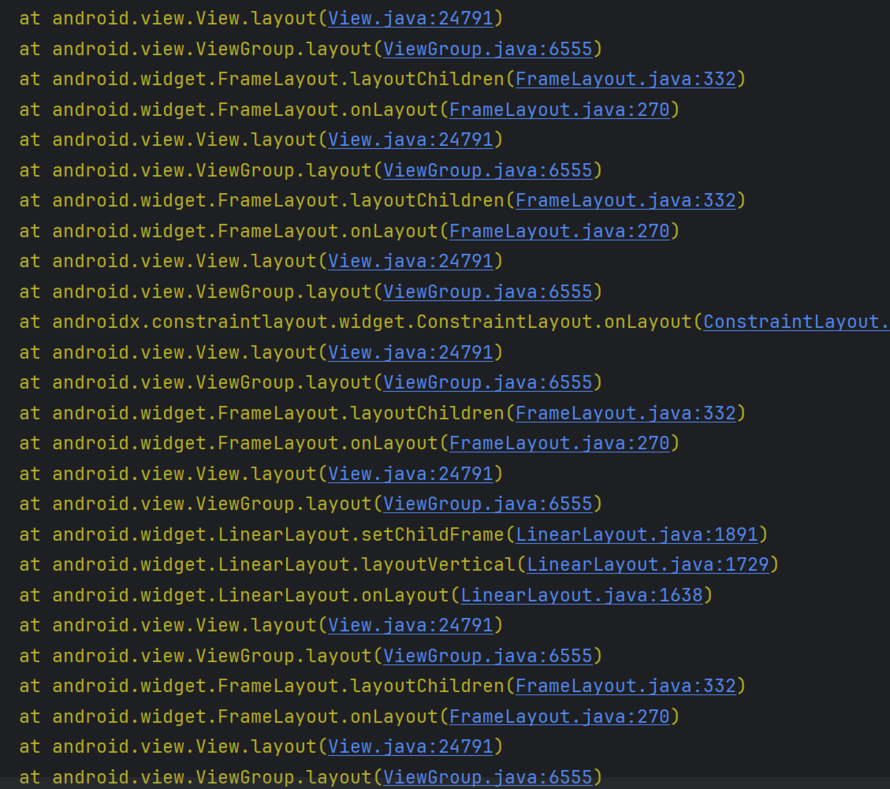
因为项目里有重复的 post + updateLayoutParams ,实际上会造成 measure/layout 一直循环触发,而 ConstraintLayout 如果未能解答子结构应该怎样 layout,最终给出的是 width = 0 。
解决方案:重写 onMeasure
override fun onMeasure(widthMeasureSpec: Int, heightMeasureSpec: Int) {
    val desiredWidth = (getWidthProportion() * dip(170)).toInt()
    val newWidthSpec = MeasureSpec.makeMeasureSpec(desiredWidth, MeasureSpec.EXACTLY)
    super.onMeasure(newWidthSpec, heightMeasureSpec)
}
相当于告诉系统:我就是要这个宽度,你别算了。
五、总结
1. 尽量避免使用 ConstraintLayout 处理简单布局
为了项目的后续的拓展性,能简单布局的地方,尽量简单,我发现在很多业务代码中,明明是几行占满的textView,用线性布局可以很简单的实现,但是写的人非要复杂的套上约束布局,写上一堆topToTop,为后续的很多功能都会埋下很多的坑
2. ConstraintLayout 必须写全约束,不能说看着没问题就给 match_parent
布局中的约束布局一定要注意约束,不是视觉上暂时看起来没问题就是真的没问题了,没有加上约束,相当于一次性的绘制,一旦涉及到子布局或者整体布局的改变,没有走到测绘的那步,布局就会出现问题
3. 避免项目里无效、重复、不加 post 的动态布局更新
在项目中有很多频繁、密集且没有必要的刷新,属于项目的历史屎山,历经多为研发的堆叠,频繁的刷新的view,改变view的宽高、设置子ImageView的图片、设置textView的文案,甚至很多地方没有加上post,导致view在绘制的计算时频繁的触发到新的绘制,出现了问题,很容易出现宽高为0的情况
来自 “ ITPUB博客 ” ,链接:https://blog.itpub.net/69917874/viewspace-3088962/ ,如需转载,请注明出处,否则将追究法律责任。

最新文章
- 聊聊SliverPersistentHeader优先消费滑动的设计
- 从if-else和switch,聊聊“八股”的作用
- 从动态缩放自定义View,聊聊为什么不要把问题复杂化
- 产品需求驱动下的技术演进:动态缩放View的不同方案
- 从Android到Kotlin Multiplatform:我们的模块化业务逻辑
- 一次Android下载优化,CDN消耗占比从50+%到1%
- Android图片批量添加处理优化:从「30」秒缩短至「4.4」秒
- 以小见大:从一行代码透视设计模式在项目架构中的关键作用
- Flutter 拖动会比原生更省资源?分析 GPU呈现模式条形图 不动的秘密
- 从一个Bug深入WindowInsets 的传递机制演化
