管道的特点
每个管道只有一个页面作为缓冲区,该页面是按照环形缓冲区的方式来使用的。这种访问方式是典型的“ 生产者 —— 消费者 ” 模型。当 “ 生产者 ” 进程有大量的数据需要写时,而且每当写满一个页面就需要进行睡眠等待,等待 “ 消费者 ” 从管道中读走一些数据,为其腾出一些空间。相应的,如果管道中没有可读数据, “ 消费者 ” 进程就要睡眠等待,具体过程如下图所示:
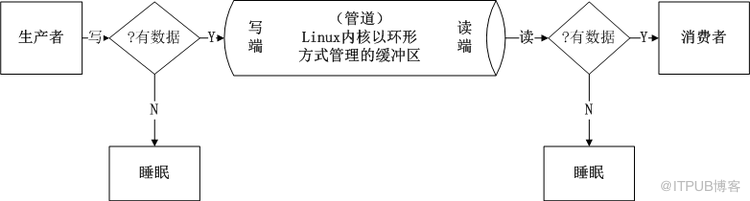
默认的情况下,从管道中读写数据,最主要的特点就是阻塞问题(这一特点应该记住),当管道里没有数据,另一个进程默认用read() 函数从管道中读数据是阻塞的。
测试代码如下:
#include<stdio.h>
#include<string.h>
#include<unistd.h>
#include<stdlib.h>
#include<sys/types.h>
#include<sys/wait.h>
int main(int argc,char*argv[])
{
int fd_pipe[2]={0};
pid_t pid;
if(pipe(fd_pipe)<0){// 创建无名管道
perror("pipe");
}
pid=fork();// 创建进程
if(pid<0){// 出错
perror("fork");
exit(-1);
}
if(pid==0){// 子进程
_exit(0);
}else if(pid>0){// 父进程
wait(NULL);// 等待子进程结束,回收其资源
char str[50]={0};
printf("before read\n");
// 从管道里读数据,如果管道没有数据, read() 会阻塞
read(fd_pipe[0],str,sizeof(str));
printf("after read\n");
printf("str=[%s]\n",str);// 打印数据
}
return 0;
}
运行结果:

当然,我们编程时可通过fcntl() 函数设置文件的阻塞特性。
设置为阻塞:fcntl(fd,F_SETFL,0);
设置为非阻塞:fcntl(fd,F_SETFL,O_NONBLOCK);
测试代码如下:
#include<stdio.h>
#include<string.h>
#include<unistd.h>
#include<stdlib.h>
#include<sys/types.h>
#include<sys/wait.h>
#include<fcntl.h>
int main(int argc,char*argv[])
{
int fd_pipe[2]={0};
pid_t pid;
if(pipe(fd_pipe)<0){// 创建无名管道
perror("pipe");
}
pid=fork();// 创建进程
if(pid<0){// 出错
perror("fork");
exit(-1);
}
if(pid==0){// 子进程
sleep(3);
char buf[]="hello,edu";
write(fd_pipe[1],buf,strlen(buf));// 写数据
_exit(0);
}else if(pid>0){// 父进程
fcntl(fd_pipe[0],F_SETFL,O_NONBLOCK);// 非阻塞
//fcntl(fd_pipe[0],F_SETFL,0);// 阻塞
while(1){
char str[50]={0};
read(fd_pipe[0],str,sizeof(str));// 读数据
printf("str=[%s]\n",str);
sleep(1);
}
}
return 0;
}
运行结果:
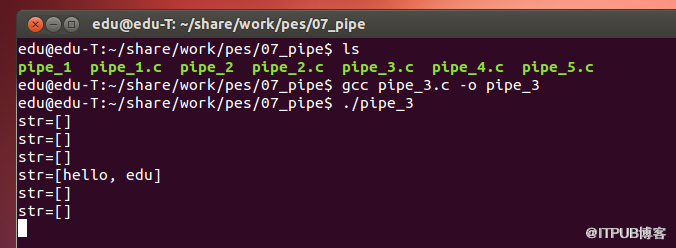
默认的情况下,从管道中读写数据,还有如下特点(知道有这么回事就够了,不用刻意去记这些特点):
1 )调用 write() 函数向管道里写数据,当缓冲区已满时 write() 也会阻塞。
测试代码如下:
#include<stdio.h>
#include<string.h>
#include<unistd.h>
#include<stdlib.h>
#include<sys/types.h>
#include<sys/wait.h>
int main(int argc,char*argv[])
{
int fd_pipe[2]={0};
pid_t pid;
char buf[1024]={0};
memset(buf,'a',sizeof(buf));// 往管道写的内容
int i=0;
if(pipe(fd_pipe)<0){// 创建无名管道
perror("pipe");
}
pid=fork();// 创建进程
if(pid<0){// 出错
perror("fork");
exit(-1);
}
if(pid==0){// 子进程
while(1){
write(fd_pipe[1],buf,sizeof(buf));
i++;
printf("i========%d\n",i);
}
_exit(0);
}else if(pid>0){// 父进程
wait(NULL);// 等待子进程结束,回收其资源
}
return 0;
}
运行结果:

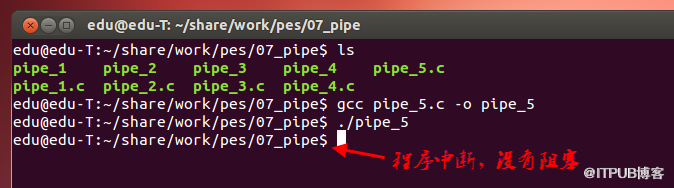
2 )通信过程中,别的进程先结束后,当前进程读端口关闭后,向管道内写数据时, write() 所在进程会(收到 SIGPIPE 信号)退出,收到 SIGPIPE 默认动作为中断当前进程。
测试代码如下:
#include<stdio.h>
#include<string.h>
#include<unistd.h>
#include<stdlib.h>
#include<sys/types.h>
#include<sys/wait.h>
int main(int argc,char*argv[])
{
int fd_pipe[2]={0};
pid_t pid;
if(pipe(fd_pipe)<0){// 创建无名管道
perror("pipe");
}
pid=fork();// 创建进程
if(pid<0){// 出错
perror("fork");
exit(-1);
}
if(pid==0){// 子进程
//close(fd_pipe[0]);
_exit(0);
}else if(pid>0){// 父进程
wait(NULL);// 等待子进程结束,回收其资源
close(fd_pipe[0]);// 当前进程读端口关闭
char buf[50]="12345";
// 当前进程读端口关闭
//write() 会收到 SIGPIPE 信号,默认动作为中断当前进程
write(fd_pipe[1],buf,strlen(buf));
while(1);// 阻塞
}
return 0;
}
运行结果:
来自 “ ITPUB博客 ” ,链接:https://blog.itpub.net/69914734/viewspace-2657157/ ,如需转载,请注明出处,否则将追究法律责任。

