命名管道的默认操作
2)假如FIFO里没有数据,调用read()函数从FIFO里读数据时read()也会阻塞。这个特点和无名管道是一样的。
写端代码如下:
#include<stdio.h>
#include<string.h>
#include<unistd.h>
#include<sys/types.h>
#include<sys/stat.h>
#include<fcntl.h>
int main(int argc,char*argv[])
{
int fd;
int ret;
ret=mkfifo("my_fifo",0666);//创建命名管道
if(ret!=0)
{
perror("mkfifo");
}
printf("before open\n");
fd=open("my_fifo",O_WRONLY);//等着只读
if(fd<0)
{
perror("open fifo");
}
printf("after open\n");
printf("before write\n");
//5s后才往命名管道写数据,没数据前,读端read()阻塞
sleep(5);
char send[100]="Hello Mike";
write(fd,send,strlen(send));
printf("write to my_fifo buf=%s\n",send);
return 0;
}
读端代码如下:
#include<stdio.h>
#include<string.h>
#include<unistd.h>
#include<sys/types.h>
#include<sys/stat.h>
#include<fcntl.h>
int main(int argc,char*argv[])
{
int fd;
int ret;
ret=mkfifo("my_fifo",0666);//创建命名管道
if(ret!=0)
{
perror("mkfifo");
}
printf("before open\n");
fd=open("my_fifo",O_RDONLY);//等着只写
if(fd<0)
{
perror("open fifo");
}
printf("after open\n");
printf("before read\n");
char recv[100]={0};
//读数据,命名管道没数据时会阻塞,有数据时就取出来
read(fd,recv,sizeof(recv));
printf("read from my_fifo buf=[%s]\n",recv);
return 0;
}
请根据下图自行编译运行验证:
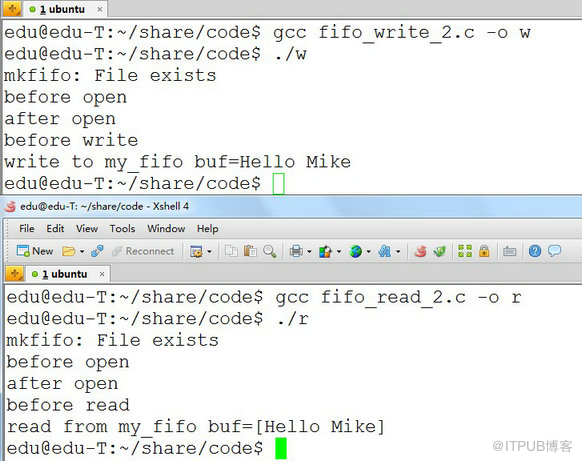
3)通信过程中若写进程先退出了,就算命名管道里没有数据,调用read()函数从FIFO里读数据时不阻塞;若写进程又重新运行,则调用read()函数从FIFO里读数据时又恢复阻塞。
写端代码如下:
#include<stdio.h>
#include<string.h>
#include<unistd.h>
#include<sys/types.h>
#include<sys/stat.h>
#include<fcntl.h>
int main(int argc,char*argv[])
{
int fd;
int ret;
ret=mkfifo("my_fifo",0666);//创建命名管道
if(ret!=0)
{
perror("mkfifo");
}
fd=open("my_fifo",O_WRONLY);//等着只读
if(fd<0)
{
perror("open fifo");
}
char send[100]="Hello Mike";
write(fd,send,strlen(send));//写数据
printf("write to my_fifo buf=%s\n",send);
while(1);//阻塞,保证读写进程保持着通信过程
return 0;
}
读端代码如下:
#include<stdio.h>
#include<string.h>
#include<unistd.h>
#include<sys/types.h>
#include<sys/stat.h>
#include<fcntl.h>
int main(int argc,char*argv[])
{
int fd;
int ret;
ret=mkfifo("my_fifo",0666);//创建命名管道
if(ret!=0)
{
perror("mkfifo");
}
fd=open("my_fifo",O_RDONLY);//等着只写
if(fd<0)
{
perror("open fifo");
}
while(1)
{
char recv[100]={0};
read(fd,recv,sizeof(recv));//读数据
printf("read from my_fifo buf=[%s]\n",recv);
sleep(1);
}
return 0;
}
请根据下图自行编译运行验证:

5)通信过程中,读进程退出后,写进程向命名管道内写数据时,写进程也会(收到SIGPIPE信号)退出。
6)调用write()函数向FIFO里写数据,当缓冲区已满时write()也会阻塞。
5)和6)这两个特点和无名管道是一样的,这里不再验证,详情请看《无名管道》。
命名管道非阻塞标志操作
命名管道可以以非阻塞标志(O_NONBLOCK)方式打开:
fd=open("my_fifo",O_WRONLY|O_NONBLOCK);
fd=open("my_fifo",O_RDONLY|O_NONBLOCK);
非阻塞标志(O_NONBLOCK)打开的命名管道有以下特点:
1、先以只读方式打开,如果没有进程已经为写而打开一个FIFO,只读open()成功,并且open()不阻塞。
2、先以只写方式打开,如果没有进程已经为读而打开一个FIFO,只写open()将出错返回-1。
3、read()、write()读写命名管道中读数据时不阻塞。
请根据以下代码自行编译运行验证。
写端代码如下:
#include<stdio.h>
#include<string.h>
#include<unistd.h>
#include<sys/types.h>
#include<sys/stat.h>
#include<fcntl.h>
int main(int argc,char*argv[])
{
int fd;
int ret;
ret=mkfifo("my_fifo",0666);//创建命名管道
if(ret!=0)
{
perror("mkfifo");
}
//只写并指定非阻塞方式打开
fd=open("my_fifo",O_WRONLY|O_NONBLOCK);
if(fd<0)
{
perror("open fifo");
}
char send[100]="Hello Mike";
write(fd,send,strlen(send));
printf("write to my_fifo buf=%s\n",send);
while(1);
return 0;
}
读端代码如下:
#include<stdio.h>
#include<string.h>
#include<unistd.h>
#include<sys/types.h>
#include<sys/stat.h>
#include<fcntl.h>
int main(int argc,char*argv[])
{
int fd;
int ret;
ret=mkfifo("my_fifo",0666);//创建命名管道
if(ret!=0)
{
perror("mkfifo");
}
//只读并指定非阻塞方式打开
fd=open("my_fifo",O_RDONLY|O_NONBLOCK);
if(fd<0)
{
perror("open fifo");
}
while(1)
{
char recv[100]={0};
read(fd,recv,sizeof(recv));
printf("read from my_fifo buf=[%s]\n",recv);
sleep(1);
}
return 0;
}
来自 “ ITPUB博客 ” ,链接:https://blog.itpub.net/69914734/viewspace-2656894/ ,如需转载,请注明出处,否则将追究法律责任。

