本文关键词: 动态转发代理IP ,HTTP代理, 爬虫代理ip
一:什么是端口转发?
SSH 会自动加密和解密所有SSH 客户端与服务端之间的网络数据。但是,SSH 还能够将其他TCP 端口的网络数据通过SSH 链接来转发,并且自动提供了相应的加密及解密服务。这一过程也被叫做“隧道”(tunneling),这是因为SSH 为其他TCP 链接提供了一个安全的通道来进行传输而得名。例如,Telnet,SMTP,LDAP 这些TCP 应用均能够从中得益,避免了用户名,密码以及隐私信息的明文传输。而与此同时,如果工作环境中的防火墙限制了一些网络端口的使用,但是允许SSH 的连接,也能够通过将TCP 端口转发来使用SSH 进行通讯。
二:SSH 端口转发能够提供两大功能:
1.加密SSH Client 端至SSH Server 端之间的通讯数据2.突破防火墙的限制完成一些之前无法建立的TCP 连接
三:SSH端口本地转发
本地转发机制:
-L localport:remotehost:remotehostportsshserver
选项:
-f 后台启用
-N 不打开远程shell,处于等待状态
-g 启用网关功能
举例:
ssh–L 9527:telnetsrv:23 -N sshsrv
telnet 127.0.0.1 9527
当访问本机的9527的端口时,被加密后转发到sshsrv的ssh服务,再解密被转发到telnetsrv:23
data < >localhost:9527 < > localhost:XXXXX < > sshsrv:22 < > sshrv:yyyyy < > telnetsrv:23
流程解释:
数据一旦telnet以后,数据会发送到本机9527端口,再在本机开一个随机端口,充当ssh客户端,再把数据流量发送到22端口的ssh服务端,收到数据以后,解密数据,临时开一个随机端口充当客户端,再把流量发送到23端口telnet服务端
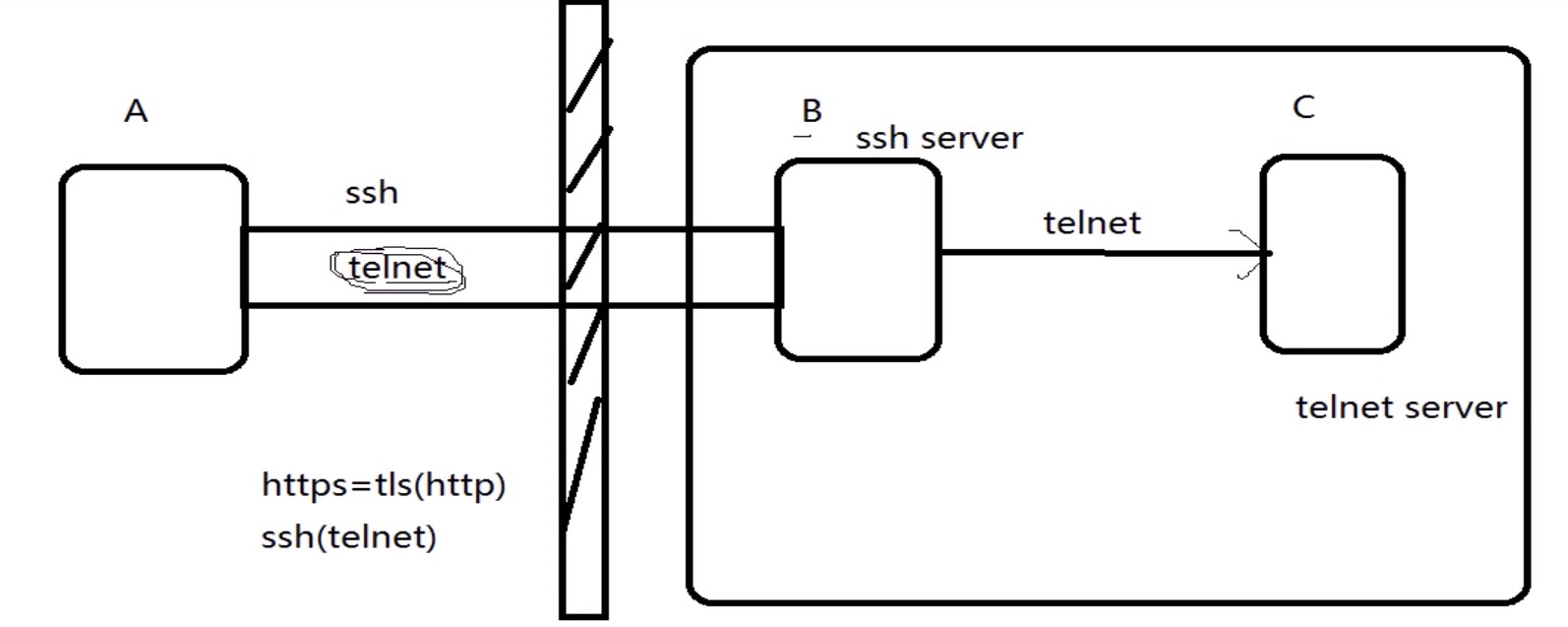
ssh协议里面封装了telnet,一旦A连接了B主机,立即使用telnet连接C主机,此过程可以
突破防火墙的限制
#实验
A->C 访问被限制
A-B->C 使用B主机作为跳板突破访问限制
选项回顾
-L 本机端口
-f 后台启用,可以在本机直接执行命令,无需另开新终端
-N 不打开远程shell,处于等待状态,不跳到远程主机,还在主机上,只是搭好了隧道,桥搭好,不ssh上去
-g 启用网关功能
-R 服务端口
环境:
|
1
2
3
4
|
[root@Centos6 ~]
# vim /etc/hosts
A:Centos7 172.18.254.173
B:Centos6 172.18.253.175
C:Centos6-1 172.18.253.192
|
注:每个机器都添加hosts
条件:设置防火墙策略不让Centos7直连Centos6-1
|
1
|
[root@centos6-1 ~]
# iptables -A INPUT -s centos7 -j REJECT
|
操作:
|
1
2
3
4
5
6
7
8
9
10
11
12
13
14
15
16
17
18
19
20
21
22
23
24
25
|
[root@centos7 ~]
# ssh -L 9527:centos6-1:23 -Nf centos6
#通过本地9527端口访问centos6-1服务器IP地址使用telnet协议23端口,跳板机ip地址
[root@centos7 ~]
# ss -tn
State Recv-Q Send-Q Local Address:Port Peer Address:Port
ESTAB 0 96 172.18.254.173:22 172.18.0.100:57618
ESTAB 0 0 172.18.254.173:35024 172.18.253.175:22
#隧道已经搭建好了,此时A主机可以通过telnet访问C主机
[root@centos7 ~]
# telnet 127.0.0.1 9527 #访问成功
Trying 127.0.0.1...
Connected to 127.0.0.1.
Escape character is
'^]'
.
CentOS release 6.9 (Final)
Kernel 2.6.32-696.el6.x86_64 on an x86_64
Centos6-1 login: docker
Password:
Last login: Mon Apr 9 21:33:43 from centos7
#删除ssh端口本地装发
[docker@centos6-1 ~]$
exit
#退出telnet但是隧道还是搭着可以使用ps aux查看到
[root@centos7 ~]
# ps aux
root 6624 0.0 0.1 180392 1392 ? Ss 21:59 0:00
ssh
-L 9527:centos6-1:23 -Nf centos6
[root@centos7 ~]
# killall ssh #删除搭建的桥
[root@centos7 ~]
# telnet centos6-1 #此时可以说明清除成功
Trying 172.18.253.192...
telnet: connect to address 172.18.253.192: Connection refused
|
总结:
Centos6上面实现代理科学上网不能用1080端口
有的公司管理的比较严格,指向外面开放80端口,如果想从我外面连接主机可以改ssh接口,在连接指定端口-p
四:SSH端口远程装发
远程转发机制:
-R sshserverport:remotehost:remotehostportsshserver
举例:
ssh–R 9527:telnetsrv:23 –N sshsrv
让sshsrv侦听9527端口的访问,如有访问,就加密后通过ssh服务转发请求到本机ssh客户端,再由本机解密后转发到telnetsrv:23
Data < > sshsrv:9527 < > sshsrv:22 < > localhost:XXXXX < > localhost:YYYYY< >telnetsrv:23
需求:
在A(Centos7)上开启smtp服务(postfix),B(Centos6)做跳板,C(Centos6-1)客户端给Centos7发送邮件
流程解析:
C-x->A (拒绝访问)
C-B->A (通过远程代理,接受访问)
查看环境:
[root@centos7 ~]# ss -ntl #查看25端口有没有开启LISTEN 0 100 127.0.0.1:25 *:*[root@centos7 ~]# vim /etc/postfix/main.cf #对文件配置文件进行修改,Centos7已经不同早期系统使用sendmail作为默认邮件服务器#目的:修改绑定接口配置# 不同文件有些localhost意思完全相反,此处localhost再邮件是127,而DNS中是表示的是本地的所有IP,相当于此处的all#inet_interfaces = all #此行不是所有主机而是所有ip意思 #此处去掉注释#inet_interfaces = $myhostname#inet_interfaces = $myhostname, localhostinet_interfaces = localhost#这一行说明接口是绑定在127.0.0.1上 #加上注释[root@centos7 ~]# ss -ntlLISTEN 0 100 *:25 *:*
环境配置:
|
1
2
3
4
5
6
7
8
9
10
11
12
13
14
15
16
17
18
19
|
[root@centos7 ~]
# systemctl start telnet.socket #开启telnet-server
[root@centos7 ~]
# systemctl status telnet.socket #查看一下是否已经开启
[root@centos7 ~]
# iptables -nvL #查看一下防火墙策略
[root@centos7 ~]
# systemctl stop firewalld.service #关闭防火墙
[root@Centos6 ~]
# chkconfig --list iptables #查看各运行级别防火墙开机运行状态
iptables 0:off 1:off 2:on 3:on 4:on 5:on 6:off
[root@Centos6 ~]
# chkconfig iptables off #关闭防火墙
[root@Centos6 ~]
# chkconfig --list iptables #所有运行级别防火墙都关闭
iptables 0:off 1:off 2:off 3:off 4:off 5:off 6:off
[root@Centos6 ~]
# chkconfig --del iptables #移除开机自动启动防火墙
[root@Centos6-1 ~]
# telnet centos7 25 #测试centos6-1可以通过telnet 25端口连接Centos7
Trying 172.18.254.173...
Connected to centos7.
Escape character is
'^]'
.
220 centos7.localdomain ESMTP Postfix
#测试成功,25端口可以连接
#关闭跳板机(Centos6)和远程服务器(Centos7)上的SELINUX
[root@centos7 ~]
# vim /etc/selinux/config
SELINUX=disabled
[root@centos7 ~]
# setenforce 0
|
创建目标条件:
[root@centos7 ~]# iptables -A INPUT -s centos6-1 -j REJECT #设置防火墙策略,使Centos7不接受Centos6一切请求[root@centos6-1 ~]# telnet centos7 25Trying 172.18.254.173...telnet: connect to address 172.18.254.173: Connection refused
操作:Centos6-1使用远程转发,发送邮件给Centos7
|
1
2
3
4
5
6
7
8
9
10
11
12
13
14
15
16
17
18
19
20
21
22
23
24
25
26
27
28
29
30
31
32
33
34
35
36
37
38
39
40
41
42
43
44
45
46
47
48
49
50
51
52
53
54
55
56
57
58
59
60
61
62
63
|
[root@Centos6 ~]
# ssh -R 9527:centos7:25 -fN centos6-1 #建立隧道,此过程确保Centos6可以公钥连接centos6-1,否则需要手动口令验证
[root@Centos6 ~]
# ss -ntl #检查邮件服务,可以知道服务已经开启
LISTEN 0 100 ::1:25 :::*
LISTEN 0 100 127.0.0.1:25 *:*
[root@centos6-1 .
ssh
]
# ss -ntl #此时也可以看到跳板机Centos6-1上9527端口已经在监听
LISTEN 0 128 127.0.0.1:9527 *:*
LISTEN 0 128 ::1:9527 :::*
[root@centos6-1 ~]
# ps -ef |grep ssh #查看一下ssh运行的进程
root 2288 1 0 09:58 ? 00:00:00
ssh
-R 9527:centos7:25 -fN centos6-1
[root@centos6-1 .
ssh
]
# telnet 127.0.0.1 9527 #此时可以通过telnet连接Cetnos7绕过了防火墙
Trying 127.0.0.1...
Connected to 127.0.0.1.
Escape character is
'^]'
.
220 centos7.localdomain ESMTP Postfix
#如果想退出进入telnet> 快捷键ctrl + ]
[root@centos7 ~]
# ss -nt
State Recv-Q Send-Q Local Address:Port Peer Address:Port
ESTAB 0 0 172.18.254.173:25 172.18.253.175:32898
ESTAB 0 96 172.18.254.173:22 172.18.0.100:58652
#此时在Centos7上发现有IP尾号为100的机子在连接实际上是Centos6-1在连接
#最后验证是否能成功发送邮件
[root@centos6-1 ~]
# telnet localhost 9527 #给Centos7发送邮件
Trying ::1...
Connected to localhost.
Escape character is
'^]'
.
220 centos7.localdomain ESMTP Postfix
mail from:ceo@app.com
250 2.1.0 Ok
rcpt to:root@centos7
250 2.1.5 Ok
data
354 End data with <CR><LF>.<CR><LF>
hello
.
250 2.0.0 Ok: queued as 86A5411EA866
quit
221 2.0.0 Bye
Connection closed by foreign host.
[root@centos7 ~]
# mail #可以收到邮件信息
Heirloom Mail version 12.5 7
/5/10
. Type ?
for
help.
"/var/spool/mail/root"
: 12 messages 12 new
>N 1 root Fri Mar 16 10:31 14
/496
"Output from your job 4"
N 2 (Cron Daemon) Sat Mar 17 08:00 25
/886
"Cron <root@zangfans> /root/bin/etcback.sh"
N 3 root Sat Mar 17 10:20 14
/506
"Output from your job 2"
N 4 (Cron Daemon) Tue Mar 20 08:00 25
/886
"Cron <root@zangfans> /root/bin/etcback.sh"
N 5 user@localhost.
local
Wed Mar 28 08:19 2129
/142373
"[abrt] kernel: WARNING: CPU: 1 PID: 0 at net/sched/sch_generic.c:300 dev"
N 6 user@localhost.
local
Fri Apr 6 19:41 1151
/90323
"[abrt] nautilus: nautilus-desktop killed by SIGSEGV"
N 7 HR@centos7.localdoma Tue Apr 10 14:44 16
/633
"*** SECURITY information for centos7 ***"
N 8 HR@centos7.localdoma Tue Apr 10 16:38 16
/637
"*** SECURITY information for centos7 ***"
N 9 HR@centos7.localdoma Tue Apr 10 16:38 16
/641
"*** SECURITY information for centos7 ***"
N 10 HR@centos7.localdoma Tue Apr 10 16:39 16
/637
"*** SECURITY information for centos7 ***"
N 11 HR@centos7.localdoma Tue Apr 10 16:39 16
/641
"*** SECURITY information for centos7 ***"
N 12 ceo@app.com Wed Apr 11 10:20 10
/314
& 12
Message 12:
From ceo@app.com Wed Apr 11 10:20:29 2018
Return-Path: <ceo@app.com>
X-Original-To: root@centos7
Delivered-To: root@centos7.localdomain
Status: R
hello
|
五:动态端口转发
原理:
当用firefox访问internet时,本机的1080端口做为代理服务器,firefox的访问请求被转发到sshserver上,由sshserver替之访问internet
动态转发机制:
ssh-D 1080 root@sshserver
在本机firefox设置代理socket proxy:127.0.0.1:1080
测试:
curl –socks5 127.0.0.1:1080 http://zangfans.com
在企业内部或者网络中,基于安全策略不能随便访问互联网某些站点
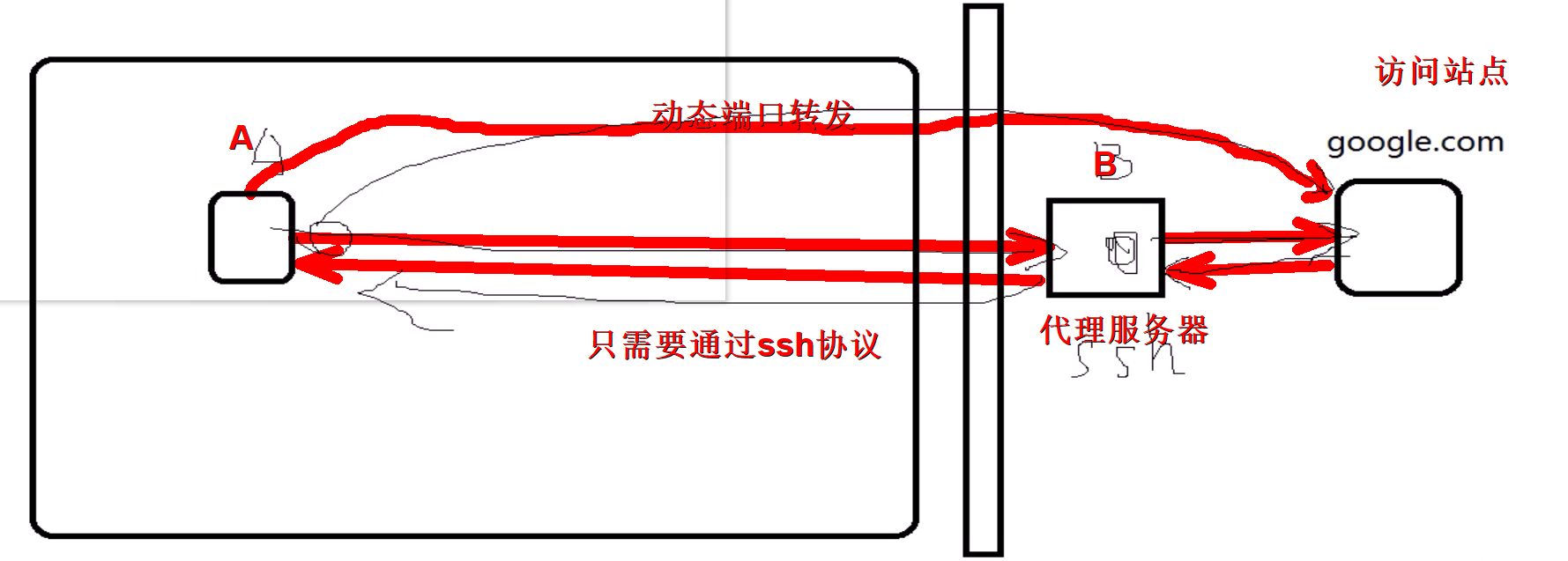
需求:
访问站点:Centos7
代理服务:centos6
企业内部主机:Centos6-1
环境配置:
|
1
2
3
4
5
6
|
[root@centos7 ~]
# systemctl status httpd #查看Cetnos7上httpd服务有没有开启
[root@centos7 ~]
# iptables -A INPUT -s centos6-1 -j REJECT #设置防火墙策略,使Centos7不接受Centos6一切请求
#确保Centos6,Centos6-1开启了防火墙都关闭了
#设置Centos7网页显示内容
[root@centos7 html]
# vim index.html
<h1>www.google.com<
/h1
>
|
#虚拟机上此时是否能够访问Centos7站点
#在此处需要多加,主机自己现在init如果从runlevel 3到5可能会出现重启防火墙策略,开启则关闭策略,对Centos7的策略重置
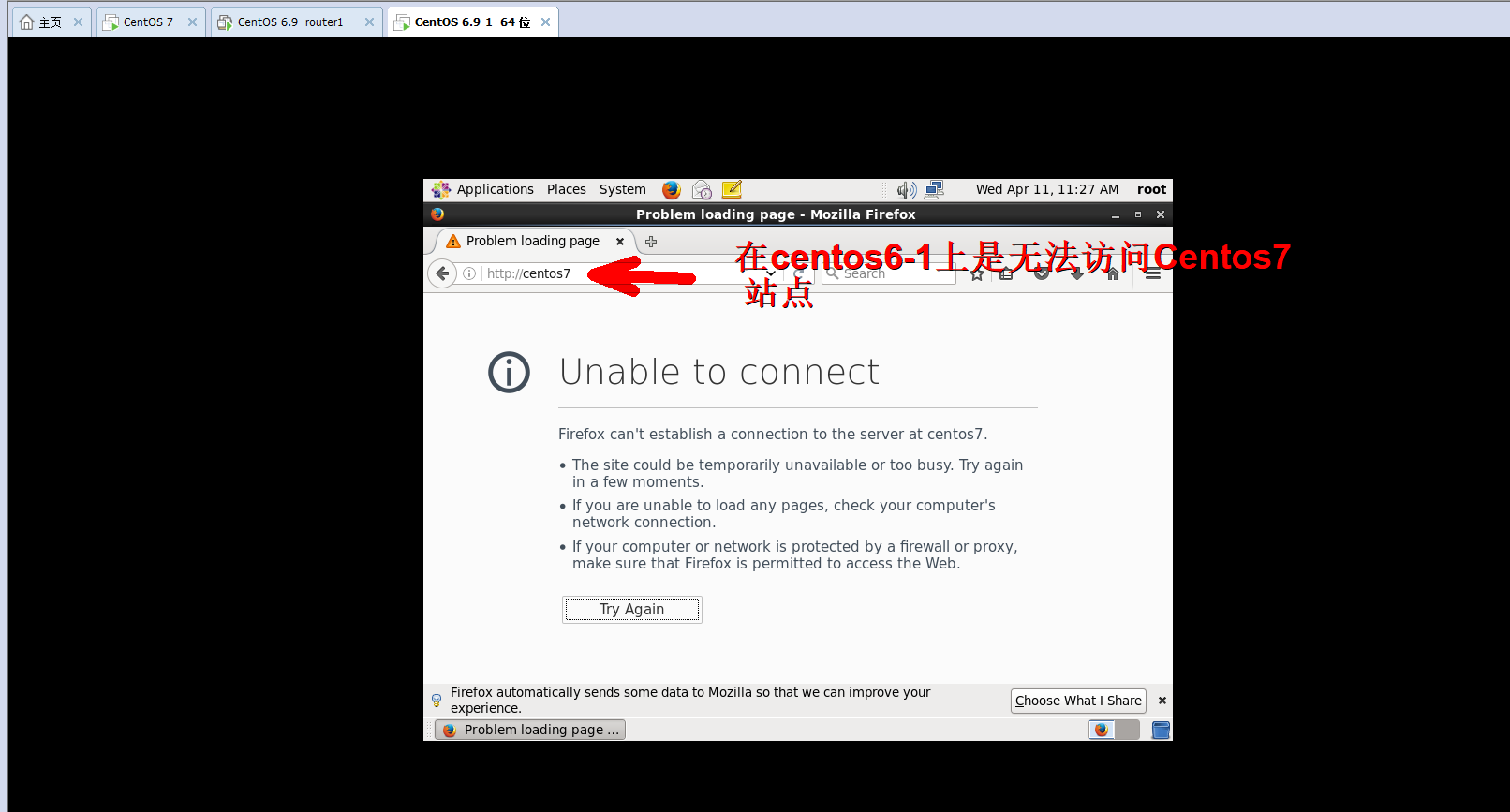
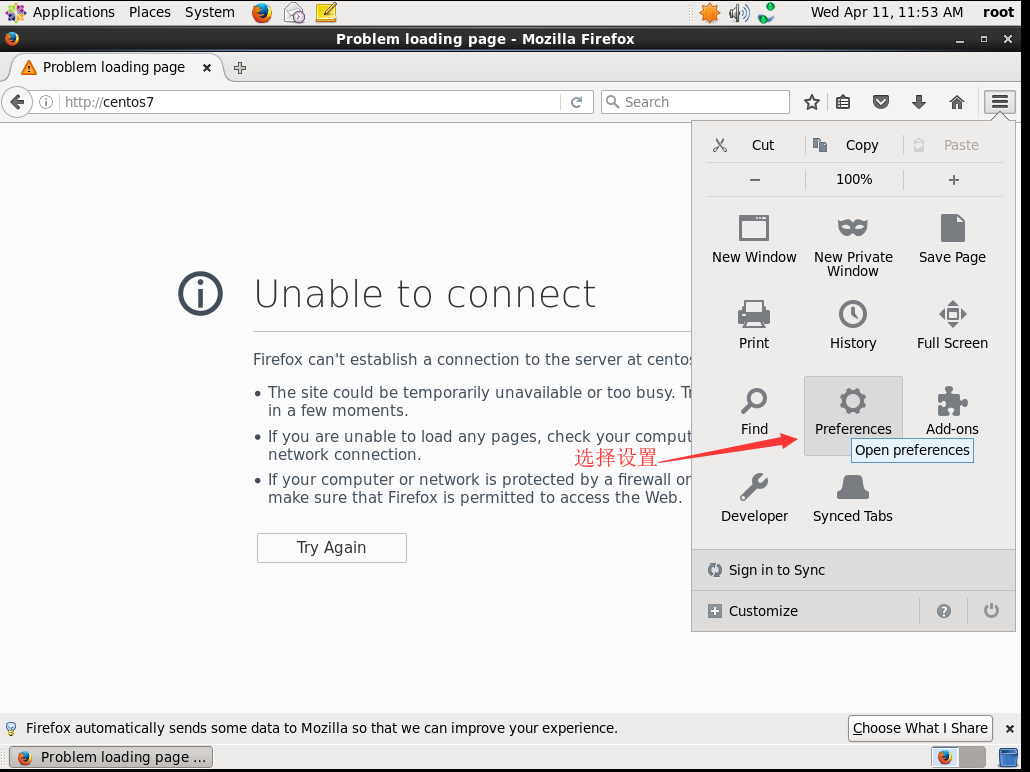
操作:
选项: -D 本地端口号
|
1
2
3
4
5
6
7
8
9
10
11
12
13
14
15
|
[root@centos6-1 ~]
# ssh -D 1080 centos6 #无秘钥登录,则需要密码验证
[root@Centos6 ~]
# ss -nt
State Recv-Q Send-Q Local Address:Port Peer Address:Port
ESTAB 0 0 172.18.253.175:47618 172.18.253.192:22
ESTAB 0 0 172.18.253.175:22 172.18.253.192:45114
ESTAB 0 0 172.18.253.175:22 172.18.0.100:58896
[root@centos6-1 ~]
# ss -nt
State Recv-Q Send-Q Local Address:Port Peer Address:Port
ESTAB 0 0 172.18.253.192:45172 172.18.253.175:22
ESTAB 0 0 172.18.253.192:22 172.18.0.100:58868
ESTAB 0 0 172.18.253.192:22 172.18.253.175:47618
#最后通过curl命令页面验证
[root@centos6-1 ~]
# curl --socks5 127.0.0.1 centos7 #默认端口就是1080
<h1>www.google.com<
/h1
>
|
#此方法也只能通过linux机器才进行互联网访问,windows机器暂不支持
知识补充
curl里面–socks5选项
|
1
2
3
4
5
6
7
8
9
10
11
12
13
|
--socks5 <host[:port]>
Use the specified SOCKS5 proxy - but resolve the host name locally. If the port number is not specified, it is
assumed at port 1080.
This option overrides any previous use of -x, --proxy, as they are mutually exclusive.
Since 7.21.7, this option is superfluous since you can specify a socks5 proxy with -x, --proxy using a socks5:
//
protocol prefix.
If this option is used several
times
, the last one will be used. (This option was previously wrongly documented and
used as --socks without the number appended.)
This option (as well as --socks4) does not work with IPV6, FTPS or LDAP.
|
基于网页验证
此时虚拟机任不能直接访问Centos7,下面设置socks代理
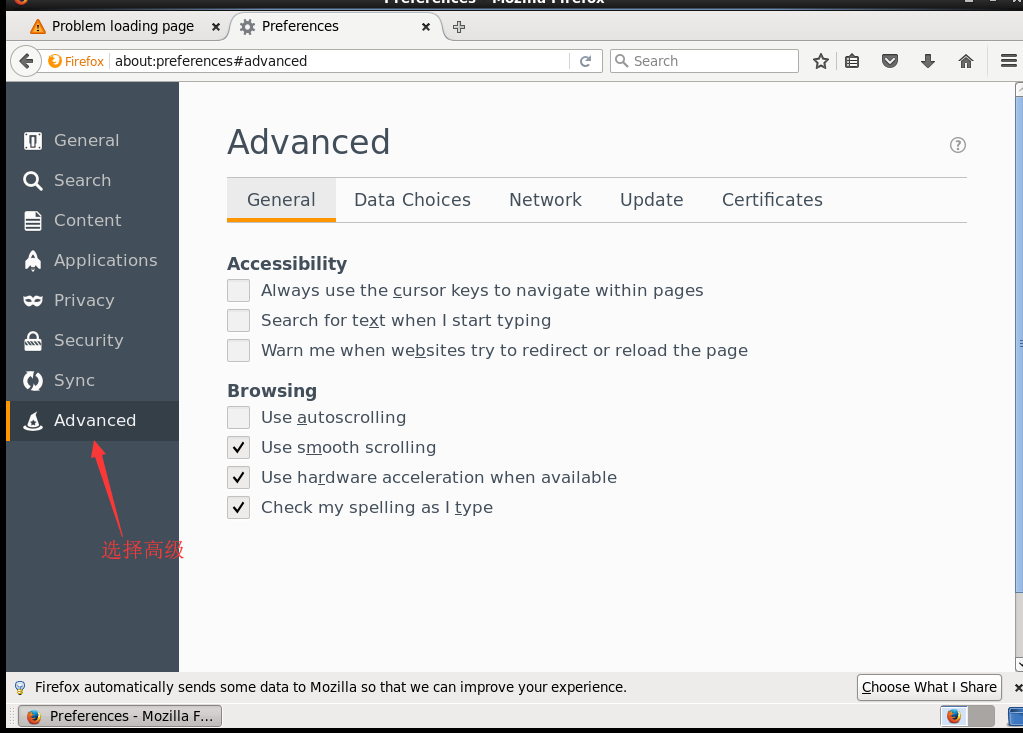
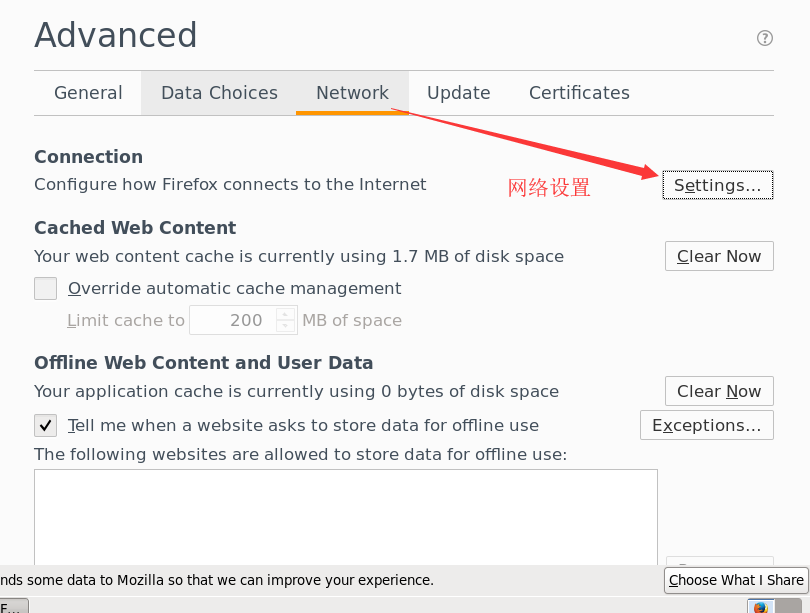

当本地1080端口受到外部网站请求会转发到外部服务器上面去,代理服务器通过1080端口把请求转发到站点服务器上面去
此时方可正常访问外部站点

文章来源:http://www.feiyiproxy.com/?p=2723
来自 “ ITPUB博客 ” ,链接:https://blog.itpub.net/69909914/viewspace-2638819/ ,如需转载,请注明出处,否则将追究法律责任。
上一篇:
没有了~
下一篇:
没有了~

请登录后发表评论
登录
全部评论
