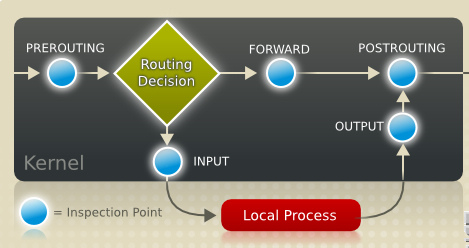

二:设定不允许server ssh到client
[root@client ~]# iptables -L -n //查看客户端默认的防火墙策略,-n参数代表不进行名字解析;可以看 出默认的系统策略做的相当严格,同时自定义了一条RH-Firewall-1-INPUT规则链,然后在INPUT链中引用,这样的执行效率会相对好些, 同时维护起来也比较容易
Chain INPUT (policy ACCEPT)
target prot opt source destination
RH-Firewall-1-INPUT all -- 0.0.0.0/0 0.0.0.0/0
Chain FORWARD (policy ACCEPT)
target prot opt source destination
RH-Firewall-1-INPUT all -- 0.0.0.0/0 0.0.0.0/0
Chain OUTPUT (policy ACCEPT)
target prot opt source destination
Chain RH-Firewall-1-INPUT (2 references)
target prot opt source destination
ACCEPT all -- 0.0.0.0/0 0.0.0.0/0
ACCEPT icmp -- 0.0.0.0/0 0.0.0.0/0 icmp type 255
ACCEPT esp -- 0.0.0.0/0 0.0.0.0/0
ACCEPT ah -- 0.0.0.0/0 0.0.0.0/0
ACCEPT udp -- 0.0.0.0/0 224.0.0.251 udp dpt:5353
ACCEPT udp -- 0.0.0.0/0 0.0.0.0/0 udp dpt:631
ACCEPT tcp -- 0.0.0.0/0 0.0.0.0/0 tcp dpt:631
ACCEPT all -- 0.0.0.0/0 0.0.0.0/0 state RELATED,ESTABLISHED
ACCEPT tcp -- 0.0.0.0/0 0.0.0.0/0 state NEW tcp dpt:22
REJECT all -- 0.0.0.0/0 0.0.0.0/0 reject-with icmp-host-prohibited
[root@client ~]# service iptables stop //关闭防火墙,这个操作可以用来初始化所有表中链的规则,并将链条的默认策略改为允许,也可以使用iptables -F来清空规则
Flushing firewall rules: [ OK ]
Setting chains to policy ACCEPT: filter [ OK ]
Unloading iptables modules: [ OK ]
[root@client ~]# iptables -A INPUT -s 192.168.100.254 -p tcp --dport 22 -j REJECT //设定server不允许ssh到client,-A表示在链中末尾添加
[root@client ~]# iptables -L -n INPUT //查看设置好的策略
Chain INPUT (policy ACCEPT)
target prot opt source destination
REJECT tcp -- 192.168.100.254 0.0.0.0/0 tcp dpt:22 reject-with icmp-port-unreachable
[root@client ~]# service iptables save //使用save命令保存规则,规则文件位于/etc /sysconfig/iptables文件中
Saving firewall rules to /etc/sysconfig/iptables: [ OK ]
[root@server ~]# ssh 192.168.100.20 //服务器端测试
ssh: connect to host 192.168.100.20 port 22: Connection refused
三:允许服务器端ssh到客户端,但需要服务 器端的IP和MAC地址合法
[root@client ~]# iptables -I INPUT -i eth0 -m mac --mac-source 00:0C:29:0C:7C:4E -s 192.168.100.254 -p tcp -m multiport --dports 22,21,20 -j ACCEPT //-I参数表示在规则链最前面添加策略,iptables的工作机制是从上到下匹配,一旦匹配就根据规则来决定数据包,所以顺序很重要
[root@client ~]# iptables -L -n //查看规则
Chain INPUT (policy ACCEPT)
target prot opt source destination
ACCEPT tcp -- 192.168.100.254 0.0.0.0/0 MAC 00:0C:29:0C:7C:4E multiport dports 22,21,20
REJECT tcp -- 192.168.100.254 0.0.0.0/0 tcp dpt:22 reject-with icmp-port-unreachable
[root@server ~]# ssh 192.168.100.20 //服务器端测试
The authenticity of host '192.168.100.20 (192.168.100.20)' can't be established.
RSA key fingerprint is 3a:5d:33:3c:c5:04:8f:31:19:38:1b:9a:b4:75:4c:51.
Are you sure you want to continue connecting (yes/no)?
[root@server ~]# ftp 192.168.100.20
Connected to 192.168.100.20.
220 (vsFTPd 2.0.5)
530 Please login with USER and PASS.
530 Please login with USER and PASS.
KERBEROS_V4 rejected as an authentication type
Name (192.168.100.20:root): ftp
331 Please specify the password.
Password:
230 Login successful.
四:定义默认的策略规则和策略的删除
[root@client ~]# iptables -P INPUT DROP //定义INPUT链的默认规则为拒绝并查看
[root@client ~]# iptables -L -n
Chain INPUT (policy DROP)
target prot opt source destination
ACCEPT tcp -- 192.168.100.254 0.0.0.0/0 MAC 00:0C:29:0C:7C:4E multiport dports 22,21,20
REJECT tcp -- 192.168.100.254 0.0.0.0/0 tcp dpt:22 reject-with icmp-port-unreachable
[root@client ~]# iptables -D INPUT 2 //删除INPUT链中的第二条规则并查看
[root@client ~]# iptables -L -n
Chain INPUT (policy DROP)
target prot opt source destination
ACCEPT tcp -- 192.168.100.254 0.0.0.0/0 MAC 00:0C:29:0C:7C:4E multiport dports 22,21,20
五:利用iptables实现SNAT
[root@server ~]# iptables -L -t nat -n -v //查看nat表的策略,-v参数表 示显示详细信息
Chain PREROUTING (policy ACCEPT 0 packets, 0 bytes)
pkts bytes target prot opt in out source destination
Chain POSTROUTING (policy ACCEPT 0 packets, 0 bytes)
pkts bytes target prot opt in out source destination
Chain OUTPUT (policy ACCEPT 0 packets, 0 bytes)
pkts bytes target prot opt in out source destination
//默认client端是连接不了公网的,因而需要在server端做SNAT,同时客户端的网关需要指向服务器的内网网卡eth1
[root@server ~]# iptables -t nat -A POSTROUTING -o eth0 -s 192.168.100.0/24 -j SNAT --to-source 10.0.0.200
[root@server ~]# iptables -A FORWARD -i eth0 -o eth1 -m state --state NEW -j ACCEPT
[root@server ~]# iptables -A FORWARD -o eth0 -i eth1 -m state --state ESTABLISHED,RELATED -j ACCEPT
//在FROWARD中这两条规则主要和tcp的三次握手的syn相关,加上之后会提高转 发的效率,不加也是可以的
[root@server ~]# iptables -L FORWARD -n -v //查看配置信息
Chain FORWARD (policy ACCEPT 237 packets, 18186 bytes)
pkts bytes target prot opt in out source destination
0 0 ACCEPT all -- eth0 eth1 0.0.0.0/0 0.0.0.0/0 state NEW
0 0 ACCEPT all -- eth1 eth0 0.0.0.0/0 0.0.0.0/0 state RELATED,ESTABLISHED
[root@client ~]# ping -c 2 //客户端测试
PING (203.208.39.99) 56(84) bytes of data.
64 bytes from bi-in-f99.1e100.net (203.208.39.99): icmp_seq=1 ttl=242 time=78.7 ms
64 bytes from bi-in-f99.1e100.net (203.208.39.99): icmp_seq=2 ttl=243 time=81.3 ms
[root@client ~]# traceroute
traceroute to (203.208.39.104), 30 hops max, 40 byte packets
1 bogon (192.168.100.254) 1.243 ms 1.217 ms 1.064 ms
2 bogon (10.0.0.1) 4.884 ms 4.738 ms 5.800 ms
3 122.90.176.1 (122.90.176.1) 68.062 ms 67.964 ms 67.821 ms
4 122.90.10.237 (122.90.10.237) 35.287 ms 64.357 ms 78.671 ms
//若在实际生产环境中,server端使用ADSL方式上网,那也可以使用MASQUERADE参数来实现上述功能
[root@server ~]# iptables -t nat -D POSTROUTING 1
[root@server ~]# iptables -t nat -A POSTROUTING -o eth0 -j MASQUERADE
[root@server ~]# iptables -t nat -L POSTROUTING -n -v
Chain POSTROUTING (policy ACCEPT 2 packets, 194 bytes)
pkts bytes target prot opt in out source destination
0 0 MASQUERADE all -- * eth0 0.0.0.0/0 0.0.0.0/0
六:利用iptables实现DNAT
[root@client ~]# service httpd restart //在client端配置好Apache服务器
Stopping httpd: [ OK ]
Starting httpd: [ OK ]
[root@client ~]# echo "just one test" > /var/www/html/index.html
[root@server ~]# service httpd status //验证服务器端没有安装Apache服务
httpd: unrecognized service
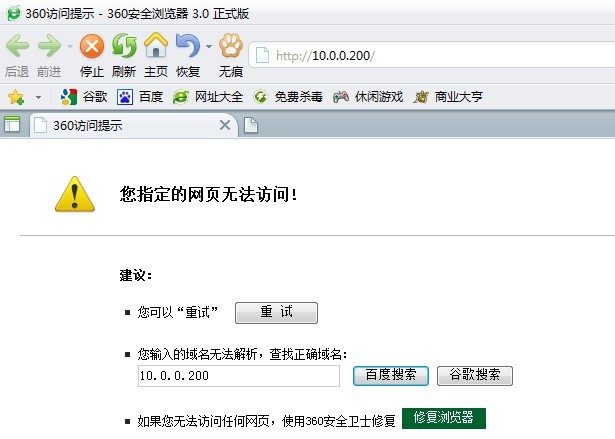
//配置DNAT
[root@server ~]# iptables -t nat -A PREROUTING -p tcp --dport 80 -j DNAT --to-destination 192.168.100.20
[root@server ~]# iptables -t nat -L -v PREROUTING
Chain PREROUTING (policy ACCEPT 182 packets, 13431 bytes)
pkts bytes target prot opt in out source destination
0 0 DNAT tcp -- any any anywhere anywhere tcp dpt:http to:192.168.100.20
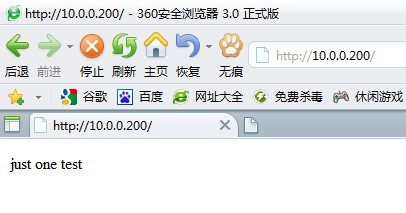
[root@server ~]# iptables -t nat -A OUTPUT -p tcp --dport 80 -j DNAT --to-dest 192.168.100.200:3128 //iptables针对透明代理的配置
[root@server ~]# iptables -t nat -L OUTPUT -v //查看配置
Chain OUTPUT (policy ACCEPT 1 packets, 140 bytes)
pkts bytes target prot opt in out source destination
0 0 DNAT tcp -- any any anywhere anywhere tcp dpt:http to:192.168.100.200:3128
[root@server ~]# lsmod |grep ip //查看iptables所加载的模块,配置文件为/etc/sysconfig/iptables-config
ipt_MASQUERADE 7617 1
iptable_nat 11077 1
ip_nat 21101 2 ipt_MASQUERADE,iptable_nat
ip_conntrack 53281 4 xt_state,ipt_MASQUERADE,iptable_nat,ip_nat
nfnetlink 10713 2 ip_nat,ip_conntrack
iptable_filter 7105 1
ip_tables 17029 2 iptable_nat,iptable_filter
ipt_REJECT 9665 0
ip6t_REJECT 9409 1
ip6table_filter 6849 1
ip6_tables 18053 1 ip6table_filter
…………………………………………………………

