python 生成内嵌式字典(dict)-案例从python提取内嵌j
从mongo查询利用python 读写如新的集合
import traceback,from gaode_hotel.conn_mongodb import conn_mongodbimport pandas as pdclass extra_yunnan_hotel(object):
    def get_yunnan_hotel(self):
        #查询
        db_1 = conn_mongodb("gaode_pois","gaode_pois_hotel_beijing")        #插入
        db_2 = conn_mongodb("gaode_pois","gaode_pois_hotel_beijing_extra_mid010000")
        data=db_1.db_find({}).limit(10)        for x in data:        #创建字典
            dic={}        #创建嵌套字典
            dic.setdefault('geo',{})["loc"]={}            try:
                dic["_id"]=x["id"]
                dic["name"]=x["name"]                # dic["loction"]=x["location"]
                dic.setdefault('geo',{})["loc"]=x["location"]
                dic["lng"]=x["location"].split(',')[0]
                dic["lat"]=x["location"].split(',')[1]
            except:
                print(traceback.print_exc())
start=extra_yunnan_hotel()
start.get_yunnan_hotel()
结果成功: 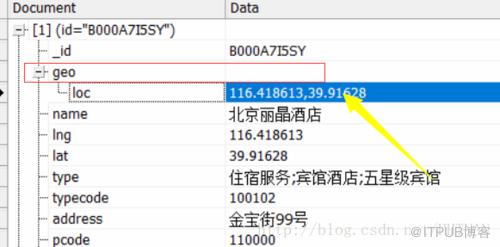
更多的字典镶嵌
目的:生成{1: {‘errors’: {0: ‘d:helloworld’, 1: ‘d:dict’}, ‘os’: ‘windows’, ‘type’: 2}}这样的多层嵌套的数据。
d1={} d1.setdefault(1,{})[errors]={}
用同样的方式设置下一侧的嵌套
temp = d1[1]
temp.setdefault(‘errors’,{})[error_len]=’d:helloworld’

d1.setdefault(key,{})[‘os’]=’windows’

d1.setdefault(key,{})[‘type’]=2
OK,这样就可以生成想要的格式的数据了。
来自 “ ITPUB博客 ” ,链接:https://blog.itpub.net/644/viewspace-2803894/ ,如需转载,请注明出处,否则将追究法律责任。
上一篇:
MySQL无限分类之二

请登录后发表评论
登录
全部评论
