使用Python 语句将excel 自动导入本地Mysql数据表, 显示执行完毕
使用Python 语句将excel 自动导入本地Mysql数据表, 显示执行完毕,但Mysql 数据表中没有找到纪录
各位高手好:
在尝试着把之前自己的工作纪录导进本机建立的Mysql 数据库中
网上找到了某大神的代码:
如连接:https://www.cnblogs.com/longbigbeard/p/9309180.html
运行代码后显示运行成功,如图:

然而,当在MySQL 表格中复查的时候,发现数据库表格为空值(如图)
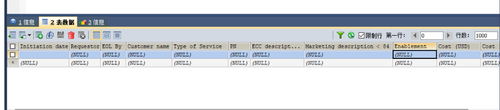
要导入的excel 表格截图如下:(好遗憾,似乎慕课网不能添加excel作为附件)
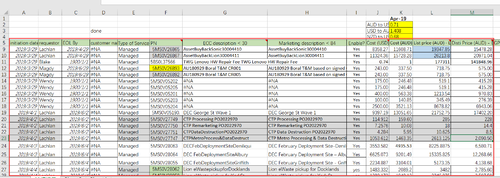
仿写代码如下:高手们知道问题出在那里么?
import xlrd
import pymysql
import xlrd
# 打开excel----------------------------------------------------------
def open_excel():
try:
book = xlrd.open_workbook('C:/Users/lenovo/Desktop/工作纪录就靠它了.xlsx') #文件名,把文件与py文件放在同一目录下
except:
print("open excel file failed!")
try:
sheet = book.sheet_by_name('ANZ纪录') #execl里面的worksheet1
return sheet
except:
print("locate worksheet in excel failed!")
# 验证:open_excel 是跑的通的
#-----------------------------------------------------------------
#连接数据库-------------------------------------------------------
try:
db = pymysql.connect(host='localhost',user="root",
passwd='QAZwsx12345678',
db='test',
charset='utf8')
except:
print("could not connect to mysql server")
# 验证:本机数据库连接 是跑的通的
#----------------------------------------------------------------
def search_count():
cursor = db.cursor()
select = "select count(PN) from pn_infor" #获取表中xxxxx记录数
cursor.execute(select) #执行sql语句
line_count = cursor.fetchone()
print(line_count[0])
#验证:search_count 是可以跑通的
#-----------------------------------------------------------------
def insert_deta():
sheet = open_excel()
cursor = db.cursor()
for i in range(5, sheet.nrows): #前5行是标题名,对应表中的字段名所以应该从第6行开始,计算机以0开始计数,所以值是6
inidate = sheet.cell(i,0).value #取第i行第0列
initiation_date = xlrd.xldate_as_datetime(inidate,0) # 把数字型的日期解码成真正的日期
requestor = sheet.cell(i,1).value#取第i行第1列,下面依次类推
EB = sheet.cell(i,2).value
EOL_By = xlrd.xldate_as_datetime(EB,0) # 把数字型的日期解码成真正的日期
customer_name = sheet.cell(i,3).value
Type_of_Service = sheet.cell(i,4).value
PN = sheet.cell(i,5).value
description30 = sheet.cell(i,6).value
description80 = sheet.cell(i,7).value
Enable = sheet.cell(i,8).value
CostUSD = sheet.cell(i,9).value
CostAUD = sheet.cell(i,10).value
ListpriceAUD = sheet.cell(i,11).value
DistipriceAUD = sheet.cell(i,12).value
print(initiation_date)
print(requestor)
print(EOL_By)
print(customer_name)
print(Type_of_Service)
print(PN)
print(description30)
print(description80)
print(Enable)
print(CostUSD)
print(CostAUD)
print(ListpriceAUD)
print(DistipriceAUD)
print("---------------")
value = (initiation_date,requestor,EOL_By,customer_name,Type_of_Service,PN,description30,description80,Enable,CostUSD,CostAUD,ListpriceAUD,DistipriceAUD)
print(value)
sql = "INSERT INTO pn_infor(initiation_date,requestor,EOL_By,customer_name,Type_of_Service,PN,description30,description80,Enable,CostUSD,CostAUD,ListpriceAUD,DistipriceAUD)VALUES(%s,%s,%s,%s,%s,%s,%s,%s,%s,%s,%s,%s)"
cursor.execute(sql,value) #执行sql语句
db.commit()
cursor.close() #关闭连接
insert_deta()
db.close()#关闭数据
print ("ok ")
来自 “ ITPUB博客 ” ,链接:https://blog.itpub.net/4809/viewspace-3159214/ ,如需转载,请注明出处,否则将追究法律责任。

