【Android】自定义View---验证码View
效果图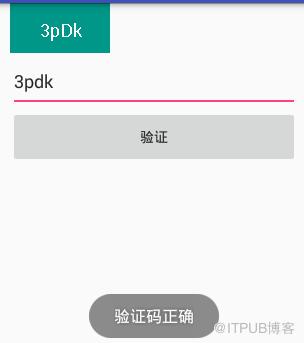
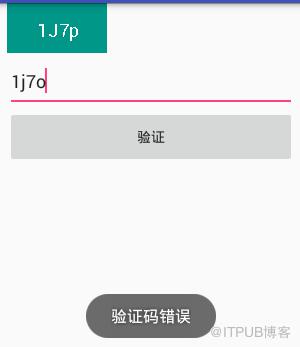
知识点主要有:
获取自定义的属性值
计算View大小
绘制
生成验证码
回调
1.获取自定义属性
  /**
     * 获取自定义属性
     *
     * @param context
     * @param attrs
     * @param defStyle
     */
    private void obtainCustomAttribute(Context context,AttributeSet attrs,int defStyle)
    {
        /**
         * 获得我们所定义的自定义样式属性
         */
        TypedArray typedArray = context.getTheme()
                .obtainStyledAttributes(attrs,R.styleable.ValidateCodeView,defStyle,0);
        //遍历获取自定义属性值
        for(int i = 0;i
2.计算View大小
@Override
    protected void onMeasure(int widthMeasureSpec,int heightMeasureSpec)
    {
        int widthMode = MeasureSpec.getMode(widthMeasureSpec);
        int widthSize = MeasureSpec.getSize(widthMeasureSpec);
        int heightMode = MeasureSpec.getMode(heightMeasureSpec);
        int heightSize = MeasureSpec.getSize(heightMeasureSpec);

        int width = getActualWidth(widthMode,widthSize);
        int height = getActualHeight(heightMode,heightSize);

        //重新设置属性
        setMeasuredDimension(width,height);

    }
 /**
     * 获取到实际的宽度
     *
     * @param widthMode
     * @param widthSize
     * @return
     */
    private int getActualWidth(int widthMode,int widthSize)
    {
        mPaintCode.getTextBounds(mCurrentCode,0,mCurrentCode.length(),mCodeBounds);
        //精确的宽度
        if(widthMode == MeasureSpec.EXACTLY)
            return widthSize;
        //wrap_content
        //测量出验证码的宽度
        float textWidth = mCodeBounds.width();
        return (int)(getPaddingLeft() + textWidth + getPaddingRight());
    }

    /**
     * 获取到实际的高度
     *
     * @param heightMode
     * @param heightSzie
     * @return
     */
    private int getActualHeight(int heightMode,int heightSzie)
    {
        mPaintCode.getTextBounds(mCurrentCode,0,mCurrentCode.length(),mCodeBounds);
        //精确的高度
        if(heightMode == MeasureSpec.EXACTLY)
            return heightSzie;
        //wrap_content
        //测量出验证码的高度
        float textHeight = mCodeBounds.height();
        return (int)(getPaddingTop() + textHeight + getPaddingBottom());
    }
3.绘制
  /**
     * 绘制方法
     * @param canvas
     */
    @Override
    protected void onDraw(Canvas canvas)
    {

        //绘制背景
        canvas.drawRect(0,0,getMeasuredWidth(),getMeasuredHeight(),mPaintBackground);
        //绘制验证码
        float x = getWidth() / 2 - mCodeBounds.width() / 2;
        float y = getHeight() / 2 + mCodeBounds.height() / 2;
        canvas.drawText(mCurrentCode,x,y,mPaintCode);
    }
4.生成验证码
    //随机字符集
    private static final char[] RANDOM_CHARS = {
            '0', '1', '2', '3', '4', '5', '6', '7', '8', '9',
            'a', 'b', 'c', 'd', 'e', 'f', 'g', 'h', 'i', 'j', 'k', 'l', 'm',
            'n', 'o', 'p', 'q', 'r', 's', 't', 'u', 'v', 'w', 'x', 'y', 'z',
            'A', 'B', 'C', 'D', 'E', 'F', 'G', 'H', 'I', 'J', 'K', 'L', 'M',
            'N', 'O', 'P', 'Q', 'R', 'S', 'T', 'U', 'V', 'W', 'X', 'Y', 'Z'
    };
 /**
     * 改变验证码
     */
    private void changeValidateCode()
    {
        mCurrentCode = getValidateCode();
        //请求重新测量(不同的验证码字符串大小也不一样)
        requestLayout();
        //刷新
        invalidate();
    }

    /**
     * 获取验证码
     *
     * @return
     */
    private String getValidateCode()
    {
        //验证码
        char[] result =new char[mCodeLength];
        Random random = new Random();
        //随机获取,并填充
        for(int i=0;i
5.回调
    /********************************************************
     *
     *   生成随机数完成回调接口
     *
     ********************************************************
     */
    public interface ValidateCodeChangedListener
    {
        void changed(String validateCode);
    }

    private ValidateCodeChangedListener mListener;

    public void setValidateCodeChangedListener(ValidateCodeChangedListener listener)
    {
        mListener = listener;
    }
全部代码:
package jfsl.customview.view;

import android.content.Context;
import android.content.res.TypedArray;
import android.graphics.Canvas;
import android.graphics.Color;
import android.graphics.Paint;
import android.graphics.Rect;
import android.support.annotation.Nullable;
import android.util.AttributeSet;
import android.util.DisplayMetrics;
import android.util.TypedValue;
import android.view.View;

import java.util.Random;

import jfsl.customview.R;

/**
 * 验证码View
 *  1.文字大小
 *  2.颜色
 *  3.背景色
 *  4.验证码长度
 ********************************************
 * 未完成:
 *  1.添加干扰线
 *  2.改变角度
 ********************************************
 * @author JFSL
 * @version 1.0.0
 * @date 2017-04-29 20:05
 */

public class ValidateCodeView extends View
{
    public static final int DEFAULT_TEXT_SIZE = 16;
    public static final int DEFAULT_CODE_LENGTH = 6;
    public static final String DEFAULT_CODE_COLOR = "#444444";
    public static final String DEFAULT_CODE_BACKGROUND = "#FAFAFA";
    //随机字符集
    private static final char[] RANDOM_CHARS = {
            '0', '1', '2', '3', '4', '5', '6', '7', '8', '9',
            'a', 'b', 'c', 'd', 'e', 'f', 'g', 'h', 'i', 'j', 'k', 'l', 'm',
            'n', 'o', 'p', 'q', 'r', 's', 't', 'u', 'v', 'w', 'x', 'y', 'z',
            'A', 'B', 'C', 'D', 'E', 'F', 'G', 'H', 'I', 'J', 'K', 'L', 'M',
            'N', 'O', 'P', 'Q', 'R', 'S', 'T', 'U', 'V', 'W', 'X', 'Y', 'Z'
    };
    //当前验证码
    private String mCurrentCode;
    //验证码文字大小
    private int mCodeSize;
    //验证码颜色
    private int mCodeColor;
    //验证码背景色
    private int mCodeBackground;
    //验证码长度
    private int mCodeLength;
    //验证码的画笔
    private Paint mPaintCode;
    //验证码背景色的画笔
    private Paint mPaintBackground;
    //验证的边界
    private Rect mCodeBounds;

    public ValidateCodeView(Context context)
    {
        this(context,null);
    }

    public ValidateCodeView(Context context,@Nullable AttributeSet attrs)
    {
        this(context,attrs,0);
    }

    /**
     * 获得我自定义的样式属性
     *
     * @param context
     * @param attrs
     * @param defStyle
     */
    public ValidateCodeView(Context context,AttributeSet attrs,int defStyle)
    {
        super(context,attrs,defStyle);
        //获取自定义属性
        obtainCustomAttribute(context,attrs,defStyle);

        initDatas();
        initEvent();
    }

    /**
     * 获取自定义属性
     *
     * @param context
     * @param attrs
     * @param defStyle
     */
    private void obtainCustomAttribute(Context context,AttributeSet attrs,int defStyle)
    {
        /**
         * 获得我们所定义的自定义样式属性
         */
        TypedArray typedArray = context.getTheme()
                .obtainStyledAttributes(attrs,R.styleable.ValidateCodeView,defStyle,0);
        //遍历获取自定义属性值
        for(int i = 0;i
属性文件:
<!--验证码颜色--> 布局文件:
测试代码:
package jfsl.customview;

import android.os.Bundle;
import android.support.v7.app.AppCompatActivity;
import android.view.View;
import android.widget.Button;
import android.widget.EditText;
import android.widget.Toast;

import jfsl.customview.view.ValidateCodeView;

public class ActivityMain extends AppCompatActivity
{
    private ValidateCodeView mValidateCodeView;
    private EditText mEditText;
    private Button mButton;
    private String mCode;

    @Override
    protected void onCreate(Bundle savedInstanceState)
    {
        super.onCreate(savedInstanceState);
        setContentView(R.layout.activity_main);

        initViews();
        initDatas();
        initEvent();
    }

    private void initViews()
    {
        mValidateCodeView = (ValidateCodeView)findViewById(R.id.id_vcv_my);
        mEditText = (EditText)findViewById(R.id.id_edittext_code);
        mButton = (Button)findViewById(R.id.id_button_validate);
    }

    private void initDatas()
    {

    }

    private void initEvent()
    {
        mValidateCodeView.setValidateCodeChangedListener(
                new ValidateCodeView.ValidateCodeChangedListener()
                {

                    @Override
                    public void changed(String validateCode)
                    {
                        //转成成大写
                        mCode = validateCode.toUpperCase();
                    }
                });
        mButton.setOnClickListener(new View.OnClickListener()
        {

            @Override
            public void onClick(View v)
            {
                validate();
            }
        });

    }

    private void validate()
    {
        String code = mEditText.getText().toString().trim();
        String upperCode = code.toUpperCase();

        if(upperCode.equals(mCode))
        {
            Toast.makeText(this,"验证码正确",Toast.LENGTH_SHORT).show();
            return;
        }
        Toast.makeText(this,"验证码错误",Toast.LENGTH_SHORT).show();
    }
}
参考代码 http://blog.csdn.net/lmj623565791/article/details/24252901/
来自 “ ITPUB博客 ” ,链接:https://blog.itpub.net/4809/viewspace-2807734/ ,如需转载,请注明出处,否则将追究法律责任。
下一篇:
我的架构学习与实战记录

请登录后发表评论
登录
全部评论
