带着问题思考:
- what SSL
- why SSL
- 如何获取免费的SSL证书
HTTP & Https
- HTTP : Hyper Text Transfer Protocol(超文本传输协议)的缩写,服务器传输超文本到本地浏览器的传送协议
- HTTPS: Hyper Text Transfer Protocol over SecureSocket Layer(安全套接层的超文本传输协议)的缩写,在HTTP的基础上进行了数据传输增加了加密解密过程。
加密 & 解密
- 对称加密:私钥加密,即信息的发送方和接收方使用同一个密钥去加密和解密数据。
特点:
- 加密过程快,适合大量数据加密
- 安全性不高,一旦私钥泄露就导致可以随意解密数据
- 算法透明:DES、3DES、TDEA、Blowfish、RC5、IDEA
-
非对称加密: 同时使用公钥和私钥来加密和解密. 用公钥来加密数据,用私钥来解密数据,只有私钥可以解密公钥加密过的数据。
非对称加密解密过程示例:
加密: 明文 + 加密算法 + 公钥 => 密文
解密: 密文 + 解密算法 + 私钥 => 明文
特点:
- 加密过程慢且复杂,只适合少量数据进行加密时使用
- 安全性高,私钥本地保存,是不能泄露的,公钥是和私钥配合使用来加解密的.
- 算法有:RSA、Elgamal、Rabin、D-H、ECC
SSL
SSL(Secure Sockets Layer)安全套接层协议,是为网络通信提供安全及数据完整性的一种安全协议。 SSL协议在1994年被 Netscape 网景公司发明,
现在各个浏览器均支持SSL,而且甚至成为了主流,谷歌浏览器现在已经不支持HTTP方式访问网站了,它直接会认为你的网站不安全,会导致用户信息泄露。
为什么会这样,因为黑客如果拦截到http请求的信息,而我们没有使用SSL加密,那么就相当于将数据送给黑客作为不法用途.
所以HTTPS 以后成为必须的也不足为奇.
HTTPS = HTTP + SSL/TLS
获取免费的 SSL 证书
这里推荐一个网址: https://certbot.eff.org
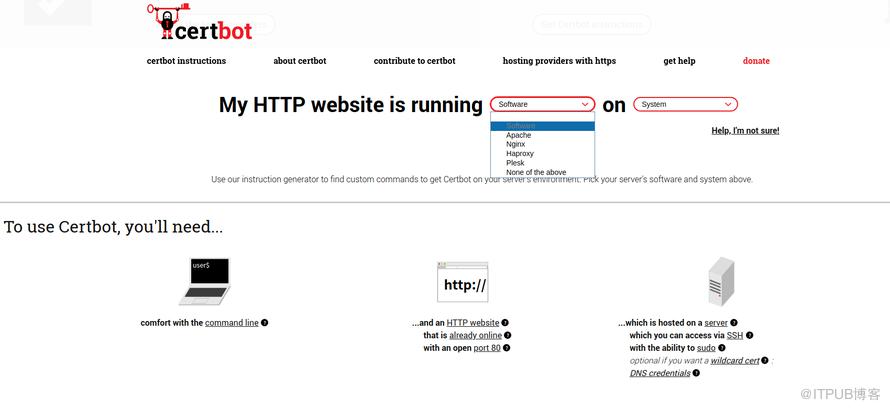
大名顶顶 Lets encrypt。
我下面以 centos 为例写一下,其他的系统可以参考官网使用教程命令执行。
- 安装:
    $ yum -y install yum-utils
    $ yum-config-manager --enable rhui-REGION-rhel-server-extras rhui-REGION-rhel-server-optional
    $ sudo yum install certbot python2-certbot-nginx
- 开始
$ sudo certbot --nginx
- 刷新证书
$ sudo certbot renew --dry-run
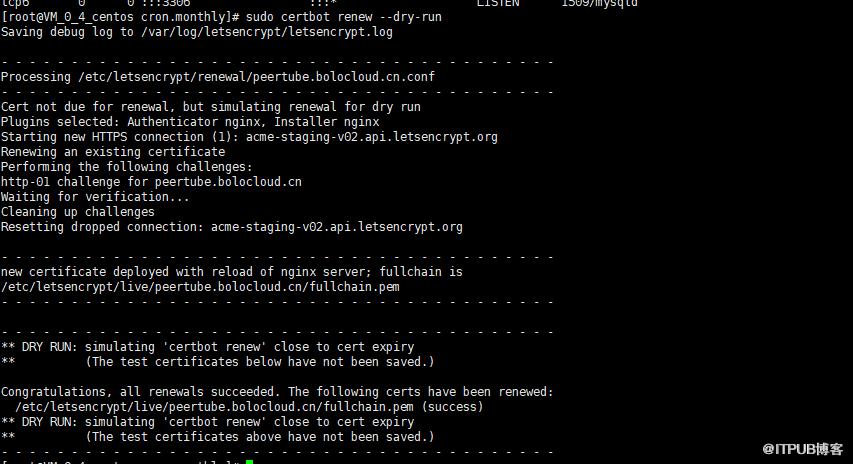
定时任务每天刷新
echo “0 0,12 * * * root python -c ‘import random; import time; time.sleep(random.random() * 3600)’
&& certbot renew” | sudo tee -a /etc/crontab > /dev/null
/dev/null 解释:
2>/dev/null
意思就是把错误输出到“黑洞”
异常解决
- 安装异常 AttributeError: ‘module’ object has no attribute ‘pyopenssl’
   Traceback (most recent call last):
     File "/bin/certbot", line 9, in <module>
       load_entry_point('certbot==0.31.0', 'console_scripts', 'certbot')()
     File "/usr/lib/python2.7/site-packages/pkg_resources.py", line 378, in load_entry_point
       return get_distribution(dist).load_entry_point(group, name)
     File "/usr/lib/python2.7/site-packages/pkg_resources.py", line 2566, in load_entry_point
       return ep.load()
     File "/usr/lib/python2.7/site-packages/pkg_resources.py", line 2260, in load
       entry = __import__(self.module_name, globals(),globals(), ['__name__'])
     File "/usr/lib/python2.7/site-packages/certbot/main.py", line 21, in <module>
       from certbot import client
     File "/usr/lib/python2.7/site-packages/certbot/client.py", line 16, in <module>
       from acme import client as acme_client
     File "/usr/lib/python2.7/site-packages/acme/client.py", line 40, in <module>
       urllib3.contrib.pyopenssl.inject_into_urllib3()
   AttributeError: 'module' object has no attribute 'pyopenssl'
解决方案:
   pip install requests==2.6.0

   easy_install --upgrade pip
- 异常 :No valid IP address
添加相应的 DNS 解析子域名. 需要去域名服务网站添加一级或者二级域名管理。
来自 “ ITPUB博客 ” ,链接:https://blog.itpub.net/4648/viewspace-2824047/ ,如需转载,请注明出处,否则将追究法律责任。

