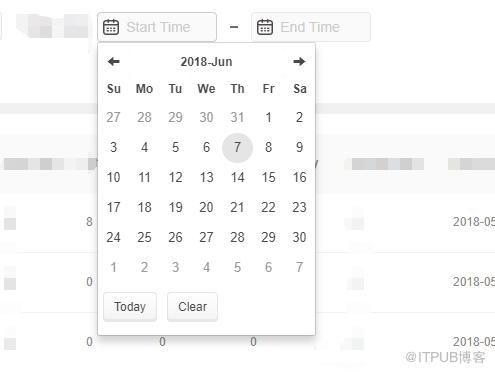
1.需要npm引入
npm install angular-bootstrap-datetimepicker --save
2.加载:module
angular.module('app', [ui.bootstrap.datetimepicker])
3.JS:
angular.module('app').directive('dateRange', function() {
return {
restrict : 'EA',
replace: true,
scope: {
startDate: '=',
endDate: '=',
startId: '@',
endId: '@'
},
template : '' +
'' +
'' +
'' +
' ' +
'' +
'' +
'' +
'
' +
'' +
'' +
'' +
'' +
'' +
'
' +
'' +
' ' +
'' +
'' +
'' +
'' +
'' +
'' +
'' +
'
' +
'' +
'' +
'' +
'' +
'' +
'' +
'' +
'' +
'' +
'' +
'
' +
'' +
'' +
'' +
'' +
'
' +
'' +
'',
controller : function($scope) {
//时间组件
$scope.endDateBeforeRender = endDateBeforeRender;
$scope.endDateOnSetTime = endDateOnSetTime;
$scope.startDateBeforeRender = startDateBeforeRender;
$scope.startDateOnSetTime = startDateOnSetTime;
$scope.startToday = startToday;
$scope.endToday = endToday;
$scope.clearStartDate = clearStartDate;
$scope.clearEndDate = clearEndDate;
$scope.nowDate = moment(new Date).format('YYYY-MM-DD');
$scope.endId = _.isEmpty($scope.endId)? 'endTime':$scope.endId;
$scope.startId = _.isEmpty($scope.startId)? 'startTime':$scope.startId;
function startDateOnSetTime () {
$scope.$broadcast('start-date-changed');
}
function endDateOnSetTime () {
$scope.$broadcast('end-date-changed');
}
function startDateBeforeRender ($view, $dates) {
if ($scope.endDate) {
let activeDate = moment($scope.endDate).add(1, $view).subtract(1, 'minute');
$dates.filter(function (date) {
return date.localDateValue() >= activeDate.valueOf()
}).forEach(function (date) {
date.selectable = false;
})
}
}
function endDateBeforeRender ($view, $dates) {
if ($scope.startDate) {
let activeDate = moment($scope.startDate).subtract(1, $view).add(1, 'minute');
$dates.filter(function (date) {
return date.localDateValue() 4.HTML:
引入id是为了区分组件,否则同一组件在同一页面,会出问题。可以试一下~
同理,单个时间控件可以是这样的写:
angular.module('app').directive('dateChose', function() {
return {
restrict : 'EA',
replace: true,
scope: {
date: '=',
id:'@',
required:'='
},
template : '' +
'' +
'' +
'' +
' ' +
'' +
'' +
'' +
'
' +
'' +
'' +
'' +
'' +
'' +
'
' +
'' +
'',
controller : function($scope) {
//时间组件
$scope.Today = Today;
$scope.clearDate = clearDate;
$scope.nowDate = moment(new Date).format('YYYY-MM-DD');
function Today (){
$scope.date = $scope.nowDate;
}
function clearDate (){
$scope.date ='';
}
}
}
})
来自 “ ITPUB博客 ” ,链接:https://blog.itpub.net/4615/viewspace-2802368/ ,如需转载,请注明出处,否则将追究法律责任。
上一篇:
VasSonic深度剖析之iOS端

请登录后发表评论
登录
全部评论
