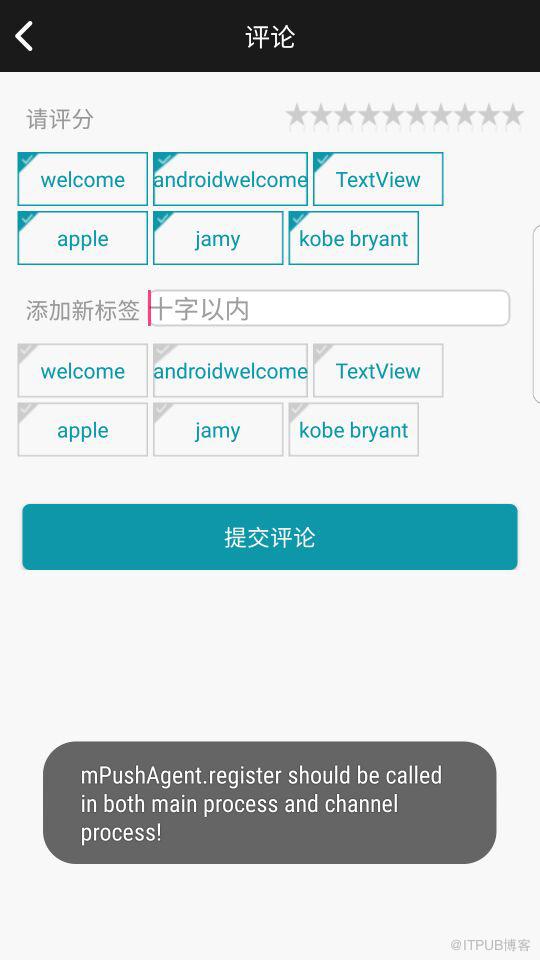
线上效果图
[代码]xml代码:
?
|
import java.util.ArrayList;import java.util.List; import android.content.Context;import android.util.AttributeSet;import android.view.View;import android.view.ViewGroup;public class XCFlowLayout extends ViewGroup{ //存储所有子View private ListList> mAllChildViews = new ArrayList(); //每一行的高度 private ListInteger> mLineHeight = new ArrayList(); public XCFlowLayout(Context context) { this(context, null); // TODO Auto-generated constructor stub } public XCFlowLayout(Context context, AttributeSet attrs) { this(context, attrs, 0); // TODO Auto-generated constructor stub } public XCFlowLayout(Context context, AttributeSet attrs, int defStyle) { super(context, attrs, defStyle); // TODO Auto-generated constructor stub } @Override protected void onMeasure(int widthMeasureSpec, int heightMeasureSpec) { // TODO Auto-generated method stub //父控件传进来的宽度和高度以及对应的测量模式 int sizeWidth = MeasureSpec.getSize(widthMeasureSpec); int modeWidth = MeasureSpec.getMode(widthMeasureSpec); int sizeHeight = MeasureSpec.getSize(heightMeasureSpec); int modeHeight = MeasureSpec.getMode(heightMeasureSpec); //如果当前ViewGroup的宽高为wrap_content的情况 int width = 0;//自己测量的 宽度 int height = 0;//自己测量的高度 //记录每一行的宽度和高度 int lineWidth = 0; int lineHeight = 0; //获取子view的个数 int childCount = getChildCount(); for(int i = 0;i childCount; i ++){ View child = getChildAt(i); //测量子View的宽和高 measureChild(child, widthMeasureSpec, heightMeasureSpec); //得到LayoutParams// MarginLayoutParams lp = (MarginLayoutParams) getLayoutParams(); MarginLayoutParams lp =(MarginLayoutParams) child.getLayoutParams(); //子View占据的宽度 int childWidth = child.getMeasuredWidth() + lp.leftMargin + lp.rightMargin; //子View占据的高度 int childHeight = child.getMeasuredHeight() + lp.topMargin + lp.bottomMargin; //换行时候 if(lineWidth + childWidth > sizeWidth){ //对比得到最大的宽度 width = Math.max(width, lineWidth); //重置lineWidth lineWidth = childWidth; //记录行高 height += lineHeight; lineHeight = childHeight; }else{//不换行情况 //叠加行宽 lineWidth += childWidth; //得到最大行高 lineHeight = Math.max(lineHeight, childHeight); } //处理最后一个子View的情况 if(i == childCount -1){ width = Math.max(width, lineWidth); height += lineHeight; } } //wrap_content setMeasuredDimension(modeWidth == MeasureSpec.EXACTLY ? sizeWidth : width, modeHeight == MeasureSpec.EXACTLY ? sizeHeight : height);// super.onMeasure(widthMeasureSpec, heightMeasureSpec); } @Override protected void onLayout(boolean changed, int l, int t, int r, int b) { // TODO Auto-generated method stub mAllChildViews.clear(); mLineHeight.clear(); //获取当前ViewGroup的宽度 int width = getWidth(); int lineWidth = 0; int lineHeight = 0; //记录当前行的view ListView> lineViews = new ArrayListView>(); int childCount = getChildCount(); for(int i = 0;i childCount; i ++){ View child = getChildAt(i); MarginLayoutParams lp = (MarginLayoutParams) child.getLayoutParams(); int childWidth = child.getMeasuredWidth(); int childHeight = child.getMeasuredHeight(); //如果需要换行 if(childWidth + lineWidth + lp.leftMargin + lp.rightMargin > width){ //记录LineHeight mLineHeight.add(lineHeight); //记录当前行的Views mAllChildViews.add(lineViews); //重置行的宽高 lineWidth = 0; lineHeight = childHeight + lp.topMargin + lp.bottomMargin; //重置view的集合 lineViews = new ArrayList(); } lineWidth += childWidth + lp.leftMargin + lp.rightMargin; lineHeight = Math.max(lineHeight, childHeight + lp.topMargin + lp.bottomMargin); lineViews.add(child); } //处理最后一行 mLineHeight.add(lineHeight); mAllChildViews.add(lineViews); //设置子View的位置 int left = 0; int top = 0; //获取行数 int lineCount = mAllChildViews.size(); for(int i = 0; i //当前行的views和高度 lineViews = mAllChildViews.get(i); lineHeight = mLineHeight.get(i); for(int j = 0; j View child = lineViews.get(j); //判断是否显示 if(child.getVisibility() == View.GONE){ continue; } MarginLayoutParams lp = (MarginLayoutParams) child.getLayoutParams(); int cLeft = left + lp.leftMargin; int cTop = top + lp.topMargin; int cRight = cLeft + child.getMeasuredWidth(); int cBottom = cTop + child.getMeasuredHeight(); //进行子View进行布局 child.layout(cLeft, cTop, cRight, cBottom); left += child.getMeasuredWidth() + lp.leftMargin + lp.rightMargin; } left = 0; top += lineHeight; } } @Override public LayoutParams generateLayoutParams(AttributeSet attrs) { // TODO Auto-generated method stub return new MarginLayoutParams(getContext(), attrs); }}
|
然后在activity的xml中引用自定义控件
[代码]xml代码:
?
|
com.segohotels.app.widget.XCFlowLayout android:id="@+id/flowlayout1" android:layout_width="match_parent" android:layout_marginTop="10dp" android:layout_marginLeft="10dp" android:layout_height="wrap_content"> com.segohotels.app.widget.XCFlowLayout> |
最后在activity中使用
[代码]xml代码:
申明自定义控件
?
|
rivate String mNames[] = { "welcome", "androidwelcome", "TextView", "apple", "jamy", "kobe bryant", }; @InjectViews({R.id.flowlayout,R.id.flowlayout1}) ListXCFlowLayout> mFlowLayout;
|
[代码]xml代码:
?
|
private void initChildViews() { // TODO Auto-generated method stub MarginLayoutParams lp = new MarginLayoutParams( LayoutParams.WRAP_CONTENT, LayoutParams.WRAP_CONTENT); lp.leftMargin = 5; lp.rightMargin = 5; lp.topMargin = 5; lp.bottomMargin = 5; for (int i = 0; i TextView view = new TextView(this); view.setText(mNames[i]); view.setTextColor(getResources().getColor(R.color.Login_btn)); view.setGravity(Gravity.CENTER); view.setBackgroundDrawable(getResources().getDrawable(R.drawable.em_main_bottom_item_bg2)); view.setSelected(true); TextView view1 = new TextView(this); view1.setText(mNames[i]); view1.setTextColor(getResources().getColor(R.color.Login_btn)); view1.setGravity(Gravity.CENTER); view1.setBackgroundDrawable(getResources().getDrawable(R.drawable.em_main_bottom_item_bg2)); view1.setSelected(false); mFlowLayout.get(0).addView(view, lp); mFlowLayout.get(1).addView(view1, lp); } }
|
最后在调用这个方法
原文链接:http://www.apkbus.com/blog-508687-68496.html
来自 “ ITPUB博客 ” ,链接:https://blog.itpub.net/4606/viewspace-2813990/
,如需转载,请注明出处,否则将追究法律责任。

