
Jupyter的主题、字体的调整主要依靠一个插件:jupyterthemes。(推荐:jupyter使用教程)
安装jupyterthemes的方法:
# Kill and exit the Notebook server
# Make sure you are in the base conda environment
conda activate base# install jupyterthemes
pip install jupyterthemes

# upgrade to latest version
pip install --upgrade jupyterthemes
切换主题:
使用下面的命令
jt -l
来查看可用的主题:
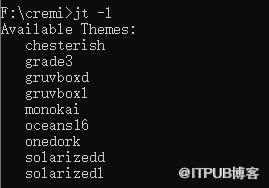
设置新主题(以onedork为例)(-T的作用是显示Toolbar):
jt -t onedork -T
调整字体:
jt -fs 18
更多python知识请关注python视频教程。
来自 “ ITPUB博客 ” ,链接:https://blog.itpub.net/4594/viewspace-2834555/ ,如需转载,请注明出处,否则将追究法律责任。
上一篇:
python列表怎么查找?
下一篇:
python新式类和经典类的区别有哪些

请登录后发表评论
登录
全部评论
