1、下载安装 python (https://www.python.org/downloads/windows/)
web-based installer 在线安装
executable installer exe安装
embeddable zip file 内嵌版本
python的安装步聚可以参考http://jingyan.baidu.com/article/0bc808fc42dfab1bd485b99f.html,注意安装后配置 path。
2、下载安装VS Code (https://code.visualstudio.com/Download)
相关推荐:《Python培训视频》
3、在VS Code里安装 python 插件
(1)按“Ctrl + Shift + P”键,输入“ext install”,选择“Extensions:install extension”,按回车键。
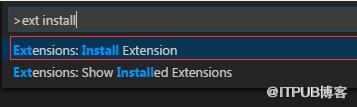
(2)再输入“python”
(3)等待安装成功。
4、在vs code中配置运行python程序的命令
(1)按“Ctrl + Shift + P”键,搜索“Configure Task Runner”。
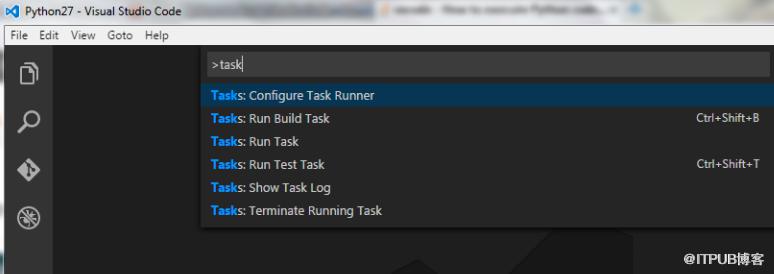
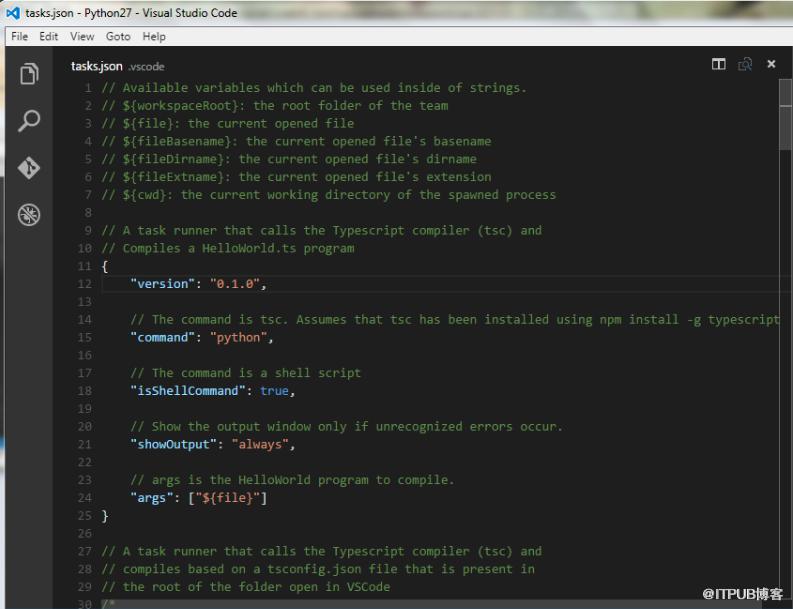
(2)打开tasks.json
修改“Command”中的“tsc”为“python”;
修改“showOutput”中的“silent”为“always”;
修改“Arguments”中的‘[“Helloworld.ts”]’为‘[“${file}”]’;
删除最后的一行属性“problemMatcher”。
然后保存更改。
(3)使用“Ctrl + Shift + B”执行py程序文件即可。
来自 “ ITPUB博客 ” ,链接:https://blog.itpub.net/4586/viewspace-2835818/ ,如需转载,请注明出处,否则将追究法律责任。

