小弟最近刚开始搞MVC,遇到个问题,JS里面的参数如果写固定值的话是可以传递,但如果取textbox中的值,后台controller获得的参数就变为空了,看了下有没有写错参数名什么的,发现好像也没有,实在不知道如何解决了,请各位大神帮帮忙看下哪里出了问题,下面贴出代码和效果图。
1.Index.cshtml
1 <!DOCTYPE html>
  2 <html>
  3 <head>
  4     @*<meta name="viewport" content="width=device-width" />
  5     <title>BootStrap Table使用</title>*@
  6     @*1、Jquery组件引用*@
  7     <script src="~/Scripts/jquery-1.10.2.js"></script>
  8
  9     @*2、bootstrap组件引用*@
 10     @*<script src="~/Scripts/bootstrap.js"></script>
 11     <link href="~/Content/bootstrap.css" rel="stylesheet" />*@
 12
 13     @*3、bootstrap table组件以及中文包的引用*@
 14     @*<script src="~/Scripts/bootstrap-table.js"></script>
 15     <link href="~/Content/bootstrap-table.css" rel="stylesheet" />
 16     <script src="~/Scripts/bootstrap-table-zh-CN.js"></script>*@
 17
 18
 19 </head>
 20 <body>
 21     <div class="panel-body" style="padding-bottom:0px;">
 22         <div class="panel panel-default">
 23             <div class="panel-heading">查询条件</div>
 24             <div class="panel-body">
 25                 <form id="formSearch" class="form-horizontal">
 26                     <div class="form-group" style="margin-top:15px">
 27                         <label class="control-label col-sm-1" for="txt_search_documentname">文档名称</label>
 28                         <div class="col-sm-3">
 29                             <input type="text" class="form-control" id="txt_search_documentname" name="txt_search_documentname">
 30                         </div>
 31                         <label class="control-label col-sm-1" for="txt_search_Des">描述</label>
 32                         <div class="col-sm-3">
 33                             <input type="text" class="form-control" id="txt_search_Des">
 34                         </div>
 35                         <div class="col-sm-4" style="text-align:left;">
 36                             <button type="submit" style="margin-left:50px" id="btn_query" class="btn btn-primary">查询</button>
 37                         </div>
 38                     </div>
 39                 </form>
 40             </div>
 41         </div>
 42
 43         <div id="toolbar" class="btn-group">
 44             <button id="btn_add" type="button" class="btn btn-default">
 45                 <span class="glyphicon glyphicon-plus" aria-hidden="true"></span>新增
 46             </button>
 47             <button id="btn_edit" type="button" class="btn btn-default">
 48                 <span class="glyphicon glyphicon-pencil" aria-hidden="true"></span>修改
 49             </button>
 50             <button id="btn_delete" type="button" class="btn btn-default">
 51                 <span class="glyphicon glyphicon-remove" aria-hidden="true"></span>删除
 52             </button>
 53         </div>
 54         <table id="tb_documents"></table>
 55     </div>
 56     <script>
 57         $(function () {
 58
 59             //1.初始化Table
 60             var oTable = new TableInit();
 61             oTable.Init();
 62
 63             //2.初始化Button的点击事件
 64             var oButtonInit = new ButtonInit();
 65             oButtonInit.Init();
 66
 67         });
 68
 69
 70         var TableInit = function () {
 71             var oTableInit = new Object();
 72             //初始化Table
 73             oTableInit.Init = function () {
 74                 $('#tb_documents').bootstrapTable({
 75                     url: '/Document/GetDocument',         //请求后台的URL(*)
 76                     method: 'get',                      //请求方式(*)
 77                     //method: 'post',
 78                     //contentType: "application/X-www-form-urlencoded",
 79                     toolbar: '#toolbar',                //工具按钮用哪个容器
 80                     striped: true,                      //是否显示行间隔色
 81                     cache: false,                       //是否使用缓存,默认为true,所以一般情况下需要设置一下这个属性(*)
 82                     pagination: true,                   //是否显示分页(*)
 83                     sortable: false,                     //是否启用排序
 84                     sortOrder: "asc",                   //排序方式
 85                     queryParams: oTableInit.queryParams,//传递参数(*)
 86                     sidePagination: "server",           //分页方式:client客户端分页,server服务端分页(*)
 87                     pageNumber: 1,                       //初始化加载第一页,默认第一页
 88                     pageSize: 10,                       //每页的记录行数(*)
 89                     pageList: [10, 25, 50, 100],        //可供选择的每页的行数(*)
 90                     search: true,                       //是否显示表格搜索,此搜索是客户端搜索,不会进服务端,所以,个人感觉意义不大
 91                     strictSearch: true,
 92                     showColumns: true,                  //是否显示所有的列
 93                     showRefresh: true,                  //是否显示刷新按钮
 94                     minimumCountColumns: 2,             //最少允许的列数
 95                     clickToSelect: true,                //是否启用点击选中行
 96                     height: 500,                        //行高,如果没有设置height属性,表格自动根据记录条数觉得表格高度
 97                     uniqueId: "ID",                     //每一行的唯一标识,一般为主键列
 98                     showToggle: true,                    //是否显示详细视图和列表视图的切换按钮
 99                     cardView: false,                    //是否显示详细视图
100                     detailView: false,                   //是否显示父子表
101                     columns: [{
102                         checkbox: true
103                     }, {
104                         field: 'Name',
105                         title: '文档名称'
106                     }, {
107                             field: 'Description',
108                         title: '描述'
109                     },]
110                 });
111             };
112
113             //得到查询的参数
114             oTableInit.queryParams = function (params) {
115                 var temp = {   //这里的键的名字和控制器的变量名必须一直,这边改动,控制器也需要改成一样的
116                     limit: params.limit,   //页面大小
117                     offset: params.offset,  //页码
118                     documentname: $("#txt_search_documentname").val(),
119                     Des: $("#txt_search_Des").val(),
120                 };
121                 return temp;
122             };
123             return oTableInit;
124         };
125
126
127         var ButtonInit = function () {
128             var oInit = new Object();
129             var postdata = {};
130
131             oInit.Init = function () {
132                 //初始化页面上面的按钮事件
133             };
134
135             return oInit;
136         };
137     </script>
138 </body>
139 </html>
上面主要是
1 //得到查询的参数
 2             oTableInit.queryParams = function (params) {
 3                 var temp = {   //这里的键的名字和控制器的变量名必须一直,这边改动,控制器也需要改成一样的
 4                     limit: params.limit,   //页面大小
 5                     offset: params.offset,  //页码
 6                     documentname: $("#txt_search_documentname").val(),
 7                     Des: $("#txt_search_Des").val(),
 8                 };
 9                 return temp;
10             };
这段代码里面的documentname和Des两个参数,如果我把这2个参数变为固定值,那是能够传递到Controller里面,如果是参数,例如上面的代码,点击查询传过去的就是空,我怀疑是哪里清空了参数,但我不知道在哪,请帮忙看看。
2.DocumentController:
1 using MVC研究项目6.Models;
 2 using System;
 3 using System.Collections.Generic;
 4 using System.Linq;
 5 using System.Web;
 6 using System.Web.Mvc;
 7
 8 namespace MVC研究项目6.Controllers
 9 {
10     public class DocumentController : Controller
11     {
12         private IPS_WZGDEntities db = new IPS_WZGDEntities();
13         // GET: Document
14         public ActionResult Index()
15         {
16             return View();
17         }
18         public JsonResult GetDocument(int limit, int offset, string documentname, string Des)
19         {
20             var dc = from d in db.Documents
21                      select d;
22             if (!string.IsNullOrEmpty(documentname))
23             {
24                 dc = dc.Where(d => d.Name.Contains(documentname));
25             }
26             if (!string.IsNullOrEmpty(Des))
27             {
28                 dc = dc.Where(d => d.Description.Contains(Des));
29             }
30             var total = dc.ToList().Count;
31             var rows = dc.ToList().Skip(offset).Take(limit).ToList();
32             return Json(new { total = total, rows = rows }, JsonRequestBehavior.AllowGet);
33         }
34     }
35 }
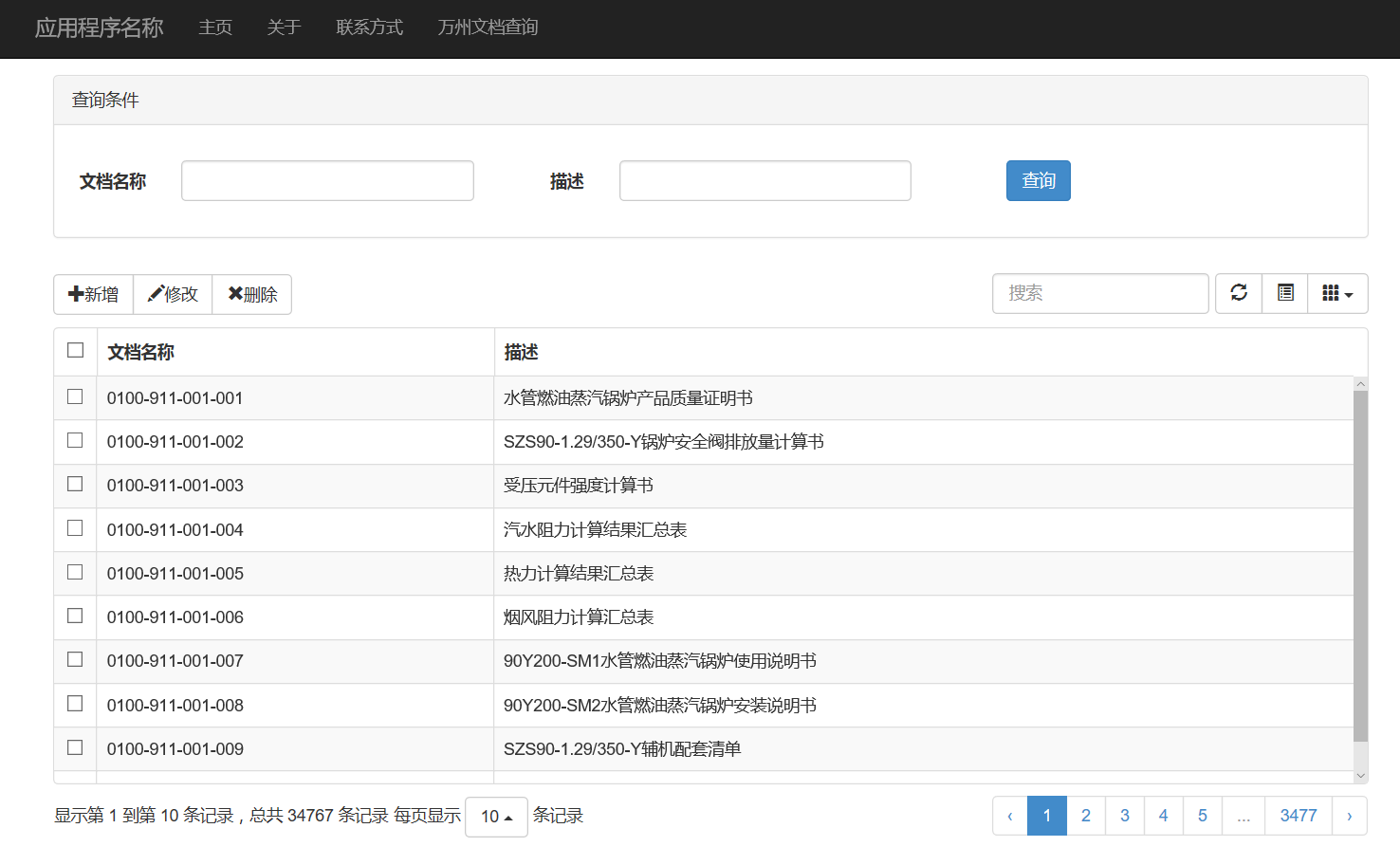
3.效果图:
来自 “ ITPUB博客 ” ,链接:https://blog.itpub.net/4571/viewspace-3169956/ ,如需转载,请注明出处,否则将追究法律责任。

请登录后发表评论
登录
全部评论
