下面以一个简单的学生信息为例介绍Gii的简单使用方法。
首先利用数据书迁移脚本创建数据库(默认数据库连接已经配置成功)。
输入命令:
./yii migrate/create create_student_table
然后根据提示创建。
*使用数据库迁移文件创建数据库。完善该文件如下:
createTable('student', [            'id' => $this->primaryKey(),            'number' => $this->integer()->notNull()->unique()->comment("学号"),            'name' => $this->string(20)->notNull(),            'gender' => $this->integer()->notNull()->comment("0:未知  1:男  2:女"),            'class' => $this->integer()->notNull()->comment("班级")
        ]);
    }    /**
     * {@inheritdoc}
     */
    public function safeDown()
    {        $this->dropTable('student');
    }
}
然后执行
./yii migrate
命令,根据提示完成。
-
打开浏览器,输入 http://localhost/index.php?r=gii 进入gii页面。
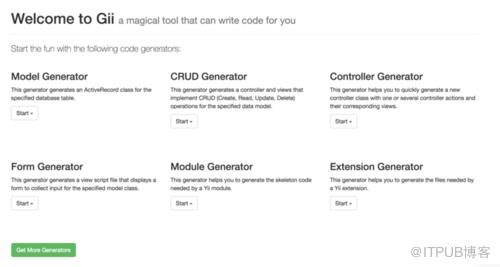
gii web界面
然后点击 Model Generator 生成模型代码。
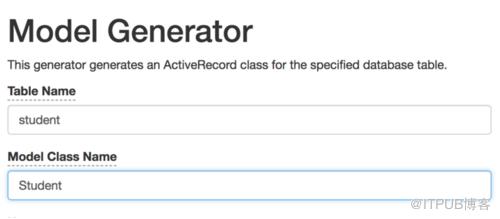
生成模型代码
然后可能报错,如下:
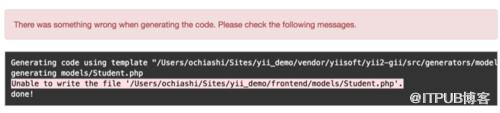
报错代码
那么更改一下文件的权限即可。
-
创建模型的控制器等代码
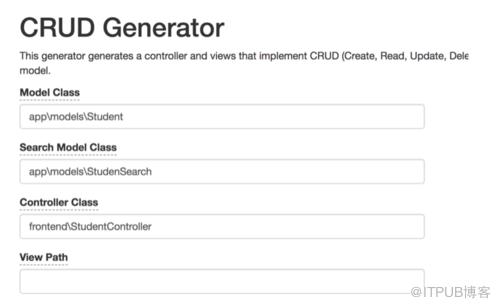
生成CRUD代码
上图StudentController的路径有误,应写到controllers文件夹下。
这样就完成了简单的查询的代码生成。
作者:偏偏注定要落脚丶
链接:https://www.jianshu.com/p/75434054c62a
来自 “ ITPUB博客 ” ,链接:https://blog.itpub.net/4565/viewspace-2804961/ ,如需转载,请注明出处,否则将追究法律责任。
下一篇:
php连接MySQL的两种方式对比

请登录后发表评论
登录
全部评论
