因为公司使用的spring版本太高,在集成swagger的时候会存在一些问题,而网上的很多实例大多都是版本比较低的,为了是朋友们少才坑,我这边将集成的过程记录一下:
1. 引入spring、swagger的相关jar包(springfox-swagger2、springfox-swagger-ui),在pom.xml中配置:
            io.springfox
            springfox-swagger2
            2.4.0


                    org.springframework
                    spring-core


                    org.springframework
                    spring-beans


                    org.springframework
                    spring-context


                    org.springframework
                    spring-context-support


                    org.springframework
                    spring-aop


                    org.springframework
                    spring-tx


                    org.springframework
                    spring-orm


                    org.springframework
                    spring-jdbc


                    org.springframework
                    spring-web


                    org.springframework
                    spring-webmvc


                    org.springframework
                    spring-oxm


            io.springfox
            springfox-swagger-ui
            2.4.0
提醒: 特别注意,springfox-swagger2在集成的时候,已经引入了spring的相关jar,特别是spring-context、spring-context-support的版本和项目中使用的版本完全不一致,项目在启动的时候出现很多包冲突的问题,这边在引入pom.xml文件的时候过滤掉了spring的相关jar包,如绿色标志。
2. 编写Swagger的配置类:
package com.ml.honghu.swagger.web;

import org.springframework.context.annotation.Bean;
import org.springframework.context.annotation.ComponentScan;
import org.springframework.context.annotation.Configuration;
import org.springframework.web.servlet.config.annotation.EnableWebMvc;

import springfox.documentation.builders.ApiInfoBuilder;
import springfox.documentation.builders.PathSelectors;
import springfox.documentation.builders.RequestHandlerSelectors;
import springfox.documentation.service.ApiInfo;
import springfox.documentation.service.Contact;
import springfox.documentation.spi.DocumentationType;
import springfox.documentation.spring.web.plugins.Docket;
import springfox.documentation.swagger2.annotations.EnableSwagger2;

@EnableWebMvc
@EnableSwagger2
@Configuration
@ComponentScan(basePackages ={"com.ml.honghu.**.rest"})
public class SwaggerConfig {
    @Bean
    public Docket createRestApi() {
        return new Docket(DocumentationType.SWAGGER_2)
                .apiInfo(apiInfo())
                .select()
                .apis(RequestHandlerSelectors.basePackage("com.ml.honghu"))
                .paths(PathSelectors.any())
                .build();
    }

    private ApiInfo apiInfo() {
        return new ApiInfoBuilder()
                .title("接口列表 v1.0")
                .description("接口信息")
                .termsOfServiceUrl("http://honghu.com")
                .contact(new Contact("", "", "HongHu"))
                .version("1.1.0")
                .build();
    }
}
3. 在spring-mvc.xml文件中进行过滤器的配置,过滤掉swagger的相关访问配置:
4. 服务配置项
@Api("区域服务") @RestController @RequestMapping(value = "/rest/area") public class AreaService { @Autowired private AreaService areaService; @ApiOperation(value = "区域列表", httpMethod = "GET", notes = "区域列表") @IsLogin @ResponseBody @RequestMapping(value = "treeData", method = RequestMethod.GET) public List
4. 启动项目,查看结果:
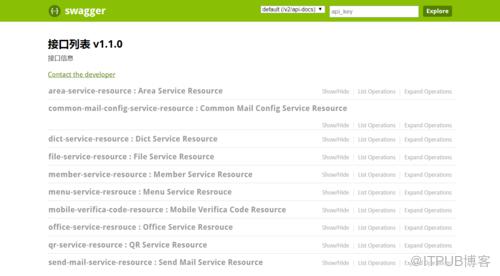
到此结束!!源码来源
来自 “ ITPUB博客 ” ,链接:https://blog.itpub.net/4556/viewspace-2802270/ ,如需转载,请注明出处,否则将追究法律责任。

请登录后发表评论
登录
全部评论
