文件分割与合并是一个常见需求,比如:上传大文件时,可以先分割成小块,传到服务器后,再进行合并。很多高大上的分布式文件系统(比如:google的GFS、taobao的TFS)里,也是按block为单位,对文件进行分割或合并。
看下基本思路:
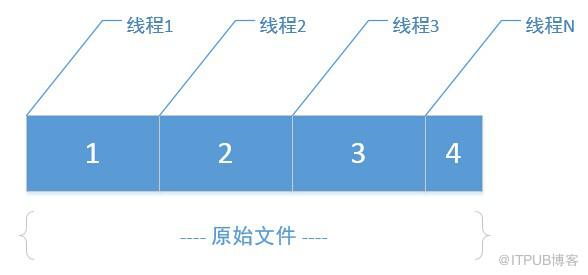
如果有一个大文件,指定分割大小后(比如:按1M切割)
step 1:
先根据原始文件大小、分割大小,算出最终分割的小文件数N
step 2:
在磁盘上创建这N个小文件
step 3:
开多个线程(线程数=分割文件数),每个线程里,利用RandomAccessFile的seek功能,将读取指针定位到原文件里每一段的段首位置,然后向后读取指定大小(即:分割块大小),最终写入对应的分割文件,因为多线程并行处理,各写各的小文件,速度相对还是比较快的。
合并时,把上面的思路逆向处理即可。
核心代码:
分割处理:
1 /** 2 * 拆分文件 3 * @param fileName 待拆分的完整文件名 4 * @param byteSize 按多少字节大小拆分 5 * @return 拆分后的文件名列表 6 * @throws IOException 7 */ 8 public ListsplitBySize(String fileName, int byteSize) 9 throws IOException { 10 List parts = new ArrayList (); 11 File file = new File(fileName); 12 int count = (int) Math.ceil(file.length() / (double) byteSize); 13 int countLen = (count + "").length(); 14 ThreadPoolExecutor threadPool = new ThreadPoolExecutor(count, 15 count * 3, 1, TimeUnit.SECONDS, 16 new ArrayBlockingQueue (count * 2)); 17 18 for (int i = 0; i 1 private class SplitRunnable implements Runnable { 2 int byteSize; 3 String partFileName; 4 File originFile; 5 int startPos; 6 7 public SplitRunnable(int byteSize, int startPos, String partFileName, 8 File originFile) { 9 this.startPos = startPos; 10 this.byteSize = byteSize; 11 this.partFileName = partFileName; 12 this.originFile = originFile; 13 } 14 15 public void run() { 16 RandomAccessFile rFile; 17 OutputStream os; 18 try { 19 rFile = new RandomAccessFile(originFile, "r"); 20 byte[] b = new byte[byteSize]; 21 rFile.seek(startPos);// 移动指针到每“段”开头 22 int s = rFile.read(b); 23 os = new FileOutputStream(partFileName); 24 os.write(b, 0, s); 25 os.flush(); 26 os.close(); 27 } catch (IOException e) { 28 e.printStackTrace(); 29 } 30 } 31 }合并处理:
1 /** 2 * 合并文件 3 * 4 * @param dirPath 拆分文件所在目录名 5 * @param partFileSuffix 拆分文件后缀名 6 * @param partFileSize 拆分文件的字节数大小 7 * @param mergeFileName 合并后的文件名 8 * @throws IOException 9 */ 10 public void mergePartFiles(String dirPath, String partFileSuffix, 11 int partFileSize, String mergeFileName) throws IOException { 12 ArrayListpartFiles = FileUtil.getDirFiles(dirPath, 13 partFileSuffix); 14 Collections.sort(partFiles, new FileComparator()); 15 16 RandomAccessFile randomAccessFile = new RandomAccessFile(mergeFileName, 17 "rw"); 18 randomAccessFile.setLength(partFileSize * (partFiles.size() - 1) 19 + partFiles.get(partFiles.size() - 1).length()); 20 randomAccessFile.close(); 21 22 ThreadPoolExecutor threadPool = new ThreadPoolExecutor( 23 partFiles.size(), partFiles.size() * 3, 1, TimeUnit.SECONDS, 24 new ArrayBlockingQueue (partFiles.size() * 2)); 25 26 for (int i = 0; i 1 private class MergeRunnable implements Runnable { 2 long startPos; 3 String mergeFileName; 4 File partFile; 5 6 public MergeRunnable(long startPos, String mergeFileName, File partFile) { 7 this.startPos = startPos; 8 this.mergeFileName = mergeFileName; 9 this.partFile = partFile; 10 } 11 12 public void run() { 13 RandomAccessFile rFile; 14 try { 15 rFile = new RandomAccessFile(mergeFileName, "rw"); 16 rFile.seek(startPos); 17 FileInputStream fs = new FileInputStream(partFile); 18 byte[] b = new byte[fs.available()]; 19 fs.read(b); 20 fs.close(); 21 rFile.write(b); 22 rFile.close(); 23 } catch (IOException e) { 24 e.printStackTrace(); 25 } 26 } 27 }为了方便文件操作,把关于文件读写的功能,全封装到FileUtil类:
1 package com.cnblogs.yjmyzz; 2 3 import java.io.*; 4 import java.util.*; 5 import java.util.concurrent.*; 6 7 /** 8 * 文件处理辅助类 9 * 10 * @author yjmyzz@126.com 11 * @version 0.2 12 * @since 2014-11-17 13 * 14 */ 15 public class FileUtil { 16 17 /** 18 * 当前目录路径 19 */ 20 public static String currentWorkDir = System.getProperty("user.dir") + "\"; 21 22 /** 23 * 左填充 24 * 25 * @param str 26 * @param length 27 * @param ch 28 * @return 29 */ 30 public static String leftPad(String str, int length, char ch) { 31 if (str.length() >= length) { 32 return str; 33 } 34 char[] chs = new char[length]; 35 Arrays.fill(chs, ch); 36 char[] src = str.toCharArray(); 37 System.arraycopy(src, 0, chs, length - src.length, src.length); 38 return new String(chs); 39 40 } 41 42 /** 43 * 删除文件 44 * 45 * @param fileName 46 * 待删除的完整文件名 47 * @return 48 */ 49 public static boolean delete(String fileName) { 50 boolean result = false; 51 File f = new File(fileName); 52 if (f.exists()) { 53 result = f.delete(); 54 55 } else { 56 result = true; 57 } 58 return result; 59 } 60 61 /*** 62 * 递归获取指定目录下的所有的文件(不包括文件夹) 63 * 64 * @param obj 65 * @return 66 */ 67 public static ArrayListgetAllFiles(String dirPath) { 68 File dir = new File(dirPath); 69 70 ArrayList files = new ArrayList (); 71 72 if (dir.isDirectory()) { 73 File[] fileArr = dir.listFiles(); 74 for (int i = 0; i getDirFiles(String dirPath) { 93 File path = new File(dirPath); 94 File[] fileArr = path.listFiles(); 95 ArrayList files = new ArrayList (); 96 97 for (File f : fileArr) { 98 if (f.isFile()) { 99 files.add(f); 100 } 101 } 102 return files; 103 } 104 105 /** 106 * 获取指定目录下特定文件后缀名的文件列表(不包括子文件夹) 107 * 108 * @param dirPath 109 * 目录路径 110 * @param suffix 111 * 文件后缀 112 * @return 113 */ 114 public static ArrayList getDirFiles(String dirPath, 115 final String suffix) { 116 File path = new File(dirPath); 117 File[] fileArr = path.listFiles(new FilenameFilter() { 118 public boolean accept(File dir, String name) { 119 String lowerName = name.toLowerCase(); 120 String lowerSuffix = suffix.toLowerCase(); 121 if (lowerName.endsWith(lowerSuffix)) { 122 return true; 123 } 124 return false; 125 } 126 127 }); 128 ArrayList files = new ArrayList (); 129 130 for (File f : fileArr) { 131 if (f.isFile()) { 132 files.add(f); 133 } 134 } 135 return files; 136 } 137 138 /** 139 * 读取文件内容 140 * 141 * @param fileName 142 * 待读取的完整文件名 143 * @return 文件内容 144 * @throws IOException 145 */ 146 public static String read(String fileName) throws IOException { 147 File f = new File(fileName); 148 FileInputStream fs = new FileInputStream(f); 149 String result = null; 150 byte[] b = new byte[fs.available()]; 151 fs.read(b); 152 fs.close(); 153 result = new String(b); 154 return result; 155 } 156 157 /** 158 * 写文件 159 * 160 * @param fileName 161 * 目标文件名 162 * @param fileContent 163 * 写入的内容 164 * @return 165 * @throws IOException 166 */ 167 public static boolean write(String fileName, String fileContent) 168 throws IOException { 169 boolean result = false; 170 File f = new File(fileName); 171 FileOutputStream fs = new FileOutputStream(f); 172 byte[] b = fileContent.getBytes(); 173 fs.write(b); 174 fs.flush(); 175 fs.close(); 176 result = true; 177 return result; 178 } 179 180 /** 181 * 追加内容到指定文件 182 * 183 * @param fileName 184 * @param fileContent 185 * @return 186 * @throws IOException 187 */ 188 public static boolean append(String fileName, String fileContent) 189 throws IOException { 190 boolean result = false; 191 File f = new File(fileName); 192 if (f.exists()) { 193 RandomAccessFile rFile = new RandomAccessFile(f, "rw"); 194 byte[] b = fileContent.getBytes(); 195 long originLen = f.length(); 196 rFile.setLength(originLen + b.length); 197 rFile.seek(originLen); 198 rFile.write(b); 199 rFile.close(); 200 } 201 result = true; 202 return result; 203 } 204 205 /** 206 * 拆分文件 207 * 208 * @param fileName 209 * 待拆分的完整文件名 210 * @param byteSize 211 * 按多少字节大小拆分 212 * @return 拆分后的文件名列表 213 * @throws IOException 214 */ 215 public List splitBySize(String fileName, int byteSize) 216 throws IOException { 217 List parts = new ArrayList (); 218 File file = new File(fileName); 219 int count = (int) Math.ceil(file.length() / (double) byteSize); 220 int countLen = (count + "").length(); 221 ThreadPoolExecutor threadPool = new ThreadPoolExecutor(count, 222 count * 3, 1, TimeUnit.SECONDS, 223 new ArrayBlockingQueue (count * 2)); 224 225 for (int i = 0; i partFiles = FileUtil.getDirFiles(dirPath, 251 partFileSuffix); 252 Collections.sort(partFiles, new FileComparator()); 253 254 RandomAccessFile randomAccessFile = new RandomAccessFile(mergeFileName, 255 "rw"); 256 randomAccessFile.setLength(partFileSize * (partFiles.size() - 1) 257 + partFiles.get(partFiles.size() - 1).length()); 258 randomAccessFile.close(); 259 260 ThreadPoolExecutor threadPool = new ThreadPoolExecutor( 261 partFiles.size(), partFiles.size() * 3, 1, TimeUnit.SECONDS, 262 new ArrayBlockingQueue (partFiles.size() * 2)); 263 264 for (int i = 0; i { 278 public int compare(File o1, File o2) { 279 return o1.getName().compareToIgnoreCase(o2.getName()); 280 } 281 } 282 283 /** 284 * 分割处理Runnable 285 * 286 * @author yjmyzz@126.com 287 * 288 */ 289 private class SplitRunnable implements Runnable { 290 int byteSize; 291 String partFileName; 292 File originFile; 293 int startPos; 294 295 public SplitRunnable(int byteSize, int startPos, String partFileName, 296 File originFile) { 297 this.startPos = startPos; 298 this.byteSize = byteSize; 299 this.partFileName = partFileName; 300 this.originFile = originFile; 301 } 302 303 public void run() { 304 RandomAccessFile rFile; 305 OutputStream os; 306 try { 307 rFile = new RandomAccessFile(originFile, "r"); 308 byte[] b = new byte[byteSize]; 309 rFile.seek(startPos);// 移动指针到每“段”开头 310 int s = rFile.read(b); 311 os = new FileOutputStream(partFileName); 312 os.write(b, 0, s); 313 os.flush(); 314 os.close(); 315 } catch (IOException e) { 316 e.printStackTrace(); 317 } 318 } 319 } 320 321 /** 322 * 合并处理Runnable 323 * 324 * @author yjmyzz@126.com 325 * 326 */ 327 private class MergeRunnable implements Runnable { 328 long startPos; 329 String mergeFileName; 330 File partFile; 331 332 public MergeRunnable(long startPos, String mergeFileName, File partFile) { 333 this.startPos = startPos; 334 this.mergeFileName = mergeFileName; 335 this.partFile = partFile; 336 } 337 338 public void run() { 339 RandomAccessFile rFile; 340 try { 341 rFile = new RandomAccessFile(mergeFileName, "rw"); 342 rFile.seek(startPos); 343 FileInputStream fs = new FileInputStream(partFile); 344 byte[] b = new byte[fs.available()]; 345 fs.read(b); 346 fs.close(); 347 rFile.write(b); 348 rFile.close(); 349 } catch (IOException e) { 350 e.printStackTrace(); 351 } 352 } 353 } 354 355 } 单元测试:
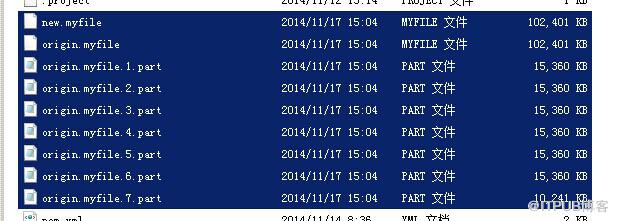
1 package com.cnblogs.yjmyzz; 2 3 import java.io.IOException; 4 5 import org.junit.Test; 6 7 public class FileTest { 8 9 @Test 10 public void writeFile() throws IOException, InterruptedException { 11 12 System.out.println(FileUtil.currentWorkDir); 13 14 StringBuilder sb = new StringBuilder(); 15 16 long originFileSize = 1024 * 1024 * 100;// 100M 17 int blockFileSize = 1024 * 1024 * 15;// 15M 18 19 // 生成一个大文件 20 for (int i = 0; i
来自 “ ITPUB博客 ” ,链接:https://blog.itpub.net/4369/viewspace-2800452/ ,如需转载,请注明出处,否则将追究法律责任。
下一篇:
Java进阶学习之事件响应

请登录后发表评论
登录
全部评论
