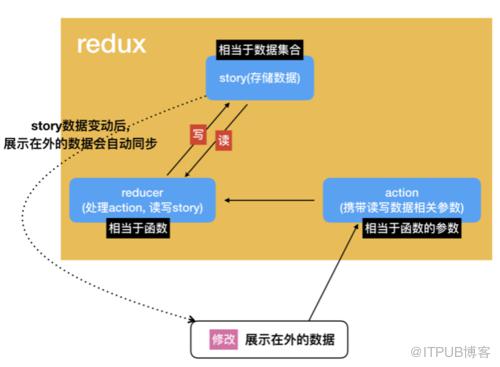
Redux是一种解决数据共享的方案
import {createStore} from 'redux';import React from 'react';import ReactDOM from 'react-dom';import {connect, createProvider} from 'react-redux'// datalet allNum = {num :1000}// 创建reducer, 名字的默认值为function reducer(state, action) { let tmp = {} if (action.type == "decrease"){
allNum.num = allNum.num - action.value;
tmp = Object.assign({}, state, {num: allNum.num}) return tmp
}else if(action.type == "increase"){
allNum.num = allNum.num + action.value;
tmp = Object.assign({}, state, {num: allNum.num}) return tmp
}else{ return state
}
}// 创建store存储数据(传入处理函数reducer, 核心数据allNum)let store = createStore(reducer, allNum)console.log("初始化的数据为",store.getState('num'))// 添加监听函数store.subscribe(() => {console.log("监听函数发出:", store.getState())});// 发出actionlet tmp = {};
tmp = store.dispatch({type: "decrease", value: 10})console.log("---->", tmp);
tmp = store.dispatch({type: "decrease", value: 100})console.log("---->", tmp);
tmp = store.dispatch({type: "increase", value: 31})console.log("---->", tmp);
tmp = store.dispatch({type: "increase", value: 123})console.log("---->", tmp);class MyComponent extends React.Component {
render() {return Hello World;}
}
ReactDOM.render(
React和Redux组合使用
React组件, 有两个数据集,
props和stateprops表示外部传入组件的参数(数据由外部传入, 可以被外部更改)state表示组件固有的属性(数据私有, 不可以被外部更改)我们可以把多个React组件的
props交由Redux进行管理, 这样就实现了React组件之间数据的共享
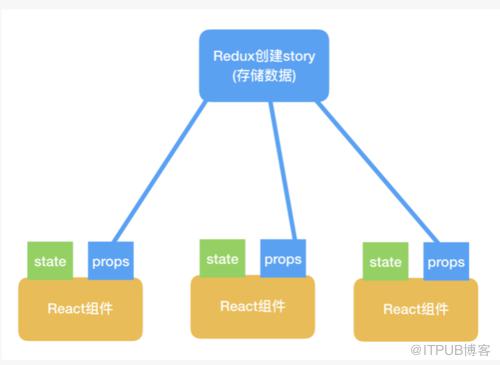
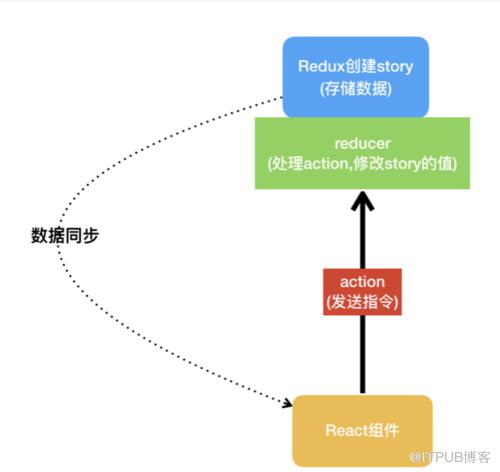
组件如何读写数据
组件通过action发送信号, reducer处理action, story内的值被reducer修改, 由于React组件已经被绑定到story中, 所以story内的数据被修改后, 可以直接同步到React的组件中
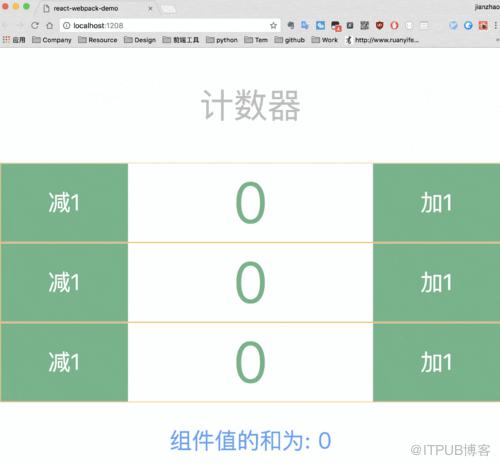
小案例: 实现一个组合计数器
单个计数器的数据由组件自身state管理
三个计数器的数据只和由Redux管理
动图演示
实现的源码如下
index.html
html>react-webpack-demo
index.js
import 'babel-polyfill';
import React from 'react';
import ReactDOM from 'react-dom';
import './index.scss';
import Redux from 'redux';
import { connect, Provider } from 'react-redux';
import { createStore } from 'redux';
import { PropTypes } from 'prop-types';class ManageCounter extends React.Component {
    constructor(props) {
        super(props);
    }

    render() {        return (
            计数器


             组件值的和为: { this.props.sum }
             )
    }
}class Counter extends React.Component {
    constructor(props) {
        super(props);
        this.changeSum = this.changeSum.bind(this)
        this.decrease = this.decrease.bind(this)
        this.increase = this.increase.bind(this)
        this.state = { value: 0 };
    }
    changeSum() {
        this.props.dispatch({ type: 'changeSum', payload: { id: this.props.id, value: this.state.value } })
    }
    decrease() {
        let self = this;
        this.setState({ value: this.state.value - 1 }, () => {            self.changeSum()

        })
    }

    increase() {
        let self = this;        self.setState({ value: this.state.value + 1 }, () => {            self.changeSum()
        })
    }

    render() {        const { value } = this.state;
        let { id } = this.props;        return (

             { value }


 )
    }
}// 创建reducerfunction reducer(state = { number: [0, 0, 0], sum: 0 }, action = {}) {    if (action.type == 'changeSum') {
        let { id, value } = action.payload
        console.log("id:", id, "value:", value);
        state.number[id] = value
        let tmpSum = 0;        for (let i = 0; i  ({

})const ManageCounterMapStateToProps = (state) => ({
    sum: state.sum
})const mapDispatchToProps = (dispatch) => ({
    dispatch: dispatch
})// 创建storelet store = createStore(reducer)// connect连接Counter = connect(CounterMapStateToProps, mapDispatchToProps)(Counter)
ManageCounter = connect(ManageCounterMapStateToProps, mapDispatchToProps)(ManageCounter)

ReactDOM.render(


     ,
    document.getElementById('root'));
index.scss
$designWidth: 750;
@function px2rem($px) {
    @return $px*10/$designWidth+rem;
}#root {
    div {
        p {
            font-size: px2rem(300);
            color: #5EA1F3;
            text-align: center;
        }
        div {
            font-size: px2rem(500);
            display: flex;
            color: #64B587;
            border: 1px solid #F0BB40;
            input {
                flex: 1 1 auto;
                background-color: #64B587;
                font-size: px2rem(200);
                outline: none;
                color:#ffffff;
            }
            span {
                width: 300px;
                flex: 1 1 auto;
                text-align: center;
            }
        }
        .title {
            color: #BDBDBD;
        }
        .result {

            font-size: px2rem(200);
        }
    }
}
小结
redux的设计思想是很简单的, 也有了很成熟的库函数供我们调用, 所以面对一个问题时, 我们考虑的重点是: React组件内哪些数据需要被Redux管理?把重点问题考虑清楚, 问题也就解决了大半!
为便于管理, 相关资源整合到一张独立的帖子,链接如下:
http://www.jianshu.com/p/4f28e1ae08b1
作者:木子昭
链接:https://www.jianshu.com/p/bf3231af3906
来自 “ ITPUB博客 ” ,链接:https://blog.itpub.net/4301/viewspace-2804344/ ,如需转载,请注明出处,否则将追究法律责任。

