用户不管是打开A/R Posted Transactions Detail还是A/R Posted Transactions Summary 窗口,均显示如下一个警示: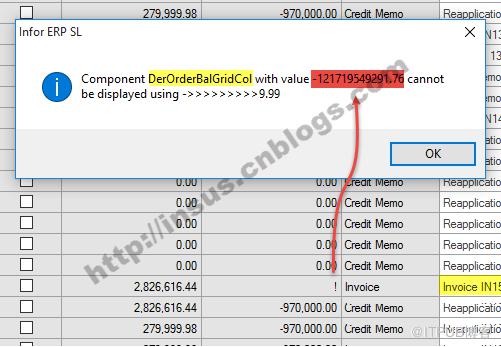
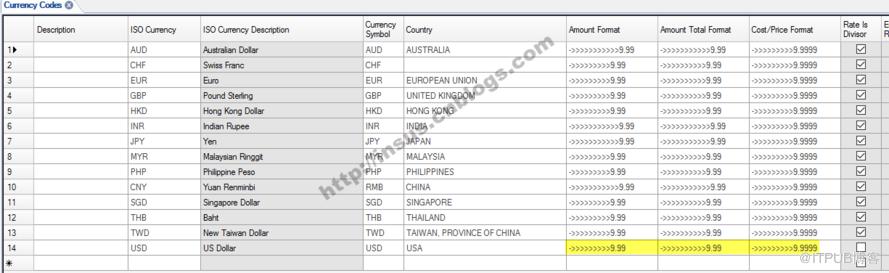
打开Currency Codes窗口,检查decimal显示格式,均已经设为最大长度,说明与此无关。
后来,找到一个Utility,Modules >> Customer >> General >> Utilities >> Rebalance Customer Balances: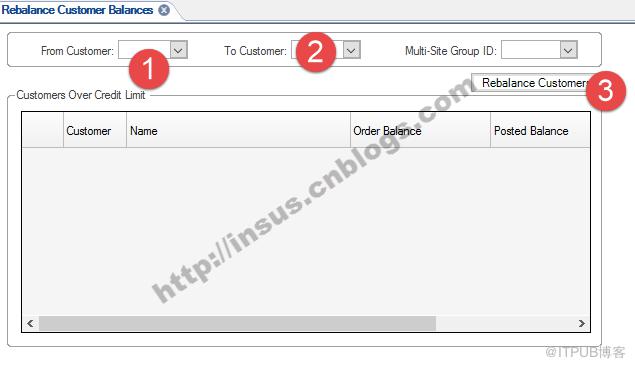
Rebalance Customer Balances
Use the Rebalance Customer Balances utility to ensure the On Order Balance and Posted Balance fields on the Customers record are correct.
NOTE: If you use an external financial system to handle Accounts Receivable (the Use External A/R System field is selected on the External Financial Interface Parameters form), this utility skips the recalculating of the posted balance.
What Happens During Rebalancing
When you click Rebalance Customers, the system does the following:
-
Sets the On Order and Posted Balance fields for each selected customer to zero.
-
Adds the total price (quantity ordered * price) of each ordered line/release into the On Order Balance field.
NOTE: The system includes only customer orders with a header status of "Ordered" or "Stopped."
-
Adds the total of all open items into the Posted Balance field.
-
Displays a message indicating the process is complete.
-
Displays a list of all customers with balances over their credit limits. This list includes the customer number, name, on order balance, posted balance, and credit limit.
NOTE: Balances for corporate customers in the specified range also account for all of the corporate customer's "child" customers - even if the child customer numbers are not in the specified range. This is necessary to provide accurate balances for the corporate customer.
来自 “ ITPUB博客 ” ,链接:https://blog.itpub.net/4237/viewspace-2812798/ ,如需转载,请注明出处,否则将追究法律责任。

