报错信息大概如下:
Error running 'xxx':
Command line is too long. Shorten command line for xxx or also for Application default configuration.
解决方案(1):
找到项目下的.idea/workspace.xml,在标签<component name="PropertiesComponent">里添加一行属性:<property name="dynamic.classpath" value="true" />
<component name="PropertiesComponent">
  其它属性不改
  <property name="dynamic.classpath" value="true" />
</component>
解决方案(2):
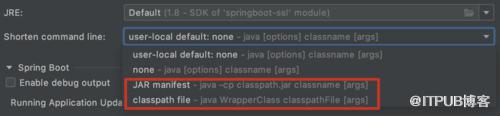
打开程序的运行配置,把Shorten command line改为JAR manifest或classpath file,如图所示:
欢迎访问南瓜慢说 获取更多精彩文章!
多读书,多分享;多写作,多整理。
来自 “ ITPUB博客 ” ,链接:https://blog.itpub.net/406/viewspace-2825381/ ,如需转载,请注明出处,否则将追究法律责任。
上一篇:
Django中的session的使用

请登录后发表评论
登录
全部评论
