java中的NIO和IO到底是什么区别?20个问题告诉你答案
摘要:NIO即New IO,这个库是在JDK1.4中才引入的。NIO和IO有相同的作用和目的,但实现方式不同,NIO主要用到的是块,所以NIO的效率要比IO高很多。
本文分享自华为云社区《java中的NIO和IO到底是什么区别?20个问题告诉你答案【奔跑吧!JAVA】》,原文作者:breakDraw 。
NIO即New IO,这个库是在JDK1.4中才引入的。NIO和IO有相同的作用和目的,但实现方式不同,NIO主要用到的是块,所以NIO的效率要比IO高很多。
Q: NIO和标准IO有什么区别?
A:
- 标准IO, 基于字节流和字符流进行操作,阻塞IO。
- NIO基于通道channel和缓冲区Buffer进行操作,支持非阻塞IO,提供选择器
§ JavaNIO核心3组件:
§ Channels 通道
Q: 通道Channel对象能同时做读写操作吗?
还是说需要像标准IO那样,需要同时创建input和output对象才能做读写操作?
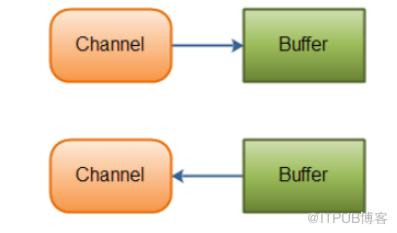
A:通道Channel是双向的, 既可以从channel中读数据,也可以写数据。
可以看到既能调用read也能调用write,且需要依赖缓冲区buffer。
 FileChannel fileChannel = FileChannel.open(new File("a.txt").toPath());
    ByteBuffer buf = ByteBuffer.allocate(1024);
     fileChannel.read(buf);
     fileChannel.write(buf);
- 注意上图上,fileChannel.read(buf)是将a.txt里的数据读到buf, 即a.txt->buf
- fileChannel.write(buf)是将buf里的数据写入到a.txt中, 即buf->a.txt,不要搞反啦!
- 通道和缓冲区的关系
Q: 通道支持异步读写吗
A: 支持。
Q: 通道的读写是否必须要依赖缓冲区buffer?
A: 一般都是依赖buffer的。 但也支持2个管道之间的传输,即管道之间直接读写。
String[] arr=new String[]{"a.txt","b.txt"};
FileChannel in=new FileInputStream(arr[0]).getChannel();
FileChannel out =new FileOutputStream(arr[1]).getChannel();

// 将a.txt中的数据直接写进b.txt中,相当于文件拷贝
in.transferTo(0, in.size(), out);
常用的几种Channel
- FileChannel
Java NIO中的FileChannel是一个连接到文件的通道。可以通过文件通道读写文件。FileChannel无法设置为非阻塞模式,它总是运行在阻塞模式下
创建方式
RandomAccessFile    file = new RandomAccessFile("D:/aa.txt");
FileChannel    fileChannel = file.getChannel();
- SocketChannel
Java NIO中的SocketChannel是一个连接到TCP网络套接字的通道。支持非阻塞模式socketChannel.configureBlocking(false)。可以通过以下2种方式创建SocketChannel:
打开一个SocketChannel并连接到互联网上的某台服务器。一个新连接到达ServerSocketChannel时,会创建一个SocketChannel
创建方式
SocketChannel socketChannel = SocketChannel.open();
socketChannel.connect(new InetSocketAddress("192.168.1.100",80));
- ServerSocketChannel
Java NIO中的 ServerSocketChannel 是一个可以监听新进来的TCP连接的通道, 就像标准IO中的ServerSocket一样。ServerSocketChannel类在 java.nio.channels包中。SocketChannel和ServerSocketChannel的区别: 前者用于客户端,后者用于服务端
创建方式:
ServerSocketChannel serverSocketChannel = ServerSocketChannel.open();
serverSocketChannel.socket.bind(new InetSocketAddress(80));
serverSocketChannel.configureBlocking(false);
while(true){
    SocketChannel socketChannel = serverSocketChannel.accept();
    if(socketChannle != null)
        doSomething...
}
Buffer缓冲区
- 我们真正要把数据拿到或者要写数据, 实际上都是通过buffer进行操作的。
文件 <-> buffer <-> 数据 - buffer是1个即可读也可写的缓冲区,拥有读写2种模式。
- buffer的capacity属性限定了每个buffer的最大容量,下面的1024就是capacity。
ByteBuffer buf = ByteBuffer.allocate(1024);
- buffer拥有1个position属性,表示当前的读写位置。
- 往buffer中写数据时,position就会增加。
- position最大值为capacity-1
- 把fileChannel对应文件里的数据 写入到buffer,叫做写模式
- 写之后,调用flip,让buffer的postion置0,此时相当于准备读取buffer里的数据(即调用buffer.get()拿数据)
- (这个模式的叫法个人也觉得不太好,很容易绕,你可以就记忆成: flip就是从写模式转成读模式!)
Q: buffer调用flip()方法从写模式切换到读模式时,position会变成多少?
A: 变为0。
 ByteBuffer buf = ByteBuffer.allocate(1024);
    // 数据读到buf中,并返回数量,每次最多读1024个
    int byteRead = fileChannel.read(buf);
    // 输出byteRead的数量,最多为1024
    System.out.println("position=" + buf.position()+", byteRead=" + byteRead);

    buf.flip();
    // 切换到读模式了,输出0
    System.out.println("position=" + buf.position());
- buffer拥有1个limit属性。
- 写模式下,buffer的limit就是buffer的capacity。
Q: 当buffer从写模式切换到读模式时,limit为多少?
A: 每次切换前都要调用flip(),切换后,limit为写模式中的position。
int byteRead = fileChannel.read(buf);
        // 输出1024
        System.out.println("limit=" + buf.limit() + ",postion=" + buf.position());
        System.out.println("切换到读模式");
        buf.flip();
        // 输出byteRead数量
        System.out.println("limit=" + buf.limit());
结果如下

Q: 向buf缓冲区写数据的方式有哪些?
A:
- int byteRead = fileChannel.read(buf);
从通道中读数据到buf中, 即相当于向buf缓冲区中写数据。 - buf.putChar(‘a’);
手动向buf中写入字符a, postion加1。
Q: 从buf缓冲区读数据的方式有哪些?
- int bytesWrite = fileChannel.write(buf)
buf中的数据写入到管道,即相当于fileChannel读取buf中的数据。 - byte getByte = buf.get()
手动读取1个buf中的字符,postion加1.
Q: 手动修改当前缓冲区的postion的方法有哪些?
A:
- rewind() 将postion设置为0
- mark() 可以标记1个特定的位置, 相当于打标记, 在一顿操作后,可通过reset()回到之前mark()的位置(就像你需要mark我的这几篇博文一样!)
Q:1个channel管道支持多个buffer吗?
A: 支持。 通道的write和read方法都支持传入1个buffer数组,会按照顺序做读写操作。
Buffer的种类: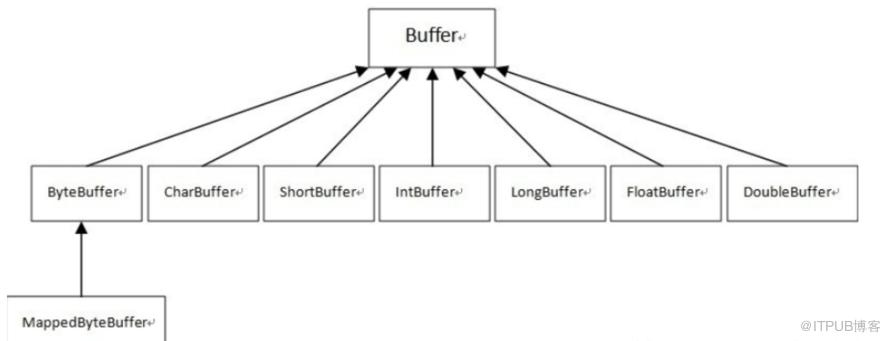
Buffer的另外3个方法:
- warp:
根据一个byte[]来生成一个固定的ByteBuffer时,使用ByteBuffer.wrap()非法的合适。他会直接基于byte[]数组生成一个新的buffer,值也保持一致。 - slice:
得到切片后的数组。 - duplicate:
调用duplicate方法返回的Buffer对象就是复制了一份原始缓冲区,复制了position、limit、capacity这些属性 - 注意!!!!!!
以上warpsliceduplicte生成的缓冲区get和put所操作的数组还是与原始缓冲区一样的。所以对复制后的缓冲区进行修改也会修改原始的缓冲区,反之亦然。
因此duplicte、slice一般是用于操作一下poistionlimit等处理,但是原内容不会去变他,否则就会引起原缓冲器的修改。
§ Selector
selector可用来在线程中关联多个通道,并进行事件监听。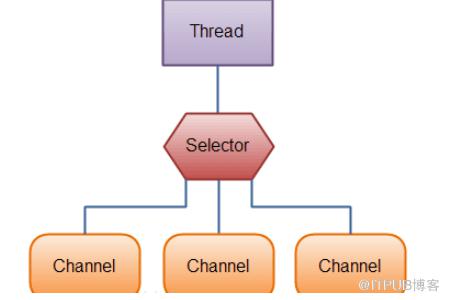
Q: 在NIO中Selector的好处是什么?
A:
- 可以用更少的线程来管理各个通道。
- 减少线程上下文切换的资源开销。
Q: Selector支持注册哪种类型的通道?
A:
支持非阻塞的通道。
通道要在注册前调用 channel.configureBlocking(false) 设置为非阻塞。
例如FileChannel就没办法注册,他注定是阻塞的。而socketChannel就可以支持非阻塞。
Q: Selector注册时,支持监听哪几种事件,对应的常量是什么?(啊最不喜欢记忆这种东西了…)
A:共有4种可监听事件
- Connect 成功连接到1个服务器,对应常量SelectionKey.OP_CONNECT
- Accept 准备好接收新进入的连接, 对应常量SelectionKey.OP_ACCEPT
- Read, 有数据可读,对应常量SelectionKey.OP_READ
- Write 接收到往里写的数据, 对应常量SelectionKey.OP_WRITE
如果希望对该通道监听多种事件,可以用"|"位或操作符把常量连接起来。
 int interestingSet = Selectionkey.OP_READ | Selectionkey.OP_WRITE;
Selectionkey key = channel.register(selector,interestingSet)
- SelectionKey键表示了一个特定的通道对象和一个特定的选择器对象之间的注册关系
Q: Selector维护的SelectionKey集合共有哪几种?
A:共有三种。
(1)已注册的所有键的集合(Registered key set)
所有与选择器关联的通道所生成的键的集合称为已经注册的键的集合。并不是所有注册过的键都仍然有效。这个集合通过keys()方法返回,并且可能是空的。这个已注册的键的集合不是可以直接修改的;试图这么做的话将引发java.lang.UnsupportedOperationException。
(2)已选择的键的集合(Selected key set)
已注册的键的集合的子集。这个集合的每个成员都是相关的通道被选择器(在前一个选择操作中)判断为已经准备好的,并且包含于键的interest集合中的操作。这个集合通过selectedKeys()方法返回(并有可能是空的)。
不要将已选择的键的集合与ready集合弄混了。这是一个键的集合,每个键都关联一个已经准备好至少一种操作的通道。每个键都有一个内嵌的ready集合,指示了所关联的通道已经准备好的操作。键可以直接从这个集合中移除,但不能添加。试图向已选择的键的集合中添加元素将抛出java.lang.UnsupportedOperationException。
(3)已取消的键的集合(Cancelled key set)
已注册的键的集合的子集,这个集合包含了cancel()方法被调用过的键(这个键已经被无效化),但它们还没有被注销。这个集合是选择器对象的私有成员,因而无法直接访问。
注册之后, 如何使用selector对准备就绪的通道做处理:
- 调用select()方法获取已就绪的通道,返回的int值表示有多少通道已经就绪
- 从selector中获取selectedkeys
- 遍历selectedkeys
- 查看各SelectionKey中 是否有事件就绪了。
- 如果有事件就绪,从key中获取对应对应管道。做对应处理
类似如下,一般都会启1个线程来run这个selector监听的处理:
while(true) {
    int readyNum = selector.select();
    if (readyNum == 0) {
        continue;
    }

    Set<SelectionKey> selectedKeys = selector.selectedKeys();
    Iterator<SelectionKey> it = selectedKeys.iterator();

    while(it.hasNext()) {
        SelectionKey key = it.next();
        if(key.isAcceptable()) {
            // 接受连接
        } else if (key.isReadable()) {
            // 通道可读
        } else if (key.isWritable()) {
            // 通道可写
        }

        it.remove();
    }
}
Q:select()方法其实是阻塞方法,即调用时会进入等待,直到把所有通道都轮询完毕。如果希望提前结束select(),有哪些方法?
A:有2个办法:
wakeup(), 调用后,select()方法立刻返回。
close(), 直接关闭selector。
PS: 之前说NIO是非阻塞IO,但为什么上面却说select()方法是阻塞的?
- 其实NIO的非阻塞,指的是IO不阻塞,即我们不会卡在read()处,我们会用selector去查询就绪状态,如果状态ok就。
- 而查询操作是需要时间,因此select()必须要把所有通道都检查一遍才能告诉结果,因此select这个查询操作是阻塞的。
§ 其他
Q: 多线程读写同一文件时,如何加锁保证线程安全?
A:使用FileChannel的加锁功能。
RandomAccessFile randFile = new RandomAccessFile(target, "rw");
FileChannel  channel = randFile.getChannel();
// pos和siz决定加锁区域, shared指定是否是共享锁
FileLock fileLock = channel.lock(pos , size , shared);
if (fileLock!=null) {
       do();
   // 这里简化了,实际上应该用try-catch
       fileLock.release();
}
Q: 如果需要读1个特大文件,可以使用什么缓冲区?
A:使用MappedByteBuffer。
这个缓冲区可以把大文件理解成1个byte数组来访问(但实际上并没有加载这么大的byte数组,实际内容放在内存+虚存中)。
主要通过FileChannel.map(模式,起始位置,区域)来生成1个MappedByteBuffer。然后可以用put和get去处理对应位置的byte。
int length = 0x8FFFFFF;//一个byte占1B,所以共向文件中存128M的数据
try (FileChannel channel = FileChannel.open(Paths.get("src/c.txt"),
              StandardOpenOption.READ, StandardOpenOption.WRITE);) {
       MappedByteBuffer mapBuffer = channel.map(FileChannel.MapMode.READ_WRITE, 0, length);
       for(int i=0;i<length;i++) {
              mapBuffer.put((byte)0);
       }
       for(int i = length/2;i<length/2+4;i++) {
              //像数组一样访问
              System.out.println(mapBuffer.get(i));
       }
}
三种模式:
- MapMode.READ_ONLY(只读): 试图修改得到的缓冲区将导致抛出 ReadOnlyBufferException。
- MapMode.READ_WRITE(读/写): 对得到的缓冲区的更改会写入文件,需要调用fore()方法
- MapMode.PRIVATE(专用): 可读可写,但是修改的内容不会写入文件,只是buffer自身的改变。
Q:NIO中ByteBuffer, 该如何根据正确的编码,转为对应的CharBuffer
A:利用Charset的decode功能。
ByteBuffer byteBuffer = ...;
Charset charset = Charset.forName("UTF-8");
CharBuffer charBuffer = charset.decode(byteBuffer);
如果是CharBuffer转ByteBuffer, 就用charset.encode。
来自 “ ITPUB博客 ” ,链接:https://blog.itpub.net/4003/viewspace-2796022/ ,如需转载,请注明出处,否则将追究法律责任。

