要求查询的值在页面循环显示,后台所有的值都能查询到,可以在控制台台显示,jsp页面alert能弹出正确结果但是页面不显示是为啥?是不是我html哪里写错了?
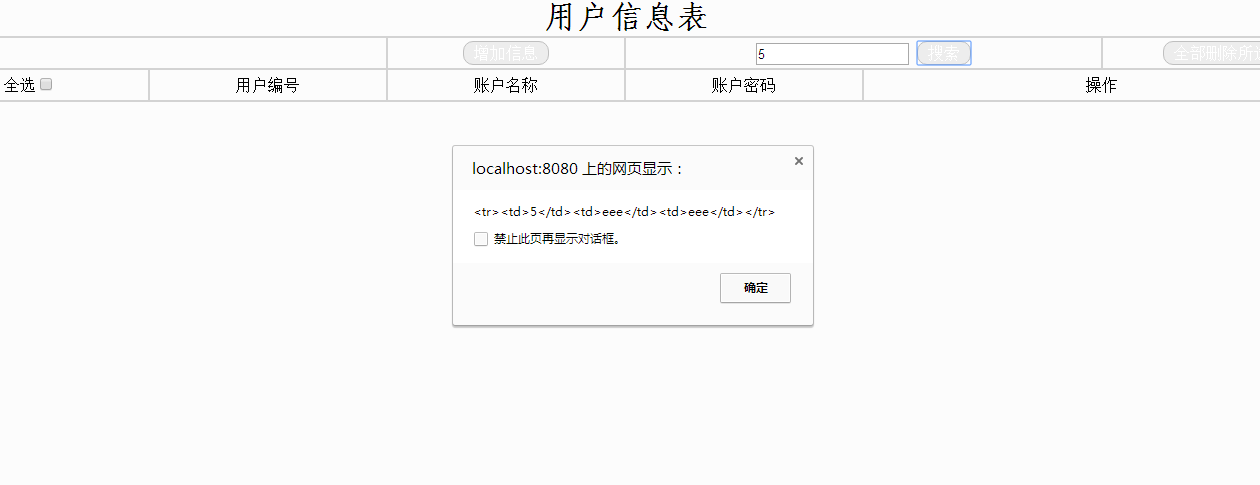

以下是代码:
  1 <%@ page language="java" contentType="text/html; charset=utf-8"
  2     pageEncoding="utf-8"%>
  3 <!DOCTYPE html PUBLIC "-//W3C//DTD HTML 4.01 Transitional//EN" "http://www.w3.org/TR/html4/loose.dtd">
  4 <html>
  5 <head>
  6 <meta http-equiv="Content-Type" content="text/html; charset=ISO-8859-1">
  7 <title>动态sql文的页面后台连接</title>
  8 <script type="text/javascript" src="js/jquery-1.11.0.js"></script>
  9 </head>
 10 <style type="text/css">
 11     body
 12     {
 13         background-color: #FCFCFC;
 14         margin-top: 0px;
 15         margin-left: 0px;
 16     }
 17     table
 18     {
 19         width: 100%;
 20         table-layout: fixed;
 21     }
 22     .tdd
 23     {
 24             text-overflow:ellipsis;
 25            white-space:nowrap;
 26            overflow:hidden;
 27        }
 28     button
 29      {
 30          border-radius: 10px;   /* 设置按钮圆角 */
 31         background-color: #EDEDED; /*灰色 */
 32         border: 1px solid #BFBFBF;
 33         color: white;
 34         font-family:' 仿宋' ;
 35         font-size:12pt;
 36         padding: 2px 10px;
 37         text-align: center;
 38         text-decoration: none;
 39         display: inline-block;
 40         cursor: pointer;
 41     /*     float: left; */
 42     }
 43
 44     button:hover
 45     {
 46         background-color: #A1A1A1;/* 深灰 */
 47     }
 48 </style>
 49 <body>
 50     <form id="frm">
 51         <table width="100%" border="1px" cellspacing="0" cellpadding="0"  bordercolor="lightgrey"  id="tbe" >
 52             <tr class="trr" align="center" valign="middle">
 53                 <th class="tdd" height="35"  colspan="6">
 54                     <font style="font-size:24pt; font-family:'仿宋' ;">用户信息表</font>
 55                 </th>
 56             </tr>
 57             <tr class="trr" align="center" valign="middle">
 58                     <td class="tdd" height="30"  colspan="2">
 59                     </td>
 60                     <td class="tdd" height="30" >
 61                         <button onclick="ins();">增加信息</button>
 62                     </td>
 63                     <td class="tdd" height="30"   colspan="2">
 64                             <input type="text" id="txt1" placeholder="请输入查询的id"/>
 65                             <button onclick="selauto();">搜索</button>
 66                     </td>
 67                     <td class="tdd" height="30">
 68                             <button value="btn"  onclick="delall();">全部删除所选</button>
 69                     </td>
 70                 </tr>
 71                 <tr class="trr" align="center" valign="middle">
 72                     <td class="tdd" height="30"  >
 73                         全选<input type="checkbox" id="chk" name="check" value="chked" onclick="chkall();" />
 74                     </td>
 75                     <td class="tdd" height="30" >
 76                         用户编号
 77                     </td>
 78                     <td class="tdd" height="30"  >
 79                         账户名称
 80                     </td>
 81                     <td class="tdd" height="30"  >
 82                         账户密码
 83                     </td>
 84                     <td class="tdd" height="30"  colspan="2" >
 85                         操作
 86                     </td>
 87                 </tr>
 88                 <tr>
 89                     <tbody id="t_body"  > </tbody>
 90                 </tr>
 91         </table>
 92         <div id="d1"></div>
 93         <input type="hidden"  name="hidd"  id="hidd"/>
 94     </form>
 95 </body>
 96 <script>
 97     //增加
 98     function ins()
 99     {
100         alert("跳转增加页面");
101         window.open("index.jsp");
102     /*     window.location.href="index.jsp"; */
103     }
104
105     //自动加载所有数据
106     function selauto()
107     {
108             alert("---search id---");
109             //异步刷新查找数据
110              $.ajax({
111                 type:"post",
112                 url:"selallServlet",
113                 data:
114                 {
115                     "userid":$("#txt1").val()
116                 },
117                 dataType:"json",
118                 success:function(data)
119                 {
120                     alert("success:"+data.userinfo);
121                     $("#t_body").empty();
122                      if(data.msg!="没有符合条件的数据"){
123                         $.each(data.userinfo,function(index,obj){
124                             alert(obj.userid+obj.username+obj.password);
125                             var str ="<tr><td>"+obj.userid+"</td>";
126                             str = str +"<td>"+obj.username+"</td>";
127                             str = str +"<td>"+obj.password+"</td></tr>";
128                             alert(str);
129                             /* $("#d1").html(str); */
130                             $("#t_body").append(str);
131                         });
132                      }else{
133                         $("#tby").html(data.msg);
134                     }
135                 }
136             });
137     }
138
139     /* window.onload(selauto());//可以不加括号 */
140 </script>
141 </html>
来自 “ ITPUB博客 ” ,链接:https://blog.itpub.net/3932/viewspace-3146378/ ,如需转载,请注明出处,否则将追究法律责任。

请登录后发表评论
登录
全部评论
