tags: 从零开发项目
title: 从零开始写项目第一篇【搭建环境】
http://mvnrepository.com/这个网站中找jar包,大多数使用最新的jar包
- 本来是使用spring5来进行整合的,结果与asm冲突了,网上又没什么解决方案。
- 最后妥协了改成3.2.2
http://blog.csdn.net/qq_15127715/article/details/78139228
又去查了一大堆的资料,发现还是因为mysql的驱动包太高的问题。只能往下转了。
Failed to read candidate component class错误分析:
spring 3.2不支持1.8编译环境,解决办法就是降为1.7编译环境
解决连接:http://www.cnblogs.com/cxj20160928/p/5954336.html
编写BaseMapper
/**
 * 将通用的方法抽取在BaseMapper中,那么就不用在每个单独的Mapper都要写对应的方法了。
 * @param
 */
public interface BaseMapper {

    int insert(T entity);

    int insertSelective(T entity);

    int deleteByPrimaryKey(String id);

    T selectByPrimaryKey(String id);

    int updateByPrimaryKeySelective(T entity);

    int updateByPrimaryKey(T entity);

}
/**
 * 将通用的业务方法抽取到BaseService中,那么实现它的Service都有这些方法了。
 * @param
 */
public interface BaseService {

    int insert(T entity);

    int insertSelective(T entity);

    int deleteByPrimaryKey(String id);

    T selectByPrimaryKey(String id);

    int updateByPrimaryKeySelective(T entity);

    int updateByPrimaryKey(T entity);
}
/**
 * 使用initBaseMapper()将baseMapper实例化,service实现类是什么类型,baseMapper就是什么类型
 * 将所有的Mapper都定义出来,那么子类service就可以直接使用了
 * @param
 */
public class BaseServiceImpl implements BaseService {

    protected BaseMapper baseMapper;

    @Autowired
    protected StoreHouseMapper storeHouseMapper;

    @PostConstruct
    private void initBaseMapper() throws Exception{

        //获取泛型的信息
        ParameterizedType type =(ParameterizedType) this.getClass().getGenericSuperclass();
        Class clazz = (Class)type.getActualTypeArguments()[0];

        //拼接成“泛型”Mapper字符串
        String localField = clazz.getSimpleName().substring(0,1).toLowerCase()+clazz.getSimpleName().substring(1)+"Mapper";

        //通过反射来获取成员变量的值
        Field field=this.getClass().getSuperclass().getDeclaredField(localField);
        Field baseField = this.getClass().getSuperclass().getDeclaredField("baseMapper");

        //将baseDao来进行实例化
        baseField.set(this, field.get(this));

        System.out.println("------this:" + this);
        System.out.println("------baseMapper:" + baseMapper);
    }

    public int insert(T entity) {
        return baseMapper.insert(entity);
    }

    public int insertSelective(T entity) {
        return baseMapper.insertSelective(entity);
    }

    public int deleteByPrimaryKey(String id) {
        return baseMapper.deleteByPrimaryKey(id);
    }

    public T selectByPrimaryKey(String id) {
        return baseMapper.selectByPrimaryKey(id);
    }

    public int updateByPrimaryKeySelective(T entity) {
        return baseMapper.updateByPrimaryKeySelective(entity);
    }

    public int updateByPrimaryKey(T entity) {
        return baseMapper.updateByPrimaryKey(entity);
    }

}
@RunWith(SpringJUnit4ClassRunner.class)
@ContextConfiguration(locations={"/application-context.xml"})
public class TestSpringAndMybatis {

    @Autowired
    private StoreHouseService hoseService;

    @Test
    public void add() {
        StoreHouse storeHouse = hoseService.selectByPrimaryKey("1");
        System.out.println(storeHouse);

    }

}
/**
 * 将所有的service实现都定义出来,controller子类使用的使用就不需要定义了。
 */
public class BaseController {
    @Autowired
    protected StoreHouseService storeHoseService;

}
@Controller
@RequestMapping("/store")
public class StoreHouseController extends BaseController {

    @RequestMapping("/getById.do")
    public void getById(String id ) {
        StoreHouse storeHouse = storeHoseService.selectByPrimaryKey(id);
        System.out.println(storeHouse);
    }
}在测试的时候出现了: org.apache.ibatis.binding.BindingException: Invalid bound statement (not found)的异常。
上网上查看之后,****。因此我就将StoreHouseMapper.xml放到resouces下了。
同时,我们的application-context.xml加载配置文件和generator.xml逆向配置文件的位置也要修改。
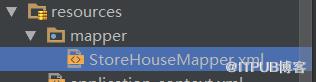
说要把生成出来的mapper.xml放在resouces目录下才能识别出来
<!--配置扫描式加载SQL映射文件,那么在mybatis配置文件中就不用加载了-->
<!-- 所生成的sqlMap的影射文件的位置,默认资源包src -->
测试代码:
    @RequestMapping("/getById.do")
    @ResponseBody
    public Object getById(String id ) {
        StoreHouse storeHouse = storeHoseService.selectByPrimaryKey(id);
        System.out.println(storeHouse);

        return storeHouse;

    }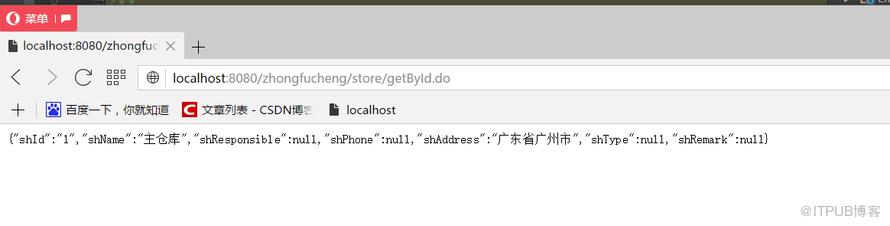
到目前为止、SSM已整合完成。
创建web常用的目录结构。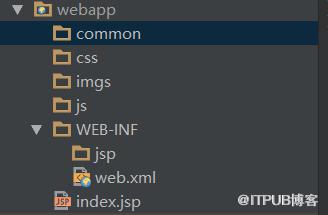
- Intellij idea
- Spring 3.2.2
- Mybatis3.4.5
- mysql 5.1.34
- Tomcat 7.0
- jdk1.7
想用新版本的jar包遇到了很多的麻烦
- 使用spring5.0与asm发生冲突,无法启动Tomcat,降为3.2.2
- 使用Mysql 6.0在逆向工程的时候出现时区、无法创建表的问题,经过一轮解决,最后生成的SqlMapper只有insert语句。随后降为5.1.34
- 使用JDK1.8有提示过时的错误,后来在pom加入一段配置解决。
-
在初始化Spring容器的时候,无法创建对象。Spring3.2.2与JDK1.8发生冲突。随后降为JDK1.7
- 在Intellij idea降JDK版本需要指定4个部分,详情可参见上面的连接。
来自 “ ITPUB博客 ” ,链接:https://blog.itpub.net/3932/viewspace-2800093/ ,如需转载,请注明出处,否则将追究法律责任。
上一篇:
跨浏览器的事件处理程序(1)
下一篇:
java 多态心得

请登录后发表评论
登录
全部评论
