首先需要一个Python3环境,怎么准备我就不多说了,实在不会的出门右转看一下廖雪峰老师的博客.
HTML部分
代码来自:高德API+Python解决租房问题,简单改了下加载数据部分
代码路径:/static/index.html
毕业生租房 公交+地铁 地铁
Python flask部分
Python3环境,使用安装Flask,pymysql,BeautifulSoup
pip install Flask;pip install pymysql;pip install beautifulsoup4;pip install requests;
然后直接上代码咯.
路径:/app.py
from flask import Flask, requestfrom flask import jsonifyfrom flask import render_templatefrom flask import Responseimport requestsfrom bs4 import BeautifulSoupimport pymysql
app = Flask(__name__)@app.route("/get_houses_db/")def get_houses_db():
    # 从数据库读出来的数据,url为房源url,address为房源定位地址
    houses = []    # Connect to the database
    connection = pymysql.connect(host='127.0.0.1',
                                 user='root',
                                 password='123',
                                 db='你的数据库名字',
                                 charset='utf8mb4',
                                 cursorclass=pymysql.cursors.DictCursor)    try:        with connection.cursor() as cursor:            # Read a single record
            sql = "SELECT 你的URL字段,你的地址字段 FROM 你的房源数据表 where 1=1;"
            keyword = request.args.get('keyword')            if keyword is not None:
                sql = sql + "查询字段 like %%s%" % keyword
            cursor.execute(sql)
            houses = cursor.fetchall()    finally:
        connection.close()    return jsonify(houses)@app.route("/get_houses", methods=['POST', 'GET'])def get_houses():
    # 直接从网页获取数据,url为房源url,address为房源定位地址
    houses = []
    city = request.args.get('city')    if city is None:
        city = 'bj'
    city_url = 'http://%s.58.com' % city    for page_num in range(1, 10):
        url = "%s/pinpaigongyu/pn/%d/" % (city_url, page_num)
        headers = {            'connection': "keep-alive",            'upgrade-insecure-requests': "1",            'user-agent': "Mozilla/5.0 (Macintosh; Intel Mac OS X 10_13_4) AppleWebKit/537.36 (KHTML, like Gecko) Chrome/66.0.3359.181 Safari/537.36",            'accept': "text/html,application/xhtml+xml,application/xml;q=0.9,image/webp,image/apng,*/*;q=0.8",            'accept-encoding': "gzip, deflate",            'accept-language': "zh-CN,zh;q=0.9,en;q=0.8,da;q=0.7",            'cookie': "f=n; f=n; id58=c5/njVsEqPqC7y9vB/RHAg==; 58tj_uuid=ac94c044-cbb8-451c-b6be-974f90197010; new_uv=1; utm_source=; spm=; init_refer=https%253A%252F%252Fcn.bing.com%252F; als=0; f=n; new_session=0; qz_gdt=; Hm_lvt_dcee4f66df28844222ef0479976aabf1=1527032264,1527032267,1527032270,1527032380; Hm_lpvt_dcee4f66df28844222ef0479976aabf1=1527032421; ppStore_fingerprint=3283C76981CCD1090B42ACBBF624A4C9613FE967CDC69C58%EF%BC%BF1527032420843",            'cache-control': "no-cache",
        }
        response = requests.request("GET", url, headers=headers)
        htmlSoup = BeautifulSoup(response.text, "html.parser")
        ul = htmlSoup.find(attrs={"class": "list"})        if ul is None:            continue
        li_list = ul.find_all("li")        if li_list is None:            continue
        for li in li_list:
            house = {}
            house['url'] = '%s/%s' % (city_url, li.find("a")['href'])
            house['address'] = li.find("h2").text
            houses.append(house)    return jsonify(houses)@app.route('/')def index():
    return app.send_static_file('index.html')if __name__ == '__main__':
    app.run(port=8888)# python3 安装flask之后,安装命令pip install Flask# 运行 python app.py
效果图:
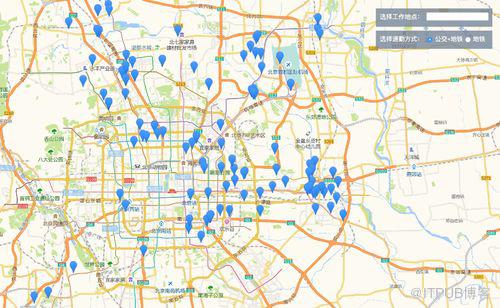
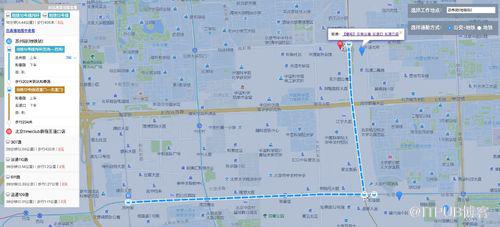
然后...
写完了...
下次见...
来自 “ ITPUB博客 ” ,链接:https://blog.itpub.net/3789/viewspace-2801452/ ,如需转载,请注明出处,否则将追究法律责任。

请登录后发表评论
登录
全部评论
