函数
- 直接使用函数名调用,可以将其想象成Shell中的一条命令
- 函数内部可以直接使用参数
$1、$2...$n - 调用函数:function name $1$2
#!/bin/bash
this_pid=$$
status=`ps -ef | grep nginx | grep-v grep | grep -v $this_pid &> /dev/null`
if  [$status == 0];then
	echo "Nginx is running well"
	sleep 60
else
	systemc start nginx
	echo "Nginx is down,Start it...."
fi
向函数传递参数:
函数传参和给脚本传参类似,都是使用$1$2$3$4$5$6$7这种方式
#!/bin/bash
function calcu
{
	case $2 in
			+)
				echo "expr $1+$3"
				;;
			-)
				echo "expr$1-$3"I
				;;
			*)
				echo "expr $1*$3"
				;;
			/)
				echo "expr $1/$3"
				;;
	esac
}
calcu $1 $2 $3
返回值的形式
- return
- 使用return返回值,只能返回1-255的整数
- 函数使用return返回值,通常只是用来供其他地方调用获取状态,因此通常仅返回0或1;0表示成功,1表示失败
- echo
- 使用echo可以返回任何字符串结果
- 通常用于返回数据,比如一个字符串值或者列表值
#!/bin/bash
this_pid=$$
function is_nginx_running
{
	ps-ef | grep nginx | grep -v grep | grep-v Sthis_pid s>/dev/null
	if[ $? -eq 0];then
		return
	else
		return 1
	fi
}
if_nginx_ running && echo "Nginx is running " || echo "Nginx is stoped"
#!/bin/bash

function get users
{
	users=`cat /etc/passwd | cut -d: -f1`
	echo $users
}
user_list=`get_users`
index=1
for u in $user_list
do
	echo "The $index user is:$u"
	index=$(($index+1))
done
局部变量和全局变量
- 不做特殊声明,Shell中变量都是全局变量
- Tips:大型脚本程序中函数中慎用全局变量
- 定义变量时,使用local关键字
- 函数内和外若存在同名变量,则函数内部变量覆盖外部变量
函数库
- 经常使用的重复代码封装成函数文件
- 一般不直接执行,而是由其他脚本调用
function sys load
{
	echo "Memory Info"
	echo
	free-m
	echo
	echo "Disk Usage"I
	echo
	df-h
	echo
}
- 库文件名的后缀是任意的,但一般使用.lib
- 库文件通常没有可执行选项
- 库文件无需和脚本在同级目录,只需在脚本中引用时指定
- 第一行一般使用#!/bin/echo,输出警告信息,避免用户执行
find
- -name 根据文件名查找
- -perm 根据文件权限查找
- -prune 该选项可以排除某些查找目录
- -user 根据文件属主查找
- -group 根据文件属组查找
- -mtime -n|+n 根据文件更改时间查找
- -nogroup 查找无有效属组的文件
- -nouser 查找无有效属主的文件
- -newer file1!file2 查找更改时间比file1新但比file2旧IDE文件
- -type 按文件类型查找
- -size-n+n 按文件大小查找
- -mindepth n 从n级子目录开始搜索
- -maxdepth n 最多搜索到n级子目录
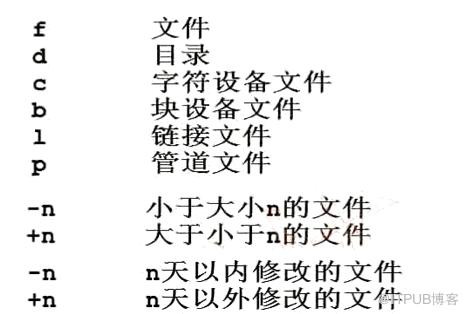
#prune通常和-path一起使用,用于将特定目录排除在搜索条件之外
#例子1:查找当前目录下所有普通文件,但排除test目录
find . -path ./etc -prune -o -type f
#例子2:查找当前目录下所有普通文件,但排除etc和opt目录
find .-path./etc -prune -o -path./opt -prune-o-type f
#例子3:查找当前目录下所有普通文件,但排除etc和opt目录,但属主为hdfs
find . -path ./etc -prune -o -path ./opt -prune -o -type f -a -user hdfs
#例子4:查找当前目录下所有普通文件,但排除etc和opt目录,但属主为hdfs,且文件大小必须大于500字
find . -path ./etc -prune -o -path ./opt -prune -o-type f -a -user hdfs -a -size +500c
- -print打印输出
- -exec对搜索到的文件执行特定的操作,格式为-execcommand’{};
- 例子1:搜索/etc下的文件(非目录),文件名以conf结尾,且大于10k,然后将其删除
-
find ./etc/ -type f-name '*.conf' -size +10k -exec rm -f {};
-
- 例子2:将/var/1og/目录下以1og结尾的文件,且更改时间在7天以上的删除
-
find /var/log/ -name '*.log' -mtime +7-exec rm -rf {};
-
- 例子3:搜索条件和例子1一样,只是不删除,而是将其复制到/root/conf目录下
-
find ./etc/ -size +10k -type f -name '*.conf' -exec cp {} /root/conf/;
-
- 例子1:搜索/etc下的文件(非目录),文件名以conf结尾,且大于10k,然后将其删除
- -ok和exec功能一样,只是每次操作都会给用户提示
- -a 与
- -o 或
- -notl!非
例子1:查找当前目录下,属主不是hdfs的所有文件
find . -not -user hdfs | find . ! -user hdfs
例子2:查找当前目录下,属主属于hdfs,且大小大于300字节的文件
find . -type f -a -user hdfs -a -size +300c
例子3:查找当前目录下的属主为hdfs或者以xm1结尾的普通文件
find . -type f -a (-user hdfs -o -name '*.xml')
locate
- 文件查找命令,所属软件包mlocate
- 不同于find命令是在整块磁盘中搜索,locate命令在数据库文件中查找
- find是默认全部匹配,locate则是默认部分匹配
updatedb
- 用户更新/var/lib/mlocate/mlocate.db
- 听使用配置文件/etc/updatedb.conf
- 该命令在后台cron计划任务中定期执行
whereis
- -b 只返回二进制文件
- -m 只返回帮助文档文件
- -s 只返回源代码文件
which
作用:仅查找二进制程序文件
-b 只返回二进制文件
- find 查找某一类文件,比如文件名部分一致 功能强大,速度慢
- locate只能查找单个文件功能单一,速度快
- whereis 查找程序的可执行文件、帮助文档等不常用
- which 只查找程序的可执行文件常用于查找程序的绝对路径
sed
- sed(Stream Editor),流编辑器。对标准输出或文件逐行进行处理
- 第一种形式:stdout | sed [option] “pattern command”
- 第二种形式:sed [option] “pattern command” file
- -n 只打印模式匹配行
- -e 直接在命令行进行sed编辑,默认选项
- -f 编辑动作保存在文件中,指定文件执行
- -r 支持扩展正则表达式
- -i 直接修改文件内容
sed pattern
- 10command 匹配到第10行
- 10,20command 匹配从第10行开始,到第20行结束
- 10,+5command 匹配从第10行开始,到第16行结束
- /pattern1/command 匹配到pattern1的行
- /pattern1/,/pattern2/command 匹配到pattern1的行开始,到匹配到pattern2的行结束
- 10,/pattern1/command 匹配从第10行开始,到匹配到pettern1的行结束
- /pattern1/,10command 匹配到pattern1的行开始,到第10行匹配结束
sed -n "17p" fi1e #打印file文件的第17行
sed -n "10,20p" file #打印file文件的10到20行
sed -n "10,+5p" file #打印file文件中从第10行开始,往后面加5行的所有行
sed -n "/^root/p" file #打印fi1e文件中以root开头的行
sed -n "/^ftp/,/^mail/p" file #打印fi1e文件中第一个匹配到以ftp开头的行,到第二个以mail开头的行
sed -n "4,/^hdfs/p" file #打印fi1e文件中从第4行开始匹配,直到以hdfs开头
sed -n "/root/,10p" file #打印fi1e文件中匹配root的行,直到第10行结束
编辑
- 查询
- p 打印
- 增加
- a 行后追加
- i 行前追加
- r 外部文件读入,行后追加
- w 匹配行写入外部文件
- 删除
- d 删除
- 修改
- s/old/new 将行内第一个old替换为new
- s/old/new/g 将行内全部的old替换为new
- 修议s/old/new/2g 将行内前2个old替换为new(同一行内,只替换前2个匹配的,剩下的不替换)
- s/old/new/ig 将行内old全部替换为new,忽略大小写
- 其他
- = 显示行号
什么是反向引用?
- &和1 引用模式匹配到的整个串
- sed “s/1…e/&r/g” file 在file中搜寻以1开头,然后跟两个任意字符,以e结尾的字符串
- sed “s/(1…e)/1r/g” file 和上面实现一样的功能,使用1代表搜寻到的字
- 上面两种方式实现了一样的功能,分别使用&和1引用前面匹配到的整个字符串
- 两者区别在于**&只能表示匹配到的完整字符串**,只能引用整个字符串;而1可以使用()对匹配到的字符串部分匹配
例如:如果我们仅想要替换匹配到的字符串的一部分,name必须使用**1**这种方式,不能
查找test.txt文件中以1开头,紧接着跟两个任意字符,再接一个e的字符串。将找到的字符串中开头的文字替换成L
sed "s/1(..e)/L1/g" test.txt
- 匹配模式中存在变量,则建议使用双引号
- sed中需要引入自定义变量时,如果外面使用单引号,则自定义变量也必须使用单引号
修道场
#1、打印/etc/passwd中第20行的内容
sed -n '20p' /etc/passwd
#2、打印/etc/passwd中从第8行开始,到第15行结束的内容
sed -n '8,15p' /etc/passwd
#3、打印/etc/passwd中从第8行开始,然后+5行结束的内容
sed -n '8,+5p' /etc/passwd
#4、打印/etc/passwd中开头匹配hdfs字符串的内容
sed -n '/^hdfs/p' /etc/passwd
#5、打印/etc/passwd中开头为root的行开始,到开头为hdfs的行结束的内容
sed -n '/^root/,/^hdfs/p' /etc/passwd
#6、打印/etc/passwd中第8行开始,到含有/sbin/nologin的内容的行结束内容
sed -n '8,//sbin/nologin/p' /etc/passwd
#7、打印/etc/passwd中第一个包含/bin/bash内容的行开始,到第5行结束的内容
sed -n '//bin/bash/,5p' /etc/passwd
#!/bin/bash
FILE NAME=/root/lesson/5.6/my.cnf
function get_all_segments
{
	echo "`sed -n '/[.*]/p' my.cnf | sed -e 's/[//g'-e's/]//g'`"
}
for seg in get all segments
echo " 配置项:$seg"
done

function count_items_in_segment
{
	items=`sed -n '/['$1']/,/[.*]/p' $FILE_NAME | grep -v "^#" | grep -v "^$" | grep -v "[.*]"`
	index = 0
	for item in $items
	do
		index=`expr $index+1`
	done
	echo $index
}
number=0

for segment in `get_all_segements`
do
	number = `expr $number+1`
	items_count=`count_items_in_segment $segment`
	echo "$number: $segment $items_count"
done
#1、删除/etc/passwd中的第15行
sed -i '15d' /etc/passwd
#2、删除/etc/passwd中的第8行到第14行的所有内容
sed- i  '8,14d' passwd
#3、删除/etc/passwd中的不能登录的用户(筛选条件:/sbin/nologin)
sed -i '//sbin/nologin/d' passwd
#4、删除/etc/passwd中以mai1开头的行,到以yarn开头的行的所有内容
sed -i '/^mail/,/^yarn/d' passwd
#5、删除/etc/passwd中第一个不能登录的用户,到第13行的所有内容
sed -i '//sbin/nologin/,13d' passwd
#6、删除/etc/passwd中第5行到以ftp开头的所有行的内容
sed -i '5,/^ftp/d' passwd
#7、删除/etc/passwd中以yarn开头的行到最后行的所有内容
sed -i '/^yarn/,$' passwd
#8、删除配置文件中的所有注释行和空行
sed -i '/[:blank:]*#/d;/^$/d' nginx.conf
#9、在配置文件中所有不以#开头的行前面添加*符号,注意:以#开头的行不添加
sed -i 's/^[#]/*&/g' nginx.conf
来自 “ ITPUB博客 ” ,链接:https://blog.itpub.net/3643/viewspace-2823047/ ,如需转载,请注明出处,否则将追究法律责任。
上一篇:
冰山理论

请登录后发表评论
登录
全部评论
