Thymeleaf
Thymeleaf是跟Velocity、FreeMarker类似的模板引擎,它可以完全替代JSP,相较与其他的模板引擎,它主要有以下几个特点:
1. Thymeleaf在有网络和无网络的环境下皆可运行,即它可以让美工在浏览器查看页面的静态效果,也可以让程序员在服务器查看带数据的动态页面效果。这是由于它支持 html 原型,然后在 html 标签里增加额外的属性来达到模板+数据的展示方式。浏览器解释 html 时会忽略未定义的标签属性,所以thymeleaf的模板可以静态地运行;当有数据返回到页面时,Thymeleaf 标签会动态地替换掉静态内容,使页面动态显示。
2. Thymeleaf开箱即用的特性。它提供标准和spring标准两种方言,可以直接套用模板实现JSTL、OGNL表达式效果,避免每天套模板、改jstl、改标签的困扰。同时开发人员也可以扩展和创建自定义的方言。
3. Thymeleaf提供spring标准方言和一个与SpringMVC完美集成的可选模块,可以快速的实现表单绑定、属性编辑器、国际化等功能。
Thymeleaf官网:http://www.thymeleaf.org
Thymeleaf整合SpringBoot
1. 在pom.xml文件引入thymeleaf
     org.springframework.boot
     spring-boot-starter-thymeleaf
2. 在application.properties(application.yml)文件中配置thymeleaf

# thymeleaf
spring.thymeleaf.prefix=classpath:/templates/
spring.thymeleaf.check-template-location=true
spring.thymeleaf.suffix=.html
spring.thymeleaf.encoding=UTF-8
spring.thymeleaf.content-type=text/html
spring.thymeleaf.mode=HTML5
spring.thymeleaf.cache=false

3. 新建编辑控制层代码HelloController,在request添加了name属性,返回到前端hello.html再使用thymeleaf取值显示。

@Controller
public class HelloController {

    @RequestMapping("/hello")
    public String hello(HttpServletRequest request, @RequestParam(value = "name", defaultValue = "springboot-thymeleaf") String name) {
        request.setAttribute("name", name);
        return "hello";
    }
}

4. 新建编辑模板文件,在resources文件夹下的templates目录,用于存放HTML等模板文件,在这新增hello.html,添加如下代码。

html>springboot-thymeleaf demo

切记:使用Thymeleaf模板引擎时,必须在html文件上方添加该行代码使用支持Thymeleaf。
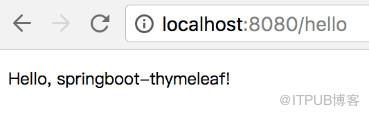
5. 启动项目,访问http://localhost:8080/hello,看到如下显示证明SpringBoot整合Thymeleaf成功。
原文出处:https://www.cnblogs.com/weknow619/p/8323497.html
来自 “ ITPUB博客 ” ,链接:https://blog.itpub.net/3643/viewspace-2813827/ ,如需转载,请注明出处,否则将追究法律责任。

