前言
本文是对SpringBoot使用JdbcTemplate操作数据库的一个介绍,,提供一个小的Demo供大家参考。
操作数据库的方式有很多,本文介绍使用SpringBoot结合JdbcTemplate。
新建项目
新建一个项目。pom文件中加入Jdbc依赖,完整pom如下:
4.0.0 com.dalaoyang springboot_jdbc 0.0.1-SNAPSHOT jar springboot_jdbc springboot_jdbc org.springframework.boot spring-boot-starter-parent 1.5.9.RELEASE UTF-8 UTF-8 1.8 org.springframework.boot spring-boot-starter-jdbc org.springframework.boot spring-boot-devtools runtime mysql mysql-connector-java runtime org.springframework.boot spring-boot-starter-test test org.springframework.boot spring-boot-starter-web org.springframework.boot spring-boot-maven-plugin 配置文件如下:
##端口号
server.port=8888

##数据库配置
##数据库地址
spring.datasource.url=jdbc:mysql://localhost:3306/test?characterEncoding=utf8&useSSL=false
##数据库用户名
spring.datasource.username=root
##数据库密码
spring.datasource.password=123456
##数据库驱动
spring.datasource.driver-class-name=com.mysql.jdbc.Driver
新建一个实体类User,其中需要注意的是,User类实现了RowMapper类,重写了mapRow方法,完整代码如下:
package com.dalaoyang.entity;


import org.springframework.jdbc.core.RowMapper;
import java.sql.ResultSet;
import java.sql.SQLException;

/**
 * @author dalaoyang
 * @project springboot_learn
 * @package com.dalaoyang.entity
 * @email yangyang@dalaoyang.cn
 * @date 2018/7/25
 */
public class User implements RowMapper {
    private int id;
    private String user_name;
    private String pass_word;

    public User(int id, String user_name, String pass_word) {
        this.id = id;
        this.user_name = user_name;
        this.pass_word = pass_word;
    }

    public User() {
    }

    public User(String user_name, String pass_word) {
        this.user_name = user_name;
        this.pass_word = pass_word;
    }

    public int getId() {
        return id;
    }

    public void setId(int id) {
        this.id = id;
    }

    public String getUser_name() {
        return user_name;
    }

    public void setUser_name(String user_name) {
        this.user_name = user_name;
    }

    public String getPass_word() {
        return pass_word;
    }

    public void setPass_word(String pass_word) {
        this.pass_word = pass_word;
    }

    @Override
    public User mapRow(ResultSet resultSet, int i) throws SQLException {
        User user = new User();
        user.setId(resultSet.getInt("id"));
        user.setUser_name(resultSet.getString("user_name"));
        user.setPass_word(resultSet.getString("pass_word"));
        return user;
    }
}
常用CURD操作大致使用以下三个方法:
1.execute方法,用于直接执行SQL语句
2.update方法,用户新增修改删除操作
3.query方法,用于查询方法
本文和往常一样,用Controller进行测试,注入JdbcTemplate。完整代码如下,下面会对测试方法进行介绍:
package com.dalaoyang.controller;
import com.dalaoyang.entity.User;
import org.springframework.beans.factory.annotation.Autowired;
import org.springframework.jdbc.core.JdbcTemplate;
import org.springframework.web.bind.annotation.GetMapping;
import org.springframework.web.bind.annotation.RestController;
import java.util.ArrayList;
import java.util.List;
import java.util.Map;
/**
* @author dalaoyang
* @project springboot_learn
* @package com.dalaoyang.controller
* @email yangyang@dalaoyang.cn
* @date 2018/7/25
*/
@RestController
public class UserController {
@Autowired
private JdbcTemplate jdbcTemplate;
//http://localhost:8888/createTable
@GetMapping("createTable")
public String createTable(){
String sql = "CREATE TABLE `user` (n" +
" `id` int(11) NOT NULL AUTO_INCREMENT,n" +
" `user_name` varchar(255) DEFAULT NULL,n" +
" `pass_word` varchar(255) DEFAULT NULL,n" +
" PRIMARY KEY (`id`)n" +
") ENGINE=InnoDB AUTO_INCREMENT=7 DEFAULT CHARSET=utf8;n" +
"n";
jdbcTemplate.execute(sql);
return "创建User表成功";
}
//http://localhost:8888/saveUserSql
@GetMapping("saveUserSql")
public String saveUserSql(){
String sql = "INSERT INTO USER (USER_NAME,PASS_WORD) VALUES ('dalaoyang','123')";
int rows= jdbcTemplate.update(sql);
return "执行成功,影响"+rows+"行";
}
//http://localhost:8888/saveUser?userName=lisi&passWord=111
@GetMapping("saveUser")
public String saveUser(String userName,String passWord){
int rows= jdbcTemplate.update("INSERT INTO USER (USER_NAME,PASS_WORD) VALUES (?,?)",userName,passWord);
return "执行成功,影响"+rows+"行";
}
//http://localhost:8888/updateUserPassword?id=1&passWord=111
@GetMapping("updateUserPassword")
public String updateUserPassword(int id,String passWord){
int rows= jdbcTemplate.update("UPDATE USER SET PASS_WORD = ? WHERE ID = ?",passWord,id);
return "执行成功,影响"+rows+"行";
}
//http://localhost:8888/deleteUserById?id=1
@GetMapping("deleteUserById")
public String deleteUserById(int id){
int rows= jdbcTemplate.update("DELETE FROM USER WHERE ID = ?",id);
return "执行成功,影响"+rows+"行";
}
//http://localhost:8888/batchSaveUserSql
@GetMapping("batchSaveUserSql")
public String batchSaveUserSql(){
String sql =
"INSERT INTO USER (USER_NAME,PASS_WORD) VALUES (?,?)" ;
List测试方法介绍
1.createTable方法
使用execute方法创建User表
2.saveUserSql方法
使用update方法,传入参数sql语句,直接执行插入操作
3.saveUser方法
使用update方法,传入sql语句和对应字段值,进行插入操作
4.updateUserPassword方法
使用update方法,传入sql语句和对应字段值,进行修改操作
5.deleteUserById方法
使用update方法,传入sql语句和对应字段值,进行删除操作
6.batchSaveUserSql方法
使用batchUpdate方法,传入sql和参数集合,进行批量更新
7.getUserByUserName方法
使用query方法,传入sql,实体对象,查询参数,这里就用到了实体类重写的mapRow方法
8.getMapById方法
使用queryForMap方法,传入sql和参数,返回Map
9.getUserById方法
使用queryForObject方法,传入sql,实体对象,查询参数,返回User实体类,这里也用到了实体类重写的mapRow方法
具体使用方法还有很多,请参考文档:
https://docs.spring.io/spring/docs/current/javadoc-api/org/springframework/jdbc/core/JdbcTemplate.html
注意
出现下图错误不要担心,如图
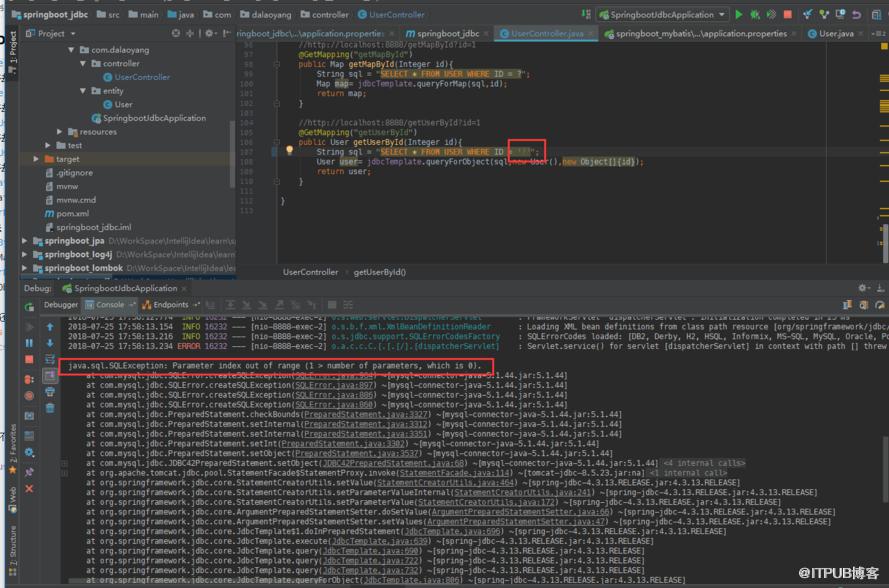
出现这个错误是因为sql在参数问号的时候多写了引号造成的,这也是我在写demo的时候犯下的错误。
源码下载 :大老杨码云
来自 “ ITPUB博客 ” ,链接:https://blog.itpub.net/336/viewspace-2805320/ ,如需转载,请注明出处,否则将追究法律责任。

