FTP上传功能因不是平台自带功能,所以需要进行额外的java开发。当把jar包打包后,需要放入到O2目录:o2server\custom\jars。
重启服务器后生效!
一、自定义包DocumentManager.java
package com.z.custom;
import java.io.FileNotFoundException;
import java.io.IOException;
import java.io.InputStream;
import java.io.OutputStream;
import javax.servlet.http.HttpServletRequest;
import org.apache.commons.io.IOUtils;
import org.apache.commons.lang3.StringUtils;
import org.apache.commons.vfs2.FileObject;
import org.apache.commons.vfs2.FileSystemException;
import org.apache.commons.vfs2.FileSystemManager;
import org.apache.commons.vfs2.VFS;
public class DocumentManager {
    private static HttpServletRequest request;
    private static FileSystemManager fsManager = null;
    static {
        try {
            fsManager = VFS.getManager();
        } catch (FileSystemException e) {
            System.out.println(e.getMessage());
        }
    }

    public static byte[] readFileToByte(String filePath, String encoding) throws IOException {
        if (StringUtils.isEmpty(filePath)) {
            throw new IOException("File '" + filePath + "' is empty.");
        }
        FileObject fileObj = null;
        InputStream in = null;
        try {
            fileObj = fsManager.resolveFile(filePath);
            if (fileObj.exists()) {
                if (org.apache.commons.vfs2.FileType.FOLDER.equals(fileObj.getType())) {
                    throw new IOException("File '" + filePath + "' exists but is a directory");
                } else {
                    in = fileObj.getContent().getInputStream();
                    return IOUtils.toByteArray(in);
                }
            } else {
                throw new FileNotFoundException("File '" + filePath + "' does not exist");
            }
        } catch (FileSystemException e) {
            throw new IOException("File '" + filePath + "' resolveFile fail.");
        } finally {
            in.close();
            IOUtils.closeQuietly(in);
            if (fileObj != null) {
                fileObj.close();
            }
        }
    }


    public static void writeByteToFile(String filePath, byte[] fileByte, String encoding) throws IOException {
        if (StringUtils.isEmpty(filePath)) {
            throw new IOException("File '" + filePath + "' is empty.");
        }
        FileObject fileObj = null;
        OutputStream out = null;
        filePath = new String(filePath.getBytes("UTF-8"),"ISO-8859-1");
        try {
            fileObj = fsManager.resolveFile(filePath);
            if (!fileObj.exists()) {
                fileObj.createFile();
            } else {
                if (org.apache.commons.vfs2.FileType.FOLDER.equals(fileObj.getType())) {
                    throw new IOException("Write fail. File '" + filePath + "' exists but is a directory");
                }
            }
            out = fileObj.getContent().getOutputStream();
            IOUtils.write(fileByte, out);
        } catch (FileSystemException e) {
            throw new IOException("File '" + filePath + "' resolveFile fail.");
        } finally {
            out.flush();
            out.close();
            IOUtils.closeQuietly(out);
            if (fileObj != null) {
                fileObj.close();
            }
        }
    }
}
二、服务管理平台创建接口编写上传ftp接口代码
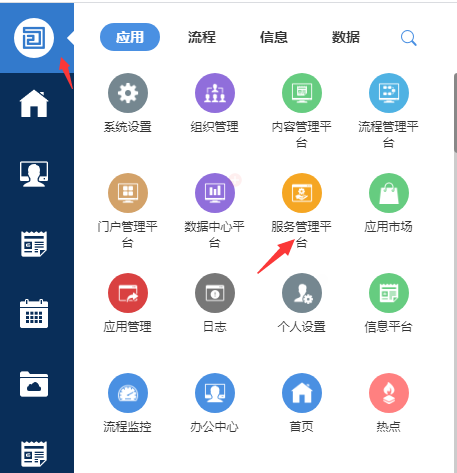
1、打开服务管理平台
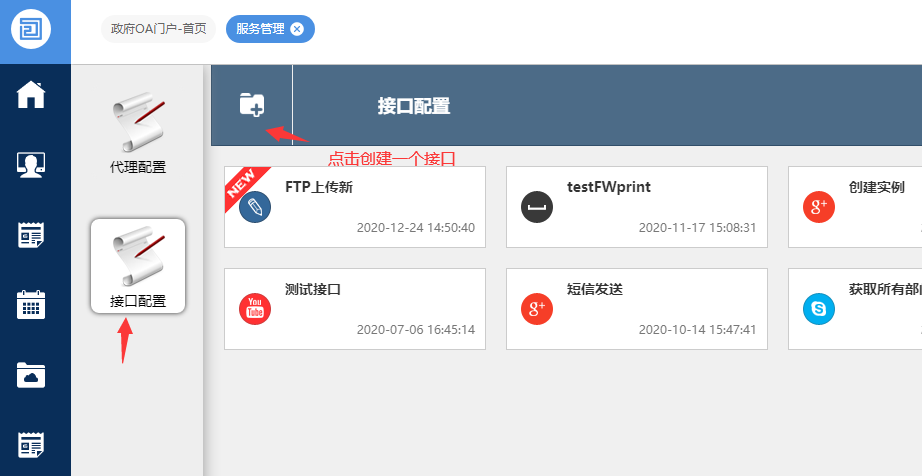
2、创建接口写上相关代码
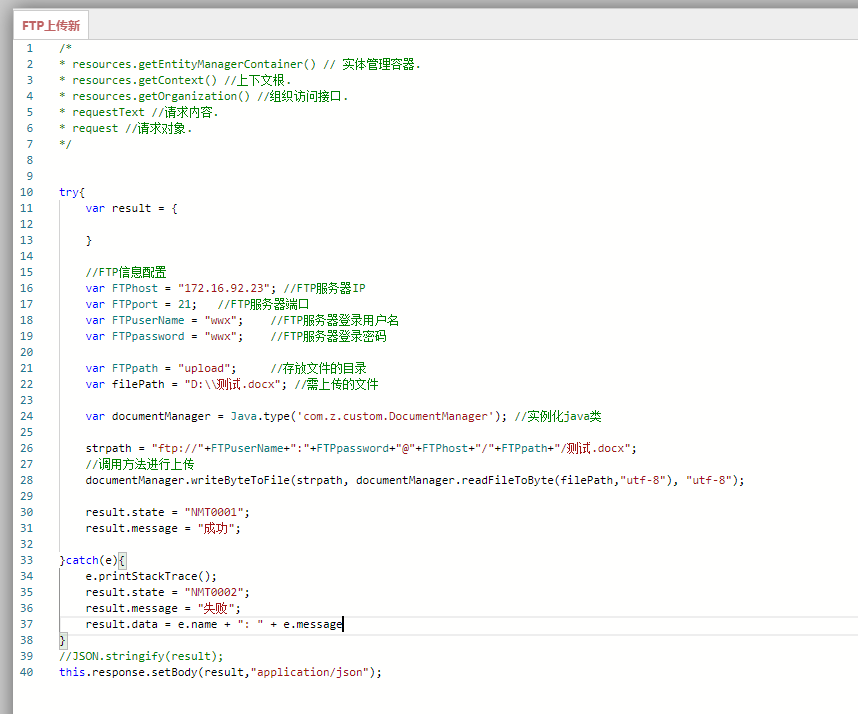
/*
* resources.getEntityManagerContainer() // 实体管理容器.
* resources.getContext() //上下文根.
* resources.getOrganization() //组织访问接口.
* requestText //请求内容.
* request //请求对象.
*/
try{
    var result = {

    }
    //FTP信息配置
    var FTPhost = "172.16.92.23"; //FTP服务器IP
    var FTPport = 21;   //FTP服务器端口
    var FTPuserName = "wwx";    //FTP服务器登录用户名
    var FTPpassword = "wwx";    //FTP服务器登录密码
    var FTPpath = "upload";     //存放文件的目录
    var filePath = "D:\\测试.docx"; //需上传的文件
    var documentManager = Java.type('com.z.custom.DocumentManager'); //实例化java类

    strpath = "ftp://"+FTPuserName+":"+FTPpassword+"@"+FTPhost+"/"+FTPpath+"/测试.docx";
    //调用方法进行上传
    documentManager.writeByteToFile(strpath, documentManager.readFileToByte(filePath,"utf-8"), "utf-8");
    result.state = "NMT0001";
    result.message = "成功";

}catch(e){
    e.printStackTrace();
    result.state = "NMT0002";
    result.message = "失败";
    result.data = e.name + ": " + e.message
}
//JSON.stringify(result);
this.response.setBody(result,"application/json");
来自 “ ITPUB博客 ” ,链接:https://blog.itpub.net/31563356/viewspace-2746535/ ,如需转载,请注明出处,否则将追究法律责任。

请登录后发表评论
登录
全部评论
最新文章
- 当AI真正进入业务:O2OA(翱途)开发平台正在重新定义企业协作
- 行业案例:O2OA 助力生物科技企业构建实验鼠数字化管理平台
- 能源行业一体化用工管理系统,O2OA(翱途)助推外包用工规范化数字化
- 制造业数字化协同落地实践:一体化办公平台破解工厂多环节协同痛点
- 高校数字化协同办公实践:O2OA(翱途) 一站式平台打造智慧校园办公体系
- 村镇金融数字化升级:O2OA(翱途) 赋能信贷全流程,革新协同办公体系
- 政务数字化办公解决方案 O2OA(翱途)构建机关一体化协同平台
- O2OA(翱途)V10 工作联系单:跨部门沟通标准化 工作流转可追溯闭环
- 翱途 (O2OA) V10采购管理:从请购到开票,如何打通企业采购全流程?
- O2OA(翱途) V10 升级说明(四)移动端 APP :让移动办公更统一、更协同、更易用
