程序环境:
- 测试文档:Office Excel 2013
- 编译环境:IntelliJ IDEA 2018
- JDK版本:1.8.0
- Excel库:Java系列free spire.xls.jar 3.9.1
import com.spire.xls.*;
import java.awt.*;
import java.awt.image.BufferedImage;
import static java.awt.image.BufferedImage.TYPE_INT_ARGB;
// java项目 www fhamdin org
public class SingleWatermark {
    public static void main(String[] args) {
        //加载Excel测试文档
        Workbook wb = new Workbook();
        wb.loadFromFile("test.xlsx");
        //设置文本和字体大小
        Font font = new Font("仿宋", Font.PLAIN, 40);
        for (int i =0;i<wb.getWorksheets().getCount();i++)
        {
            Worksheet sheet = wb.getWorksheets().get(i);
            //调用DrawText() 方法插入图片
            BufferedImage imgWtrmrk = drawText("内部专用", font, Color.pink, Color.white, sheet.getPageSetup().getPageHeight(), sheet.getPageSetup().getPageWidth());
            //将图片设置为页眉
            sheet.getPageSetup().setCenterHeaderImage(imgWtrmrk);
            sheet.getPageSetup().setCenterHeader("&G");
            //将显示模式设置为Layout
            sheet.setViewMode(ViewMode.Layout);
        }
        //保存文档
        wb.saveToFile("SingleWatermark.xlsx", ExcelVersion.Version2013);
    }
    private static BufferedImage drawText (String text, Font font, Color textColor, Color backColor,double height, double width)
    {
        //定义图片宽度和高度
        BufferedImage img = new BufferedImage((int) width, (int) height, TYPE_INT_ARGB);
        Graphics2D loGraphic = img.createGraphics();
        //获取文本size
        FontMetrics loFontMetrics = loGraphic.getFontMetrics(font);
        int liStrWidth = loFontMetrics.stringWidth(text);
        int liStrHeight = loFontMetrics.getHeight();
        //文本显示样式及位置
        loGraphic.setColor(backColor);
        loGraphic.fillRect(0, 0, (int) width, (int) height);
        loGraphic.translate(((int) width - liStrWidth) / 2, ((int) height - liStrHeight) / 2);
        loGraphic.rotate(Math.toRadians(-45));
        loGraphic.translate(-((int) width - liStrWidth) / 2, -((int) height - liStrHeight) / 2);
        loGraphic.setFont(font);
        loGraphic.setColor(textColor);
        loGraphic.drawString(text, ((int) width - liStrWidth) / 2, ((int) height - liStrHeight) / 2);
        loGraphic.dispose();
        return img;
    }
}

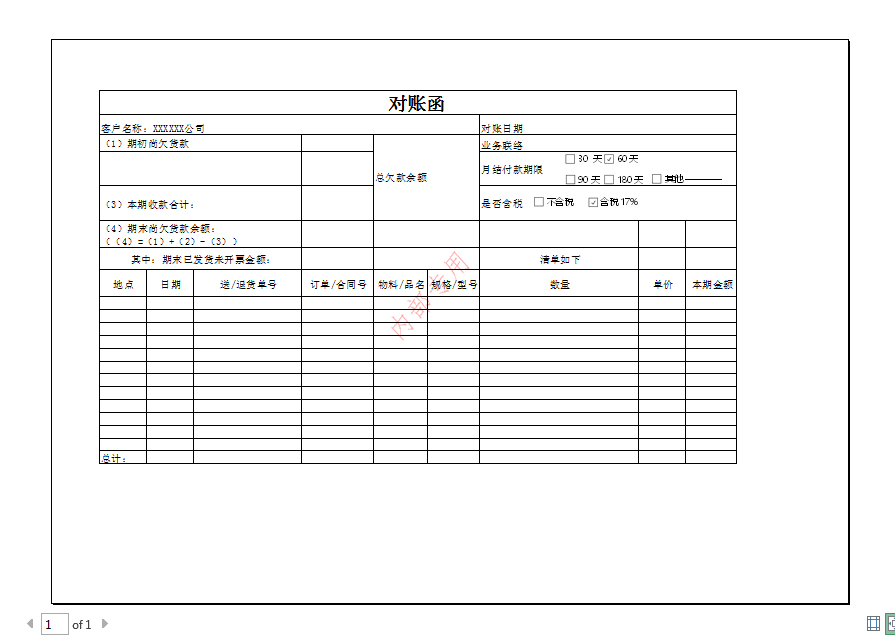
单一水印效果:
2. 平铺水印效果
import com.spire.xls.*;
import java.awt.*;
import java.awt.image.BufferedImage;
import static java.awt.image.BufferedImage.TYPE_INT_ARGB;
// java项目 www fhamdin org
public class TiledWatermark {
    public static void main(String[] args) {
        //加载Excel测试文档
        Workbook wb = new Workbook();
        wb.loadFromFile("test.xlsx");
        //设置文本和字体大小
        Font font = new Font("仿宋", Font.PLAIN, 25);
        for (int i =0;i<wb.getWorksheets().getCount();i++)
        {
            Worksheet sheet = wb.getWorksheets().get(i);
            //调用DrawText() 方法插入图片
            BufferedImage imgWtrmrk = drawText("内部专用     内部专用     内部专用     内部专用", font, Color.pink, Color.white, sheet.getPageSetup().getPageHeight(), sheet.getPageSetup().getPageWidth());
            //将图片设置为页眉
            sheet.getPageSetup().setCenterHeaderImage(imgWtrmrk);
            sheet.getPageSetup().setCenterHeader("&G");
            //将显示模式设置为Layout
            sheet.setViewMode(ViewMode.Layout);
        }
        //保存文档
        wb.saveToFile("TiledWatermark.xlsx", ExcelVersion.Version2013);
    }
    private static BufferedImage drawText (String text, Font font, Color textColor, Color backColor,double height, double width)
    {
        //定义图片宽度和高度
        BufferedImage img = new BufferedImage((int) width, (int) height, TYPE_INT_ARGB);
        Graphics2D loGraphic = img.createGraphics();
        //获取文本size
        FontMetrics loFontMetrics = loGraphic.getFontMetrics(font);
        int liStrWidth = loFontMetrics.stringWidth(text);
        int liStrHeight = loFontMetrics.getHeight();
        //文本显示样式及位置
        loGraphic.setColor(backColor);
        loGraphic.fillRect(0, 0, (int) width, (int) height);
        loGraphic.translate(((int) width - liStrWidth) / 2, ((int) height - liStrHeight) / 2);
        //loGraphic.rotate(Math.toRadians(-45));
        loGraphic.translate(-((int) width - liStrWidth) / 2, -((int) height - liStrHeight) / 2);
        loGraphic.setFont(font);
        loGraphic.setColor(textColor);
        loGraphic.drawString(text, ((int) width - liStrWidth) /6 , ((int) height - liStrHeight) /6);
        loGraphic.drawString(text,((int) width - liStrWidth) /3, ((int) height - liStrHeight) /3);
        loGraphic.drawString(text,((int) width - liStrWidth) /2, ((int) height - liStrHeight) /2);
        loGraphic.dispose();
        return img;
    }
}
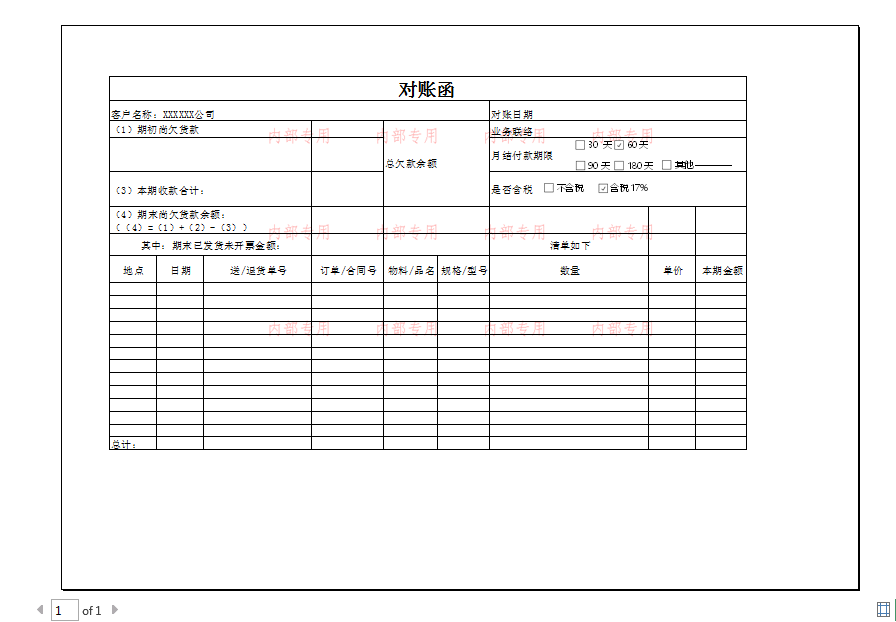
平铺水印效果:
★ 需要注意的是:在添加完水印效果后,查看文档时,在“普通视图”水印不可见,需在“页面布局”模式或“打印预览”模式下查看。
来自 “ ITPUB博客 ” ,链接:https://blog.itpub.net/31558068/viewspace-2769023/ ,如需转载,请注明出处,否则将追究法律责任。
上一篇:
java 从视频里面提取音频 批量

请登录后发表评论
登录
全部评论
最新文章
- java OA项目源码 flowable activiti流程引擎 Springboot html vue.js 前后分离
- 微服务监控中心springboot-admin 配置登录密码
- spring boot html+vue.js 形式前后分离代码示例
- 阿里注册中心 Nacos 启动报错 Unable to start web server
- springcloud 整合 druid 阿里的数据库连接池
- flowable 三种方式部署流程
- SpringBoot 2.7.0 处理跨域的问题
- springboot 整合国产达梦数据库配置代码
- java 生成 zip格式 压缩文件
- SpringBoot 前后端分离 实现验证码操作
