sysbench是一个非常经典的综合性能测试工具,它支持CPU,IO,内存,尤其是数据库的性能测试。那它是怎么做到通用性的呢,总结一句话是大量运用了重载的方法。
sysbench总体架构
sysbench是一个总体框架,它用来操作各个测性能的计算,那各个部门只需要做的一件事情是声明需要的实现。只要理解了这三个struct就可以了:
/* 某个测试用例的整体结构 */typedef struct sb_test
{  const char        *sname;  const char        *lname;  /* 下面有具体说明 */
  sb_operations_t   ops;  sb_builtin_cmds_t builtin_cmds;  sb_arg_t          *args;  sb_list_item_t    listitem;
} sb_test_t;/* 某个测试用例的具体操作实现结构 */typedef struct{
  sb_op_init            *init;            /* initialization function */
  sb_op_prepare         *prepare;         /* called after timers start,  but
                                             before thread execution */
  sb_op_thread_init     *thread_init;     /* thread initialization
                                             (called when each thread starts) */
  sb_op_print_mode      *print_mode;      /* print mode function */
  sb_op_next_event      *next_event;      /* event generation function */
  sb_op_execute_event   *execute_event;   /* event execution function */
  sb_op_report          *report_intermediate; /* intermediate reports handler */
  sb_op_report          *report_cumulative;   /* cumulative reports handler */
  sb_op_thread_run      *thread_run;      /* main thread loop */
  sb_op_thread_done     *thread_done;     /* thread finalize function */
  sb_op_cleanup         *cleanup;         /* called after exit from thread,
                                             but before timers stop */
  sb_op_done            *done;            /* finalize function */} sb_operations_t;/* 某个测试用例的三阶段实现结构 */typedef struct{  sb_builtin_cmd_func_t *help;  /* print help */
  sb_builtin_cmd_func_t *prepare; /* prepare for the test */
  sb_builtin_cmd_func_t *run;   /* run the test */
  sb_builtin_cmd_func_t *cleanup; /* cleanup the test database, files, etc. */} sb_builtin_cmds_t;
拿最简单的CPU性能计算举例,它需要实现的是:
static sb_test_t cpu_test =
{
  .sname = "cpu", /*case简称*/
  .lname = "CPU performance test",/*case全称*/
  .ops = {
    .init = cpu_init, /* 初始化case */
    .print_mode = cpu_print_mode, /* case启动前,做说明 */
    .next_event = cpu_next_event, /* 拿到下一个event的数据 */
    .execute_event = cpu_execute_event, /* 具体执行这个event */
    .report_cumulative = cpu_report_cumulative,  /* 阶段性报告输出 */
    .done = cpu_done /* case结束后,处理干净 */
  },
  .args = cpu_args /*子case需要的参数说明*/};
看到这个后,把一个case需要做的事情描述很清楚了,从需要什么参数,到初始化,逐个event执行,函数定义很清晰。sysbench的其他case也都这样需要一个完整的结构说明,如io操作,则需要多一个case的prepare和cleandown声明。
那sysbench的完整流程是怎样呢?黄色部分是测试用例需要实现的。
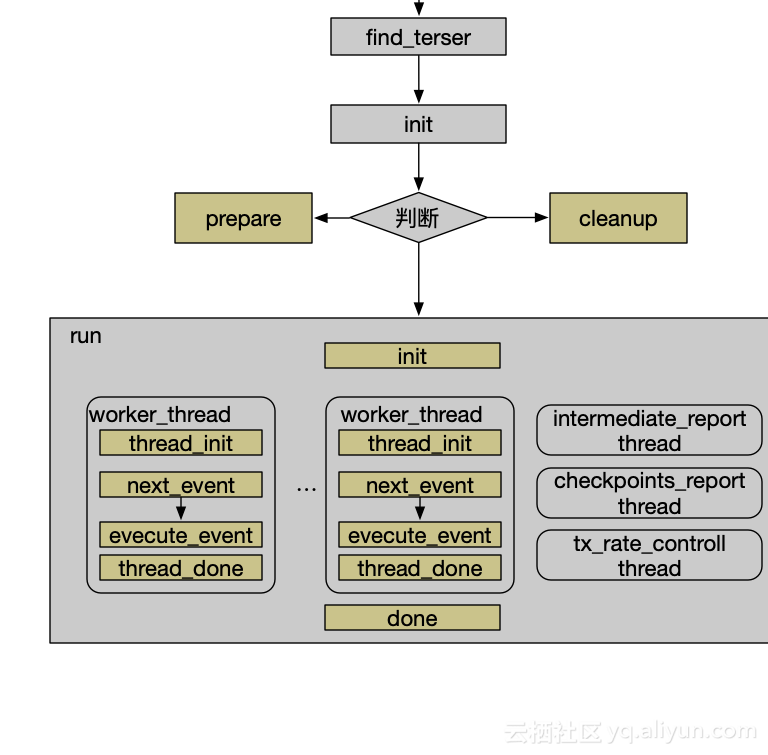
至此,可以清晰地看到sysbench的框架还是非常好理解。
上面struct里面有个event概念,不同的测试event的定义都不一样:比如CPU的测试case,一个event是完成求得小于某数(默认10000)的所有质数。比如fileio的测试case,一次read或者一次write操作就是一个event。
sysbench的线程介绍
- worker_thread具体实现是怎样呢:欣赏下sysbench.c里面某子线程是如何执行的,代码非常清晰易懂:
static int thread_run(sb_test_t *test, int thread_id){  sb_event_t        event;  int               rc = 0;  while (sb_more_events(thread_id) && rc == 0)
  {
    event = test->ops.next_event(thread_id);    if (event.type == SB_REQ_TYPE_NULL)      break;
    sb_event_start(thread_id);
    rc = test->ops.execute_event(&event, thread_id);
    sb_event_stop(thread_id);
  }  return rc;
}
-
intermediate_report线程:周期性输出性能数据,参数项为:
--report-interval=N,对CPU的测试用例举例:sysbench cpu --report-interval=1,截取部分输出结果如下:
Threads started![ 1s ] thds: 1 eps: 922.10 lat (ms,95%): 1.08[ 2s ] thds: 1 eps: 925.19 lat (ms,95%): 1.08[ 3s ] thds: 1 eps: 926.00 lat (ms,95%): 1.08[ 4s ] thds: 1 eps: 926.00 lat (ms,95%): 1.08[ 5s ] thds: 1 eps: 926.00 lat (ms,95%): 1.08[ 6s ] thds: 1 eps: 926.00 lat (ms,95%): 1.08[ 7s ] thds: 1 eps: 925.00 lat (ms,95%): 1.08[ 8s ] thds: 1 eps: 926.02 lat (ms,95%): 1.08[ 9s ] thds: 1 eps: 925.99 lat (ms,95%): 1.08[ 10s ] thds: 1 eps: 924.98 lat (ms,95%): 1.08
每一秒输出一个结果,eps是每一秒的event数,lat单位是毫秒,95分位延迟数据是1.08
-
checkpoints_report线程:如果嫌周期性输出不够多,那么可以在某几个时间点整体输出,参数项为:
--report-checkpoints=[LIST,...]
还是对CPU测试用例举例:sysbench cpu --report-checkpoints=3,8 run,截取部分输出结果如下:
Threads started!
[ 3s ] Checkpoint report:
CPU speed:
    events per second:   923.01General statistics:
    total time:                          3.0001s
    total number of events:              2771Latency (ms):
         min:                                  1.08
         avg:                                  1.08
         max:                                  1.22
         95th percentile:                      1.08
         sum:                               3000.88Threads fairness:
    events (avg/stddev):           2773.0000/0.00
    execution time (avg/stddev):   3.0009/0.00[ 8s ] Checkpoint report:
CPU speed:
    events per second:   924.47General statistics:
    total time:                          8.0001s
    total number of events:              4622Latency (ms):
         min:                                  1.08
         avg:                                  1.08
         max:                                  1.16
         95th percentile:                      1.08
         sum:                               4998.04Threads fairness:
    events (avg/stddev):           4621.0000/0.00
    execution time (avg/stddev):   4.9980/0.00
-
tx_rate_controll线程,控制每秒输出量的一个线程:参数项为:
--rate=N,默认是不做控制的。
还是拿CPU测试用例举例,控制每秒跑10个event:sysbench cpu run --rate=10,截取部分输出结果如下:
Running the test with following options:
Number of threads: 1
Target transaction rate: 10/sec
Initializing random number generator from current time
Prime numbers limit: 10000
Initializing worker threads...
Threads started!
CPU speed:
    events per second:     8.87 #没那么精准哈
输出速率控制在哪里呢?眼尖的人马上可以看到是在
sb_more_events
函数。那
sb_more_events
函数主要是做什么呢:
- 判断是否超时,默认是10秒
- 判断是否到达最大event数,如果设置了的话
- 就是速率控制。
综上,大概介绍了sysbench框架的总体实现,关于数据库性能测试容下篇再介绍。
来自 “ ITPUB博客 ” ,链接:https://blog.itpub.net/31551794/viewspace-2286523/ ,如需转载,请注明出处,否则将追究法律责任。

