轻量化日志 Loki 全攻略,运维利器要收好~
作者:一入IT深似海,从此妹子是路人
链接:https://www.cnblogs.com/you-men/p/14900249.html
1、前言
2、简介
Loki 是 Grafana Labs 团队新的开源项目,是一个水平可扩展,高可用性,多租户的日志聚合系统。它的设计非常经济高效且易于操作,因为它不会为日志内容编制索引,而是为每个日志流编制一组标签,专门为 Prometheus 和 Kubernetes 用户做了相关优化。该项目受 Prometheus 启发,官方的介绍就是:Like Prometheus,But For Logs.,类似于 Prometheus 的日志系统;
项目地址:https://github.com/grafana/loki/
不对日志进行全文索引。通过存储压缩非结构化日志和仅索引元数据,Loki 操作起来会更简单,更省成本。 通过使用与 Prometheus 相同的标签记录流对日志进行索引和分组,这使得日志的扩展和操作效率更高,能对接 alertmanager; 特别适合储存 Kubernetes Pod 日志;诸如 Pod 标签之类的元数据会被自动删除和编入索引; 受 Grafana 原生支持,避免kibana和grafana来回切换;
3、部署
3.1 本地化模式安装
下载 Promtail 和 Loki
wget https://github.com/grafana/loki/releases/download/v2.2.1/loki-linux-amd64.zipwget https://github.com/grafana/loki/releases/download/v2.2.1/promtail-linux-amd64.zip
安装 Promtail
$ mkdir /opt/app/{promtail,loki} -pv
# promtail配置文件$ cat <<EOF> /opt/app/promtail/promtail.yamlserver:  http_listen_port: 9080  grpc_listen_port:
positions:  filename: /var/log/positions.yaml # This location needs to be writeable by promtail.
client:  url: http://localhost:3100/loki/api/v1/push
scrape_configs: - job_name: system   pipeline_stages:   static_configs:   - targets:      - localhost     labels:      job: varlogs      host: yourhost      __path__: /var/log/*.logEOF
# 解压安装包unzip promtail-linux-amd64.zipmv promtail-linux-amd64 /opt/app/promtail/promtail
# service文件$ cat <<EOF >/etc/systemd/system/promtail.service[Unit]Description=promtail serverWants=network-online.targetAfter=network-online.target
[Service]ExecStart=/opt/app/promtail/promtail -config.file=/opt/app/promtail/promtail.yamlStandardOutput=syslogStandardError=syslogSyslogIdentifier=promtail[Install]WantedBy=default.targetEOF
systemctl daemon-reloadsystemctl restart promtailsystemctl status promtail
安装loki
$ mkdir /opt/app/{promtail,loki} -pv
# promtail配置文件$ cat <<EOF> /opt/app/loki/loki.yamlauth_enabled: false
server:  http_listen_port: 3100  grpc_listen_port: 9096
ingester:  wal:    enabled: true    dir: /opt/app/loki/wal  lifecycler:    address: 127.0.0.1    ring:      kvstore:        store: inmemory      replication_factor: 1    final_sleep: 0s  chunk_idle_period: 1h       # Any chunk not receiving new logs in this time will be flushed  max_chunk_age: 1h           # All chunks will be flushed when they hit this age, default is 1h  chunk_target_size: 1048576  # Loki will attempt to build chunks up to 1.5MB, flushing first if chunk_idle_period or max_chunk_age is reached first  chunk_retain_period: 30s    # Must be greater than index read cache TTL if using an index cache (Default index read cache TTL is 5m)  max_transfer_retries:      # Chunk transfers disabled
schema_config:  configs:    - from: 2020-10-24      store: boltdb-shipper      object_store: filesystem      schema: v11      index:        prefix: index_        period: 24h
storage_config:  boltdb_shipper:    active_index_directory: /opt/app/loki/boltdb-shipper-active    cache_location: /opt/app/loki/boltdb-shipper-cache    cache_ttl: 24h         # Can be increased for faster performance over longer query periods, uses more disk space    shared_store: filesystem  filesystem:    directory: /opt/app/loki/chunks
compactor:  working_directory: /opt/app/loki/boltdb-shipper-compactor  shared_store: filesystem
limits_config:  reject_old_samples: true  reject_old_samples_max_age: 168h
chunk_store_config:  max_look_back_period: 0s
table_manager:  retention_deletes_enabled: false  retention_period: 0s
ruler:  storage:    type: local    local:      directory: /opt/app/loki/rules  rule_path: /opt/app/loki/rules-temp  alertmanager_url: http://localhost:9093  ring:    kvstore:      store: inmemory  enable_api: trueEOF
# 解压包unzip loki-linux-amd64.zip mv loki-linux-amd64 /opt/app/loki/loki
# service文件
$ cat <<EOF >/etc/systemd/system/loki.service[Unit]Description=loki serverWants=network-online.targetAfter=network-online.target
[Service]ExecStart=/opt/app/loki/loki -config.file=/opt/app/loki/loki.yamlStandardOutput=syslogStandardError=syslogSyslogIdentifier=loki[Install]WantedBy=default.targetEOF
systemctl daemon-reloadsystemctl restart lokisystemctl status loki
4、使用
4.1 grafana上配置loki数据源

grafana-loki-dashsource
在数据源列表中选择 Loki,配置 Loki 源地址:

源地址配置 http://loki:3100 即可,保存。
保存完成后,切换到 grafana 左侧区域的 Explore,即可进入到 Loki 的页面

然后我们点击 Log labels 就可以把当前系统采集的日志标签给显示出来,可以根据这些标签进行日志的过滤查询:
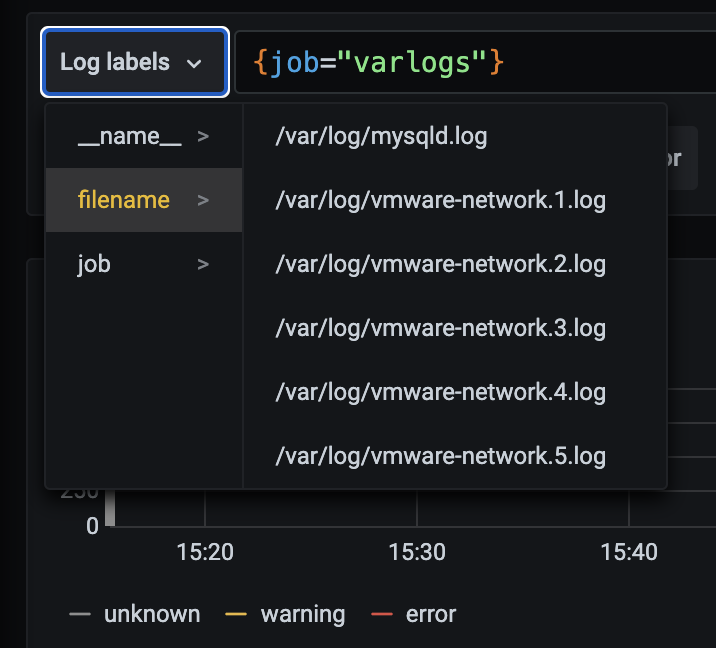
比如我们这里选择 /var/log/messages,就会把该文件下面的日志过滤展示出来,不过由于时区的问题,可能还需要设置下时间才可以看到数据:
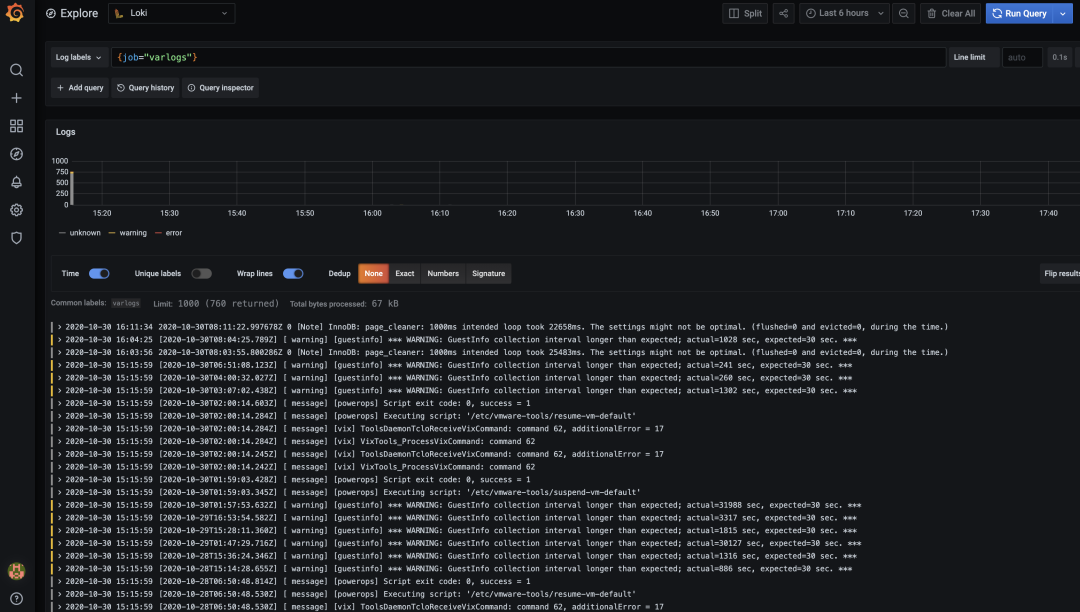
这里展示的是 promtail 容器里面 / var/log 目录中的日志
promtail 容器 /etc/promtail/config.yml
server:  http_listen_port: 9080  grpc_listen_port:
positions:  filename: /tmp/positions.yaml
clients:  - url: http://loki:3100/loki/api/v1/push
scrape_configs:- job_name: system  static_configs:  - targets:      - localhost    labels:      job: varlogs      __path__: /var/log/*log
这里的 job 就是 varlog,文件路径就是 /var/log/*log
4.2 在grafana explore上配置查看日志
查看日志 rate({job="message"} |="kubelet"
算 qps rate({job=”message”} |=”kubelet” [1m])
4.3 只索引标签
之前多次提到 loki 和 es 大的不同是 loki 只对标签进行索引而不对内容索引 下面我们举例来看下。
以简单的 promtail 配置举例
配置解读
scrape_configs: - job_name: system pipeline_stages: static_configs: - targets: - localhost labels: job: message __path__: /var/log/messages
上面这段配置代表启动一个日志采集任务 这个任务有 1 个固定标签job=”syslog” 采集日志路径为 /var/log/messages,会以一个名为 filename 的固定标签 在 promtail 的 web 页面上可以看到类似 prometheus 的 target 信息页面
scrape_configs: - job_name: system pipeline_stages: static_configs: - targets: - localhost labels: job: syslog __path__: /var/log/syslog - job_name: system pipeline_stages: static_configs: - targets: - localhost labels: job: apache __path__: /var/log/apache.log
同时也支持正则和正则非匹配
5.3 标签匹配模式的特点
原理
prometheus 中标签一致对应的同一个 hash 值和 refid(正整数递增的 id),也就是同一个 series
时序数据不断的 append 追加到这个 memseries 中
当有任意标签发生变化时会产生新的 hash 值和 refid,对应新的 series
loki 处理日志的模式 - 和 prometheus 一致,loki 一组标签值会生成一个 stream - 日志随着时间的递增会追加到这个 stream 中,后压缩为 chunk - 当有任意标签发生变化时会产生新的 hash 值,对应新的 stream
查询过程
所以 loki 先根据标签算出 hash 值在倒排索引中找到对应的 chunk? 然后再根据查询语句中的关键词等进行过滤,这样能大大的提速 因为这种根据标签算哈希在倒排中查找 id,对应找到存储的块在 prometheus 中已经被验证过了 属于开销低 速度快
4.5 动态标签和高基数
- 何为动态标签:说白了就是标签的 value 不固定
- 何为高基数标签:说白了就是标签的 value 可能性太多了,达到 10 万,100 万甚至更多
11.11.11.11 - frank [25/Jan/2000:14:00:01 -0500] "GET /1986.js HTTP/1.1" 200 932 "-" "Mozilla/5.0 (Windows; U; Windows NT 5.1; de; rv:1.9.1.7) Gecko/20091221 Firefox/3.5.7 GTB6"
在 Promtail 中使用 regex 想要匹配 action 和 status_code 两个标签
scrape_configs: - job_name: system   pipeline_stages:   static_configs:   - targets:      - localhost     labels:      job: syslog      __path__: /var/log/syslog - job_name: system   pipeline_stages:   static_configs:   - targets:      - localhost     labels:      job: apache      __path__: /var/log/apache.log
  - job_name: system    pipeline_stages:       - regex:         expression: "^(?P<ip>\\S+) (?P<identd>\\S+) (?P<user>\\S+) \\[(?P<timestamp>[\\w:/]+\\s[+\\-]\\d{4})\\] \"(?P<action>\\S+)\\s?(?P<path>\\S+)?\\s?(?P<protocol>\\S+)?\" (?P<status_code>\\d{3}|-) (?P<size>\\d+|-)\\s?\"?(?P<referer>[^\"]*)\"?\\s?\"?(?P<useragent>[^\"]*)?\"?$"     - labels:         action:         status_code:    static_configs:    - targets:       - localhost      labels:       job: apache       env: dev       __path__: /var/log/apache.log
11.11.11.11 - frank [25/Jan/2000:14:00:01 -0500] "GET /1986.js HTTP/1.1" 200 932 "-" "Mozilla/5.0 (Windows; U; Windows NT 5.1; de; rv:1.9.1.7) Gecko/20091221 Firefox/3.5.7 GTB6"11.11.11.12 - frank [25/Jan/2000:14:00:02 -0500] "POST /1986.js HTTP/1.1" 200 932 "-" "Mozilla/5.0 (Windows; U; Windows NT 5.1; de; rv:1.9.1.7) Gecko/20091221 Firefox/3.5.7 GTB6"11.11.11.13 - frank [25/Jan/2000:14:00:03 -0500] "GET /1986.js HTTP/1.1" 400 932 "-" "Mozilla/5.0 (Windows; U; Windows NT 5.1; de; rv:1.9.1.7) Gecko/20091221 Firefox/3.5.7 GTB6"11.11.11.14 - frank [25/Jan/2000:14:00:04 -0500] "POST /1986.js HTTP/1.1" 400 932 "-" "Mozilla/5.0 (Windows; U; Windows NT 5.1; de; rv:1.9.1.7) Gecko/20091221 Firefox/3.5.7 GTB6"
如果出现另一个独特的标签组合(例如 status_code =“500”),则会创建另一个新流
高基数问题
4.6 全文索引问题
加速查询没标签字段
以上边提到的 ip 字段为例 - 使用过滤器表达式查询
{job="apache"} |= "11.11.11.11"
loki查询时的分片(按时间范围分段grep)
两种索引模式对比
loki 的逻辑是查询时再启动多个分段并行查询。
日志量少时少加标签
举例,如果该查询是 {app=”loki”,level!=”debug”}
在没加 level 标签的情况下只需加载一个 chunk 即 app=“loki” 的标签。
需要标签时再去添加
日志应当按时间递增
---END---
来自 “ ITPUB博客 ” ,链接:https://blog.itpub.net/31548844/viewspace-3161023/ ,如需转载,请注明出处,否则将追究法律责任。

