1.show databases;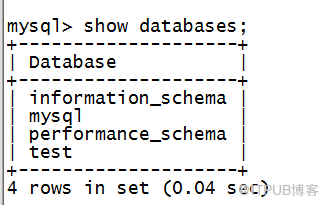
2.use mysql转换database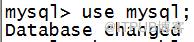
3.show tables 显示数据库里的表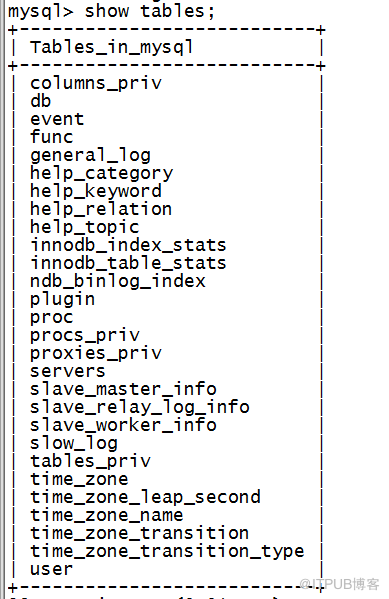
4.select user,host,password from user查询我的数据库mysql的user,host,password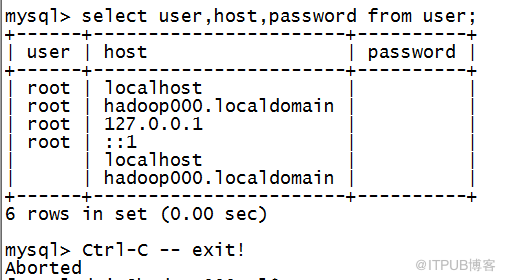
5.给账号设置密码
mysql> update user set password=password('123456') where user='root';
6.清除空用户
delete From user where user='' ;
7.查看剩余用户
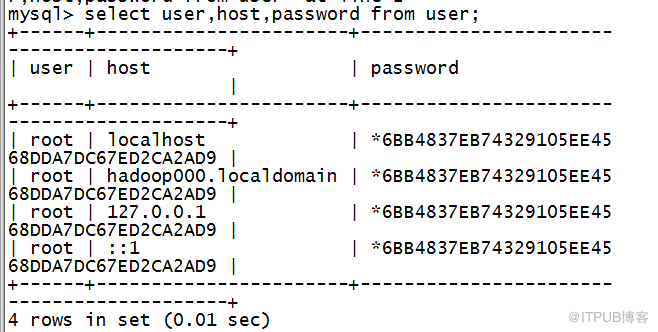 命令与上文相同的查询用户命令
8.刷新权限(重点)
命令flush privileges; 每次操作结束后都要刷新权限!!
9.通过用户进入数据库
mysql -u root -p123456; (-p后全是密码)
10.编辑.bash_profile文件(此步骤是为了可以让我们使用which mysql直接找到mysql文件在哪)
vi 。bash_profile修改为# .bash_profile
# Get the aliases and functions
if [ -f ~/.bashrc ]; then
. ~/.bashrc
fi
# User specific environment and startup programs
PATH=$PATH:$HOME/bin
1,1 Top
# .bash_profile
# Get the aliases and functions
if [ -f ~/.bashrc ]; then
. ~/.bashrc
fi
# User specific environment and startup programs
export MYSQL_BASE=/usr/local/mysql
export PATH=${MYSQL_BASE}/bin:$PATH
PS1=`uname -n`":"'$USER'":"'$PWD'":>"; export PS1得到结果
11.创建一个新的数据库并且设定可以进入他的机器
11.1 create database ruozedb;创建数据库ruozedb
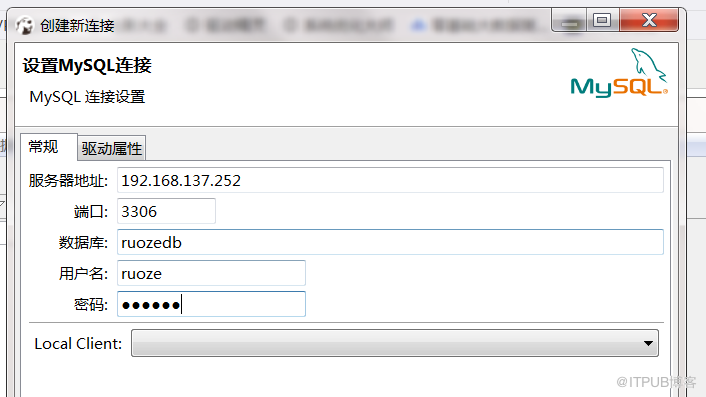
11.2grant all privileges on ruozedb.* to ruoze@'192.168.137.252' identified by '123456'设定可以进入数据库ruozedb的用户只有IP为192.168.137.252的用户名叫做ruoze且密码为123456(如果把IP地址改为%则表示任意ID都可以用ruoze用户进入)
11.3flush privileges;权限刷新
实践如图: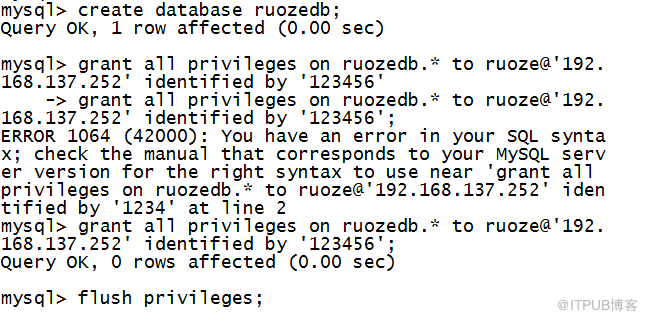
12.连接Dbeaver
2.use mysql转换database
3.show tables 显示数据库里的表
4.select user,host,password from user查询我的数据库mysql的user,host,password
5.给账号设置密码
mysql> update user set password=password('123456') where user='root';
6.清除空用户
delete From user where user='' ;
7.查看剩余用户
 命令与上文相同的查询用户命令
 8.刷新权限(重点)
命令flush privileges;
 每次操作结束后都要刷新权限!!
9.通过用户进入数据库
mysql -u root -p123456; (-p后全是密码)

10.编辑.bash_profile文件(此步骤是为了可以让我们使用which mysql直接找到mysql文件在哪)
vi 。bash_profile修改为# .bash_profile
# Get the aliases and functions
if [ -f ~/.bashrc ]; then
. ~/.bashrc
fi
# User specific environment and startup programs
PATH=$PATH:$HOME/bin
1,1 Top
# .bash_profile
# Get the aliases and functions
if [ -f ~/.bashrc ]; then
. ~/.bashrc
fi
# User specific environment and startup programs
export MYSQL_BASE=/usr/local/mysql
export PATH=${MYSQL_BASE}/bin:$PATH
PS1=`uname -n`":"'$USER'":"'$PWD'":>"; export PS1得到结果

11.创建一个新的数据库并且设定可以进入他的机器
11.1 create database ruozedb;创建数据库ruozedb
11.2grant all privileges on ruozedb.* to ruoze@'192.168.137.252' identified by '123456'设定可以进入数据库ruozedb的用户只有IP为192.168.137.252的用户名叫做ruoze且密码为123456(如果把IP地址改为%则表示任意ID都可以用ruoze用户进入)
11.3flush privileges;权限刷新
实践如图:
12.连接Dbeaver
来自 “ ITPUB博客 ” ,链接:https://blog.itpub.net/31537584/viewspace-2155286/ ,如需转载,请注明出处,否则将追究法律责任。
上一篇:
MySQL部署(在Linux上)
下一篇:
Db基础命令1

请登录后发表评论
登录
全部评论
