TiUP 是 TiDB 4.0 版本引入的集群运维工具,TiUP cluster 是 TiUP 提供的使用 Golang 编写的集群管理组件,通过 TiUP cluster 组件就可以进行日常的运维工作,包括部署、启动、关闭、销毁、弹性扩缩容、升级 TiDB 集群;管理 TiDB 集群参数;部署 TiDB Binlog;部署 TiFlash 等。
本文介绍了使用 TiUP 部署 TiDB 集群的流程,具体步骤如下:
- 第 1 步:软硬件环境配置
- 第 2 步:在中控机上安装 TiUP 组件
- 第 3 步:在 TiKV 部署目标机器上添加数据盘 EXT4 文件系统挂载参数
- 第 4 步:配置初始化参数文件
topology.yaml - 第 5 步:执行部署命令
- 第 6 步:检查 TiUP 管理的集群情况
- 第 7 步:检查部署的 TiDB 集群情况
- 第 8 步:执行集群启动命令
- 第 9 步:通过 TiUP 检查集群状态
- 第 10 步:通过 TiDB Dashboard 和 Grafana 检查集群状态
- 第 11 步:登录数据库执行简单 DML、DDL 操作和查询 SQL 语句
另外,本文还提供了使用 TiUP 关闭、销毁集群的命令,以及使用 TiUP 部署的常见问题和解决方案。具体参见:
环境准备
环境准备环节分为如下几步。
第 1 步:软硬件环境配置
中控机软硬件配置建议如下:
- 中控机可以是部署目标机器中的某一台
- 推荐安装 CentOS 7.3 及以上版本 Linux 操作系统
- 该机器需开放外网访问,用于下载 TiDB 及相关软件安装包
- 需要安装 TiUP 组件(参考第 2 步)
目标主机软硬件配置建议如下:
- 建议 4 台及以上,TiKV 至少 3 实例,且与 TiDB、PD 模块不位于同一主机,详见部署建议
- 目前 TiUP 仅支持在 x86_64 (AMD64) 架构上部署 TiDB 集群(TiUP 将在 4.0 GA 时支持在 ARM 架构上部署)
- 在 AMD64 架构下,建议使用 CentOS 7.3 及以上版本 Linux 操作系统
- 在 ARM 架构下,建议使用 CentOS 7.6 1810 版本 Linux 操作系统
- TiKV 数据文件的文件系统推荐使用 EXT4 格式,也可以使用 CentOS 默认的 XFS 格式(参考第 3 步)
- 机器之间内网互通(建议关闭防火墙
firewalld,或者开放 TiDB 集群的节点间所需端口) - 所有部署机器关闭系统 swap
- 如果需要绑核操作,需要安装
numactl工具
其他软硬件环境配置可参考官方文档 TiDB 软件和硬件环境建议配置。
第 2 步:在中控机上安装 TiUP 组件
使用普通用户登录中控机,以 tidb 用户为例,后续安装 TiUP 及集群管理操作均通过该用户完成:
执行如下命令安装 TiUP 工具:
curl --proto '=https' --tlsv1.2 -sSf https://tiup-mirrors.pingcap.com/install.sh | sh执行成功输出结果样例:
% Total    % Received % Xferd  Average Speed   Time    Time     Time  Current
                                Dload  Upload   Total   Spent    Left  Speed
100 6029k  100 6029k    0     0  2384k      0  0:00:02  0:00:02 --:--:-- 2385k
Detected shell: /bin/bash
Shell profile:  /home/tidb/.bash_profile
/home/tidb/.bash_profile has been modified to to add tiup to PATH
open a new terminal or source /home/tidb/.bash_profile to use it
Installed path: /home/tidb/.tiup/bin/tiup
===============================================
Have a try:     tiup playground
===============================================
按如下步骤设置 TiUP 环境变量:
重新声明全局环境变量:
source .bash_profile确认 TiUP 工具是否安装:
which tiup安装 TiUP cluster 组件(以 cluster-v0.4.3 为例)
tiup cluster预期结果输出:
The component `cluster` is not installed; downloading from repository.
download https://tiup-mirrors.pingcap.com/cluster-v0.4.3-linux-amd64.tar.gz:
17400435 / 17400435 [---------------------------------------------------------------------------------------------------------------------------------------------------------------------------------------------------------] 100.00% ? p/s
Starting /home/tidb/.tiup/components/cluster/v0.4.3/cluster
Deploy a TiDB cluster for production

Usage:
cluster [flags]
cluster [command]

Available Commands:
deploy      Deploy a cluster for production
start       Start a TiDB cluster
stop        Stop a TiDB cluster
restart     Restart a TiDB cluster
scale-in    Scale in a TiDB cluster
scale-out   Scale out a TiDB cluster
destroy     Destroy a specified cluster
upgrade     Upgrade a specified TiDB cluster
exec        Run shell command on host in the tidb cluster
display     Display information of a TiDB cluster
list        List all clusters
audit       Show audit log of cluster operation
import      Import an exist TiDB cluster from TiDB-Ansible
edit-config Edit TiDB cluster config
reload      Reload a TiDB cluster's config and restart if needed
help        Help about any command

Flags:
-h, --help      help for cluster
    --version   version for cluster

Use "cluster [command] --help" for more information about a command.

# cluster 组件提供以下集群管理功能
# deploy      集群部署
# start       启动 TiDB 集群
# stop        关闭 TiDB 集群
# restart     重启 TiDB 集群
# scale-in    缩容 TiDB 集群
# scale-out   扩容 TiDB 集群
# destroy     销毁指定 TiDB 集群
# upgrade     升级指定 TiDB 集群
# exec        在 TiDB 集群的目标主机执行命令
# display     展示 TiDB 集群信息
# list        展示管理的 TiDB 集群
# audit       审计 TiUP 历史操作命令
# import      导入 TiDB-Ansible 部署的 TiDB 集群
# edit-config 编辑 TiDB 集群参数
# reload      重新加载 TiDB 集群或者指定实例的参数配置
# help        帮助信息
如果已经安装,则更新 TiUP cluster 组件至最新版本:
tiup update cluster预期输出如下
“Update successfully!”字样:The `cluster:v0.4.3` has been installed Update successfully!验证当前 TiUP cluster 版本信息。执行如下命令查看 TiUP cluster 组件版本:
tiup --binary cluster预期结果输出(当前版本为 v0.4.3):
/home/tidb/.tiup/components/cluster/v0.4.3/cluster
第 3 步:在 TiKV 部署目标机器上添加数据盘 EXT4 文件系统挂载参数
注意:
推荐 TiKV 部署目标机器的数据目录使用 EXT4 文件系统格式。相比于 XFS 文件系统格式,EXT4 文件系统格式在 TiDB 集群部署案例较多,生产环境优先选择使用 EXT4 文件系统格式。
使用 root 用户登录目标机器,将部署目标机器数据盘格式化成 ext4 文件系统,挂载时添加 nodelalloc 和 noatime 挂载参数。nodelalloc 是必选参数,否则 TiUP 安装时检测无法通过;noatime 是可选建议参数。
注意:
如果你的数据盘已经格式化成 ext4 并挂载了磁盘,可先执行
umount /dev/nvme0n1p1命令卸载,从编辑/etc/fstab文件步骤开始执行,添加挂载参数重新挂载即可。
以 /dev/nvme0n1 数据盘为例,具体操作步骤如下:
查看数据盘。
fdisk -lDisk /dev/nvme0n1: 1000 GB创建分区表。
parted -s -a optimal /dev/nvme0n1 mklabel gpt -- mkpart primary ext4 1 -1注意:
使用
lsblk命令查看分区的设备号:对于 nvme 磁盘,生成的分区设备号一般为nvme0n1p1;对于普通磁盘(例如/dev/sdb),生成的的分区设备号一般为sdb1。格式化文件系统。
mkfs.ext4 /dev/nvme0n1p1查看数据盘分区 UUID。
本例中
nvme0n1p1的 UUID 为c51eb23b-195c-4061-92a9-3fad812cc12f。lsblk -fNAME FSTYPE LABEL UUID MOUNTPOINT sda ├─sda1 ext4 237b634b-a565-477b-8371-6dff0c41f5ab /boot ├─sda2 swap f414c5c0-f823-4bb1-8fdf-e531173a72ed └─sda3 ext4 547909c1-398d-4696-94c6-03e43e317b60 / sr0 nvme0n1 └─nvme0n1p1 ext4 c51eb23b-195c-4061-92a9-3fad812cc12f编辑
/etc/fstab文件,添加nodelalloc挂载参数。vi /etc/fstabUUID=c51eb23b-195c-4061-92a9-3fad812cc12f /data1 ext4 defaults,nodelalloc,noatime 0 2挂载数据盘。
mkdir /data1 && \
mount -a
执行以下命令,如果文件系统为 ext4,并且挂载参数中包含
nodelalloc,则表示已生效。mount -t ext4/dev/nvme0n1p1 on /data1 type ext4 (rw,noatime,nodelalloc,data=ordered)
第 4 步:配置初始化参数文件 topology.yaml
集群初始化配置文件需要手动编写,完整的全配置参数模版可以参考 Github TiUP 项目配置参数模版。
需要在中控机上面创建 YAML 格式配置文件,例如 topology.yaml。下文介绍 3 个经典场景的集群配置模版:
场景 1:单机单实例
部署需求
通过 tidb 用户做集群管理,使用默认 22 端口,部署目录为 /tidb-deploy,数据目录为 /tidb-data。
拓扑信息
| 实例 | 个数 | 物理机配置 | IP | 配置 |
|---|---|---|---|---|
| TiKV | 3 | 16 VCore 32GB * 1 | 10.0.1.1 10.0.1.2 10.0.1.3 | 默认端口 全局目录配置 |
| TiDB | 3 | 16 VCore 32GB * 1 | 10.0.1.7 10.0.1.8 10.0.1.9 | 默认端口 全局目录配置 |
| PD | 3 | 4 VCore 8GB * 1 | 10.0.1.4 10.0.1.5 10.0.1.6 | 默认端口 全局目录配置 |
| TiFlash | 1 | 32 VCore 64 GB * 1 | 10.0.1.10 | 默认端口 全局目录配置 |
配置文件模版 topology.yaml
注意:
无需手动创建 tidb 用户,TiUP cluster 组件会在部署主机上自动创建该用户。可以自定义用户,也可以和中控机的用户保持一致。
部署 TiFlash 需要在 topology.yaml 配置文件中将
replication.enable-placement-rules设置为true,以开启 PD 的 Placement Rules 功能。tiflash_servers 实例级别配置
"-host"目前只支持 IP,不支持域名。TiFlash 具体的参数配置介绍可参考 TiFlash 参数配置。
cat topology.yaml
# # Global variables are applied to all deployments and used as the default value of
# # the deployments if a specific deployment value is missing.
global:
  user: "tidb"
  ssh_port: 22
  deploy_dir: "/tidb-deploy"
  data_dir: "/tidb-data"

pd_servers:
  - host: 10.0.1.4
  - host: 10.0.1.5
  - host: 10.0.1.6

tidb_servers:
  - host: 10.0.1.7
  - host: 10.0.1.8
  - host: 10.0.1.9

tikv_servers:
  - host: 10.0.1.1
  - host: 10.0.1.2
  - host: 10.0.1.3

tiflash_servers:
  - host: 10.0.1.10

monitoring_servers:
  - host: 10.0.1.4

grafana_servers:
  - host: 10.0.1.4

alertmanager_servers:
  - host: 10.0.1.4
更详细的配置为:
# # Global variables are applied to all deployments and used as the default value of
# # the deployments if a specific deployment value is missing.
global:
  user: "tidb"
  ssh_port: 22
  deploy_dir: "/tidb-deploy"
  data_dir: "/tidb-data"

# # Monitored variables are applied to all the machines.
monitored:
  node_exporter_port: 9100
  blackbox_exporter_port: 9115
  # deploy_dir: "/tidb-deploy/monitored-9100"
  # data_dir: "/tidb-data/monitored-9100"
  # log_dir: "/tidb-deploy/monitored-9100/log"

# # Server configs are used to specify the runtime configuration of TiDB components.
# # All configuration items can be found in TiDB docs:
# # - TiDB: https://pingcap.com/docs/stable/reference/configuration/tidb-server/configuration-file/
# # - TiKV: https://pingcap.com/docs/stable/reference/configuration/tikv-server/configuration-file/
# # - PD: https://pingcap.com/docs/stable/reference/configuration/pd-server/configuration-file/
# # All configuration items use points to represent the hierarchy, e.g:
# #   readpool.storage.use-unified-pool
# #
# # You can overwrite this configuration via the instance-level `config` field.

server_configs:
  tidb:
    log.slow-threshold: 300
    binlog.enable: false
    binlog.ignore-error: false
  tikv:
    # server.grpc-concurrency: 4
    # raftstore.apply-pool-size: 2
    # raftstore.store-pool-size: 2
    # rocksdb.max-sub-compactions: 1
    # storage.block-cache.capacity: "16GB"
    # readpool.unified.max-thread-count: 12
    readpool.storage.use-unified-pool: false
    readpool.coprocessor.use-unified-pool: true
  pd:
    schedule.leader-schedule-limit: 4
    schedule.region-schedule-limit: 2048
    schedule.replica-schedule-limit: 64
    replication.enable-placement-rules: true
  tiflash:
    logger.level: "info"
  # pump:
  #   gc: 7

pd_servers:
  - host: 10.0.1.4
    # ssh_port: 22
    # name: "pd-1"
    # client_port: 2379
    # peer_port: 2380
    # deploy_dir: "/tidb-deploy/pd-2379"
    # data_dir: "/tidb-data/pd-2379"
    # log_dir: "/tidb-deploy/pd-2379/log"
    # numa_node: "0,1"
    # # The following configs are used to overwrite the `server_configs.pd` values.
    # config:
    #   schedule.max-merge-region-size: 20
    #   schedule.max-merge-region-keys: 200000
  - host: 10.0.1.5
  - host: 10.0.1.6

tidb_servers:
  - host: 10.0.1.7
    # ssh_port: 22
    # port: 4000
    # status_port: 10080
    # deploy_dir: "/tidb-deploy/tidb-4000"
    # log_dir: "/tidb-deploy/tidb-4000/log"
    # numa_node: "0,1"
    # # The following configs are used to overwrite the `server_configs.tidb` values.
    # config:
    #   log.slow-query-file: tidb-slow-overwrited.log
  - host: 10.0.1.8
  - host: 10.0.1.9

tikv_servers:
  - host: 10.0.1.1
    # ssh_port: 22
    # port: 20160
    # status_port: 20180
    # deploy_dir: "/tidb-deploy/tikv-20160"
    # data_dir: "/tidb-data/tikv-20160"
    # log_dir: "/tidb-deploy/tikv-20160/log"
    # numa_node: "0,1"
    # # The following configs are used to overwrite the `server_configs.tikv` values.
    # config:
    #   server.grpc-concurrency: 4
    #   server.labels: { zone: "zone1", dc: "dc1", host: "host1" }
  - host: 10.0.1.2
  - host: 10.0.1.3

tiflash_servers:
  - host: 10.0.1.10
    # ssh_port: 22
    # tcp_port: 9000
    # http_port: 8123
    # flash_service_port: 3930
    # flash_proxy_port: 20170
    # flash_proxy_status_port: 20292
    # metrics_port: 8234
    # deploy_dir: /tidb-deploy/tiflash-9000
    # data_dir: /tidb-data/tiflash-9000
    # log_dir: /tidb-deploy/tiflash-9000/log
    # numa_node: "0,1"
    # # The following configs are used to overwrite the `server_configs.tiflash` values.
    # config:
    #   logger.level: "info"
    # learner_config:
    #   log-level: "info"
  # - host: 10.0.1.15
  # - host: 10.0.1.16

# pump_servers:
#   - host: 10.0.1.17
#     ssh_port: 22
#     port: 8250
#     deploy_dir: "/tidb-deploy/pump-8249"
#     data_dir: "/tidb-data/pump-8249"
#     log_dir: "/tidb-deploy/pump-8249/log"
#     numa_node: "0,1"
#     # The following configs are used to overwrite the `server_configs.drainer` values.
#     config:
#       gc: 7
#   - host: 10.0.1.18
#   - host: 10.0.1.19

# drainer_servers:
#   - host: 10.0.1.17
#     port: 8249
#     data_dir: "/tidb-data/drainer-8249"
#     # If drainer doesn't have a checkpoint, use initial commitTS as the initial checkpoint.
#     # Will get a latest timestamp from pd if commit_ts is set to -1 (the default value).
#     commit_ts: -1
#     deploy_dir: "/tidb-deploy/drainer-8249"
#     log_dir: "/tidb-deploy/drainer-8249/log"
#     numa_node: "0,1"
#     # The following configs are used to overwrite the `server_configs.drainer` values.
#     config:
#       syncer.db-type: "mysql"
#       syncer.to.host: "127.0.0.1"
#       syncer.to.user: "root"
#       syncer.to.password: ""
#       syncer.to.port: 3306
#   - host: 10.0.1.19

# cdc_servers:
#   - host: 10.0.1.20
#     ssh_port: 22
#     port: 8300
#     deploy_dir: "/tidb-deploy/cdc-8300"
#     log_dir: "/tidb-deploy/cdc-8300/log"
#     numa_node: "0,1"
#   - host: 10.0.1.21
#   - host: 10.0.1.22

monitoring_servers:
  - host: 10.0.1.4
    # ssh_port: 22
    # port: 9090
    # deploy_dir: "/tidb-deploy/prometheus-8249"
    # data_dir: "/tidb-data/prometheus-8249"
    # log_dir: "/tidb-deploy/prometheus-8249/log"

grafana_servers:
  - host: 10.0.1.4
    # port: 3000
    # deploy_dir: /tidb-deploy/grafana-3000

alertmanager_servers:
  - host: 10.0.1.4
    # ssh_port: 22
    # web_port: 9093
    # cluster_port: 9094
    # deploy_dir: "/tidb-deploy/alertmanager-9093"
    # data_dir: "/tidb-data/alertmanager-9093"
    # log_dir: "/tidb-deploy/alertmanager-9093/log"
场景 2:单机多实例
部署需求
部署 TiDB 和 TiKV 组件的物理机为 2 路处理器,每路 16 VCore,内存也达标,为提高物理机资源利用率,可为单机多实例,即 TiDB、TiKV 通过 numa 绑核,隔离 CPU 资源。PD 和 Prometheus 混合部署,但两者的数据目录需要使用独立的文件系统。
单机多实例部署的关键参数配置
本节介绍单机多实例的关键参数,主要用于 TiDB、TiKV 的单机多实例部署场景。你需要按照提供的计算公式,将结果填写至下一步的配置文件中。
TiKV 进行配置优化
readpool 线程池自适应,配置
readpool.unified.max-thread-count参数可以使readpool.storage和readpool.coprocessor共用统一线程池,同时要分别设置自适应开关。开启
readpool.storage和readpool.coprocessor:readpool.storage.use-unified-pool: false readpool.coprocessor.use-unified-pool: true计算公式如下:
readpool.unified.max-thread-count = cores * 0.8 / TiKV 数量
storage CF (all RocksDB column families) 内存自适应,配置
storage.block-cache.capacity参数即可实现 CF 之间自动平衡内存使用。storage.block-cache默认开启 CF 自适应,无需修改。storage.block-cache.shared: true计算公式如下:
storage.block-cache.capacity = (MEM_TOTAL * 0.5 / TiKV 实例数量)
如果多个 TiKV 实例部署在同一块物理磁盘上,需要在 tikv 配置中添加 capacity 参数:
raftstore.capacity = 磁盘总容量 / TiKV 实例数量
label 调度配置
由于采用单机多实例部署 TiKV,为了避免物理机宕机导致 Region Group 默认 3 副本的 2 副本丢失,导致集群不可用的问题,可以通过 label 来实现 PD 智能调度,保证同台机器的多 TiKV 实例不会出现 Region Group 只有 2 副本的情况。
TiKV 配置
相同物理机配置相同的 host 级别 label 信息:
config: server.labels: host: tikv1PD 配置
PD 需要配置 labels 类型来识别并调度 Region:
pd: replication.location-labels: ["host"]
numa_node绑核在实例参数模块配置对应的
numa_node参数,并添加对应的物理 CPU 的核数;numa 绑核使用前,确认已经安装 numactl 工具,以及物理机对应的物理机 CPU 的信息后,再进行参数配置;
numa_node这个配置参数与numactl --membind配置对应。
拓扑信息
| 实例 | 个数 | 物理机配置 | IP | 配置 |
|---|---|---|---|---|
| TiKV | 6 | 32 VCore 64GB | 10.0.1.1 10.0.1.2 10.0.1.3 | 1. 区分实例级别的 port、status_port; 2. 配置全局参数 readpool、storage 以及 raftstore 参数; 3. 配置实例级别 host 维度的 labels; 4. 配置 numa 绑核操作 |
| TiDB | 6 | 32 VCore 64GB | 10.0.1.7 10.0.1.8 10.0.1.9 | 配置 numa 绑核操作 |
| PD | 3 | 16 VCore 32 GB | 10.0.1.4 10.0.1.5 10.0.1.6 | 配置 location_lables 参数 |
| TiFlash | 1 | 32 VCore 64 GB | 10.0.1.10 | 默认端口 自定义部署目录,配置 data_dir 参数为 /data1/tiflash/data |
配置文件模版 topology.yaml
注意:
配置文件模版时,注意修改必要参数、IP、端口及目录。
各个组件的 deploy_dir,默认会使用 global 中的 <deploy_dir>/<components_name>-
。例如 tidb 端口指定 4001,则 deploy_dir 默认为 /tidb-deploy/tidb-4001。因此,在多实例场景下指定非默认端口时,无需再次指定目录。
注意:
部署 TiFlash 需要在 topology.yaml 配置文件中将
replication.enable-placement-rules设置为true,以开启 PD 的 Placement Rules 功能。tiflash_servers 实例级别配置
"-host"目前只支持 IP,不支持域名。TiFlash 具体的参数配置介绍可参考 TiFlash 参数配置。
cat topology.yaml
# # Global variables are applied to all deployments and used as the default value of
# # the deployments if a specific deployment value is missing.
global:
user: "tidb"
ssh_port: 22
deploy_dir: "/tidb-deploy"
data_dir: "/tidb-data"
server_configs:
tikv:
readpool.unified.max-thread-count: <取值参考上文计算公式的结果>
readpool.storage.use-unified-pool: false
readpool.coprocessor.use-unified-pool: true
storage.block-cache.capacity: "<取值参考上文计算公式的结果>"
raftstore.capacity: "<取值参考上文计算公式的结果>"
pd:
  replication.location-labels: ["host"]
replication.enable-placement-rules: true
pd_servers:
- host: 10.0.1.4
- host: 10.0.1.5
- host: 10.0.1.6
tidb_servers:
- host: 10.0.1.7
port: 4000
status_port: 10080
numa_node: "0"
- host: 10.0.1.7
port: 4001
status_port: 10081
numa_node: "1"
- host: 10.0.1.8
port: 4000
status_port: 10080
numa_node: "0"
- host: 10.0.1.8
port: 4001
status_port: 10081
numa_node: "1"
- host: 10.0.1.9
port: 4000
status_port: 10080
numa_node: "0"
- host: 10.0.1.9
port: 4001
status_port: 10081
numa_node: "1"
tikv_servers:
- host: 10.0.1.1
port: 20160
status_port: 20180
numa_node: "0"
config:
server.labels: { host: "tikv1" }
- host: 10.0.1.1
port: 20161
status_port: 20181
numa_node: "1"
config:
server.labels: { host: "tikv1" }
- host: 10.0.1.2
port: 20160
status_port: 20180
numa_node: "0"
config:
server.labels: { host: "tikv2" }
- host: 10.0.1.2
port: 20161
status_port: 20181
numa_node: "1"
config:
server.labels: { host: "tikv2" }
- host: 10.0.1.3
port: 20160
status_port: 20180
numa_node: "0"
config:
server.labels: { host: "tikv3" }
- host: 10.0.1.3
port: 20161
status_port: 20181
numa_node: "1"
config:
server.labels: { host: "tikv3" }
tiflash_servers:
- host: 10.0.1.10
data_dir: /data1/tiflash/data
monitoring_servers:
- host: 10.0.1.7
grafana_servers:
- host: 10.0.1.7
alertmanager_servers:
- host: 10.0.1.7
更详细的配置为:
# # Global variables are applied to all deployments and used as the default value of
# # the deployments if a specific deployment value is missing.
global:
  user: "tidb"
  ssh_port: 22
  deploy_dir: "/tidb-deploy"
  data_dir: "/tidb-data"

monitored:
  node_exporter_port: 9100
  blackbox_exporter_port: 9115
  deploy_dir: "/tidb-deploy/monitored-9100"
  data_dir: "/tidb-data-monitored-9100"
  log_dir: "/tidb-deploy/monitored-9100/log"

server_configs:
  tikv:
    readpool.unified.max-thread-count: <取值参考上文计算公式的结果>
    readpool.storage.use-unified-pool: false
    readpool.coprocessor.use-unified-pool: true
    storage.block-cache.capacity: "<取值参考上文计算公式的结果>"
    raftstore.capacity: "<取值参考上文计算公式的结果>"
  pd:
    replication.location-labels: ["host"]
    replication.enable-placement-rules: true

pd_servers:
  - host: 10.0.1.4
  - host: 10.0.1.5
  - host: 10.0.1.6

tidb_servers:
  - host: 10.0.1.7
    port: 4000
    status_port: 10080
    deploy_dir: "/tidb-deploy/tidb-4000"
    log_dir: "/tidb-deploy/tidb-4000/log"
    numa_node: "0"
  - host: 10.0.1.7
    port: 4001
    status_port: 10081
    deploy_dir: "/tidb-deploy/tidb-4001"
    log_dir: "/tidb-deploy/tidb-4001/log"
    numa_node: "1"
  - host: 10.0.1.8
    port: 4000
    status_port: 10080
    deploy_dir: "/tidb-deploy/tidb-4000"
    log_dir: "/tidb-deploy/tidb-4000/log"
    numa_node: "0"
  - host: 10.0.1.8
    port: 4001
    status_port: 10081
    deploy_dir: "/tidb-deploy/tidb-4001"
    log_dir: "/tidb-deploy/tidb-4001/log"
    numa_node: "1"
  - host: 10.0.1.9
    port: 4000
    status_port: 10080
    deploy_dir: "/tidb-deploy/tidb-4000"
    log_dir: "/tidb-deploy/tidb-4000/log"
    numa_node: "0"
  - host: 10.0.1.9
    port: 4001
    status_port: 10081
    deploy_dir: "/tidb-deploy/tidb-4001"
    log_dir: "/tidb-deploy/tidb-4001/log"
    numa_node: "1"

tikv_servers:
  - host: 10.0.1.1
    port: 20160
    status_port: 20180
    deploy_dir: "/tidb-deploy/tikv-20160"
    data_dir: "/tidb-data/tikv-20160"
    log_dir: "/tidb-deploy/tikv-20160/log"
    numa_node: "0"
    config:
      server.labels: { host: "tikv1" }
  - host: 10.0.1.1
    port: 20161
    status_port: 20181
    deploy_dir: "/tidb-deploy/tikv-20161"
    data_dir: "/tidb-data/tikv-20161"
    log_dir: "/tidb-deploy/tikv-20161/log"
    numa_node: "1"
    config:
      server.labels: { host: "tikv1" }
  - host: 10.0.1.2
    port: 20160
    status_port: 20180
    deploy_dir: "/tidb-deploy/tikv-20160"
    data_dir: "/tidb-data/tikv-20160"
    log_dir: "/tidb-deploy/tikv-20160/log"
    numa_node: "0"
    config:
      server.labels: { host: "tikv2" }
  - host: 10.0.1.2
    port: 20161
    status_port: 20181
    deploy_dir: "/tidb-deploy/tikv-20161"
    data_dir: "/tidb-data/tikv-20161"
    log_dir: "/tidb-deploy/tikv-20161/log"
    numa_node: "1"
    config:
      server.labels: { host: "tikv2" }
  - host: 10.0.1.3
    port: 20160
    status_port: 20180
    deploy_dir: "/tidb-deploy/tikv-20160"
    data_dir: "/tidb-data/tikv-20160"
    log_dir: "/tidb-deploy/tikv-20160/log"
    numa_node: "0"
    config:
      server.labels: { host: "tikv3" }
  - host: 10.0.1.3
    port: 20161
    status_port: 20181
    deploy_dir: "/tidb-deploy/tikv-20161"
    data_dir: "/tidb-data/tikv-20161"
    log_dir: "/tidb-deploy/tikv-20161/log"
    numa_node: "1"
    config:
      server.labels: { host: "tikv3" }
tiflash_servers:
  - host: 10.0.1.10
    data_dir: /data1/tiflash/data
monitoring_servers:
  - host: 10.0.1.7
grafana_servers:
  - host: 10.0.1.7
alertmanager_servers:
  - host: 10.0.1.7
场景 3:通过 TiDB Binlog 同步到下游
部署需求
设置默认部署目录 /tidb-deploy 和数据目录 /tidb-data,通过 TiDB Binlog 同步到下游机器 10.0.1.9:4000。
关键参数
TiDB 关键参数:
binlog.enable: true开启 binlog 服务,默认为 false。
binlog.ignore-error: true高可用场景建议开启,如果设置为 true,发生错误时,TiDB 会停止写入 binlog,并且在监控项 tidb_server_critical_error_total 上计数加 1;如果设置为 false,一旦写入 binlog 失败,会停止整个 TiDB 的服务。
拓扑信息
| 实例 | 个数 | 物理机配置 | IP | 配置 |
|---|---|---|---|---|
| TiKV | 3 | 16 VCore 32 GB | 10.0.1.1 10.0.1.2 10.0.1.3 | 默认端口配置 |
| TiDB | 3 | 16 VCore 32 GB | 10.0.1.7 10.0.1.8 10.0.1.9 | 默认端口配置; 开启 enable_binlog; 开启 ignore-error |
| PD | 3 | 4 VCore 8 GB | 10.0.1.4 10.0.1.5 10.0.1.6 | 默认端口配置 |
| TiFlash | 1 | 32 VCore 64 GB | 10.0.1.10 | 默认端口 自定义部署目录,配置 data_dir 参数为 /data1/tiflash/data,/data2/tiflash/data,进行多盘部署 |
| Pump | 3 | 8 VCore 16GB | 10.0.1.6 10.0.1.7 10.0.1.8 | 默认端口配置; 设置 GC 时间 7 天 |
| Drainer | 1 | 8 VCore 16GB | 10.0.1.9 | 默认端口配置; 设置默认初始化 commitTS |
配置文件模版 topology.yaml
注意:
配置文件模版时,如无需自定义端口或者目录,仅修改 IP 即可。
部署 TiFlash 需要在 topology.yaml 配置文件中将
replication.enable-placement-rules设置为true,以开启 PD 的 Placement Rules 功能。tiflash_servers 实例级别配置
"-host"目前只支持 ip,不支持域名。TiFlash 具体的参数配置介绍可参考 TiFlash 参数配置。
cat topology.yaml
# # Global variables are applied to all deployments and used as the default value of
# # the deployments if a specific deployment value is missing.
global:
  user: "tidb"
  ssh_port: 22
  deploy_dir: "/tidb-deploy"
  data_dir: "/tidb-data"

server_configs:
  tidb:
    binlog.enable: true
    binlog.ignore-error: true
  pd:
    replication.enable-placement-rules: true

pd_servers:
  - host: 10.0.1.4
  - host: 10.0.1.5
  - host: 10.0.1.6
tidb_servers:
  - host: 10.0.1.7
  - host: 10.0.1.8
  - host: 10.0.1.9
tikv_servers:
  - host: 10.0.1.1
  - host: 10.0.1.2
  - host: 10.0.1.3

pump_servers:
  - host: 10.0.1.6
  - host: 10.0.1.7
  - host: 10.0.1.8
drainer_servers:
  - host: 10.0.1.9
    config:
      syncer.db-type: "tidb"
      syncer.to.host: "10.0.1.9"
      syncer.to.user: "root"
      syncer.to.password: ""
      syncer.to.port: 4000
tiflash_servers:
  - host: 10.0.1.10
    data_dir: /data1/tiflash/data,/data2/tiflash/data
monitoring_servers:
  - host: 10.0.1.4
grafana_servers:
  - host: 10.0.1.4
alertmanager_servers:
  - host: 10.0.1.4
更详细的配置为:
# # Global variables are applied to all deployments and used as the default value of
# # the deployments if a specific deployment value is missing.
global:
  user: "tidb"
  ssh_port: 22
  deploy_dir: "/tidb-deploy"
  data_dir: "/tidb-data"
monitored:
  node_exporter_port: 9122
  blackbox_exporter_port: 9137
  deploy_dir: "/tidb-deploy/monitored-9100"
  data_dir: "/tidb-data/monitored-9100"
  log_dir: "/tidb-deploy/monitored-9100/log"

server_configs:
  tidb:
    binlog.enable: true
    binlog.ignore-error: true
  pd:
    replication.enable-placement-rules: true

pd_servers:
  - host: 10.0.1.4
  - host: 10.0.1.5
  - host: 10.0.1.6
tidb_servers:
  - host: 10.0.1.7
  - host: 10.0.1.8
  - host: 10.0.1.9
tikv_servers:
  - host: 10.0.1.1
  - host: 10.0.1.2
  - host: 10.0.1.3

pump_servers:
  - host: 10.0.1.6
    ssh_port: 22
    port: 8250
    deploy_dir: "/tidb-deploy/pump-8249"
    data_dir: "/tidb-data/pump-8249"
    # The following configs are used to overwrite the `server_configs.drainer` values.
    config:
      gc: 7
  - host: 10.0.1.7
    ssh_port: 22
    port: 8250
    deploy_dir: "/tidb-deploy/pump-8249"
    data_dir: "/tidb-data/pump-8249"
    # The following configs are used to overwrite the `server_configs.drainer` values.
    config:
      gc: 7
  - host: 10.0.1.8
    ssh_port: 22
    port: 8250
    deploy_dir: "/tidb-deploy/pump-8249"
    data_dir: "/tidb-data/pump-8249"
    # The following configs are used to overwrite the `server_configs.drainer` values.
    config:
      gc: 7
drainer_servers:
  - host: 10.0.1.9
    port: 8249
    data_dir: "/tidb-data/drainer-8249"
    # If drainer doesn't have a checkpoint, use initial commitTS as the initial checkpoint.
    # Will get a latest timestamp from pd if commit_ts is set to -1 (the default value).
    commit_ts: -1
    deploy_dir: "/tidb-deploy/drainer-8249"
    # The following configs are used to overwrite the `server_configs.drainer` values.
    config:
      syncer.db-type: "tidb"
      syncer.to.host: "10.0.1.9"
      syncer.to.user: "root"
      syncer.to.password: ""
      syncer.to.port: 4000
tiflash_servers:
  - host: 10.0.1.10
    data_dir: /data1/tiflash/data,/data2/tiflash/data
monitoring_servers:
  - host: 10.0.1.4
grafana_servers:
  - host: 10.0.1.4
alertmanager_servers:
  - host: 10.0.1.4
场景 4:通过 TiCDC 同步到下游
部署需求
设置默认部署目录 /tidb-deploy 和数据目录 /tidb-data,需要启动 TiCDC,可在 TiCDC 集群部署完成后通过 cdc cli 创建同步任务。
拓扑信息
| 实例 | 个数 | 物理机配置 | IP | 配置 |
|---|---|---|---|---|
| TiKV | 3 | 16 VCore 32 GB | 10.0.1.1 10.0.1.2 10.0.1.3 | 默认端口配置 |
| TiDB | 3 | 16 VCore 32 GB | 10.0.1.7 10.0.1.8 10.0.1.9 | 默认端口配置 |
| PD | 3 | 4 VCore 8 GB | 10.0.1.4 10.0.1.5 10.0.1.6 | 默认端口配置 |
| TiFlash | 1 | 32 VCore 64 GB | 10.0.1.10 | 默认端口 自定义部署目录,配置 data_dir 参数为 /data1/tiflash/data,/data2/tiflash/data,进行多盘部署 |
| CDC | 3 | 8 VCore 16GB | 10.0.1.6 10.0.1.7 10.0.1.8 | 默认端口配置 |
配置文件模版 topology.yaml
注意:
配置文件模版时,如无需自定义端口或者目录,仅修改 IP 即可。
部署 TiFlash 需要在 topology.yaml 配置文件中将
replication.enable-placement-rules设置为true,以开启 PD 的 Placement Rules 功能。tiflash_servers 实例级别配置
"-host"目前只支持 ip,不支持域名。TiFlash 具体的参数配置介绍可参考 TiFlash 参数配置。
cat topology.yaml
# # Global variables are applied to all deployments and used as the default value of
# # the deployments if a specific deployment value is missing.
global:
  user: "tidb"
  ssh_port: 22
  deploy_dir: "/tidb-deploy"
  data_dir: "/tidb-data"

server_configs:
  pd:
    replication.enable-placement-rules: true

pd_servers:
  - host: 10.0.1.4
  - host: 10.0.1.5
  - host: 10.0.1.6
tidb_servers:
  - host: 10.0.1.7
  - host: 10.0.1.8
  - host: 10.0.1.9
tikv_servers:
  - host: 10.0.1.1
  - host: 10.0.1.2
  - host: 10.0.1.3
tiflash_servers:
  - host: 10.0.1.10
    data_dir: /data1/tiflash/data,/data2/tiflash/data
cdc_servers:
  - host: 10.0.1.6
  - host: 10.0.1.7
  - host: 10.0.1.8
monitoring_servers:
  - host: 10.0.1.4
grafana_servers:
  - host: 10.0.1.4
alertmanager_servers:
  - host: 10.0.1.4
执行部署命令
部署命令介绍
通过 help 查询具体的参数说明:
tiup cluster deploy --help
预期输出结果:
Deploy a cluster for production. SSH connection will be used to deploy files, as well as creating system users for running the service.

Usage:
  cluster deploy <cluster-name> <version> <topology.yaml> [flags]

Flags:
  -h, --help                   help for deploy
  -i, --identity_file string   The path of the SSH identity file. If specified, public key authentication will be used.
      --user string            The user name to login via SSH. The user must have root (or sudo) privilege. (default "root")
  -y, --yes                    Skip confirming the topology

# Usage 展示执行命令样例,<> 为必填项
# Flags 可选参数,有以下的作用:
# 通过 -h 可以查看帮助;
# 通过 -i 执行权限认证;
# --user 通过指定用户来完成 ssh 登录,该用户必须拥有 sudo 权限,默认为 root 用户;
# -y 提过拓扑信息确认直接执行部署任务
注意:
通过 TiUP 进行集群部署可以使用密钥或者交互密码方式来进行安全认证:
- 如果是密钥方式,可以通过
-i或者--identity_file来指定密钥的路径;- 如果是密码方式,无需添加其他参数,
Enter即可进入密码交互窗口。
第 5 步:执行部署命令
tiup cluster deploy tidb-test v4.0.0-rc ./topology.yaml --user root [-p] [-i /home/root/.ssh/gcp_rsa]
以上部署命令中:
- 通过 TiUP cluster 部署的集群名称为
tidb-test - 部署版本为
v4.0.0-rc,其他版本可以参考如何查看 TiUP 支持管理的 TiDB 版本的介绍 - 初始化配置文件为
topology.yaml - –user root:通过 root 用户登录到目标主机完成集群部署,该用户需要有 ssh 到目标机器的权限,并且在目标机器有 sudo 权限。也可以用其他有 ssh 和 sudo 权限的用户完成部署。
- [-i] 及 [-p]:非必选项,如果已经配置免密登陆目标机,则不需填写。否则选择其一即可,[-i] 为可登录到部署机 root 用户(或 –user 指定的其他用户)的私钥,也可使用 [-p] 交互式输入该用户的密码
预期日志结尾输出会有 Deployed cluster `tidb-test` successfully 关键词,表示部署成功。
验证集群部署状态
验证命令介绍
tiup cluster list --help
List all clusters

Usage:
  cluster list [flags]

Flags:
  -h, --help   help for list

# Usage 展示执行命令,该命令来展示受管理的所有 TiDB 集群的清单。
第 6 步:检查 TiUP 管理的集群情况
tiup cluster list
预期输出当前通过 TiUP cluster 管理的集群名称、部署用户、版本、密钥信息等:
Starting /home/tidb/.tiup/components/cluster/v0.4.3/cluster list
Name              User  Version        Path                                                        PrivateKey
----              ----  -------        ----                                                        ----------
tidb-test         tidb  v4.0.0-rc      /home/tidb/.tiup/storage/cluster/clusters/tidb-test         /home/tidb/.tiup/storage/cluster/clusters/tidb-test/ssh/id_rsa
第 7 步:检查部署的 TiDB 集群情况
例如,执行如下命令检查 tidb-test 集群情况:
tiup cluster display tidb-test
预期输出包括 tidb-test 集群中实例 ID、角色、主机、监听端口和状态(由于还未启动,所以状态为 Down/inactive)、目录信息:
Starting /home/tidb/.tiup/components/cluster/v0.4.3/cluster display tidb-test
TiDB Cluster: tidb-test
TiDB Version: v4.0.0-rc
ID                  Role          Host          Ports                            Status    Data Dir                        Deploy Dir
--                  ----          ----          -----                            ------    --------                        ----------
10.0.1.4:9104       alertmanager  10.0.1.4      9104/9105                        inactive  /tidb-data/alertmanager-9104    /tidb-deploy/alertmanager-9104
10.0.1.4:3000       grafana       10.0.1.4      3000                             inactive  -                               /tidb-deploy/grafana-3000
10.0.1.4:2379       pd            10.0.1.4      2379/2380                        Down      /tidb-data/pd-2379              /tidb-deploy/pd-2379
10.0.1.5:2379       pd            10.0.1.5      2379/2380                        Down      /tidb-data/pd-2379              /tidb-deploy/pd-2379
10.0.1.6:2379       pd            10.0.1.6      2379/2380                        Down      /tidb-data/pd-2379              /tidb-deploy/pd-2379
10.0.1.4:9090       prometheus    10.0.1.4      9090                             inactive  /tidb-data/prometheus-9090      /tidb-deploy/prometheus-9090
10.0.1.7:4000       tidb          10.0.1.7      4000/10080                       Down      -                               /tidb-deploy/tidb-4000
10.0.1.8:4000       tidb          10.0.1.8      4000/10080                       Down      -                               /tidb-deploy/tidb-4000
10.0.1.9:4000       tidb          10.0.1.9      4000/10080                       Down      -                               /tidb-deploy/tidb-4000
10.0.1.10:9000      tiflash       10.0.1.4      9000/8123/3930/20170/20292/8234  Down      /tidb-data-lzs/tiflash-10000    /tidb-deploy-lzs/tiflash-10000
10.0.1.1:20160      tikv          10.0.1.1      20160/20180                      Down      /tidb-data/tikv-20160           /tidb-deploy/tikv-2060
10.0.1.2:20160      tikv          10.0.1.2      20160/20180                      Down      /tidb-data/tikv-20160           /tidb-deploy/tikv-2060
10.0.1.3:20160      tikv          10.0.1.4      20160/20180                      Down      /tidb-data/tikv-20160           /tidb-deploy/tikv-2060
启动集群
第 8 步:执行集群启动命令
tiup cluster start tidb-test
预期结果输出 Started cluster `tidb-test` successfully 标志启动成功。
验证集群运行状态
第 9 步:通过 TiUP 检查集群状态
tiup cluster display tidb-test
预期结果输出,注意 Status 状态信息为 Up 说明集群状态正常:
Starting /home/tidb/.tiup/components/cluster/v0.4.3/cluster display tidb-test
TiDB Cluster: tidb-test
TiDB Version: v4.0.0-rc
ID              Role          Host      Ports                            Status     Data Dir                        Deploy Dir
--              ----          ----      -----                            ------     --------                        ----------
10.0.1.4:9104   alertmanager  10.0.1.4  9104/9105                        Up         /tidb-data/alertmanager-9104    /tidb-deploy/alertmanager-9104
10.0.1.4:3000   grafana       10.0.1.4  3000                             Up         -                               /tidb-deploy/grafana-3000
10.0.1.4:2379   pd            10.0.1.4  2379/2380                        Healthy|L  /tidb-data/pd-2379              /tidb-deploy/pd-2379
10.0.1.5:2379   pd            10.0.1.5  2379/2380                        Healthy    /tidb-data/pd-2379              /tidb-deploy/pd-2379
10.0.1.6:2379   pd            10.0.1.6  2379/2380                        Healthy    /tidb-data/pd-2379              /tidb-deploy/pd-2379
10.0.1.4:9090   prometheus    10.0.1.4  9090                             Up         /tidb-data/prometheus-9090      /tidb-deploy/prometheus-9090
10.0.1.7:4000   tidb          10.0.1.7  4000/10080                       Up         -                               /tidb-deploy/tidb-4000
10.0.1.8:4000   tidb          10.0.1.8  4000/10080                       Up         -                               /tidb-deploy/tidb-4000
10.0.1.9:4000   tidb          10.0.1.9  4000/10080                       Up         -                               /tidb-deploy/tidb-4000
10.0.1.10:9000  tiflash       10.0.1.4  9000/8123/3930/20170/20292/8234  Up         /tidb-data-lzs/tiflash-9000     /tidb-deploy-lzs/tiflash-9000
10.0.1.1:2060   tikv          10.0.1.1  2060/20080                       Up         /tidb-data/tikv-2060            /tidb-deploy/tikv-2060
10.0.1.2:2060   tikv          10.0.1.2  2060/20080                       Up         /tidb-data/tikv-2060            /tidb-deploy/tikv-2060
10.0.1.3:2060   tikv          10.0.1.4  2060/20080                       Up         /tidb-data/tikv-2060            /tidb-deploy/tikv-2060
第 10 步:通过 TiDB Dashboard 和 Grafana 检查集群状态
查看 TiDB Dashboard 检查 TiDB 集群状态
通过
{pd-ip}:2379/dashboard登录 TiDB Dashboard,登录用户和口令为 TiDB 数据库 root 用户和口令,如果你修改过数据库的 root 密码,则以修改后的密码为准,默认密码为空。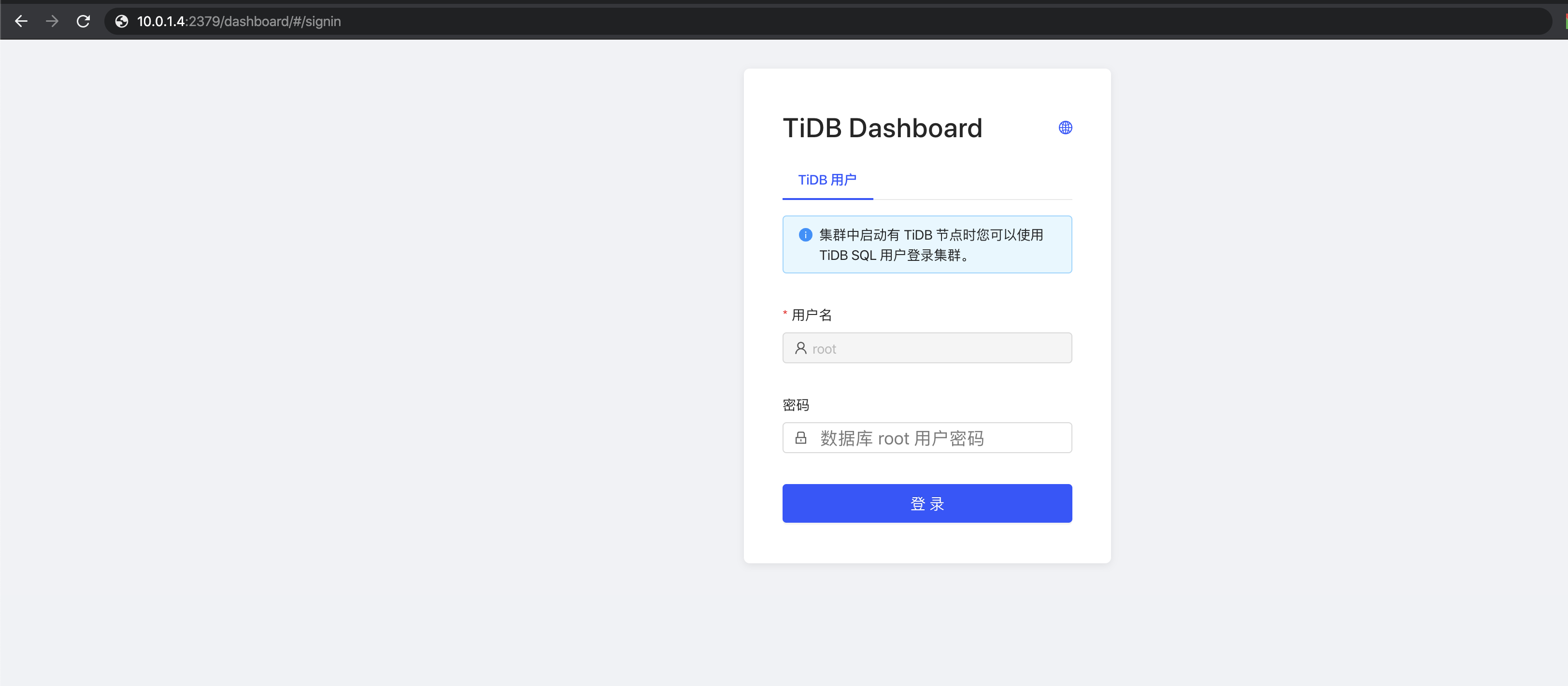
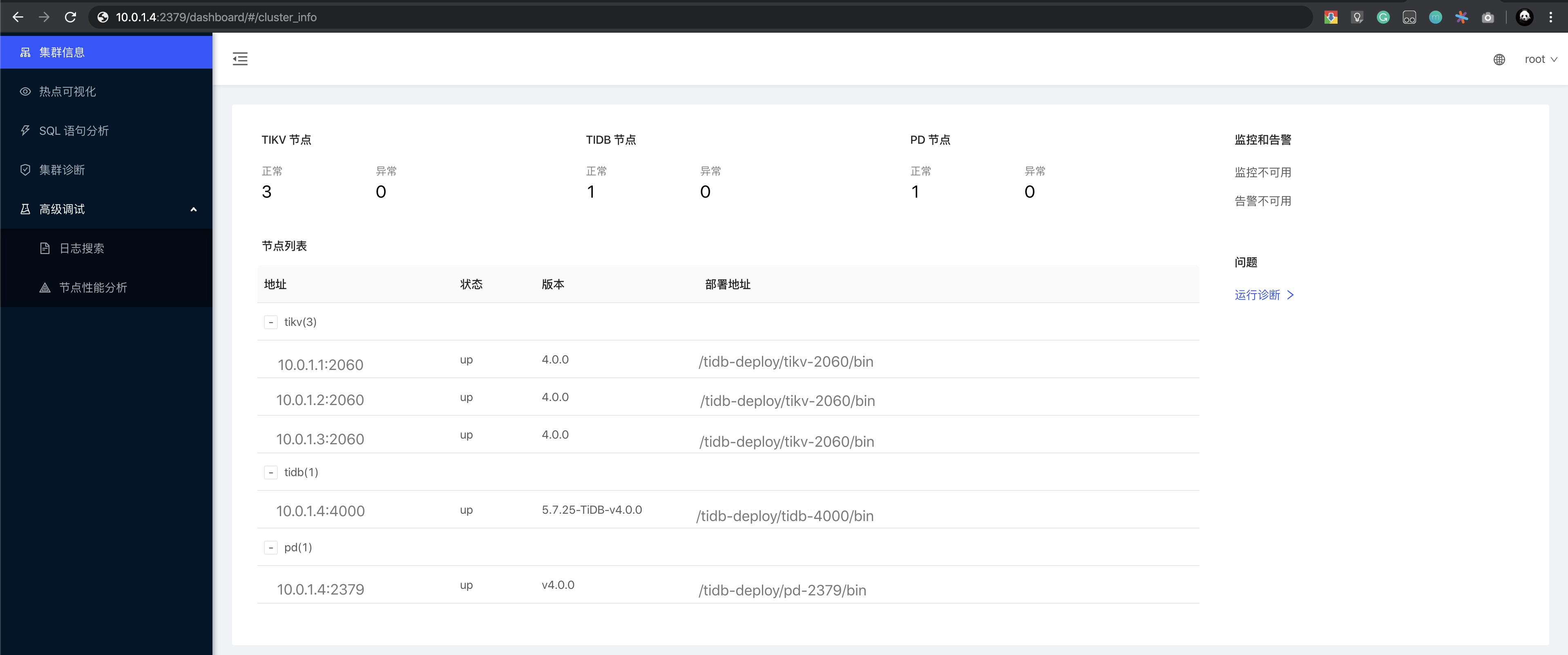
主页面显示 TiDB 集群中节点信息
查看 Grafana 监控 Overview 页面检查 TiDB 集群状态
通过
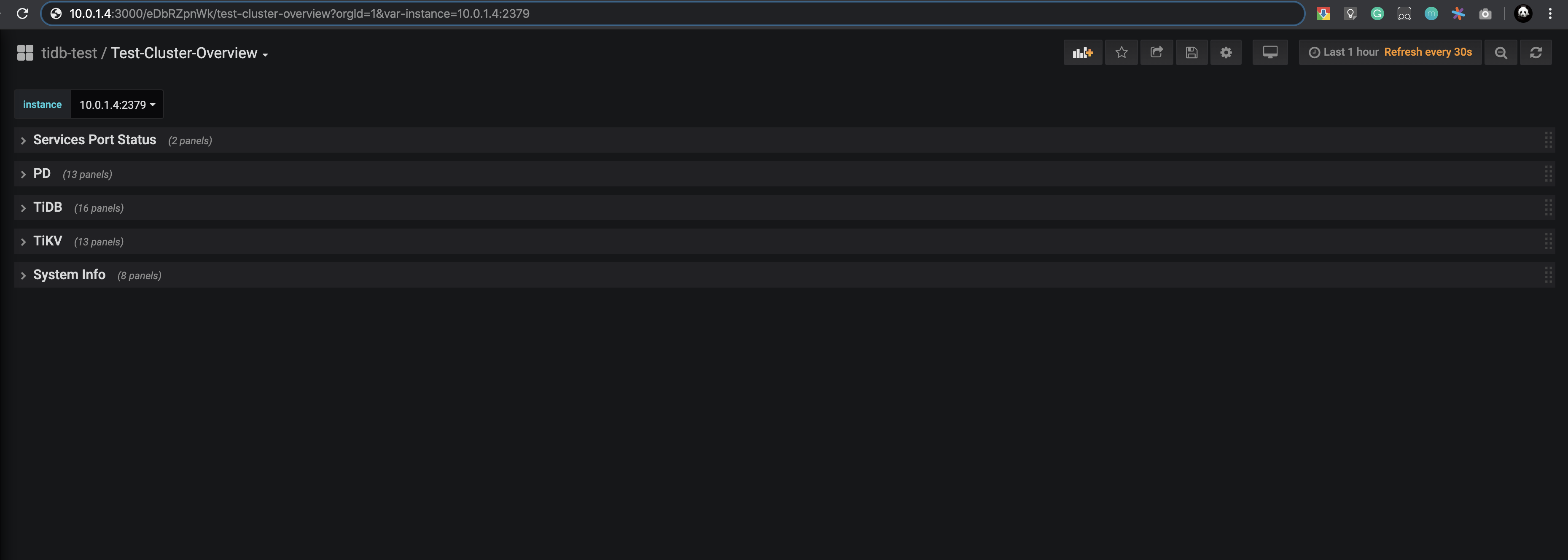
{Grafana-ip}:3000登录 Grafana 监控,默认用户名及密码为 admin/admin
点击 Overview 监控页面检查 TiDB 端口和负载监控信息
第 11 步:登录数据库执行简单 DML、DDL 操作和查询 SQL 语句
注意:
登录数据库前,你需要安装 MySQL 客户端。
执行如下命令登录数据库:
mysql -u root -h 10.0.1.4 -P 4000
数据库操作:
--
-- 登录成功
--
Welcome to the MariaDB monitor.  Commands end with ; or \g.
Your MySQL connection id is 1
Server version: 5.7.25-TiDB-v4..-beta-446-g5268094af TiDB Server (Apache License 2.), MySQL 5.7 compatible

Copyright (c) 2000, 2018, Oracle, MariaDB Corporation Ab and others.

Type 'help;' or '\h' for help. Type '\c' to clear the current input statement.

--
-- 检查 TiDB 版本
--
MySQL [(none)]> select tidb_version()\G
*************************** 1. row ***************************
tidb_version(): Release Version: v4..-beta-446-g5268094af
Git Commit Hash: 5268094afe05c7efef0d91d2deeec428cc85abe6
Git Branch: master
UTC Build Time: 2020-03-17 02:22:07
GoVersion: go1.13
Race Enabled: false
TiKV Min Version: v3..-60965b006877ca7234adaced7890d7b029ed1306
Check Table Before Drop: false
1 row in set (.00 sec)
MySQL [tidb]> create database pingcap;
Query OK,  rows affected (.10 sec)

--
-- 创建 PingCAP database
--
MySQL [(none)]> create database pingcap;
Query OK,  rows affected (.10 sec)

MySQL [(none)]> use pingcap;
Database changed
--
-- 创建 tab_tidb 表
--
MySQL [pingcap]> CREATE TABLE `tab_tidb` (
    ->         `id` int(11) NOT NULL AUTO_INCREMENT,
    ->          `name` varchar(20) NOT NULL DEFAULT '',
    ->          `age` int(11) NOT NULL DEFAULT ,
    ->          `version` varchar(20) NOT NULL DEFAULT '',
    ->           PRIMARY KEY (`id`),
    ->           KEY `idx_age` (`age`));
Query OK,  rows affected (.11 sec)
--
-- 插入数据
--
MySQL [pingcap]> insert into `tab_tidb` values (1,'TiDB',5,'TiDB-v4.0.0');
Query OK, 1 row affected (.03 sec)
--
-- 查看 tab_tidb 结果
--
MySQL [pingcap]> select * from tab_tidb;
+----+------+-----+-------------+
| id | name | age | version     |
+----+------+-----+-------------+
|  1 | TiDB |   5 | TiDB-v4.. |
+----+------+-----+-------------+
1 row in set (.00 sec)
--
-- 查看 TiKV store 状态、store_id、存储情况以及启动时间
--
MySQL [pingcap]> select STORE_ID,ADDRESS,STORE_STATE,STORE_STATE_NAME,CAPACITY,AVAILABLE,UPTIME from INFORMATION_SCHEMA.TIKV_STORE_STATUS;
+----------+--------------------+-------------+------------------+----------+-----------+--------------------+
| STORE_ID | ADDRESS            | STORE_STATE | STORE_STATE_NAME | CAPACITY | AVAILABLE | UPTIME             |
+----------+--------------------+-------------+------------------+----------+-----------+--------------------+
|        1 | 10..1.1:20160 |            | Up               | 49.98GiB | 46.3GiB   | 5h21m52.474864026s |
|        4 | 10..1.2:20160 |            | Up               | 49.98GiB | 46.32GiB  | 5h21m52.522669177s |
|        5 | 10..1.3:20160 |            | Up               | 49.98GiB | 45.44GiB  | 5h21m52.713660541s |
+----------+--------------------+-------------+------------------+----------+-----------+--------------------+
3 rows in set (.00 sec)

MySQL [pingcap]> exit
Bye
关闭集群
执行如下命令关闭 tidb-test 集群:
tiup cluster stop tidb-test
预期结果输出 Stopped cluster `tidb-test` successfully 标志关闭成功。
销毁集群
警告:
生产环境慎重执行,此操作确认后清理任务无法回退。
执行如下命令删除 tidb-test 集群,包括数据、服务:
tiup cluster destroy tidb-test
预期结果输出 Destroy cluster `tidb-test` successfully 标志销毁成功。
常见部署问题
本小节介绍使用 TiUP 部署 TiDB 集群过程中的常见问题与解决方案。
默认端口
| 组件 | 端口变量 | 默认端口 | 说明 |
|---|---|---|---|
| TiDB | port | 4000 | 应用及 DBA 工具访问通信端口 |
| TiDB | status_port | 10080 | TiDB 状态信息上报通信端口 |
| TiKV | port | 20160 | TiKV 通信端口 |
| TiKV | status_port | 20180 | 上报 TiKV 状态的通信端口 |
| PD | client_port | 2379 | 提供 TiDB 和 PD 通信端口 |
| PD | peer_port | 2380 | PD 集群节点间通信端口 |
| Pump | port | 8250 | Pump 通信端口 |
| Drainer | port | 8249 | Drainer 通信端口 |
| CDC | port | 8300 | CDC 通信接口 |
| Prometheus | port | 9090 | Prometheus 服务通信端口 |
| Node_exporter | node_exporter_port | 9100 | TiDB 集群每个节点的系统信息上报通信端口 |
| Blackbox_exporter | blackbox_exporter_port | 9115 | Blackbox_exporter 通信端口,用于 TiDB 集群端口监控 |
| Grafana | grafana_port | 3000 | Web 监控服务对外服务和客户端(浏览器)访问端口 |
| Alertmanager | web_port | 9093 | 告警 web 服务端口 |
| Alertmanager | cluster_port | 9094 | 告警通信端口 |
默认目录
| 模块 | 目录变量 | 默认目录 | 说明 |
|---|---|---|---|
| global | deploy_dir | /home/tidb/deploy | 部署目录 |
| global | data_dir | /home/tidb/data | 数据目录 |
| global | log_dir | /home/tidb/deploy/log | 日志目录 |
| monitored | deploy_dir | /home/tidb/data | 部署目录 |
| monitored | data_dir | /home/tidb/deploy | 数据目录 |
| monitored | log_dir | /home/tidb/deploy | 日志目录 |
| 实例 | deploy_dir | 继承 global 配置 | 部署目录 |
| 实例 | data_dir | 继承 global 配置 | 数据目录 |
| 实例 | log_dir | 继承 global 配置 | 日志目录 |
TiFlash 参数
| 参数 | 默认配置 | 说明 |
|---|---|---|
| ssh_port | 22 | ssh 默认端口 |
| tcp_port | 9000 | TiFlash TCP 服务端口 |
| http_port | 8123 | TiFlash HTTP 服务端口 |
| flash_service_port | 3930 | TiFlash RAFT 服务和 Coprocessor 服务端口 |
| flash_proxy_port | 20170 | TiFlash Proxy 服务端口 |
| flash_proxy_status_port | 20292 | Prometheus 拉取 TiFlash Proxy metrics 端口 |
| metrics_port | 8234 | Prometheus 拉取 TiFlash metrics 端口 |
| deploy_dir | /home/tidb/deploy/tiflash-9000 | TiFlash 部署目录 |
| data_dir | /home/tidb/deploy/tiflash-9000/data | TiFlash 数据存储目录 |
| log_dir | /home/tidb/deploy/tiflash-9000/log | TiFlash 日志存储目录 |
参数模块配置(按照从高到低顺序)
1. 实例参数模块
以 TiDB Server 为例,在实例参数模块的配置,即 “- host” 为分割的实例,是最高优先级应用到目标节点的。
- 实例下的
config配置会优先于server_configs参数模块的配置; - 实例下的
ssh_port、deploy_dir、log_dir配置优先global参数模块的配置;
tidb_servers:
  - host: 10.0.1.11
    ssh_port: 22
    port: 4000
    status_port: 10080
    deploy_dir: "deploy/tidb-4000"
    log_dir: "deploy/tidb-4000/log"
    numa_node: "0,1"
    # The following configs are used to overwrite the `server_configs.tidb` values.
    config:
      log.slow-query-file: tidb-slow-overwritten.log
2. global、server_configs、monitored 参数模块
global参数模块的配置为全局配置,优先级低于实例参数模块的配置。global: user: "tidb" ssh_port: 22 deploy_dir: "deploy" data_dir: "data"server_configs参数模块的配置应用于全局监控配置,优先级低于实例参数模块的配置。server_configs: tidb: log.slow-threshold: 300 binlog.enable: false binlog.ignore-error: false tikv: # server.grpc-concurrency: 4 # raftstore.apply-pool-size: 2 # raftstore.store-pool-size: 2 # rocksdb.max-sub-compactions: 1 # storage.block-cache.capacity: "16GB" # readpool.unified.max-thread-count: 12 readpool.storage.use-unified-pool: false readpool.coprocessor.use-unified-pool: true pd: schedule.leader-schedule-limit: 4 schedule.region-schedule-limit: 2048 schedule.replica-schedule-limit: 64 replication.enable-placement-rules: true pump: gc: 7monitored参数模块应用于被监控的主机,默认端口为 9100 和 9115,目录如果配置,默认会部署在用户的/home目录下,例如global参数模块配置的user为 tidb 用户,默认会配置到/home/tidb目录下。monitored: node_exporter_port: 9100 blackbox_exporter_port: 9115 deploy_dir: "deploy/monitored-9100" data_dir: "data/monitored-9100" log_dir: "deploy/monitored-9100/log"
如何查看 TiUP 支持管理的 TiDB 版本
执行如下命令查看 TiUP 支持管理的 TiDB 版本:
tiup list tidb --refresh
以下输出结果中,Version 为支持的 TiDB 版本,Installed 为当前安装的版本,Release 为发版时间,Platforms 为支持的平台。
Available versions for tidb (Last Modified: 2020-02-26T15:20:35+08:00):
Version        Installed  Release:                             Platforms
-------        ---------  --------                             ---------
master                    2020-03-18T08:39:11.753360611+08:00  linux/amd64,darwin/amd64
v3.0.0                    2020-04-16T14:03:31+08:00            linux/amd64,darwin/amd64
v3.0                      2020-04-16T16:58:06+08:00            linux/amd64,darwin/amd64
v3.0.1                    2020-04-17T18:33:22+08:00            linux/amd64,darwin/amd64
v3.0.2                    2020-04-16T23:55:11+08:00            linux/amd64,darwin/amd64
v3.0.3                    2020-04-17T00:16:31+08:00            linux/amd64,darwin/amd64
v3.0.4                    2020-04-17T00:22:46+08:00            linux/amd64,darwin/amd64
v3.0.5                    2020-04-17T00:29:45+08:00            linux/amd64,darwin/amd64
v3.0.6                    2020-04-17T00:39:33+08:00            linux/amd64,darwin/amd64
v3.0.7                    2020-04-17T00:46:32+08:00            linux/amd64,darwin/amd64
v3.0.8                    2020-04-17T00:54:19+08:00            linux/amd64,darwin/amd64
v3.0.9                    2020-04-17T01:00:58+08:00            linux/amd64,darwin/amd64
v3.0.10                   2020-03-13T14:11:53.774527401+08:00  linux/amd64,darwin/amd64
v3.0.11                   2020-04-17T01:09:20+08:00            linux/amd64,darwin/amd64
v3.0.12                   2020-04-17T01:16:04+08:00            linux/amd64,darwin/amd64
v3.1.0-beta               2020-04-13T16:07:51+08:00            linux/amd64,darwin/amd64
v3.1.0-beta.1             2020-04-13T15:45:38+08:00            linux/amd64,darwin/amd64
v3.1.0-beta.2             2020-03-19T00:48:48.266468238+08:00  linux/amd64,darwin/amd64
v3.1.0-rc                 2020-04-02T23:43:17.456327834+08:00  linux/amd64,darwin/amd64
v3.1.0                    2020-04-17T11:07:54+08:00            linux/amd64,darwin/amd64
v4.0.0-beta               2020-03-13T12:43:55.508190493+08:00  linux/amd64,darwin/amd64
v4.0.0-beta.1             2020-03-13T12:30:08.913759828+08:00  linux/amd64,darwin/amd64
v4.0.0-beta.2             2020-03-18T22:52:00.830626492+08:00  linux/amd64,darwin/amd64
v4.0.0-rc      YES        2020-04-17T01:22:03+08:00            linux/amd64,darwin/amd64
v4.0.0-rc.1               2020-04-29T01:03:31+08:00            darwin/amd64,linux/amd64,linux/arm64
nightly                   2020-04-18T08:54:10+08:00            darwin/amd64,linux/amd64
如何查看 TiUP 支持管理的组件
执行如下命令查看 TiUP 支持管理的组件:
tiup list
以下输出结果中,Name 为支持组件名称,Installed 为当前是否安装,Platforms 为支持的系统平台,Description 为组件描述。
Available components (Last Modified: 2020-02-27T15:20:35+8:00):
Name               Installed    Platforms                             Description
----               ---------    ---------                             -----------
tidb                            darwin/amd64,linux/amd64,linux/arm64  TiDB is an open source distributed HTAP database compatible with the MySQL protocol
tikv                            darwin/amd64,linux/amd64,linux/arm64  Distributed transactional key-value database, originally created to complement TiDB
pd                              darwin/amd64,linux/amd64,linux/arm64  PD is the abbreviation for Placement Driver. It is used to manage and schedule the TiKV cluster
playground                      darwin/amd64,linux/amd64              Bootstrap a local TiDB cluster
client                          darwin/amd64,linux/amd64              A simple mysql client to connect TiDB
prometheus                      darwin/amd64,linux/amd64,linux/arm64  The Prometheus monitoring system and time series database.
package                         darwin/amd64,linux/amd64              A toolbox to package tiup component
grafana                         darwin/amd64,linux/amd64,linux/arm64  Grafana is the open source analytics & monitoring solution for every database
alertmanager                    darwin/amd64,linux/amd64,linux/arm64  Prometheus alertmanager
blackbox_exporter               darwin/amd64,linux/amd64,linux/arm64  Blackbox prober exporter
node_exporter                   darwin/amd64,linux/amd64,linux/arm64  Exporter for machine metrics
pushgateway                     darwin/amd64,linux/amd64,linux/arm64  Push acceptor for ephemeral and batch jobs
drainer                         darwin/amd64,linux/amd64,linux/arm64  The drainer componet of TiDB binlog service
pump                            darwin/amd64,linux/amd64,linux/arm64  The pump componet of TiDB binlog service
cluster            YES(v0.6.0)  darwin/amd64,linux/amd64              Deploy a TiDB cluster for production
mirrors                         darwin/amd64,linux/amd64              Build a local mirrors and download all selected components
bench                           darwin/amd64,linux/amd64              Benchmark database with different workloads
doc                             darwin/amd64,linux/amd64              Online document for TiDB
ctl                             darwin/amd64,linux/amd64,linux/arm64
cdc                             darwin/amd64,linux/amd64,linux/arm64
如何检测 NTP 服务是否正常
执行以下命令,如果输出
running表示 NTP 服务正在运行:sudo systemctl status ntpd.servicentpd.service - Network Time Service Loaded: loaded (/usr/lib/systemd/system/ntpd.service; disabled; vendor preset: disabled) Active: active (running) since 一 2017-12-18 13:13:19 CST; 3s ago执行
ntpstat命令,如果输出synchronised to NTP server(正在与 NTP server 同步),表示在正常同步:ntpstatsynchronised to NTP server (85.199.214.101) at stratum 2 time correct to within 91 ms polling server every 1024 s注意:
Ubuntu 系统需安装
ntpstat软件包。
以下情况表示 NTP 服务未正常同步:
ntpstatunsynchronised以下情况表示 NTP 服务未正常运行:
ntpstatUnable to talk to NTP daemon. Is it running?如果要使 NTP 服务尽快开始同步,执行以下命令。可以将
pool.ntp.org替换为你的 NTP server:sudo systemctl stop ntpd.service && \ sudo ntpdate pool.ntp.org && \ sudo systemctl start ntpd.service如果要在 CentOS 7 系统上手动安装 NTP 服务,可执行以下命令:
sudo yum install ntp ntpdate && \
sudo systemctl start ntpd.service && \
sudo systemctl enable ntpd.service
如何手动配置 SSH 互信及 sudo 免密码
以
root用户依次登录到部署目标机器创建tidb用户并设置登录密码。useradd tidb && \ passwd tidb执行以下命令,将
tidb ALL=(ALL) NOPASSWD: ALL添加到文件末尾,即配置好 sudo 免密码。visudotidb ALL=(ALL) NOPASSWD: ALL以
tidb用户登录到中控机,执行以下命令。将10.0.1.1替换成你的部署目标机器 IP,按提示输入部署目标机器tidb用户密码,执行成功后即创建好 SSH 互信,其他机器同理。ssh-copy-id -i ~/.ssh/id_rsa.pub 10.0.1.1以
tidb用户登录中控机,通过ssh的方式登录目标机器 IP。如果不需要输入密码并登录成功,即表示 SSH 互信配置成功。ssh 10.0.1.1[tidb@10.0.1.1 ~]$以
tidb用户登录到部署目标机器后,执行以下命令,不需要输入密码并切换到root用户,表示tidb用户 sudo 免密码配置成功。sudo -su root[root@10.0.1.1 tidb]#
如何关闭部署机器的防火墙
检查防火墙状态(以 CentOS Linux release 7.7.1908 (Core) 为例)
sudo firewall-cmd --state
sudo systemctl status firewalld.service
关闭防火墙服务
sudo systemctl stop firewalld.service关闭防火墙自动启动服务
sudo systemctl disable firewalld.service检查防火墙状态
sudo systemctl status firewalld.service
如何安装 numactl 工具
注意:
- numa 绑核是用来隔离 CPU 资源一种方法,适合高配置物理机环境部署多实例使用。
- 通过
tiup cluster deploy完成部署操作,就可以通过exec命令来进行集群级别管理工作。
登录到目标节点进行安装(以 CentOS Linux release 7.7.1908 (Core) 为例)
sudo yum -y install numactl通过 TiUP 的 cluster 执行完 exec 命令来完成批量安装
tiup cluster exec --helpRun shell command on host in the tidb cluster Usage: cluster exec <cluster-name> [flags] Flags: --command string the command run on cluster host (default "ls") -h, --help help for exec --sudo use root permissions (default false)操作命令,将 tidb-test 集群所有目标主机通过 sudo 权限执行安装命令
tiup cluster exec tidb-test --sudo --command "yum -y install numactl"
如何关闭系统 swap
TiDB 运行需要有足够的内存,并且不建议使用 swap 作为内存不足的缓冲,这会降低性能。因此建议永久关闭系统 swap,并且不要使用 swapoff -a 方式关闭,否则重启机器后该操作会失效。
建议执行以下命令关闭系统 swap:
echo "vm.swappiness = 0">> /etc/sysctl.conf
swapoff -a && swapon -a
sysctl -p
来自 “ ITPUB博客 ” ,链接:https://blog.itpub.net/31537575/viewspace-3137191/ ,如需转载,请注明出处,否则将追究法律责任。

