| 在这里,我们学习 Shell 脚本中的3种方法来逐行读取文件。 |
方法一、使用输入重定向
逐行读取文件的最简单方法是在while循环中使用输入重定向。
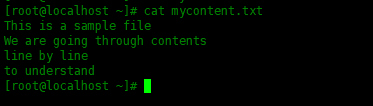
为了演示,在此创建一个名为“ mycontent.txt”的文本文件,文件内容在下面:
[root@localhost ~]# cat mycontent.txt
This is a sample file
We are going through contents
line by line
to understand
创建一个名为“ example1.sh”的
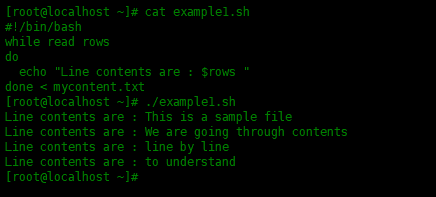
脚本,该脚本使用输入重定向和循环:
[root@localhost ~]# cat example1.sh
#!/bin/bash
while read rows
do
  echo "Line contents are : $rows "
done < mycontent.txt
运行结果:
如何工作的:
- - 开始while循环,并在变量“rows”中保存每一行的内容
- - 使用echo显示输出内容,$rows变量为文本文件中的每行内容
- - 使用echo显示输出内容,输出内容包括自定义的字符串和变量,$rows变量为文本文件中的每行内容
Tips:可以将上面的脚本缩减为一行 命令,如下:
[root@localhost ~]# while read rows; do echo "Line contents are : $rows"; done < mycontent.txt

方法二、使用cat
命令和管道符
第二种方法是使用
cat命令和管道符
|,然后使用管道符将其输出作为输入传送到while循环。
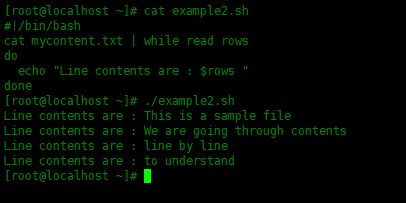
创建脚本文件“ example2.sh”,其内容为:
[root@localhost ~]# cat example2.sh
#!/bin/bash
cat mycontent.txt | while read rows
do
  echo "Line contents are : $rows "
done
运行结果:
如何工作的:
- - 使用管道将cat命令的输出作为输入发送到while循环。
- -
|管道符将cat输出的内容保存在"$rows"变量中。 - - 使用echo显示输出内容,输出内容包括自定义的字符串和变量,$rows变量为文本文件中的每行内容
Tips:可以将上面的脚本缩减为一行命令,如下:
[root@localhost ~]# cat mycontent.txt |while read rows;do echo "Line contents are : $rows";done

方法三、使用传入的文件名作为参数
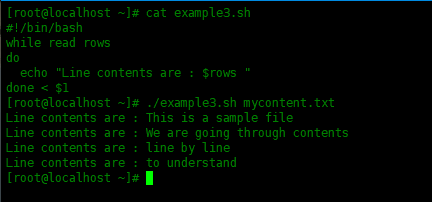
第三种方法将通过添加$1参数,执行脚本时,在脚本后面追加文本文件名称。
创建一个名为“ example3.sh”的脚本文件,如下所示:
[root@localhost ~]# cat example3.sh
#!/bin/bash
while read rows
do
  echo "Line contents are : $rows "
done < $1
运行结果:
如何工作的:
- - 开始while循环,并在变量“rows”中保存每一行的内容
- - 使用echo显示输出内容,$rows变量为文本文件中的每行内容
- - 使用输入重定向
<从命令行参数$1读取文件内容
方法四、使用awk命令
通过使用awk命令,只需要一行命令就可以逐行读取文件内容。
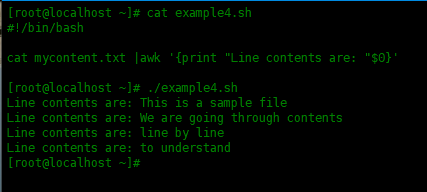
创建一个名为“ example4.sh”的脚本文件,如下所示:
[root@localhost ~]# cat example4.sh
#!/bin/bash
cat mycontent.txt |awk '{print "Line contents are: "$0}'
运行结果:
总结
本文介绍了如何使用shell脚本逐行读取文件内容,通过单独读取行,可以帮助搜索文件中的字符串。
来自 “ ITPUB博客 ” ,链接:https://blog.itpub.net/31524109/viewspace-2781161/ ,如需转载,请注明出处,否则将追究法律责任。

请登录后发表评论
登录
全部评论
