MySQL 学习系列:01_安装部署MySQL 8.2.0 并使用changer master 传统方式搭建部署一主一从操作记录
一、主从复制简介
1.1 什么是主从复制
在日常生产环境中,为解决MySQL单节点故障及提高整体服务性能,通常会使用MySQL主从复制。
MySQL 主从复制指的是将一个主节点MySQL数据复制到一个或多个从节点,从节点具有和主节点同样的数据。
采用主从复制,一方面可以避免当主节点出现故障主库无法访问,可以将业务切到从节点继续对外提供服务。另外为了更好的提高整体服务性能,比如主库可以负责写,从库负责度,做到读写分离,此外如果对数据库进行备份,可以在从库进行操作,降低对主库IO压力,当然主从复制的优势不仅仅只是这些,限于篇幅原因就不多做赘述。
1.2 主从复制原理简介
由于一些政治等方面的原因,MySQL官方已经改变了对MySQL主从的称呼,master被称为source,slave被称为replica,这里为了方便,我还是采用master、slave便于理解的称呼来分别表示主数据库和从数据库。
主数据库(Master):主数据库是数据变更的源头,它负责接收来自应用程序的写操作(INSERT、UPDATE、DELETE)并将这些变更记录到称为二进制日志(binary log)的日志文件中。
从数据库(Slave):从数据库是主数据库的副本,它通过复制主数据库的二进制日志来保持与主数据库的数据同步。从数据库连接到主数据库,请求复制日志,并将这些日志应用到自己的数据库中,以确保数据的一致性。
复制线程(Replication Threads):主数据库和从数据库之间的复制过程是通过复制线程来实现的。主数据库上的主复制线程负责将二进制日志中的数据变更发送给从数据库,而从数据库上的从复制线程则负责接收并应用这些数据变更。
复制过程:复制过程分为三个主要步骤:
主数据库写入数据变更到二进制日志。
从数据库连接到主数据库,请求获取主数据库的二进制日志,然后将这些日志复制到自己的本地日志文件中。
从数据库上的从复制线程读取本地的二进制日志,然后将其中的数据变更应用到从数据库的数据文件中。
延迟和同步问题:由于网络延迟、从数据库负载等因素,从数据库可能无法立即跟上主数据库的变更,导致主从之间的数据同步延迟。为了尽量减少延迟,可以通过优化网络、调整复制线程参数等方式来改善复制性能。
故障恢复:当主数据库发生故障时,可以将一个从数据库提升为新的主数据库,继续为应用程序提供服务。这需要手动干预或者使用自动故障转移工具来实现。
复制拓扑:除了单主单从的复制拓扑之外,还可以构建多主多从、环形复制等复杂的复制拓扑,以满足不同的业务需求和架构设计。
主从复制可以是一对一、一对多、甚至是级联(从服务器自身也作为其他从服务器的主服务器)配置。通过这样的机制,MySQL能够提供一种相对简单且有效的方式来增强数据的可用性和可靠性。
二、数据库部署
关闭防火墙及selinux,具体操作可查询晚上教程,此处略。
参数设置,依赖包安装,本次为测试环境验证测试,此处略,生产环境可参照官网介绍修改。
1.1 环境规划
本次采用两台Centos 7.9服务器用于安装部署MySQL主从。
| IP地址 | 操作系统版本 | 系统架构 | 数据库版本 | 类型 |
|---|---|---|---|---|
| 192.168.73.15 | Centos 7.9 | x86_64 | MySQL 8.2.0 | master |
| 192.168.73.19 | Centos 7.9 | x86_64 | MySQL 8.2.0 | slave |
1.2 数据库安装包下载
登录MySQL官网https://downloads.mysql.com/archives/community/,本次选择二进制安装包部署,参照如下方式选择对应版本和操作系统类型,如下所示。
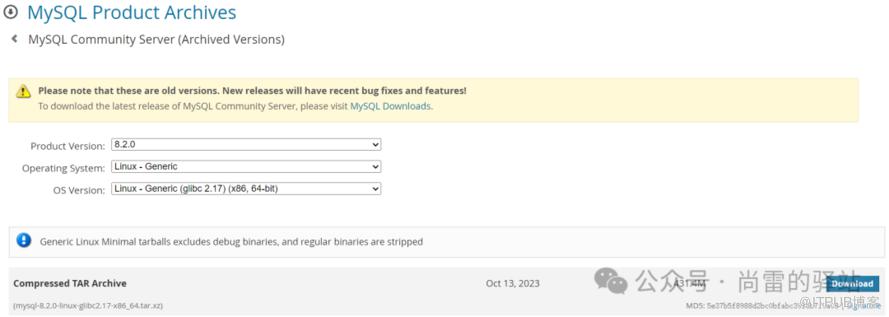
本次选择下载mysql-8.2.0-linux-glibc2.17-x86_64.tar.xz 压缩包,大小为431.4M,将下载的安装包分别上传到主从服务器某个目录下。
解释
-- 主从都需执行如下操作,本次已master节点为例
[root@host19c-node1 opt]# tar -xf mysql-8.2.0-linux-glibc2.17-x86_64.tar.xz
[root@host19c-node1 opt]# mv mysql-8.2.0-linux-glibc2.17-x86_64 /usr/local/mysql
-- 创建用户,主从都需操作
[root@host19c-node1 ~]# id mysql
id: mysql: no such user
[root@host19c-node1 ~]# groupadd mysql
[root@host19c-node1 ~]# useradd -r -g mysql -s /sbin/nologin mysql
[root@host19c-node1 ~]# id mysql
uid=594(mysql) gid=1019(mysql) groups=1019(mysql)
-- 创建目录,主从都需操作
[root@host19c-node1 ~]# mkdir /usr/local/mysql/{data,etc,log}
[root@host19c-node1 ~]# chown -R mysql:mysql /usr/local/mysql/
1.3 卸载mariadb
在部署MySQL 8.2.0之前需要先卸载系统自带的mariadb。
解释
-- 主从都需该操作卸载mariadb,本次以master为例
[root@host19c-node1 ~]# rpm -qa | grep mariadb
mariadb-5.5.68-1.el7.x86_64
mariadb-libs-5.5.68-1.el7.x86_64

解释
-- 使用yum 卸载 mariadb
[root@host19c-node1 ~]# yum remove mariadb-5.5.68-1.el7.x86_64 mariadb-libs-5.5.68-1.el7.x86_64
Resolving Dependencies
--> Running transaction check
---> Package mariadb.x86_64 1:5.5.68-1.el7 will be erased
---> Package mariadb-libs.x86_64 1:5.5.68-1.el7 will be erased
--> Processing Dependency: libmysqlclient.so.18()(64bit) for package: 2:postfix-2.10.1-7.el7.x86_64
--> Processing Dependency: libmysqlclient.so.18(libmysqlclient_18)(64bit) for package: 2:postfix-2.10.1-7.el7.x86_64
--> Running transaction check
---> Package postfix.x86_64 2:2.10.1-7.el7 will be erased
--> Finished Dependency Resolution
Dependencies Resolved
========================================================================================================
Package Arch Version Repository Size
========================================================================================================
Removing:
mariadb x86_64 1:5.5.68-1.el7 @base 49 M
mariadb-libs x86_64 1:5.5.68-1.el7 @base 4.4 M
Removing for dependencies:
postfix x86_64 2:2.10.1-7.el7 @anaconda 12 M
Transaction Summary
================================================================================================
Remove 2 Packages (+1 Dependent package)
Installed size: 65 M
Is this ok [y/N]: y
Downloading packages:
Running transaction check
Running transaction test
Transaction test succeeded
Running transaction
Erasing : 1:mariadb-5.5.68-1.el7.x86_64 1/3
Erasing : 2:postfix-2.10.1-7.el7.x86_64 2/3
Erasing : 1:mariadb-libs-5.5.68-1.el7.x86_64 3/3
Verifying : 2:postfix-2.10.1-7.el7.x86_64 1/3
Verifying : 1:mariadb-libs-5.5.68-1.el7.x86_64 2/3
Verifying : 1:mariadb-5.5.68-1.el7.x86_64 3/3
Removed:
mariadb.x86_64 1:5.5.68-1.el7 mariadb-libs.x86_64 1:5.5.68-1.el7
Dependency Removed:
postfix.x86_64 2:2.10.1-7.el7
Complete!
1.4 编辑my.cnf配置文件
解释
-- 主从都需操作
-- master主库my.cnf配置文件如下
[root@host19c-node1 ~]# sudo tee /usr/local/mysql/etc/my.cnf <<-'EOF'
port = 3306
socket = /usr/local/mysql/data/mysql.sock
[mysqld]
port = 3306
mysqlx_port = 33060
mysqlx_socket = /usr/local/mysql/data/mysqlx.sock
basedir = /usr/local/mysql
datadir = /usr/local/mysql/data
socket = /usr/local/mysql/data/mysql.sock
pid-file = /usr/local/mysql/data/mysqld.pid
log-error = /usr/local/mysql/log/error.log
default-authentication-plugin = caching_sha2_password
log_timestamps = SYSTEM
server-id = 15
log-bin = mysql-bin
innodb-file-per-table = ON
skip_name_resolve = ON
EOF
-- slave从库my.cnf配置文件如下
[root@tsops ~]# sudo tee /usr/local/mysql/etc/my.cnf <<-'EOF'
[mysql]
port = 3306
socket = /usr/local/mysql/data/mysql.sock
[mysqld]
port = 3306
mysqlx_port = 33060
mysqlx_socket = /usr/local/mysql/data/mysqlx.sock
basedir = /usr/local/mysql
datadir = /usr/local/mysql/data
socket = /usr/local/mysql/data/mysql.sock
pid-file = /usr/local/mysql/data/mysqld.pid
log-error = /usr/local/mysql/log/error.log
default-authentication-plugin = caching_sha2_password
log_timestamps = SYSTEM
relay-log=relay-log
relay-log-index=relay-log.index
server-id = 19
log-bin = mysql-bin
innodb-file-per-table = ON
skip_name_resolve = ON
EOF
# 以上配置文件各参数含义如下:
port:指定MySQL服务器监听的端口号。在这里,端口号被设置为3306,与主服务器相同。
mysqlx_port:指定MySQL X协议的端口号。这里设置为33060
mysqlx_socket:指定MySQL X协议的UNIX套接字路径。
basedir:指定MySQL安装的根目录
datadir:指定MySQL数据文件的存储目录
socket:指定MySQL服务器监听的UNIX套接字路径
pid-file:指定MySQL服务器进程的PID文件路径
log-error:指定MySQL错误日志文件的路径
default-authentication-plugin:指定默认的身份验证插件。在这里,使用的是caching_sha2_password插件
log_timestamps:指定日志时间戳的格式,在这里,设置为SYSTEM
relay-log:指定从服务器的中继日志文件的前缀
relay-log-index:指定从服务器的中继日志索引文件
server-id:设置服务器的唯一标识符,在主从复制中,每个服务器都必须具有不同的server_id
log-bin:启用二进制日志,并指定二进制日志文件的前缀,与主服务器相同。
innodb-file-per-table:设置InnoDB存储引擎创建每个表的单独文件
skip_name_resolve:禁用MySQL对客户端的反向DNS查找
-- 修改my.cnf属主,主从都需修改
[root@xxx ~]# chown mysql.mysql /usr/local/mysql/etc/my.cnf
1.5 初始化数据库
解释
-- 主从都需操作,此处以master为例
[root@host19c-node1 ~]# /usr/local/mysql/bin/mysqld --initialize --user=mysql --basedir=/usr/local/mysql --datadir=/usr/local/mysql/data
-- 如上述操作未有任何提示,表名初始化顺利
--- 初始化后,查看数据库日志,查找初始化root临时口令,负责无法进入数据库
[root@host19c-node1 ~]# tail -10f /usr/local/mysql/log/error.log
2024-02-18T17:29:14.191874+08:00 0 [System] [MY-015017] [Server] MySQL Server Initialization - start.
2024-02-18T17:29:14.195337+08:00 0 [System] [MY-013169] [Server] /usr/local/mysql/bin/mysqld (mysqld 8.2.0) initializing of server in progress as process 3726
2024-02-18T17:29:14.278615+08:00 1 [System] [MY-013576] [InnoDB] InnoDB initialization has started.
2024-02-18T17:29:17.412812+08:00 1 [System] [MY-013577] [InnoDB] InnoDB initialization has ended.
2024-02-18T17:29:26.638433+08:00 6 [Note] [MY-010454] [Server] A temporary password is generated for root@localhost: sn3hQySHe:kd
2024-02-18T17:29:43.653677+08:00 0 [System] [MY-015018] [Server] MySQL Server Initialization - end.
========================如my.cnf使用default-authentication-plugin = mysql_native_password 会有如下提示,会提示在MySQL 8版本mysql_native_password是一个过期参数,使用caching_sha2_password代替
[root@host19c-node1 ~]# tail -10f /usr/local/mysql/log/error.log
2024-02-18T17:09:41.071589+08:00 0 [System] [MY-015017] [Server] MySQL Server Initialization - start.
2024-02-18T17:09:41.074776+08:00 0 [Warning] [MY-010918] [Server] 'default_authentication_plugin' is deprecated and will be removed in a future release. Please use authentication_policy instead.
2024-02-18T17:09:41.074832+08:00 0 [System] [MY-013169] [Server] /usr/local/mysql/bin/mysqld (mysqld 8.2.0) initializing of server in progress as process 1850
2024-02-18T17:09:41.106682+08:00 1 [System] [MY-013576] [InnoDB] InnoDB initialization has started.
2024-02-18T17:09:44.121499+08:00 1 [System] [MY-013577] [InnoDB] InnoDB initialization has ended.
2024-02-18T17:09:53.122309+08:00 6 [Note] [MY-010454] [Server] A temporary password is generated for root@localhost: r.plumgwK5Lu
2024-02-18T17:09:54.817835+08:00 6 [Warning] [MY-013360] [Server] Plugin mysql_native_password reported: ''mysql_native_password' is deprecated and will be removed in a future release. Please use caching_sha2_password instead'
2024-02-18T17:10:08.690401+08:00 0 [System] [MY-015018] [Server] MySQL Server Initialization - end.

上图红色圈住的即为初始化root临时口令。
1.6 启动数据库并设置环境变量
解释
-- 主从都需操作,此处以master为例
-- 启动数据库
[root@host19c-node1 ~]# cp /usr/local/mysql/support-files/mysql.server /etc/init.d/mysqld
[root@host19c-node1 ~]# /etc/init.d/mysqld start
Starting MySQL.. SUCCESS!
-- 设置环境变量
[root@host19c-node1 ~]# cat >> /etc/profile <<EOF
PATH=$PATH:$HOME/bin:/usr/local/mysql/bin
EOF
-- 生效环境变量
[root@host19c-node1 ~]# source /etc/profile
1.7 重置root口令
解释
-- 主从都需操作,此处以master为例
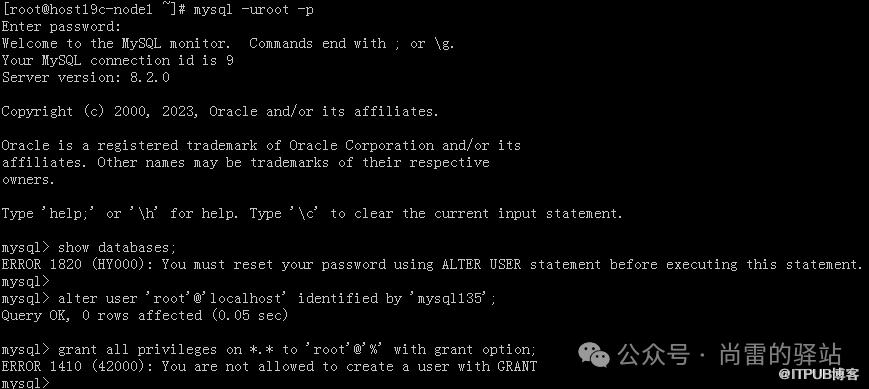
[root@host19c-node1 ~]# mysql -uroot -p
Enter password:
Welcome to the MySQL monitor. Commands end with ; or \g.
Your MySQL connection id is 9
Server version: 8.2.0
Copyright (c) 2000, 2023, Oracle and/or its affiliates.
Oracle is a registered trademark of Oracle Corporation and/or its
affiliates. Other names may be trademarks of their respective
owners.
Type 'help;' or '\h' for help. Type '\c' to clear the current input statement.
mysql> show databases;
ERROR 1820 (HY000): You must reset your password using ALTER USER statement before executing this statement.
mysql>
mysql> alter user 'root'@'localhost' identified by 'mysql135';
Query OK, 0 rows affected (0.05 sec)
[root@host19c-node1 ~]# mysql -uroot -p
Enter password:
Welcome to the MySQL monitor. Commands end with ; or \g.
Your MySQL connection id is 11
Server version: 8.2.0 MySQL Community Server - GPL
Copyright (c) 2000, 2023, Oracle and/or its affiliates.
Oracle is a registered trademark of Oracle Corporation and/or its
affiliates. Other names may be trademarks of their respective
owners.
Type 'help;' or '\h' for help. Type '\c' to clear the current input statement.
mysql> use mysql;
Reading table information for completion of table and column names
You can turn off this feature to get a quicker startup with -A
Database changed
mysql> create user 'root'@'%' identified by 'mysql135';
Query OK, 0 rows affected (0.05 sec)
mysql> grant all privileges on *.* to 'root'@'%' with grant option;
Query OK, 0 rows affected (0.10 sec)
mysql> select host,user,authentication_string,plugin from user;
+-----------+------------------+------------------------------------------+-----------------------+
| host | user | authentication_string | plugin |
+-----------+------------------+------------------------------------------+-----------------------+
Oux0mnNxZatsr7TjHF/iRnBzQC24Iw7.0ZzeU6pMCayXB | caching_sha2_password |
| localhost | mysql.infoschema | $A$005$THISISACOMBINATIONOFINVALIDSALTANDPASSWORDTHATMUSTNEVERBRBEUSED | caching_sha2_password |
| localhost | mysql.session | $A$005$THISISACOMBINATIONOFINVALIDSALTANDPASSWORDTHATMUSTNEVERBRBEUSED | caching_sha2_password |
| localhost | mysql.sys | $A$005$THISISACOMBINATIONOFINVALIDSALTANDPASSWORDTHATMUSTNEVERBRBEUSED | caching_sha2_password |
.)0'->%1fg.LS2E4rEUGxM5k13UINvKLvHimv9vO7ZPrIlwH32b5 | caching_sha2_password |
+-----------+------------------+------------------------------------------+-----------------------+
5 rows in set (0.00 sec)

三、配置主从
3.1 主库创建复制账号
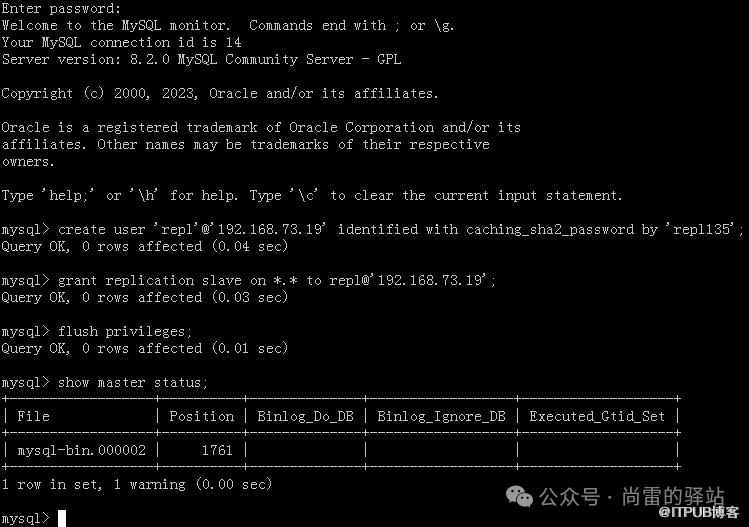
主库创建repl复制账号,并记录当前二进制日志文件名称及Position信息。
解释
--- 主库
[root@host19c-node1 ~]# mysql -uroot -p
Enter password:
Welcome to the MySQL monitor. Commands end with ; or \g.
Your MySQL connection id is 14
Server version: 8.2.0 MySQL Community Server - GPL
Copyright (c) 2000, 2023, Oracle and/or its affiliates.
Oracle is a registered trademark of Oracle Corporation and/or its
affiliates. Other names may be trademarks of their respective
owners.
Type 'help;' or '\h' for help. Type '\c' to clear the current input statement.
mysql> create user 'repl'@'192.168.73.19' identified with caching_sha2_password by 'repl135';
Query OK, 0 rows affected (0.04 sec)
mysql> grant replication slave on *.* to repl@'192.168.73.19';
Query OK, 0 rows affected (0.03 sec)
mysql> flush privileges;
Query OK, 0 rows affected (0.01 sec)
mysql> show master status;
+------------------+----------+--------------+------------------+-------------------+
| File | Position | Binlog_Do_DB | Binlog_Ignore_DB | Executed_Gtid_Set |
+------------------+----------+--------------+------------------+-------------------+
| mysql-bin.000002 | 1761 | | | |
+------------------+----------+--------------+------------------+-------------------+
1 row in set, 1 warning (0.00 sec)
3.2 从库设置主库节点参数
解释
-- slave从库设置master节点参数
[root@tsops /]# mysql -uroot -p -S /usr/local/mysql/data/mysql.sock
Enter password:
Welcome to the MySQL monitor. Commands end with ; or \g.
Your MySQL connection id is 9
Server version: 8.2.0 MySQL Community Server - GPL
Copyright (c) 2000, 2023, Oracle and/or its affiliates.
Oracle is a registered trademark of Oracle Corporation and/or its
affiliates. Other names may be trademarks of their respective
owners.
Type 'help;' or '\h' for help. Type '\c' to clear the current input statement.
mysql>
mysql> CHANGE MASTER TO MASTER_HOST='192.168.73.15', MASTER_USER='repl', MASTER_PASSWORD='repl135', MASTER_LOG_FILE='mysql-bin.000002', MASTER_LOG_POS=1761, MASTER_CONNECT_RETRY=30, GET_MASTER_PUBLIC_KEY=1;
Query OK, 0 rows affected, 10 warnings (0.27 sec)
mysql> start slave;
Query OK, 0 rows affected, 1 warning (0.08 sec)
mysql> show slave status\G
*************************** 1. row ***************************
Slave_IO_State: Waiting for source to send event
Master_Host: 192.168.73.15
Master_User: repl
Master_Port: 3306
Connect_Retry: 30
Master_Log_File: mysql-bin.000002
Read_Master_Log_Pos: 1952
Relay_Log_File: relay-log.000002
Relay_Log_Pos: 326
Relay_Master_Log_File: mysql-bin.000002
Slave_IO_Running: Yes
Slave_SQL_Running: Yes
Replicate_Do_DB:
Replicate_Ignore_DB:
Replicate_Do_Table:
Replicate_Ignore_Table:
Replicate_Wild_Do_Table:
Replicate_Wild_Ignore_Table:
Last_Errno: 0
Last_Error:
Skip_Counter: 0
Exec_Master_Log_Pos: 1952
Relay_Log_Space: 530
Until_Condition: None
Until_Log_File:
Until_Log_Pos: 0
Master_SSL_Allowed: No
Master_SSL_CA_File:
Master_SSL_CA_Path:
Master_SSL_Cert:
Master_SSL_Cipher:
Master_SSL_Key:
Seconds_Behind_Master: 0
Master_SSL_Verify_Server_Cert: No
Last_IO_Errno: 0
Last_IO_Error:
Last_SQL_Errno: 0
Last_SQL_Error:
Replicate_Ignore_Server_Ids:
Master_Server_Id: 15
Master_UUID: 2e2710bf-ce40-11ee-aba8-b82a72cf1abe
Master_Info_File: mysql.slave_master_info
SQL_Delay: 0
SQL_Remaining_Delay: NULL
Slave_SQL_Running_State: Replica has read all relay log; waiting for more updates
Master_Retry_Count: 10
Master_Bind:
Last_IO_Error_Timestamp:
Last_SQL_Error_Timestamp:
Master_SSL_Crl:
Master_SSL_Crlpath:
Retrieved_Gtid_Set:
Executed_Gtid_Set:
Auto_Position: 0
Replicate_Rewrite_DB:
Channel_Name:
Master_TLS_Version:
Master_public_key_path:
Get_master_public_key: 1
Network_Namespace:
1 row in set, 1 warning (0.00 sec)
mysql> show binary logs;
+------------------+-----------+-----------+
| Log_name | File_size | Encrypted |
+------------------+-----------+-----------+
| mysql-bin.000001 | 180 | No |
| mysql-bin.000002 | 1047 | No |
| mysql-bin.000003 | 157 | No |
+------------------+-----------+-----------+
3 rows in set (0.00 sec)
mysql> show variables like "log_bin";
+---------------+-------+
| Variable_name | Value |
+---------------+-------+
| log_bin | ON |
+---------------+-------+
1 row in set (0.00 sec)
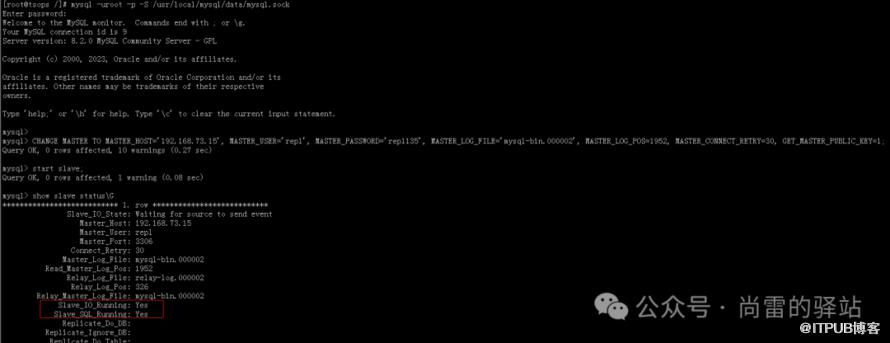
Slave_IO_Running:表示从服务器的I/O线程(复制I/O线程)是否正在运行。当值为Yes时,表示I/O线程正在运行,从主服务器读取二进制日志文件。当值为No时,表示I/O线程已停止,可能由于网络故障或其他原因导致无法连接到主服务器。

Slave_SQL_Running:表示从服务器的SQL线程(复制SQL线程)是否正在运行。当值为Yes时,表示SQL线程正在运行,将接收到的二进制日志内容应用到从服务器的数据库中。当值为No时,表示SQL线程已停止,可能由于应用二进制日志时出现错误。
解释
-- 此时可在slave通过 select * from performance_schema.replication_applier_status_by_worker \G 查看数据库性能模式及复制应用程序工作状态,如果同步正常,信息如下:
mysql> select * from performance_schema.replication_applier_status_by_worker \G
*************************** 1. row ***************************
CHANNEL_NAME:
WORKER_ID: 1
THREAD_ID: 81
SERVICE_STATE: ON
LAST_ERROR_NUMBER: 0
LAST_ERROR_MESSAGE:
LAST_ERROR_TIMESTAMP: 0000-00-00 00:00:00.000000
LAST_APPLIED_TRANSACTION: ANONYMOUS
LAST_APPLIED_TRANSACTION_ORIGINAL_COMMIT_TIMESTAMP: 2024-02-19 10:39:03.728729
LAST_APPLIED_TRANSACTION_IMMEDIATE_COMMIT_TIMESTAMP: 2024-02-19 10:39:03.728729
LAST_APPLIED_TRANSACTION_START_APPLY_TIMESTAMP: 2024-02-19 10:39:03.745666
LAST_APPLIED_TRANSACTION_END_APPLY_TIMESTAMP: 2024-02-19 10:39:04.125859
APPLYING_TRANSACTION:
APPLYING_TRANSACTION_ORIGINAL_COMMIT_TIMESTAMP: 0000-00-00 00:00:00.000000
APPLYING_TRANSACTION_IMMEDIATE_COMMIT_TIMESTAMP: 0000-00-00 00:00:00.000000
APPLYING_TRANSACTION_START_APPLY_TIMESTAMP: 0000-00-00 00:00:00.000000
LAST_APPLIED_TRANSACTION_RETRIES_COUNT: 0
LAST_APPLIED_TRANSACTION_LAST_TRANSIENT_ERROR_NUMBER: 0
LAST_APPLIED_TRANSACTION_LAST_TRANSIENT_ERROR_MESSAGE:
LAST_APPLIED_TRANSACTION_LAST_TRANSIENT_ERROR_TIMESTAMP: 0000-00-00 00:00:00.000000
APPLYING_TRANSACTION_RETRIES_COUNT: 0
APPLYING_TRANSACTION_LAST_TRANSIENT_ERROR_NUMBER: 0
APPLYING_TRANSACTION_LAST_TRANSIENT_ERROR_MESSAGE:
APPLYING_TRANSACTION_LAST_TRANSIENT_ERROR_TIMESTAMP: 0000-00-00 00:00:00.000000
*************************** 2. row ***************************
CHANNEL_NAME:
WORKER_ID: 2
THREAD_ID: 82
SERVICE_STATE: ON
LAST_ERROR_NUMBER: 0
LAST_ERROR_MESSAGE:
LAST_ERROR_TIMESTAMP: 0000-00-00 00:00:00.000000
LAST_APPLIED_TRANSACTION:
LAST_APPLIED_TRANSACTION_ORIGINAL_COMMIT_TIMESTAMP: 0000-00-00 00:00:00.000000
LAST_APPLIED_TRANSACTION_IMMEDIATE_COMMIT_TIMESTAMP: 0000-00-00 00:00:00.000000
LAST_APPLIED_TRANSACTION_START_APPLY_TIMESTAMP: 0000-00-00 00:00:00.000000
LAST_APPLIED_TRANSACTION_END_APPLY_TIMESTAMP: 0000-00-00 00:00:00.000000
APPLYING_TRANSACTION:
APPLYING_TRANSACTION_ORIGINAL_COMMIT_TIMESTAMP: 0000-00-00 00:00:00.000000
APPLYING_TRANSACTION_IMMEDIATE_COMMIT_TIMESTAMP: 0000-00-00 00:00:00.000000
APPLYING_TRANSACTION_START_APPLY_TIMESTAMP: 0000-00-00 00:00:00.000000
LAST_APPLIED_TRANSACTION_RETRIES_COUNT: 0
LAST_APPLIED_TRANSACTION_LAST_TRANSIENT_ERROR_NUMBER: 0
LAST_APPLIED_TRANSACTION_LAST_TRANSIENT_ERROR_MESSAGE:
LAST_APPLIED_TRANSACTION_LAST_TRANSIENT_ERROR_TIMESTAMP: 0000-00-00 00:00:00.000000
APPLYING_TRANSACTION_RETRIES_COUNT: 0
APPLYING_TRANSACTION_LAST_TRANSIENT_ERROR_NUMBER: 0
APPLYING_TRANSACTION_LAST_TRANSIENT_ERROR_MESSAGE:
APPLYING_TRANSACTION_LAST_TRANSIENT_ERROR_TIMESTAMP: 0000-00-00 00:00:00.000000
*************************** 3. row ***************************
CHANNEL_NAME:
WORKER_ID: 3
THREAD_ID: 83
SERVICE_STATE: ON
LAST_ERROR_NUMBER: 0
LAST_ERROR_MESSAGE:
LAST_ERROR_TIMESTAMP: 0000-00-00 00:00:00.000000
LAST_APPLIED_TRANSACTION:
LAST_APPLIED_TRANSACTION_ORIGINAL_COMMIT_TIMESTAMP: 0000-00-00 00:00:00.000000
LAST_APPLIED_TRANSACTION_IMMEDIATE_COMMIT_TIMESTAMP: 0000-00-00 00:00:00.000000
LAST_APPLIED_TRANSACTION_START_APPLY_TIMESTAMP: 0000-00-00 00:00:00.000000
LAST_APPLIED_TRANSACTION_END_APPLY_TIMESTAMP: 0000-00-00 00:00:00.000000
APPLYING_TRANSACTION:
APPLYING_TRANSACTION_ORIGINAL_COMMIT_TIMESTAMP: 0000-00-00 00:00:00.000000
APPLYING_TRANSACTION_IMMEDIATE_COMMIT_TIMESTAMP: 0000-00-00 00:00:00.000000
APPLYING_TRANSACTION_START_APPLY_TIMESTAMP: 0000-00-00 00:00:00.000000
LAST_APPLIED_TRANSACTION_RETRIES_COUNT: 0
LAST_APPLIED_TRANSACTION_LAST_TRANSIENT_ERROR_NUMBER: 0
LAST_APPLIED_TRANSACTION_LAST_TRANSIENT_ERROR_MESSAGE:
LAST_APPLIED_TRANSACTION_LAST_TRANSIENT_ERROR_TIMESTAMP: 0000-00-00 00:00:00.000000
APPLYING_TRANSACTION_RETRIES_COUNT: 0
APPLYING_TRANSACTION_LAST_TRANSIENT_ERROR_NUMBER: 0
APPLYING_TRANSACTION_LAST_TRANSIENT_ERROR_MESSAGE:
APPLYING_TRANSACTION_LAST_TRANSIENT_ERROR_TIMESTAMP: 0000-00-00 00:00:00.000000
*************************** 4. row ***************************
CHANNEL_NAME:
WORKER_ID: 4
THREAD_ID: 84
SERVICE_STATE: ON
LAST_ERROR_NUMBER: 0
LAST_ERROR_MESSAGE:
LAST_ERROR_TIMESTAMP: 0000-00-00 00:00:00.000000
LAST_APPLIED_TRANSACTION:
LAST_APPLIED_TRANSACTION_ORIGINAL_COMMIT_TIMESTAMP: 0000-00-00 00:00:00.000000
LAST_APPLIED_TRANSACTION_IMMEDIATE_COMMIT_TIMESTAMP: 0000-00-00 00:00:00.000000
LAST_APPLIED_TRANSACTION_START_APPLY_TIMESTAMP: 0000-00-00 00:00:00.000000
LAST_APPLIED_TRANSACTION_END_APPLY_TIMESTAMP: 0000-00-00 00:00:00.000000
APPLYING_TRANSACTION:
APPLYING_TRANSACTION_ORIGINAL_COMMIT_TIMESTAMP: 0000-00-00 00:00:00.000000
APPLYING_TRANSACTION_IMMEDIATE_COMMIT_TIMESTAMP: 0000-00-00 00:00:00.000000
APPLYING_TRANSACTION_START_APPLY_TIMESTAMP: 0000-00-00 00:00:00.000000
LAST_APPLIED_TRANSACTION_RETRIES_COUNT: 0
LAST_APPLIED_TRANSACTION_LAST_TRANSIENT_ERROR_NUMBER: 0
LAST_APPLIED_TRANSACTION_LAST_TRANSIENT_ERROR_MESSAGE:
LAST_APPLIED_TRANSACTION_LAST_TRANSIENT_ERROR_TIMESTAMP: 0000-00-00 00:00:00.000000
APPLYING_TRANSACTION_RETRIES_COUNT: 0
APPLYING_TRANSACTION_LAST_TRANSIENT_ERROR_NUMBER: 0
APPLYING_TRANSACTION_LAST_TRANSIENT_ERROR_MESSAGE:
APPLYING_TRANSACTION_LAST_TRANSIENT_ERROR_TIMESTAMP: 0000-00-00 00:00:00.000000
4 rows in set (0.00 sec)
四、附录
在部署主从过程中,可能会遇到如下一些故障。
4.1 Authentication报错
因我在MySQL 8.2.0配置文件使用了 caching_sha2_password 插件验证方式,在从库开启同步后,执行show slave status 显示有报错信息。
解释 -- 从库执行: CHANGE MASTER TO MASTER_HOST='192.168.73.15', MASTER_USER='repl', MASTER_PASSWORD='repl135', MASTER_LOG_FILE='mysql-bin.000002', MASTER_LOG_POS=1761, MASTER_CONNECT_RETRY=30;
 -- 然后启动slave,再执行show slave status \G; 显示如下报错信息。
[root@tsops /]# mysql -uroot -p -S /usr/local/mysql/data/mysql.sock
Enter password:
Welcome to the MySQL monitor.  Commands end with ; or \g.
Your MySQL connection id is 13
Server version: 8.2.0 MySQL Community Server - GPL

Copyright (c) 2000, 2023, Oracle and/or its affiliates.

Oracle is a registered trademark of Oracle Corporation and/or its
affiliates. Other names may be trademarks of their respective
owners.

Type 'help;' or '\h' for help. Type '\c' to clear the current input statement.

mysql> CHANGE MASTER TO MASTER_HOST='192.168.73.15', MASTER_USER='repl', MASTER_PASSWORD='repl135', MASTER_LOG_FILE='mysql-bin.000002', MASTER_LOG_POS=1761, MASTER_CONNECT_RETRY=20;
Query OK, 0 rows affected, 9 warnings (0.38 sec)

mysql> start slave;
Query OK, 0 rows affected, 1 warning (0.11 sec)

mysql> show slave status\G
*************************** 1. row ***************************
               Slave_IO_State: Connecting to source
                  Master_Host: 192.168.73.15
                  Master_User: repl
                  Master_Port: 3306
                Connect_Retry: 20
              Master_Log_File: mysql-bin.000002
          Read_Master_Log_Pos: 1761
               Relay_Log_File: tsops-relay-bin.000001
                Relay_Log_Pos: 4
        Relay_Master_Log_File: mysql-bin.000002
             Slave_IO_Running: Connecting
            Slave_SQL_Running: Yes
              Replicate_Do_DB:
          Replicate_Ignore_DB:
           Replicate_Do_Table:
       Replicate_Ignore_Table:
      Replicate_Wild_Do_Table:
  Replicate_Wild_Ignore_Table:
                   Last_Errno: 0
                   Last_Error:
                 Skip_Counter: 0
          Exec_Master_Log_Pos: 1761
              Relay_Log_Space: 157
              Until_Condition: None
               Until_Log_File:
                Until_Log_Pos: 0
           Master_SSL_Allowed: No
           Master_SSL_CA_File:
           Master_SSL_CA_Path:
              Master_SSL_Cert:
            Master_SSL_Cipher:
               Master_SSL_Key:
        Seconds_Behind_Master: NULL
Master_SSL_Verify_Server_Cert: No
                Last_IO_Errno: 2061
                Last_IO_Error: Error connecting to source 'repl@192.168.73.15:3306'. This was attempt 2/10, with a delay of 20 seconds between attempts. Message: Authentication plugin 'caching_sha2_password' reported error: Authentication requires secure connection.
               Last_SQL_Errno: 0
               Last_SQL_Error:
  Replicate_Ignore_Server_Ids:
             Master_Server_Id: 0
                  Master_UUID:
             Master_Info_File: mysql.slave_master_info
                    SQL_Delay: 0
          SQL_Remaining_Delay: NULL
      Slave_SQL_Running_State: Replica has read all relay log; waiting for more updates
           Master_Retry_Count: 10
                  Master_Bind:
      Last_IO_Error_Timestamp: 240219 09:38:15
     Last_SQL_Error_Timestamp:
               Master_SSL_Crl:
           Master_SSL_Crlpath:
           Retrieved_Gtid_Set:
            Executed_Gtid_Set:
                Auto_Position: 0
         Replicate_Rewrite_DB:
                 Channel_Name:
           Master_TLS_Version:
       Master_public_key_path:
        Get_master_public_key: 0
            Network_Namespace:
1 row in set, 1 warning (0.00 sec)

mysql> show slave status\G
*************************** 1. row ***************************
               Slave_IO_State:
                  Master_Host: 192.168.73.15
                  Master_User: repl
                  Master_Port: 3306
                Connect_Retry: 20
              Master_Log_File: mysql-bin.000002
          Read_Master_Log_Pos: 1761
               Relay_Log_File: tsops-relay-bin.000001
                Relay_Log_Pos: 4
        Relay_Master_Log_File: mysql-bin.000002
             Slave_IO_Running: No
            Slave_SQL_Running: Yes
              Replicate_Do_DB:
          Replicate_Ignore_DB:
           Replicate_Do_Table:
       Replicate_Ignore_Table:
      Replicate_Wild_Do_Table:
  Replicate_Wild_Ignore_Table:
                   Last_Errno: 0
                   Last_Error:
                 Skip_Counter: 0
          Exec_Master_Log_Pos: 1761
              Relay_Log_Space: 157
              Until_Condition: None
               Until_Log_File:
                Until_Log_Pos: 0
           Master_SSL_Allowed: No
           Master_SSL_CA_File:
           Master_SSL_CA_Path:
              Master_SSL_Cert:
            Master_SSL_Cipher:
               Master_SSL_Key:
        Seconds_Behind_Master: NULL
Master_SSL_Verify_Server_Cert: No
                Last_IO_Errno: 2061
                Last_IO_Error: Error connecting to source 'repl@192.168.73.15:3306'. This was attempt 10/10, with a delay of 20 seconds between attempts. Message: Authentication plugin 'caching_sha2_password' reported error: Authentication requires secure connection.
               Last_SQL_Errno: 0
               Last_SQL_Error:
  Replicate_Ignore_Server_Ids:
             Master_Server_Id: 0
                  Master_UUID:
             Master_Info_File: mysql.slave_master_info
                    SQL_Delay: 0
          SQL_Remaining_Delay: NULL
      Slave_SQL_Running_State: Replica has read all relay log; waiting for more updates
           Master_Retry_Count: 10
                  Master_Bind:
      Last_IO_Error_Timestamp: 240219 09:40:55
     Last_SQL_Error_Timestamp:
               Master_SSL_Crl:
           Master_SSL_Crlpath:
           Retrieved_Gtid_Set:
            Executed_Gtid_Set:
                Auto_Position: 0
         Replicate_Rewrite_DB:
                 Channel_Name:
           Master_TLS_Version:
       Master_public_key_path:
        Get_master_public_key: 0
            Network_Namespace:
1 row in set, 1 warning (0.00 sec)

mysql> stop slave;
Query OK, 0 rows affected, 1 warning (0.01 sec)

mysql> reset slave all;
Query OK, 0 rows affected, 1 warning (0.18 sec)

此报错是因为MySQL 8.0开始密码加密都是采用caching_sha2_password方式,网上查询了下有两种方式可以解决。
第一种方式,是将caching_sha2_password修改为mysql_native_password传统方式,采用如下方式修改
alter user ‘repl’@’%’ identified with mysql_native_password by ‘xxx’;
第二种方式,是在从库设置change master参数时添加 get_master_public_key=1 参数。
解释
1) 首先从库执行 stop slave;
2) 清除从库配置 reset slave all;
3) 重新设置从库参数:CHANGE MASTER TO MASTER_HOST='192.168.73.15', MASTER_USER='repl', MASTER_PASSWORD='repl135', MASTER_LOG_FILE='mysql-bin.000002', MASTER_LOG_POS=1761, MASTER_CONNECT_RETRY=30, GET_MASTER_PUBLIC_KEY=1;
4) 启动从库 start slave;
4.2 failed executing transaction ‘ANONYMOUS’
当开启了主从同步后,如果在从库上创建库表,并在主库上也创建同样的库表,就会报如下错误。
解释
mysql> show slave status\G
*************************** 1. row ***************************
Slave_IO_State: Waiting for source to send event
Master_Host: 192.168.73.15
Master_User: repl
Master_Port: 3306
Connect_Retry: 30
Master_Log_File: mysql-bin.000002
Read_Master_Log_Pos: 2150
Relay_Log_File: relay-log.000002
Relay_Log_Pos: 326
Relay_Master_Log_File: mysql-bin.000002
Slave_IO_Running: Yes
Slave_SQL_Running: No
Replicate_Do_DB:
Replicate_Ignore_DB:
Replicate_Do_Table:
Replicate_Ignore_Table:
Replicate_Wild_Do_Table:
Replicate_Wild_Ignore_Table:
Last_Errno: 1049
Last_Error: Coordinator stopped because there were error(s) in the worker(s). The most recent failure being: Worker 1 failed executing transaction 'ANONYMOUS' at source log mysql-bin.000002, end_log_pos 2150. See error log and/or performance_schema.replication_applier_status_by_worker table for more details about this failure or others, if any.
Skip_Counter: 0
Exec_Master_Log_Pos: 1952
Relay_Log_Space: 728
Until_Condition: None
Until_Log_File:
Until_Log_Pos: 0
Master_SSL_Allowed: No
Master_SSL_CA_File:
Master_SSL_CA_Path:
Master_SSL_Cert:
Master_SSL_Cipher:
Master_SSL_Key:
Seconds_Behind_Master: NULL
Master_SSL_Verify_Server_Cert: No
Last_IO_Errno: 0
Last_IO_Error:
Last_SQL_Errno: 1049
Last_SQL_Error: Coordinator stopped because there were error(s) in the worker(s). The most recent failure being: Worker 1 failed executing transaction 'ANONYMOUS' at source log mysql-bin.000002, end_log_pos 2150. See error log and/or performance_schema.replication_applier_status_by_worker table for more details about this failure or others, if any.
Replicate_Ignore_Server_Ids:
Master_Server_Id: 15
Master_UUID: 2e2710bf-ce40-11ee-aba8-b82a72cf1abe
Master_Info_File: mysql.slave_master_info
SQL_Delay: 0
SQL_Remaining_Delay: NULL
Slave_SQL_Running_State:
Master_Retry_Count: 10
Master_Bind:
Last_IO_Error_Timestamp:
Last_SQL_Error_Timestamp: 240219 09:55:39
Master_SSL_Crl:
Master_SSL_Crlpath:
Retrieved_Gtid_Set:
Executed_Gtid_Set:
Auto_Position: 0
Replicate_Rewrite_DB:
Channel_Name:
Master_TLS_Version:
Master_public_key_path:
Get_master_public_key: 1
Network_Namespace:
1 row in set, 1 warning (0.00 sec)
mysql> select * from performance_schema.replication_applier_status_by_worker \G
*************************** 1. row ***************************
CHANNEL_NAME:
WORKER_ID: 1
THREAD_ID: NULL
SERVICE_STATE: OFF
LAST_ERROR_NUMBER: 1049
LAST_ERROR_MESSAGE: Worker 1 failed executing transaction 'ANONYMOUS' at source log mysql-bin.000002, end_log_pos 2150; Error 'Unknown database 'aigcdb'' on query. Default database: 'aigcdb'. Query: 'create table tb01(id int(10))'
LAST_ERROR_TIMESTAMP: 2024-02-19 09:55:39.379676
LAST_APPLIED_TRANSACTION:
LAST_APPLIED_TRANSACTION_ORIGINAL_COMMIT_TIMESTAMP: 0000-00-00 00:00:00.000000
LAST_APPLIED_TRANSACTION_IMMEDIATE_COMMIT_TIMESTAMP: 0000-00-00 00:00:00.000000
LAST_APPLIED_TRANSACTION_START_APPLY_TIMESTAMP: 0000-00-00 00:00:00.000000
LAST_APPLIED_TRANSACTION_END_APPLY_TIMESTAMP: 0000-00-00 00:00:00.000000
APPLYING_TRANSACTION: ANONYMOUS
APPLYING_TRANSACTION_ORIGINAL_COMMIT_TIMESTAMP: 2024-02-19 09:55:39.365500
APPLYING_TRANSACTION_IMMEDIATE_COMMIT_TIMESTAMP: 2024-02-19 09:55:39.365500
APPLYING_TRANSACTION_START_APPLY_TIMESTAMP: 2024-02-19 09:55:39.378138
LAST_APPLIED_TRANSACTION_RETRIES_COUNT: 0
LAST_APPLIED_TRANSACTION_LAST_TRANSIENT_ERROR_NUMBER: 0
LAST_APPLIED_TRANSACTION_LAST_TRANSIENT_ERROR_MESSAGE:
LAST_APPLIED_TRANSACTION_LAST_TRANSIENT_ERROR_TIMESTAMP: 0000-00-00 00:00:00.000000
APPLYING_TRANSACTION_RETRIES_COUNT: 0
APPLYING_TRANSACTION_LAST_TRANSIENT_ERROR_NUMBER: 0
APPLYING_TRANSACTION_LAST_TRANSIENT_ERROR_MESSAGE:
APPLYING_TRANSACTION_LAST_TRANSIENT_ERROR_TIMESTAMP: 0000-00-00 00:00:00.000000
*************************** 2. row ***************************
CHANNEL_NAME:
WORKER_ID: 2
THREAD_ID: NULL
SERVICE_STATE: OFF
LAST_ERROR_NUMBER: 0
LAST_ERROR_MESSAGE:
LAST_ERROR_TIMESTAMP: 0000-00-00 00:00:00.000000
LAST_APPLIED_TRANSACTION:
LAST_APPLIED_TRANSACTION_ORIGINAL_COMMIT_TIMESTAMP: 0000-00-00 00:00:00.000000
LAST_APPLIED_TRANSACTION_IMMEDIATE_COMMIT_TIMESTAMP: 0000-00-00 00:00:00.000000
LAST_APPLIED_TRANSACTION_START_APPLY_TIMESTAMP: 0000-00-00 00:00:00.000000
LAST_APPLIED_TRANSACTION_END_APPLY_TIMESTAMP: 0000-00-00 00:00:00.000000
APPLYING_TRANSACTION:
APPLYING_TRANSACTION_ORIGINAL_COMMIT_TIMESTAMP: 0000-00-00 00:00:00.000000
APPLYING_TRANSACTION_IMMEDIATE_COMMIT_TIMESTAMP: 0000-00-00 00:00:00.000000
APPLYING_TRANSACTION_START_APPLY_TIMESTAMP: 0000-00-00 00:00:00.000000
LAST_APPLIED_TRANSACTION_RETRIES_COUNT: 0
LAST_APPLIED_TRANSACTION_LAST_TRANSIENT_ERROR_NUMBER: 0
LAST_APPLIED_TRANSACTION_LAST_TRANSIENT_ERROR_MESSAGE:
LAST_APPLIED_TRANSACTION_LAST_TRANSIENT_ERROR_TIMESTAMP: 0000-00-00 00:00:00.000000
APPLYING_TRANSACTION_RETRIES_COUNT: 0
APPLYING_TRANSACTION_LAST_TRANSIENT_ERROR_NUMBER: 0
APPLYING_TRANSACTION_LAST_TRANSIENT_ERROR_MESSAGE:
APPLYING_TRANSACTION_LAST_TRANSIENT_ERROR_TIMESTAMP: 0000-00-00 00:00:00.000000
*************************** 3. row ***************************
CHANNEL_NAME:
WORKER_ID: 3
THREAD_ID: NULL
SERVICE_STATE: OFF
LAST_ERROR_NUMBER: 0
LAST_ERROR_MESSAGE:
LAST_ERROR_TIMESTAMP: 0000-00-00 00:00:00.000000
LAST_APPLIED_TRANSACTION:
LAST_APPLIED_TRANSACTION_ORIGINAL_COMMIT_TIMESTAMP: 0000-00-00 00:00:00.000000
LAST_APPLIED_TRANSACTION_IMMEDIATE_COMMIT_TIMESTAMP: 0000-00-00 00:00:00.000000
LAST_APPLIED_TRANSACTION_START_APPLY_TIMESTAMP: 0000-00-00 00:00:00.000000
LAST_APPLIED_TRANSACTION_END_APPLY_TIMESTAMP: 0000-00-00 00:00:00.000000
APPLYING_TRANSACTION:
APPLYING_TRANSACTION_ORIGINAL_COMMIT_TIMESTAMP: 0000-00-00 00:00:00.000000
APPLYING_TRANSACTION_IMMEDIATE_COMMIT_TIMESTAMP: 0000-00-00 00:00:00.000000
APPLYING_TRANSACTION_START_APPLY_TIMESTAMP: 0000-00-00 00:00:00.000000
LAST_APPLIED_TRANSACTION_RETRIES_COUNT: 0
LAST_APPLIED_TRANSACTION_LAST_TRANSIENT_ERROR_NUMBER: 0
LAST_APPLIED_TRANSACTION_LAST_TRANSIENT_ERROR_MESSAGE:
LAST_APPLIED_TRANSACTION_LAST_TRANSIENT_ERROR_TIMESTAMP: 0000-00-00 00:00:00.000000
APPLYING_TRANSACTION_RETRIES_COUNT: 0
APPLYING_TRANSACTION_LAST_TRANSIENT_ERROR_NUMBER: 0
APPLYING_TRANSACTION_LAST_TRANSIENT_ERROR_MESSAGE:
APPLYING_TRANSACTION_LAST_TRANSIENT_ERROR_TIMESTAMP: 0000-00-00 00:00:00.000000
*************************** 4. row ***************************
CHANNEL_NAME:
WORKER_ID: 4
THREAD_ID: NULL
SERVICE_STATE: OFF
LAST_ERROR_NUMBER: 0
LAST_ERROR_MESSAGE:
LAST_ERROR_TIMESTAMP: 0000-00-00 00:00:00.000000
LAST_APPLIED_TRANSACTION:
LAST_APPLIED_TRANSACTION_ORIGINAL_COMMIT_TIMESTAMP: 0000-00-00 00:00:00.000000
LAST_APPLIED_TRANSACTION_IMMEDIATE_COMMIT_TIMESTAMP: 0000-00-00 00:00:00.000000
LAST_APPLIED_TRANSACTION_START_APPLY_TIMESTAMP: 0000-00-00 00:00:00.000000
LAST_APPLIED_TRANSACTION_END_APPLY_TIMESTAMP: 0000-00-00 00:00:00.000000
APPLYING_TRANSACTION:
APPLYING_TRANSACTION_ORIGINAL_COMMIT_TIMESTAMP: 0000-00-00 00:00:00.000000
APPLYING_TRANSACTION_IMMEDIATE_COMMIT_TIMESTAMP: 0000-00-00 00:00:00.000000
APPLYING_TRANSACTION_START_APPLY_TIMESTAMP: 0000-00-00 00:00:00.000000
LAST_APPLIED_TRANSACTION_RETRIES_COUNT: 0
LAST_APPLIED_TRANSACTION_LAST_TRANSIENT_ERROR_NUMBER: 0
LAST_APPLIED_TRANSACTION_LAST_TRANSIENT_ERROR_MESSAGE:
LAST_APPLIED_TRANSACTION_LAST_TRANSIENT_ERROR_TIMESTAMP: 0000-00-00 00:00:00.000000
APPLYING_TRANSACTION_RETRIES_COUNT: 0
APPLYING_TRANSACTION_LAST_TRANSIENT_ERROR_NUMBER: 0
APPLYING_TRANSACTION_LAST_TRANSIENT_ERROR_MESSAGE:
APPLYING_TRANSACTION_LAST_TRANSIENT_ERROR_TIMESTAMP: 0000-00-00 00:00:00.000000
4 rows in set (0.01 sec)
此时解决办法,就是停从库slave,然后重置从库配置参数,删除创建的库表,让数据库保持干净状态,按照主库的二进制日志文件和postion信息在从库重新执行change master。
五、总结
本次测试仅为学习验证,使用最MySQL自带的最传统的方式部署主从。一般部署主从,会是主库在运行一段时间后,产生的大量数据,此时,就需要通过MySQL的备份恢复来部署主从。
另外该方式部署主从也存在很多弊端,比如当主库出现异常,可能会导致从库丢数据。
此外当主从运行一段时间后,通过postion去查找信息也比较麻烦,在从库设置changer master时容易数据不一致。
目前一般使用GTID方式来替代这种传统方式部署主从。
后面将会使用GTID方式来部署主从。
因之前对MySQL掌握较少,写文章也是记录自己学习MySQL过程,内容粗浅,请多多见谅。
原文作者:尚雷的驿站;如有侵权,请联系管理员删除。

最新文章
- 记一次 Oracle 19c RAC 因为硬件时钟异常导致 CRS 无法正常启动故障处理记录
- AI万能胶:从挂钩到黏合,一切都靠“智”造
- 跟着博主学习 Halo 数据库带你高薪带你飞
- 【故障处理系列】elasticsearch 索引未正常分片导致集群状态异常如何分析处理
- Elasticsearch max_result_window 含义及参数调整
- Oracle ACE夜话--和首席-总监一起跟大家谈一谈分布式数据库
- openGauss 6.0.0 一主二备集群安装及使用zcbus实现Oracle到openGauss的数据全量和增量同步
- ES检测kibana端口是否宕并自动拉起进程
- clickhouse备份恢复学习分享
- 臭宝,满足您的需求,上大招,今天再分享一个我编写且非常好用处理Elasticsearch集群异常状态的脚本
