上一章节我们讲了如何创建数据库,接下来我们来讨论如何去选择我们创建的数据库。
数据库的命令窗口
PostgreSQL 命令窗口中,我们可以命令提示符后面输入 SQL 语句:
postgres=#
使用 \l 用于查看已经存在的数据库:
postgres=# \l
                             List of databases
   Name    |  Owner   | Encoding | Collate | Ctype |   Access privileges
-----------+----------+----------+---------+-------+-----------------------
 postgres  | postgres | UTF8     | C       | C     |
 runoobdb  | postgres | UTF8     | C       | C     |
 template0 | postgres | UTF8     | C       | C     | =c/postgres          +
           |          |          |         |       | postgres=CTc/postgres
 template1 | postgres | UTF8     | C       | C     | =c/postgres          +
           |          |          |         |       | postgres=CTc/postgres
(4 rows)
接下来我们可以使用 \c + 数据库名 来进入数据库:
postgres=# \c runoobdb
You are now connected to database "runoobdb" as user "postgres".
runoobdb=#
系统命令行窗口
在系统的命令行查看,我么可以在连接数据库后面添加数据库名来选择数据库:
$ psql -h localhost -p 5432 -U postgress testdb
Password for user postgress: ****
psql (11.3)
Type "help" for help.
You are now connected to database "runoobdb" as user "postgres".
runoobdb=#
pgAdmin 工具
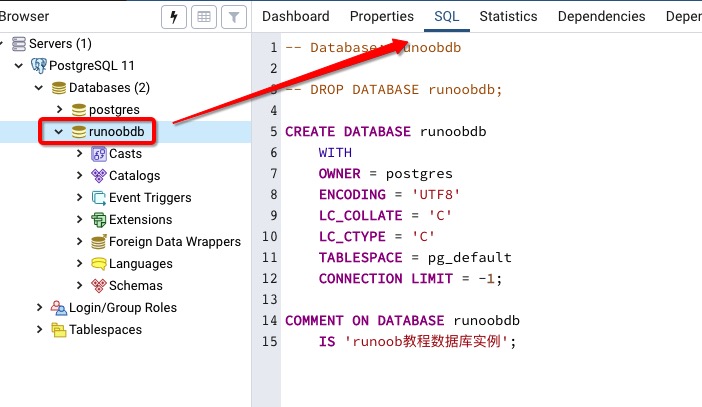
pgAdmin 工具更简单了,直接点击数据库选择就好了,还可以查看一些数据库额外的信息:
来自 “ ITPUB博客 ” ,链接:https://blog.itpub.net/31509949/viewspace-3147312/ ,如需转载,请注明出处,否则将追究法律责任。

请登录后发表评论
登录
全部评论
最新文章
- GitHub 上已有 1400+ Claude Code Skills,真正在用的就这几个
- 开多个 Agent 后 Claude Code 账单翻了 4 倍,一个配置解决了
- 2026 年了,你还不会写 Claude Code Skill?AI 工具的下一个标准已经定了
- Claude Code v2.1.139 新增 Agent 视图颠覆了工作流,这次设计比功能更值得看
- Google 开源了一个14900 Star 项目,让 AI Agent 碰数据库不再是定时炸弹
- 总觉得Claude Code 写完代码有问题?我用了一个开源 Skill 编排了 7 阶段严谨开发工作流,拦下 10 个 Critical Bug
- Spring AI Session API:大多数人用 ChatMemory 用错了场景
- R语言实战:个人贷款违约预测模型 (基于银行的个人金融业务数据进行分析)
- 汽车 4S 集团 BI 数据可视化分析案例
- IT基础架构运维服务认知
