引言
前文 TiDB 源码编译之 PD/TiDB Dashboard 篇 演示了如何编译 PD 和 TiDB Dashboard 组件,本文继续谈谈 TiUP,对于 TiUP 组件的重要意义也已经在去年的文章 TiUP:TiDBAer 必备利器 中充分阐述,不再赘述,直接上干货。
TiUP 编译
源码仓库
TiUP 的源码在 PingCAP 的 org 下,
目标地址为: https://github.com/pingcap/tiup/
需要注意的是,去年十月,bench 压测组件的源码独立成单独仓库 ( #2055 ),
目标地址变更为: https://github.com/PingCAP-QE/tiup-bench
编译执行
TiUP 主要语言也是 Go,所以编译依赖于前文相似,但注意到 TiUP 仍旧使用的 1.18, 所以这里提了个 Issue ( Upgrade golang version to 1.20 #2239 )记录一下。
# 下载源码
git clone https://github.com/shawn0915/tiup
# 执行编译
cd tiup
make
编译很丝滑,中间有提示 25 个 WARN,但不影响编译进程。只要网络没问题(由于某些资源依赖在 GitHub 上,所以需要靠谱的梯子)就可以顺利编译。
[root@shawnyan tiup]# make
gofmt (simplify)
goimports (if installed)
linting
  ⚠  https://revive.run/r#cognitive-complexity  function newImportCmd has cognitive complexity 51 (> max enabled 48)
  ./components/cluster/command/import.go:31:1
  ⚠  https://revive.run/r#cognitive-complexity  function (*Manager).Deploy has cognitive complexity 66 (> max enabled 48)
  ./pkg/cluster/manager/deploy.go:57:1
...
⚠ 25 problems (0 errors, 25 warnings)
Warnings:
  25  cognitive-complexity
go mod tidy
./tools/check/check-tidy.sh
GO111MODULE=on CGO_ENABLED=0 GOOS=linux GOARCH=amd64 go vet ./...
make -C components/client
make[1]: Entering directory `/root/tiup/components/client'
gofmt (simplify)
goimports (if installed)
linting
go mod tidy
../../tools/check/check-tidy.sh
go: downloading github.com/spf13/cobra v1.3.0
go: downloading github.com/xo/usql v0.9.5
...
go: downloading github.com/go-sql-driver/mysql v1.6.0
...
GO111MODULE=on CGO_ENABLED=0 GOOS=linux GOARCH=amd64 go vet ./...
GO111MODULE=on CGO_ENABLED=0 GOOS=linux GOARCH=amd64 go build  -ldflags '-w -s -X "github.com/pingcap/tiup/pkg/version.GitHash=041760d-dirty" -X "github.com/pingcap/tiup/pkg/version.GitRef=pr-shawnyan-0806" ' -o ../../bin/tiup-client .
make[1]: Leaving directory `/root/tiup/components/client'
GO111MODULE=on CGO_ENABLED=0 GOOS=linux GOARCH=amd64 go build  -ldflags '-w -s -X "github.com/pingcap/tiup/pkg/version.GitHash=041760d-dirty" -X "github.com/pingcap/tiup/pkg/version.GitRef=pr-shawnyan-0806" ' -o bin/tiup-cluster ./components/cluster
GO111MODULE=on CGO_ENABLED=0 GOOS=linux GOARCH=amd64 go build  -ldflags '-w -s -X "github.com/pingcap/tiup/pkg/version.GitHash=041760d-dirty" -X "github.com/pingcap/tiup/pkg/version.GitRef=pr-shawnyan-0806" ' -o bin/tiup-dm ./components/dm
GO111MODULE=on CGO_ENABLED=0 GOOS=linux GOARCH=amd64 go build  -ldflags '-w -s -X "github.com/pingcap/tiup/pkg/version.GitHash=041760d-dirty" -X "github.com/pingcap/tiup/pkg/version.GitRef=pr-shawnyan-0806" ' -o bin/tiup-server ./server
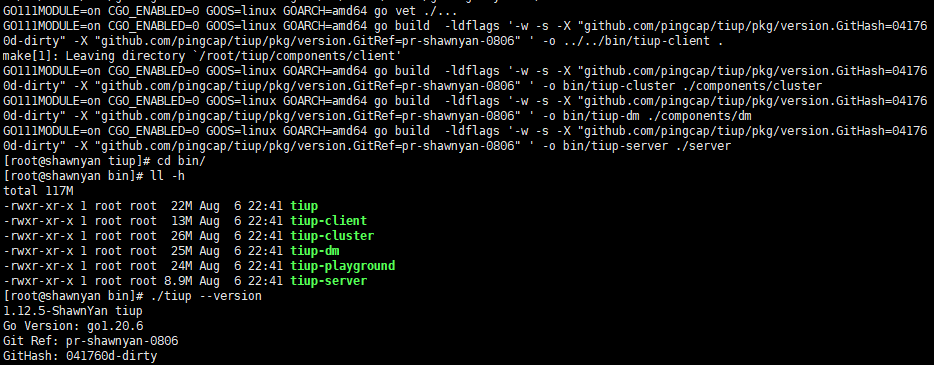
编译完成后,查看版本信息,为了便于识别演示,这里修改了 branch 和版本号。
投入使用
编译好的二进制文件在
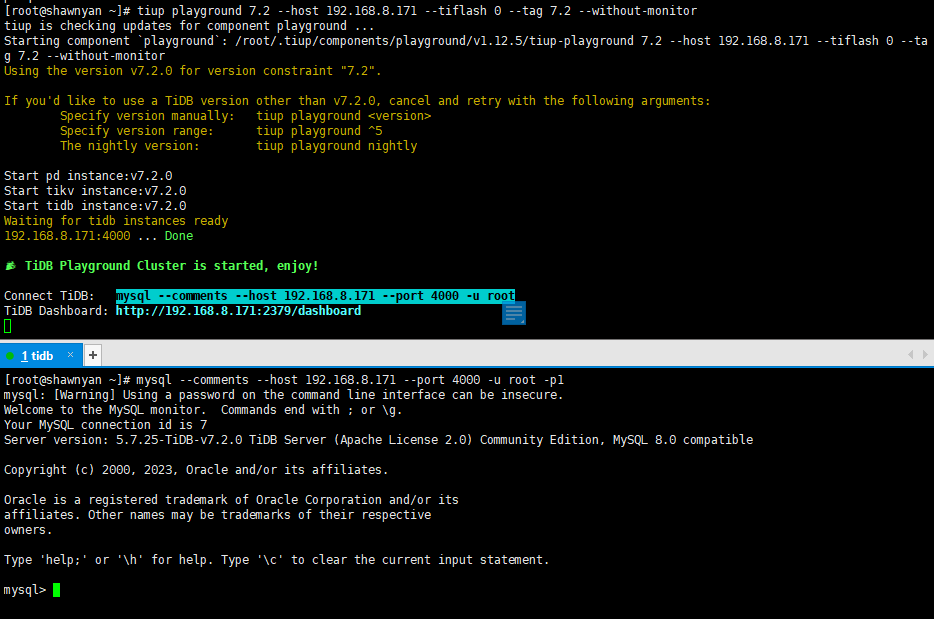
bin 目录下,可以推送到私有 mirror 库,也可以替换本地的二进制文件进行验证测试。起一个 playground 进行测试可以正常使用。
感谢 @wish 大佬的 pr (#2163),修改了启动展示效果,看起来生动许多。
TiUP 新特性
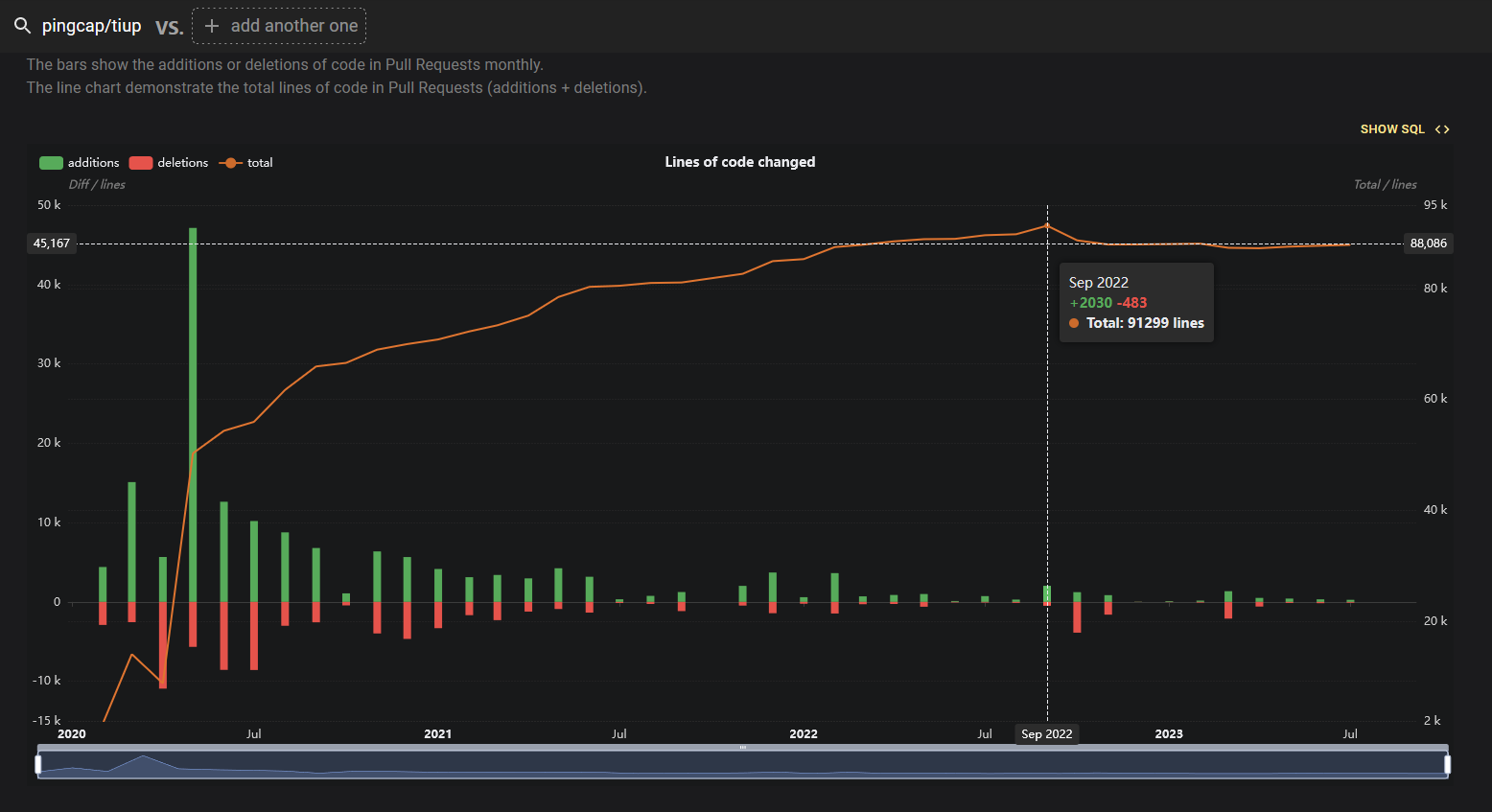
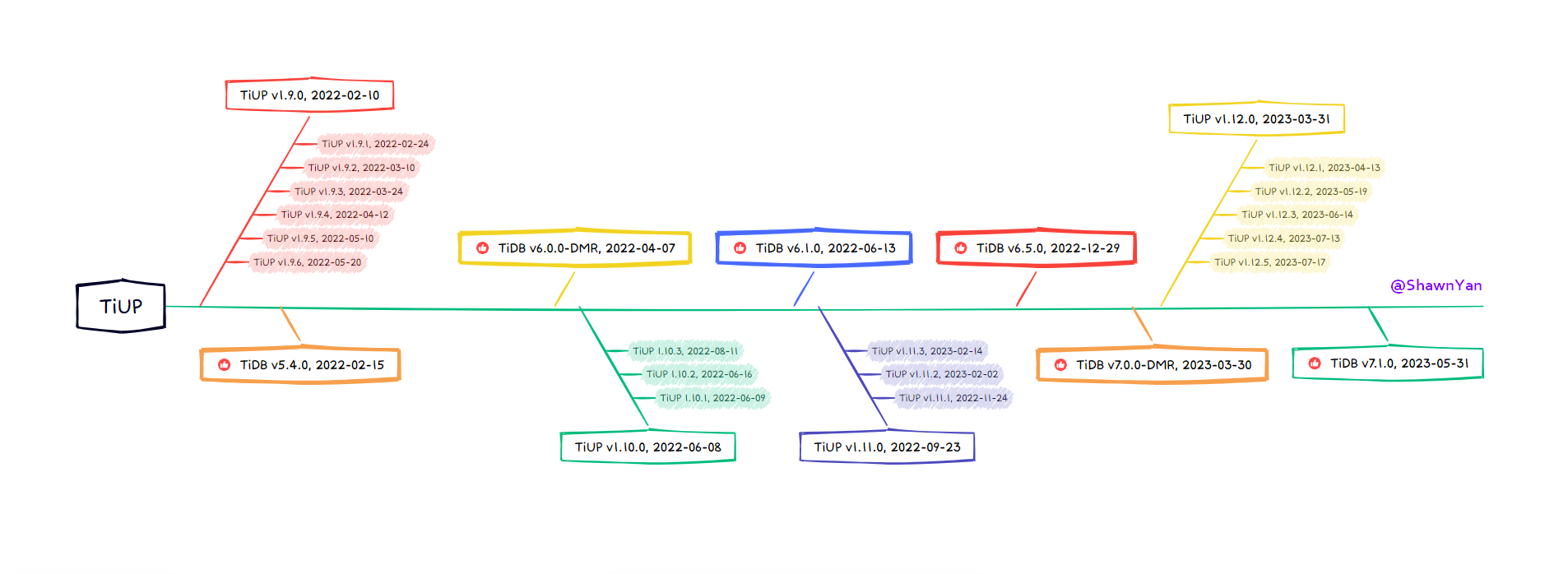
从上次撰文写 TiUP 到现在已经一年多了,从下图中可以看出,这段时间里,TiUP 仓库代码变更量趋于平缓。其中,去年 9 月,TiUP 1.11.0 发版,有较多代码新增,去年 10 月,bench 代码剥离,有较多代码删减。
下图为近一年 TiUP 的发版时间线,并标记了 TiDB 重要版本。
下面举几个栗子对其中部分新特性加以讲解。
tiup history
从 TiUP v1.10.0 开始,新增支持新命令
tiup history 可以查看之前的调用记录。(#1808)
支持 csv, json 两种输出格式。
[shawnyan@centos7 7.2.0]$ tiup history --format=default | grep history
2023-08-07T10:22:33  tiup history                                                                 0
2023-08-07T12:15:17  tiup history --format json                                                   0
2023-08-07T12:16:34  tiup history --format=json                                                   0
2023-08-07T12:16:51  tiup history --format=csv                                                    0
history log save path: /home/shawnyan/.tiup/history
[shawnyan@centos7 7.2.0]$
[shawnyan@centos7 7.2.0]$ tiup history --format=json | grep history
{"time":"2023-08-07T10:22:33.18062534+09:00","command":"tiup history","exit_code":0}
{"time":"2023-08-07T12:15:04.845158283+09:00","command":"tiup history --format json","exit_code":0}
{"time":"2023-08-07T12:15:08.7993845+09:00","command":"tiup history --format json","exit_code":0}
Kylin Linux 10+, RHEL 8
tiup-cluster 支持在麒麟 (Kylin Linux 10+) 和红帽 (RHEL 8) 上部署。(#1886, #1896)
这是对 TiDB 操作系统的要求,其他适配的操作系统可参阅文档 操作系统及平台要求 。
tikv-cdc
从 TiUP v1.11.0 开始,支持在 tiup-cluster 和 tiup-playground 中使用新组件
tikv-cdc。(#2000, #2022)
[shawnyan@centos7 7.2.0]$ tiup tikv-cdc version
tiup is checking updates for component tikv-cdc ...
Starting component `tikv-cdc`: /home/shawnyan/.tiup/components/tikv-cdc/v1.1.1/tikv-cdc version
Release Version: cdc-v1.1.1
Git Commit Hash: 35d2af65811864e548dcd44aed69dd442f703344
Git Branch: HEAD
UTC Build Time: 2023-02-28 08:13:06
Go Version: go version go1.18.1 linux/amd64
Failpoint Build: false
[shawnyan@centos7 7.2.0]$ tiup tikv-cdc --help
tiup is checking updates for component tikv-cdc ...
Starting component `tikv-cdc`: /home/shawnyan/.tiup/components/tikv-cdc/v1.1.1/tikv-cdc --help
TiKV Change Data Capture
Usage:
  tikv-cdc [command]
Available Commands:
  cli         Manage replication task and TiKV-CDC cluster
  help        Help about any command
  server      Start a TiKV-CDC capture server
  version     Output version information
Flags:
  -h, --help   help for tikv-cdc
Use "tikv-cdc [command] --help" for more information about a command.
在之前的版本中只能使用
cdc 对 TiCDC 进行控制,现在新增了 TiKV-CDC 功能,可以通过
tikv-cdc 来捕捉 TiKV 的变更,支持复制变更到其他 TiKV 集群。
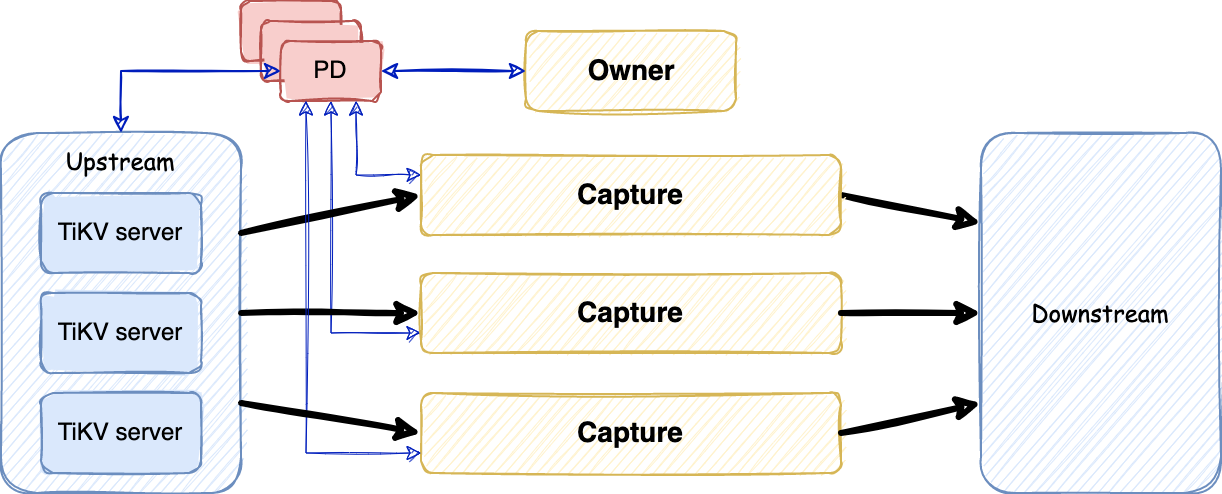
但是,只支持 TiKV v6.2.0 及以上版本。( TiKVCDCSupportDeploy )
// TiKV-CDC only support TiKV version not less than v6.2.0
这是因为从 TiKV v6.2.0 开始,支持跨集群 RawKV 复制。
不过,关于
tiup tikv-cdc
的官方文档还没有,期望可以在官方文档中看到更多信息。(
#14717
)
tidb-dashboard
从 TiUP v1.11.0 开始,支持在 tiup-cluster 中启用专用 TiDB Dashboard ((#2017),并在生成拓扑模板文件中包含了相关配置,当然上节 tikv-cdc 的相关配置也包含其中,使用
--full 选项生成模板拓扑 (
tiup cluster template --full) 可以看到下面内容。
# # Server configs are used to specify the configuration of TiKV-CDC Servers.
kvcdc_servers:
  - host: 10.0.1.20
    # # SSH port of the server.
    # ssh_port: 22
    # # TiKV-CDC Server communication port.
    port: 8600
    # # TiKV-CDC Server data storage directory.
    data_dir: "/data1/tidb-data/tikv-cdc-8600"
    # # TiKV-CDC Server log file storage directory.
    log_dir: "/data1/tidb-deploy/tikv-cdc-8600/log"
  - host: 10.0.1.21
    data_dir: "/data1/tidb-data/tikv-cdc-8600"
    log_dir: "/data1/tidb-deploy/tikv-cdc-8600/log"
# # Server configs are used to specify the configuration of TiDB Dashboard Servers. Available from v6.5.0
# tidb_dashboard_servers:
  # # The ip address of the PD Server.
#  - host: 10.0.1.11
    # # SSH port of the server.
    # ssh_port: 22
    # # port of TiDB Dashboard
    # port: 12333
    # # TiDB Dashboard deployment file, startup script, configuration file storage directory.
    # deploy_dir: "/tidb-deploy/tidb-dashboard-12333"
    # # PD Server data storage directory.
    # data_dir: "/tidb-data/tidb-dashboard-12333"
    # # PD Server log file storage directory.
    # log_dir: "/tidb-deploy/tidb-dashboard-12333/log"
    # # numa node bindings.
    # numa_node: "0,1"
Disaggregated Mode
TiUP v1.12.2 中引入了一个新参数
--mode=tidb-disagg (#2194),用来指定 TiDB 集群启动时使用
【存算分离】
模式。
TiFlash 存算分离架构目前为实验特性,不建议在生产环境中使用。
该模式只支持 TiFlash v7.1.0 及以上版本,由于文章篇幅原因,在此不多做演示。
遇到的问题
期待 tiup uninstall 加强
在测试时,会经常更新 nightly 版本到本地,但是无法使用
tiup uninstall 命令批量删除某个版本的 nightly 安装包,只能将本地全铲掉重来,期待相关功能可以得到加强。相关讨论帖:【
tiup 卸载参数
】
playground 的 root 用户修改密码问题
tiup playground 广泛应用于 TiDB 教学和功能演示,对在校大学生和 TiDB 初学者极为友好。
不过,论坛中有个帖子提到在修改 root 用户密码后无法顺利启动 playground 的问题 (
1010718
),定位到是 TiUP 的一个已提交未修复 Issue,期待可以修复,以支持这种基础功能,即便是 playground 为了方便演示最初没有考虑这方面的事情。
tiup client 的 dsn 文件解析问题
与上个问题相关联的,在 tiup playground 启动后,会在数据目录生成一个 dsn 文件,可用于 tiup client 访问 TiDB,但是该文件并不会随着密码修改而变化,也不会随着
tiup playground scale-out 而增加新地址,所以只能通过 tiup client 以无密码的方式访问最初启动的那个 TiDB Server,除非手动维护 dsn 文件。
【tiup client,dsn 不支持保存密码】
)
go-sql-driver/mysql 版本
编译最新版 TiUP 时,在编译日志中发现当前使用的版本是 v1.6.0,建议升级到 v1.7.1,相关信息记录在帖子 【tiup 的mysql driver 建议升级到1.7.1】 。
go: downloading github.com/go-sql-driver/mysql v1.6.0
其他小瑕疵
在写本文的过程中,发现几处关于 TiUP 的小瑕疵,期待官方更新。
- tiup 源码中的link 404
- 建议补充 tikv-cdc 的相关内容 #14717
- tiup-component-cluster-template 文档待更新 #14718
- tiup-component-management 文档待更新 #14723
总结
TiUP 工具的价值不言而喻,其实用程度及适用范围远超 Ansible。Playground 是教学演示神器,集众 Team 的心血,工具的好坏不是在论坛里水贴就可以论道的,而是要看在匹配人群中的口碑如何。All in TiDB, and Everyone needs TiUP~

来自 “ ITPUB博客 ” ,链接:https://blog.itpub.net/31492144/viewspace-3021702/ ,如需转载,请注明出处,否则将追究法律责任。

最新文章
- SQLark V4.0 全新架构深度测评:更快、更易用
- 我在 DTCC 遇见 9 家通过央采的数据库厂商
- 重新认识崖山数据库:国测Ⅱ级背后的技术底气与AI野心
- Oracle Skills开源:AI工程正在进入"技能时代"
- HOW2026大会:PostgreSQL与AI在泉城济南的硬核碰撞
- 告别古法部署,用OpenClaw安装KWDB 3.1.0并体验新特性
- 苦等三年!Oracle AI Database 26ai本地服务器版终于来了
- OpenAgents:让PostgreSQL和MySQL两个Agent在聊天室里辩论
- 国产数据库平替的一条有效路径
- 如期而至!MySQL 9.5.0 创新版本发布
