本文将介绍如何使用 Python 对 TiDB 进行应用开发,并做简单的 CRUD 演示。
对应
TiDB 6.0 Book Rush
的
第二章
。

测试环境
为了便于演示应用开发,本文将使用 TiDB 6.0 本地测试集群,以及 MariaDB Connector/Python,具体环境版本信息如下。
TiDB 6.0
Python 3.6.8
MariaDB Connector/Python 1.0.11
部署本地测试集群
快速启动本地测试集群,具体方法请参考 官方文档–部署本地测试集群 和文章 《TiUP:TiDBAer 必备利器》 。
- 本文使用的测试环境启动命令为:
tiup playground v6.0.0 --host 192.168.8.101 --tag classroom --pd 3 --kv 2 --db 1 --tiflash 1
- 运行结果为:
CLUSTER START SUCCESSFULLY, Enjoy it ^-^
To connect TiDB: mysql --comments --host 192.168.8.101 --port 4000 -u root -p (no password)
To view the dashboard: http://192.168.8.101:2379/dashboard
PD client endpoints: [192.168.8.101:2379 192.168.8.101:2382 192.168.8.101:2384]
Python 连接器
介绍几种常见的 Python 连接器
TiDB 高度兼容 MySQL 5.7 协议,理论上只要是支持 MySQL 及其分支版本的 Python 连接器都可以连接 TiDB,但仍需要具体测试。
-
MySQL 官方提供的连接器为 MySQL Connector/Python 。最新GA版本 8.0.29,官方文档推荐升级到最新版本,并声明此版本可用于 MySQL Server 8.0 和 5.7。
-
MariaDB 提供的连接器为 MariaDB Connector/Python 。最新GA版本为 1.0.11,可用于访问 MariaDB 和 MySQL,使用的 API 与 Python DB API Spec 2.0 (PEP 249) 兼容。
除这两种官方连接器之外,还有两种常见的客户端,分别是:
-
Python 2 下使用的 MySQL-python ,该包已停止维护,不推荐使用。
本文使用的是 MariaDB Connector/Python,下面将做具体演示。
安装 Python 连接器
CentOS 7 环境
由于 MariaDB Connector/Python 使用 Python 3 编写,且依赖 MariaDB Connector/C,所以需要先安装依赖包。
- 安装必要的依赖:
sudo yum install -y MariaDB-devel gcc python3-devel
- 安装完成后,检查已安装的包:
shawnyan@centos7:~$ rpm -q MariaDB-devel gcc python3-devel
MariaDB-devel-10.6.7-1.el7.centos.x86_64
gcc-4.8.5-44.el7.x86_64
python3-devel-3.6.8-18.el7.x86_64
- 通过 pip 安装连接器:
python3 -m pip install mariadb --user
- 运行结果为:
shawnyan@centos7:~$ python3 -m pip install mariadb --user
Installing collected packages: mariadb
    Running setup.py install for mariadb ... done
Successfully installed mariadb-1.0.11
- 安装步骤支持幂等性,二次执行命令结果如下:
shawnyan@centos7:~$ python3 -m pip install mariadb --user
Requirement already satisfied: mariadb in /home/shawnyan/.local/lib/python3.6/site-packages (1.0.11)
- 安装完成后,检查已安装的包:
shawnyan@centos7:~$ python3 -m pip show mariadb
Name: mariadb
Version: 1.0.11
Summary: Python MariaDB extension
Home-page: https://www.github.com/mariadb-corporation/mariadb-connector-python
Author: Georg Richter
Author-email:
License: LGPL 2.1
Location: /home/shawnyan/.local/lib/python3.6/site-packages
Requires:
Required-by:
到此,安装完成!
Windows 环境
与 CentOS 环境类似,需要安装 MariaDB Connector/C,下载页面为 Connectors 。
此外,还需要安装 Microsoft Visual C++ 14.0,下载页面为 Microsoft Visual C++ Build Tools 。
本文示例代码是在 PyCharm 中开发的,所以在安装完成依赖后,直接在 PyCharm 中安装 MariaDB Connector/Python。
安装路径为:
File > Settings > Project > Available Packages。
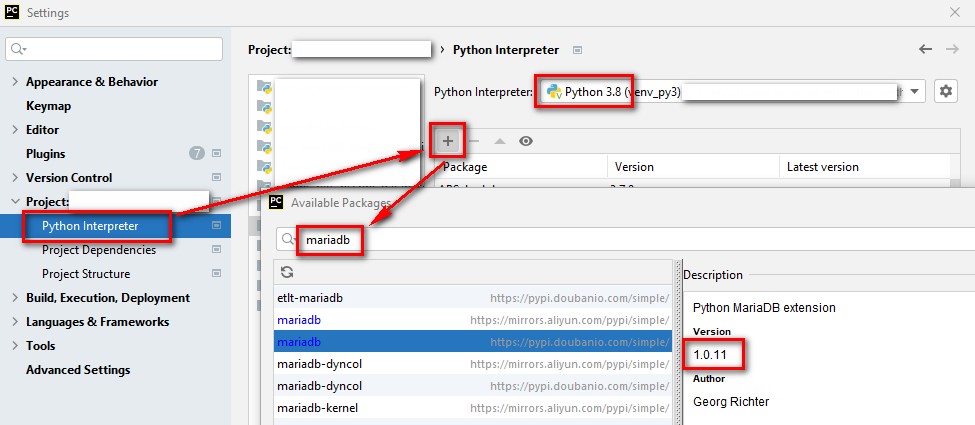
图-安装mariadb包
到此,安装完成!
CURD 实践
基础数据
通过
tiup demo 创建基础数据,会自动在 TiDB 中创建库
bookshop 以及 6 张表,并导入基础数据。
Bookshop 是一个虚拟的在线书店应用,你可以在 Bookshop 当中便捷地购买到各种类别的书,也可以对你看过的书进行点评。
- 执行如下命令,生成基础数据:
tiup demo bookshop prepare -H 192.168.8.101
- 运行结果为:
shawnyan@centos7:~$ tiup demo bookshop prepare -H 192.168.8.101
tiup is checking updates for component demo ...
Starting component `demo`: /home/shawnyan/.tiup/components/demo/v0.0.8/tidb-dataset /home/shawnyan/.tiup/components/demo/v0.0.8/tidb-dataset bookshop prepare -H 192.168.8.101
INFO[0000] Creating the tables if not existed....        dataset=bookshop
INFO[0000] Creating table books.                         dataset=bookshop
INFO[0000] Creating table users.                         dataset=bookshop
INFO[0000] Creating table authors.                       dataset=bookshop
INFO[0000] Creating table book_authors.                  dataset=bookshop
INFO[0001] Creating table orders.                        dataset=bookshop
INFO[0001] Creating table ratings.                       dataset=bookshop
INFO[0001] Finished creating tables!                     dataset=bookshop
INFO[0001] Clearing the old data....                     dataset=bookshop
INFO[0002] Loading users data...                         dataset=bookshop
INFO[0004] Loading books data...                         dataset=bookshop
INFO[0006] Loading authors data...                       dataset=bookshop
INFO[0008] Loading book authors data...                  dataset=bookshop
INFO[0009] Loading book orders data...                   dataset=bookshop
INFO[0039] Loading book ratings data...                  dataset=bookshop
INFO[0071] Finished!                                     dataset=bookshop
- 查看新建库
bookshop表数据量:
SELECT
 CONCAT(table_schema,'.',table_name) AS 'Table Name',
 table_rows AS 'Number of Rows'
FROM
 information_schema.TABLES
WHERE table_schema = 'bookshop'
ORDER BY 1;
- 运行结果为:
+-----------------------+----------------+
| Table Name            | Number of Rows |
+-----------------------+----------------+
| bookshop.authors      |          20000 |
| bookshop.book_authors |          20000 |
| bookshop.books        |          20000 |
| bookshop.orders       |         300000 |
| bookshop.ratings      |         300000 |
| bookshop.users        |           9985 |
+-----------------------+----------------+
6 rows in set (0.018 sec)
使用 Python 连接器创建连接
需要配置连接信息,默认为不自动提交:
conn_params = {
    "user": "root",
    "password": "",
    "host": "192.168.8.101",
    "port": 4000,
    "database": "bookshop",
    "autocommit": False
}
检查基本连接信息
可调用连接器内置方法,直接查看数据库版本和会话的字符集。发送查询语句,查看自动提交的参数值。
- 示例代码如下:
# 2. Check Conn Info (Server Version, Charset)
print("Server Version:", conn.server_info)
print("Connection Charset:", conn.character_set, conn.collation)
# 3. Check Server Variables
cursor.execute("SHOW VARIABLES LIKE 'autocommit'")
resAutoCommit = cursor.fetchone()
print(resAutoCommit)
- 运行结果如下:
Server Version: 5.7.25-TiDB-v6.0.0
Connection Charset: utf8mb4 utf8mb4_general_ci
('autocommit', 'OFF')
注:
使用 MariaDB Connector/Python 连接数据库,会总是使用 utf8mb4。
单值写入
下面将分单值写入、多值写入、单值查询,以及多值查询四种情况分别做演示。
向
books 表中插入一条数据,并在之后手动提交:
# 4. Insert One Row
sqlInsertOne = "REPLACE INTO books (id, title, published_at) VALUES (1, 'tidb-monthly', '2022-05-09')"
cursor.execute(sqlInsertOne)
conn.commit()
如果 TiDB Server 已开启 General 日志,则可以在日志文件中看到:
[2022/05/12 22:26:05.103 +08:00] [INFO] [session.go:3264] [GENERAL_LOG] [conn=467] [user=root@%] [schemaVersion=144] [txnStartTS=0] [forUpdateTS=0] [isReadConsistency=false] [current_db=bookshop] [txn_mode=PESSIMISTIC] [sql="REPLACE INTO books (id, title, published_at) VALUES (1, 'tidb-monthly', '2022-05-09')"]
[2022/05/12 22:26:05.120 +08:00] [INFO] [session.go:3264] [GENERAL_LOG] [conn=467] [user=root@%] [schemaVersion=144] [txnStartTS=433157718689710084] [forUpdateTS=433157718689710084] [isReadConsistency=false] [current_db=bookshop] [txn_mode=PESSIMISTIC] [sql=COMMIT]
多值写入
也可将多组值包装到一个字典中,然后传递给执行器,此时就用到了
executemany,可一次性执行多条语句,并将其封装在一个事务内,以保证写入数据的完整性。
- 演示代码如下:
# 5. Insert Multi Rows
data = [
    (10, 'TiDB Book Rush', '2022-05-10'),
    (11, 'TiDB Blog', '2022-05-11'),
    (12, 'TiDB 6.0 Release', '2022-05-12')
]
sqlInsertMulti = "REPLACE INTO books (id, title, published_at) VALUES (?, ?, ?)"
cursor.executemany(sqlInsertMulti, data)
- TiDB Server 的 General 日志打印如下:
[2022/05/12 22:26:05.131 +08:00] [INFO] [session.go:3264] [GENERAL_LOG] [conn=467] [user=root@%] [schemaVersion=144] [txnStartTS=0] [forUpdateTS=0] [isReadConsistency=false] [current_db=bookshop] [txn_mode=PESSIMISTIC] [sql=BEGIN]
[2022/05/12 22:26:05.154 +08:00] [INFO] [session.go:3264] [GENERAL_LOG] [conn=467] [user=root@%] [schemaVersion=144] [txnStartTS=433157718702817281] [forUpdateTS=433157718702817281] [isReadConsistency=false] [current_db=bookshop] [txn_mode=PESSIMISTIC] [sql="REPLACE INTO books (id, title, published_at) VALUES (?, ?, ?) [arguments: (10, \"TiDB Book Rush\", \"2022-05-10\")]"]
[2022/05/12 22:26:05.162 +08:00] [INFO] [session.go:3264] [GENERAL_LOG] [conn=467] [user=root@%] [schemaVersion=144] [txnStartTS=433157718702817281] [forUpdateTS=433157718702817281] [isReadConsistency=false] [current_db=bookshop] [txn_mode=PESSIMISTIC] [sql="REPLACE INTO books (id, title, published_at) VALUES (?, ?, ?) [arguments: (11, \"TiDB Blog\", \"2022-05-11\")]"]
[2022/05/12 22:26:05.168 +08:00] [INFO] [session.go:3264] [GENERAL_LOG] [conn=467] [user=root@%] [schemaVersion=144] [txnStartTS=433157718702817281] [forUpdateTS=433157718702817281] [isReadConsistency=false] [current_db=bookshop] [txn_mode=PESSIMISTIC] [sql="REPLACE INTO books (id, title, published_at) VALUES (?, ?, ?) [arguments: (12, \"TiDB 6.0 Release\", \"2022-05-12\")]"]
[2022/05/12 22:26:05.178 +08:00] [INFO] [session.go:3264] [GENERAL_LOG] [conn=467] [user=root@%] [schemaVersion=144] [txnStartTS=433157718702817281] [forUpdateTS=433157718702817281] [isReadConsistency=false] [current_db=bookshop] [txn_mode=PESSIMISTIC] [sql=COMMIT]
单值读取
因为 TiDB 使用
utf8_bin 做为默认校验规则,所以查询条件会区分大小写,这里使用内置函数
lower() 将所有字符转成小写,来消除大小写区分的影响。
- 使用
fetchone()方法查询一条结果,并用|作为分隔符将结果打印。
# 6. Query Data -- One Row
cursor.execute("SELECT * FROM books where lower(title) like 'tidb%'")
row = cursor.fetchone()
print("Select One Row:", *row, sep='|')
- 控制台打印结果为:
Select One Row:|1|tidb-monthly|Magazine|2022-05-09 00:00:00|0|0.00
多值读取
对于多值读取的情况,可使用
fetchmany(size: int) 方法,传入欲获取的行数后执行,即可得到需要的结果集。
本例中,因为上文只写入4条数据,所以也只能查到4条,代码如下。
# 7. Query Data -- Many
cursor.execute("SELECT * FROM books where lower(title) like 'tidb%'")
row = cursor.fetchmany(10)
print("rows_affected:", cursor.rowcount)
res = []
for i in row:
    res.append({"id": i[0], "book": i[1], "published": "{:%Y-%m-%d}".format(i[3])})
print("Select Many Rows:", res)
- 控制台输出结果:
rows_affected: 4
Select Many Rows: [{'id': 1, 'book': 'tidb-monthly', 'published': '2022-05-09'}, {'id': 10, 'book': 'TiDB Book Rush', 'published': '2022-05-10'}, {'id': 11, 'book': 'TiDB Blog', 'published': '2022-05-11'}, {'id': 12, 'book': 'TiDB 6.0 Release', 'published': '2022-05-12'}]
小结
到此,以上四种情况已全部演示完毕。
最后,以一个完整示例作为本文结尾。
- 示例:查询
Books表所在的 TiKV 节点的版本和地址,并输出结果。
#!/bin/python3
# -*- coding: utf-8 -*-
# Author: @ShawnYan
import mariadb
# 1. Connecting
conn_params = {
    "user": "root",
    "password": "",
    "host": "192.168.8.101",
    "port": 4000,
    "database": "bookshop",
    "autocommit": False
}
conn = mariadb.connect(**conn_params)
cursor = conn.cursor(buffered=True)
# 2. Check Conn Info (Server Version, Charset)
print("Server Version:", conn.server_info)
print("Connection Charset:", conn.character_set, conn.collation)
# 7. Query Data -- Many
cursor.execute(
    "SELECT DISTINCT t1.DB_NAME,t1.TABLE_NAME, t1.REGION_ID, t3.ADDRESS, t3.version "
    "FROM information_schema.tikv_region_status t1 INNER JOIN information_schema.tikv_region_peers t2 "
    "ON t1.REGION_ID = t2.region_id INNER JOIN information_schema.TIKV_STORE_STATUS t3 ON t2.STORE_ID = t3.STORE_ID "
    "WHERE t1.DB_NAME = 'bookshop' AND t1.TABLE_NAME = 'books'")
row = cursor.fetchall()
res = []
for i in row:
    res.append({"DB": i[0], "TABLE": i[1], "REGION_ID": i[2], "TIKV_ADDR": i[3], "TIKV_VERSION": i[4]})
print("Select Many Rows:", res)
# free resources
cursor.close()
conn.close()
输出结果为:
Server Version: 5.7.25-TiDB-v6.0.0
Connection Charset: utf8mb4 utf8mb4_general_ci
Select Many Rows: [{'DB': 'bookshop', 'TABLE': 'books', 'REGION_ID': 4028065, 'TIKV_ADDR': '192.168.8.101:20161', 'TIKV_VERSION': '6.0.0'}]
以上就是本文的全部内容,其他开发语言的开发实践,请参考官方文档,或扩展阅读。
扩展阅读
-
来自 PingCAP Education 原厂,适合 开发人员的课程 :
https://www.modb.pro/db/403262
https://tidb.net/blog/ef4c1f65?shareId=2923d1b6
https://tidb.net/book/book-rush/developer-guide/simple-crud/sample-application-python

来自 “ ITPUB博客 ” ,链接:https://blog.itpub.net/31492144/viewspace-3013327/ ,如需转载,请注明出处,否则将追究法律责任。

最新文章
- SQLark V4.0 全新架构深度测评:更快、更易用
- 我在 DTCC 遇见 9 家通过央采的数据库厂商
- 重新认识崖山数据库:国测Ⅱ级背后的技术底气与AI野心
- Oracle Skills开源:AI工程正在进入"技能时代"
- HOW2026大会:PostgreSQL与AI在泉城济南的硬核碰撞
- 告别古法部署,用OpenClaw安装KWDB 3.1.0并体验新特性
- 苦等三年!Oracle AI Database 26ai本地服务器版终于来了
- OpenAgents:让PostgreSQL和MySQL两个Agent在聊天室里辩论
- 国产数据库平替的一条有效路径
- 如期而至!MySQL 9.5.0 创新版本发布
