一.问题
CDH requires that you configure the Network
Time Protocol (NTP) service on each machine in your cluster.
To start NTP
and configure it to run automatically on reboot, perform the following steps on
each node in your cluster.
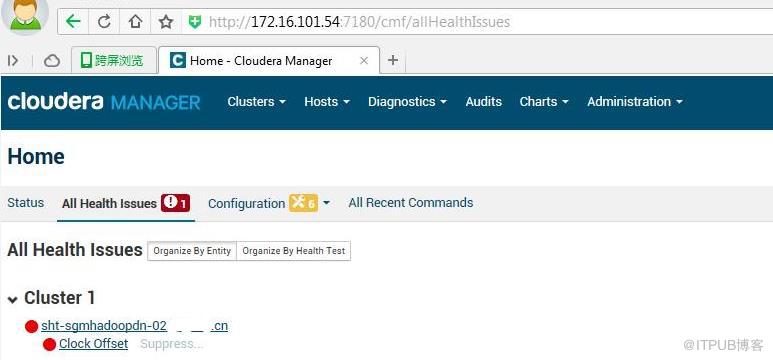
1)此角色的主机的运行状况为不良。 以下运行状况测试不良:时钟偏差.
2)The host’s NTP service is not synchronized to any remote server.
二.解决
先配置一台NTP服务,然后所有的CDH节点都作为此NTP服务的客户端。
点击(此处)折叠或打开
-
1.安装NTP(集群每台)
-
[root@sht-sgmhadoopcm-01 ~]#yum install ntp
-
2.编辑/etc/ntp.conf(集群每台)
-
[root@sht-sgmhadoopcm-01 ~]#vi /etc/ntp.conf
-
server 0.pool.ntp.org
-
server 1.pool.ntp.org
-
server 2.pool.ntp.org
-
3.配置NTP开机自启动(集群每台)
-
[root@sht-sgmhadoopcm-01 ~]#chkconfig ntpd on
-
4.开启NTP服务(集群每台)
-
[root@sht-sgmhadoopcm-01 ~]#service ntp start
-
5.同步ntp节点(集群每台)
-
[root@sht-sgmhadoopcm-01 ~]# hostname -i
-
172.16.101.54
-
选取第一台为ntp服务器
-
[root@sht-sgmhadoopcm-01 ~]# ntpdate -u 172.16.101.54
-
17 Nov 14:31:26 ntpdate[5450]: adjust time server 172.16.101.54 offset -0.000013 sec
-
6.同步到系统时间(集群每台)
- [root@sht-sgmhadoopcm-01 ~]# hwclock --systohc
三.参考
https://www.cloudera.com/documentation/enterprise/5-8-x/topics/install_cdh_enable_ntp.html
http://blog.csdn.net/freedomboy319/article/details/46710255
来自 “ ITPUB博客 ” ,链接:https://blog.itpub.net/31451369/viewspace-2153700/ ,如需转载,请注明出处,否则将追究法律责任。

请登录后发表评论
登录
全部评论
最新文章
- linux yum源设置(centos6)
- CentOS6.x使用163和epel yum源的选择
- CDH5之Unexpected error.Unable to verify database connection
- CDH5之Trash
- 【实验】/etc/hadoop/*和/var/run/cloudera-scm-agent/process/*关系
- CDH5之Balancer难以在快速增长的集群上平衡大量的数据
- Cloudera Certified Administrator for Apache Hadoop(CCAH认证)
- CDH集群调优:内存、Vcores和DRF
- CDH5之Exhausted available authentication methods
- CDH5之Found class jline.Terminal, but interface was expected
