【Grafana】告警配置并发送邮件
修改grafana的配置文件
grafana的配置文件默认是在 /etc/grafana/grafana.ini
修改配置文件如下:
#################################### SMTP / Emailing ##########################
[smtp]
enabled = true  #是否允许开启
host = smtp.exmail.qq.com:465    #发送服务器地址,可以再邮箱的配置教程中找到:
user = 你的邮箱
# If the password contains # or ; you have to wrap it with trippel quotes. Ex """#password;"""
# 这个密码是你开启smtp服务生成的密码
password = 你的密码
;cert_file =
;key_file =
;skip_verify = false
from_address = 你的邮箱
from_name = Grafana
# EHLO identity in SMTP dialog (defaults to instance_name)
ehlo_identity = dashboard.example.com
[emails]
;welcome_email_on_sign_up = true
#################################### Logging ##########################
重新启动grafana服务,让配置文件生效
service grafana-server restart
注意!
配置完毕后发送邮件时可能会出现如下错误:
error=“SMTP not configured, check your grafana.ini config file’s [smtp] section.”
这是因为 在ini文件中一行开头的分号表示它已被注释掉。所以 去掉分号 ,它就可以工作了 。
去掉分号重启完毕后就可以到页面去进行测试。
测试
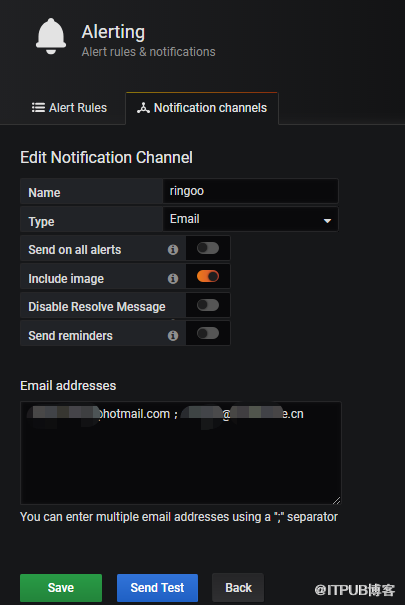
点击发送,就可以去邮件查看是否测试成功了。
来自 “ ITPUB博客 ” ,链接:https://blog.itpub.net/31442725/viewspace-2638284/ ,如需转载,请注明出处,否则将追究法律责任。

请登录后发表评论
登录
全部评论
