https://linux.cn/article-4461-2.html
第一、Smartmontools安装
1:下载最新源码包安装
下载
wget http://down1.chinaunix.net/distfiles/smartmontools-6.0.tar.gz
解压
tar -xvf smartmontools-6.0.tar.gz
编译
cd smartmontools-6.0
./configure
安装
make && make install
2:使用yum安装部署
yum install smartmontools -y
第二、Smartmontools简单应用
1、 列出系统相连硬盘
ls -l /dev |grep -E 'sd|hd'
2、展现特定硬盘的信息
smartctl --info /dev/sda
3、检查硬盘健康状态
1)在这个命令中," -s on"标志开启指定设备上的SMART功能。如果/dev/sda上已开启SMART支持,那就 省略它 。
smartctl -s on -a /dev/sdb
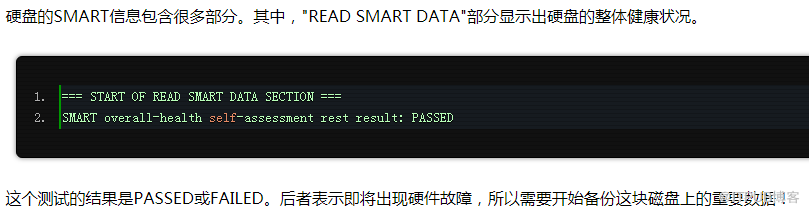
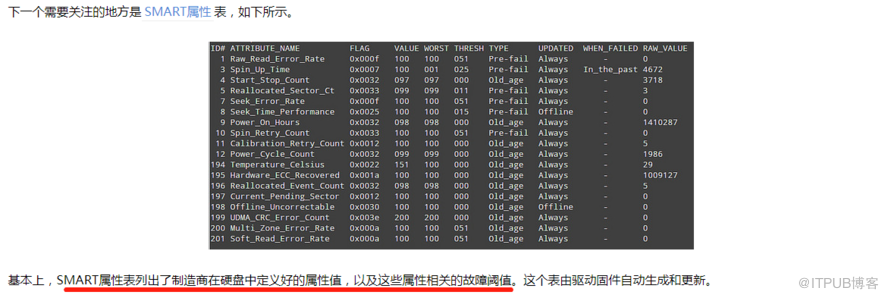
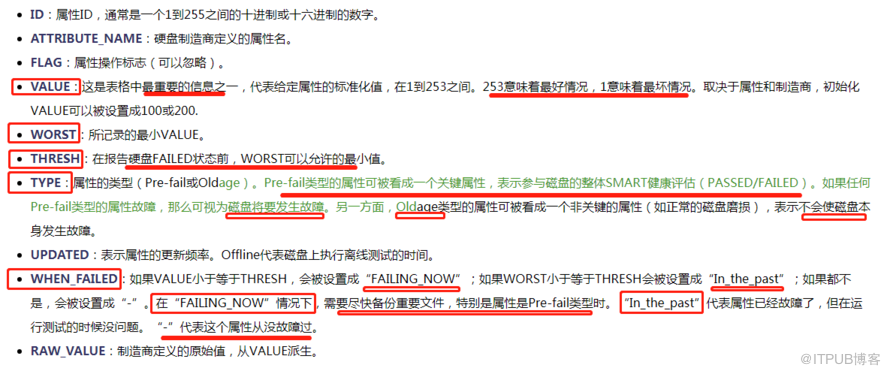
2)查看硬盘的健康状况
smartctl -H /dev/sda

4、检查硬盘
通电
时间(
显示设备SMART厂商属性和值)
smartctl -A /dev/sda
5、检查硬盘 是否支持SMART
1993年以后出厂的硬盘基本上都支持SMART技术
smartctl -i /dev/sda
6、检查该设备 是否已经打开SMART技术
smartctl -a /dev/sda
7、 显示设备所有的SMART信息
smartctl -a /dev/sda
8、后台检测硬盘,消耗时间短
smartctl -t short
9、后台检测硬盘,消耗时间长
smartctl -t long
10、前台检测硬盘,消耗时间短
smartctl -C -t short
11、前台检测硬盘,消耗时间长。其实就是利用硬盘SMART的自检程序
smartctl -C -t long
12、中断后台检测硬盘
smartctl -X
13、显示硬盘检测日志
smartctl -l selftest
14、显示硬盘错误汇总
smartctl -l error
来自 “ ITPUB博客 ” ,链接:https://blog.itpub.net/31397003/viewspace-2719577/ ,如需转载,请注明出处,否则将追究法律责任。

