linux使用FIO测试磁盘的iops
https://www.cnblogs.com/bulh/articles/12462111.html
Linux下磁盘IO读写测试工具-FIO详解
https://blog.csdn.net/weixin_43860781/article/details/120937870
IO测试工具之fio详解
https://www.cnblogs.com/raykuan/p/6914748.html
fio执行结果参数解读
https://blog.csdn.net/qq_33909098/article/details/106720656
请注意:
1.请不要在系统盘上进行fio测试,避免损坏系统重要文件.
2.fio测试建议在空闲的、未保存重要数据的硬盘上进行,并在测试完后重新制作文件系统。请不要在业务数据硬盘上测试,
避免底层文件系统元数据损坏导致数据损坏.
3.测试硬盘性能时,推荐直接测试裸盘(如vdb);测试文件系统性能时,推荐指定具体文件测试(如/data/file).
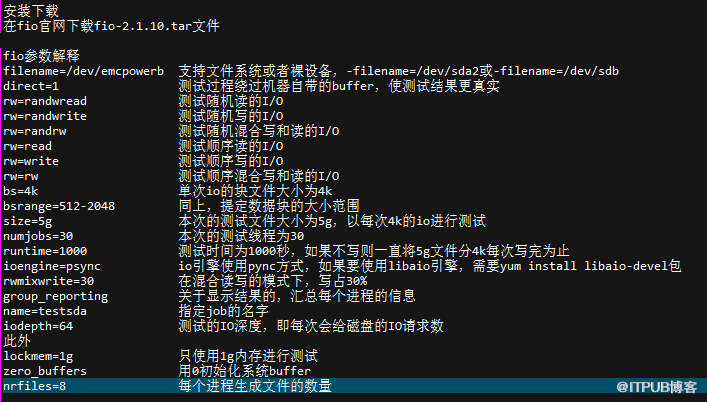
测试场景:
100%随机,100%读, 4K
fio -filename=/dev/sda4 -direct=1 -iodepth 1 -thread -rw=randread -ioengine=psync -bs=4k -size=1000G -num
jobs=50 -runtime=180 -group_reporting -name=rand_100read_4k
100%随机,100%写, 4K
fio -filename=/dev/sda4 -direct=1 -iodepth 1 -thread -rw=randwrite -ioengine=psync -bs=4k -size=1000G -num
jobs=30 -runtime=180 -group_reporting -name=rand_100write_4k
100%顺序,100%读 ,4K
fio -filename=/dev/sda4 -direct=1 -iodepth 1 -thread -rw=read -ioengine=psync -bs=4k -size=1000G -num
jobs=10 -runtime=180 -group_reporting -name=sqe_100read_4k
100%顺序,100%写 ,4K
fio -filename=/dev/sda4 -direct=1 -iodepth 1 -thread -rw=write -ioengine=psync -bs=4k -size=200G -num
jobs=5 -runtime=180 -group_reporting -name=sqe_100write_4k
100%随机,70%读,30%写 4K
fio -filename=/dev/sda4 -direct=1 -iodepth 1 -thread -rw=randrw -rwmixread=70 -ioengine=psync -bs=4k -siz
e=1000G -numjobs=50 -runtime=180 -group_reporting -name=randrw_70read_4k
来自 “ ITPUB博客 ” ,链接:https://blog.itpub.net/31397003/viewspace-2693322/ ,如需转载,请注明出处,否则将追究法律责任。

