安装MySQL
-
下载mysql到/usr/local/src/ -------当然,下载安装到其他目录也可以
cd /usr/local/src/
wget http://syslab.comsenz.com/downloads/linux/mysql-5.1.40-linux-i686-icc-glibc23.tar.gz
-
解压
[root@localhost src]# tar zxvf /usr/local/src/mysql-5.1.40-linux-i686-icc-glibc23.tar.gz
-
把解压完的数据移动到/usr/local/mysql
[root@localhost src]# mv mysql-5.1.40-linux-i686-icc-glibc23 /usr/local/mysql
-
建立mysql用户
[root@localhost src]# useradd -s /sbin/nologin mysql
-
初始化数据库
[root@localhost src]# cd /usr/local/mysql
[root@localhost mysql]# mkdir -p /data/mysql ; chown -R mysql:mysql /data/mysql
[root@localhost mysql]# ./scripts/mysql_install_db --user=mysql --datadir=/data/mysql
-
拷贝配置文件
[root@localhost mysql]# cp support-files/my-large.cnf /etc/my.cnf
-
拷贝启动脚本文件并修改其属性
[root@localhost mysql]# cp support-files/mysql.server  /etc/init.d/mysqld
[root@localhost mysql]# chmod 755 /etc/init.d/mysqld
-
修改启动脚本
[root@localhost mysql]# vim /etc/init.d/mysqld
-
把启动脚本加入系统服务项,并设定开机启动,启动mysql
[root@localhost mysql]# chkconfig --add mysqld
[root@localhost mysql]# chkconfig mysqld on
[root@localhost mysql]# service mysqld start
[root@localhost mysql]# ps aux |grep mysqld
安装Apache
[root@localhost mysql]# cd /usr/local/src/
[root@localhost src]# wget http://syslab.comsenz.com/downloads/linux/httpd-2.2.16.tar.gz
[root@localhost src]# tar zxvf httpd-2.2.16.tar.gz
[root@localhost src]# cd httpd-2.2.16
[root@localhost httpd-2.2.16]# ./configure \
--prefix=/usr/local/apache2 \
--with-included-apr \
--enable-so \
--enable-deflate=shared \
--enable-expires=shared \
--enable-rewrite=shared \
--with-pcre
error: mod_deflate has been requested but can not be built due to prerequisite failures
yum install -y zlib-devel
yum install -y pcre pcre-devel apr apr-devel
[root@localhost httpd-2.2.16]# make
[root@localhost httpd-2.2.16]# make install
安装PHP
[rot@localhost httpd-2.2.16]# cd /usr/local/src
[root@localhost src]# wget http://am1.php.net/distributions/php-5.3.27.tar.gz
[root@localhost src]# tar zxf php-5.3.27.tar.gz
[root@localhost src]# cd php-5.3.27
[root@localhost php-5.3.27]# ./configure \
--prefix=/usr/local/php \
--with-apxs2=/usr/local/apache2/bin/apxs \
--with-config-file-path=/usr/local/php/etc  \
--with-mysql=/usr/local/mysql \
--with-libxml-dir \
--with-gd \
--with-jpeg-dir \
--with-png-dir \
--with-freetype-dir \
--with-iconv-dir \
--with-zlib-dir \
--with-bz2 \
--with-openssl \
--with-mcrypt \
--enable-soap \
--enable-gd-native-ttf \
--enable-mbstring \
--enable-sockets \
--enable-exif \
--disable-ipv6
configure: error: xml2-config not found. Please check your libxml2 installation.
yum install -y libxml2-devel
configure: error: Cannot find OpenSSL's <evp.h>
yum install -y openssl openssl-devel
checking for BZip2 in default path... not found
configure: error: Please reinstall the BZip2 distribution
yum install -y bzip2 bzip2-devel
configure: error: png.h not found.
yum install -y libpng libpng-devel
configure: error: freetype.h not found.
yum install -y freetype freetype-devel
configure: error: mcrypt.h not found. Please reinstall libmcrypt.
rpm -ivh "http://www.aminglinux.com/bbs/data/attachment/forum/month_1211/epel-release-6-7.noarch.rpm"
yum install -y  libmcrypt-devel
[root@localhost php-5.3.27]# make
[root@localhost php-5.3.27]# make install
[root@localhost php-5.3.27]# cp php.ini-production /usr/local/php/etc/php.ini
apache结合php
vim /usr/local/apache2/conf/httpd.conf
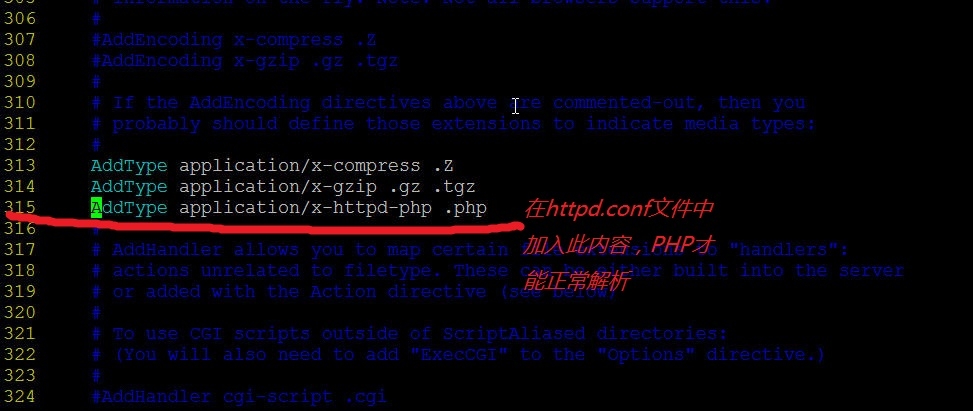
AddType application/x-gzip .gz .tgz
AddType application/x-httpd-php .php
<IfModule dir_module>
    DirectoryIndex index.html
</IfModule>
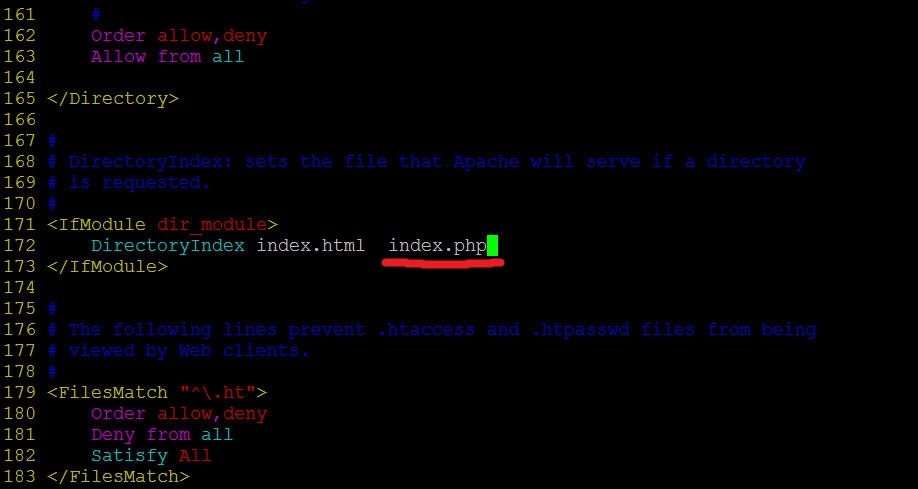
<IfModule dir_module>
    DirectoryIndex index.html index.htm index.php
</IfModule>
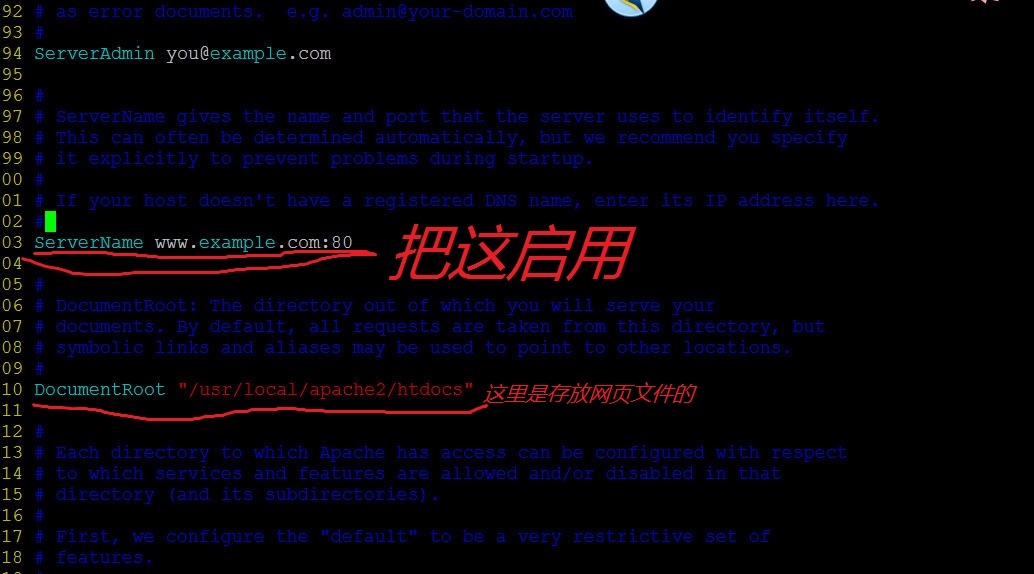
#ServerName www.example.com:80
ServerName localhost:80
测试LAMP是否成功
/usr/local/apache2/bin/apachectl -t
/usr/local/apache2/bin/apachectl start
[root@localhost ~]# netstat -lnp |grep httpd
tcp        0      0 :::80                       :::*   LISTEN      7667/httpd
[root@localhost ~]# curl localhost
<html><body><h1>It works!</h1></body></html>
vim /usr/local/apache2/htdocs/1.php
<?php
    echo "php解析正常";
?>
curl localhost/1.php
[root@localhost ~]# curl localhost/1.php
php解析正常[root@localhost ~]#

[root@localhost ~]# iptables -F
来自 “ ITPUB博客 ” ,链接:https://blog.itpub.net/30417691/viewspace-1774572/ ,如需转载,请注明出处,否则将追究法律责任。
上一篇:
没有了~
下一篇:
开发简易的chrome去广告插件

请登录后发表评论
登录
全部评论
