cd
/root/cactinagios
wget http://jaist.dl.sourceforge.net/project/nagios/nagios/nagios-4.x/nagios-4.0.7/nagios-4.0.7.tar.gz
tar –xf nagios-4.0.7.tar.gz
cd nagios-4.0.7
./configure –with-command-group=nagios --prefix=/var/www/html/nagios --enable-event-broker
make all
make install && make install-init && make install-config
make install-commandmode &&make install-webconf
设置登录web界面时http验证的账号密码:
htpasswd -c /var/www/html/nagios/etc/htpasswd.users nagiosadmin
安装nagios-plugins
cd /root/cactinagios
Wget http://nagios-plugins.org/download/nagios-plugins-2.0.2.tar.gz
tar –xf nagios-plugins-2.0.2.tar.gz
cd nagios-plugins-2.0.2
./configure –with-nagios-user=nagios –with-nagios-group=nagios –prefix=/var/www/html/nagios –with-mysql
make
mke install
附apache的配置说明:
找到apache的配置文件:/etc/httpd/httpd.conf
找到:
检查nagios的配置:
/var/www/html/nagios/bin/nagios -v /var/www/html/nagios/etc/nagios.cfg
添加自动启动:
chkconfig –add nagios
chkconfig nagios on
service nagios start
登陆页面:
http://localhost/nagios
nagios客户端的安装配置:
pssh -h ip.txt "mkdir /yunwei"
pscp -h ip.txt nagios-plugins-2.0.2.tar.gz
pssh -h ip.txt "./configure --prefix=/usr/local/nagios"
pssh -h ip.txt "make && make install"
pssh -h ip.txt "chown nagios:nagios /usr/local/nagios" make install-plugin pssh -h ip.txt "wget http://prdownloads.sourceforge.net/sourceforge/nagios/nrpe-2.13.tar.gz"
tar -xf nrpe-2.13.tar.gz
cd nrpe-2.13
./configure
make all
make install-plugin
make install-daemon
make install-daemon-config
make install-xinetd
再次查看nagios-plugins目录就会发现有5个目录了;
cat /etc/xinetd.d/nrpe
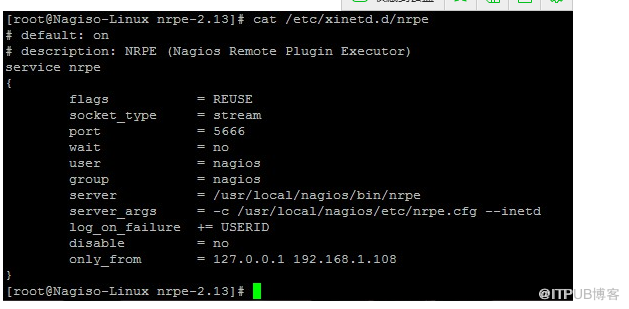
注意:only_from增加监控端主机的ip地址;
编辑/etc/services 文件,增加NRPE服务

service xinetd restart
可以看到5566端口已经在监听了;
使用如下命令,测试客户端是否正常安装了nrpe插件
/usr/local/nagios/libexec/check_nrpe -H localhost
在监控端,打开commands.cfg,编辑添加如下内容:
# 'check_nrpe' command definition
define command{
        command_name    check_nrpe         # 定义命令名称为check_nrpe,在services.cfg中要使用这个名称. command_line
$USER1$/check_nrpe -H $HOSTADDRESS$ -c $ARG1$       #这是定义实际运行的插件程序.  # 这个命令行的书写要完全按照check_nrpe这个命令的用法,不知道用法的就用check_nrpe –h查看. }

-c 后面带的$ARG1$ 参数是传给nrpe daemon 执行的检测命令,之前说过了它必须是nrpe.cfg 中所定义的那5条命令中的其中一条。在services.cfg 中
使用check_nrpe 的时候要用 “!” 带上这个参数。
来自 “ ITPUB博客 ” ,链接:https://blog.itpub.net/30129545/viewspace-1434506/ ,如需转载,请注明出处,否则将追究法律责任。

