Hadoop2.7实战v1.0之HDFS HA
HDFS HA实战v1.0
当前环境:hadoop+zookeeper(namenode,resourcemanager HA)
| namenode | serviceId | Init status |
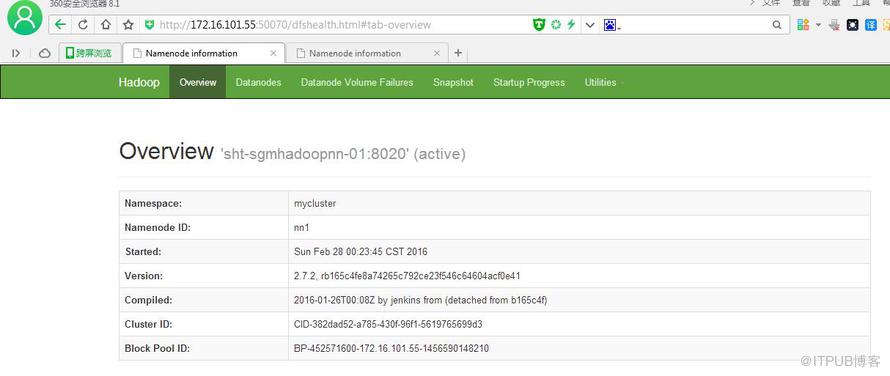
| sht-sgmhadoopnn-01 | nn1 | active |
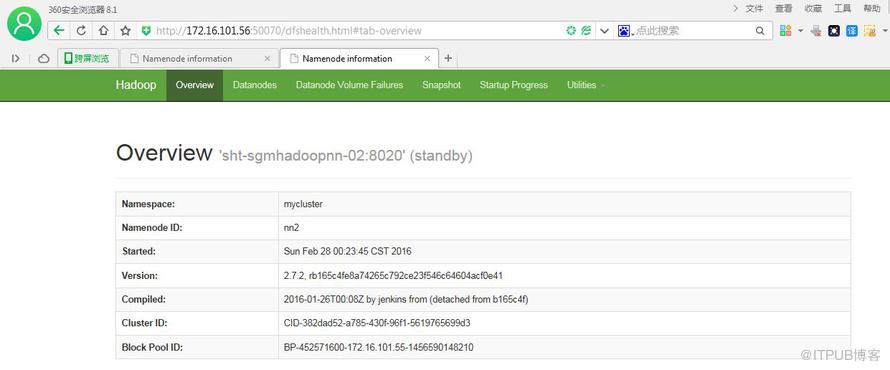
| sht-sgmhadoopnn-02 | nn2 | standby |
参考: http://blog.csdn.net/u011414200/article/details/50336735
一.查看namenode是active还是standby
1.打开网页
2.查看zkfc日志
点击(此处)折叠或打开
-
[root@sht-sgmhadoopnn-01 logs]# more hadoop-root-zkfc-sht-sgmhadoopnn-01.telenav.cn.log
-
-
…………………..
-
-
2016-02-28 00:24:00,692 INFO org.apache.hadoop.ha.ZKFailoverController: Trying to make NameNode at sht-sgmhadoopnn-01/172.16.101.55:8020 active...
-
-
2016-02-28 00:24:01,762 INFO org.apache.hadoop.ha.ZKFailoverController: Successfully transitioned NameNode at sht-sgmhadoopnn-01/172.16.101.55:8020 to active state
-
-
-
[root@sht-sgmhadoopnn-02 logs]# more hadoop-root-zkfc-sht-sgmhadoopnn-01.telenav.cn.log
-
-
…………………..
-
-
2016-02-28 00:24:01,186 INFO org.apache.hadoop.ha.ZKFailoverController: ZK Election indicated that NameNode at sht-sgmhadoopnn-02/172.16.101.56:8020 should become standby
-
- 2016-02-28 00:24:01,209 INFO org.apache.hadoop.ha.ZKFailoverController: Successfully transitioned NameNode at sht-sgmhadoopnn-02/172.16.101.56:8020 to standby state
3. 通过命令hdfs haadmin –getServiceState
###$HADOOP_HOME/etc/hadoop/hdfs-site.xml, dfs.ha.namenodes.[dfs.nameservices]
<!--设置NameNode IDs 此版本最大只支持两个NameNode -->
dfs.ha.namenodes.mycluster
nn1,nn2
点击(此处)折叠或打开
-
[root@sht-sgmhadoopnn-02 logs]# hdfs haadmin -getServiceState nn1
-
-
active
-
-
[root@sht-sgmhadoopnn-02 logs]# hdfs haadmin -getServiceState nn2
-
- standby
二.基本命令
点击(此处)折叠或打开
-
[root@sht-sgmhadoopnn-02 logs]# hdfs --help
-
-
Usage: hdfs [--config confdir] [--loglevel loglevel] COMMAND
-
-
where COMMAND is one of:
-
-
dfs run a filesystem command on the file systems supported in Hadoop.
-
-
classpath prints the classpath
-
-
namenode -format format the DFS filesystem
-
-
secondarynamenode run the DFS secondary namenode
-
-
namenode run the DFS namenode
-
-
journalnode run the DFS journalnode
-
-
zkfc run the ZK Failover Controller daemon
-
-
datanode run a DFS datanode
-
-
dfsadmin run a DFS admin client
-
-
haadmin run a DFS HA admin client
-
-
fsck run a DFS filesystem checking utility
-
-
balancer run a cluster balancing utility
-
-
jmxget get JMX exported values from NameNode or DataNode.
-
-
mover run a utility to move block replicas across
-
-
storage types
-
-
oiv apply the offline fsimage viewer to an fsimage
-
-
oiv_legacy apply the offline fsimage viewer to an legacy fsimage
-
-
oev apply the offline edits viewer to an edits file
-
-
fetchdt fetch a delegation token from the NameNode
-
-
getconf get config values from configuration
-
-
groups get the groups which users belong to
-
-
snapshotDiff diff two snapshots of a directory or diff the
-
-
current directory contents with a snapshot
-
-
lsSnapshottableDir list all snapshottable dirs owned by the current user
-
-
Use -help to see options
-
-
portmap run a portmap service
-
-
nfs3 run an NFS version 3 gateway
-
-
cacheadmin configure the HDFS cache
-
-
crypto configure HDFS encryption zones
-
-
storagepolicies list/get/set block storage policies
-
-
version print the version
-
-
###########################################################################
-
-
[root@sht-sgmhadoopnn-02 logs]# hdfs namenode --help
-
-
Usage: java NameNode [-backup] |
-
-
[-checkpoint] |
-
-
[-format [-clusterid cid ] [-force] [-nonInteractive] ] |
-
-
[-upgrade [-clusterid cid] [-renameReserved<k-v pairs>] ] |
-
-
[-upgradeOnly [-clusterid cid] [-renameReserved<k-v pairs>] ] |
-
-
[-rollback] |
-
-
[-rollingUpgrade <rollback|downgrade|started> ] |
-
-
[-finalize] |
-
-
[-importCheckpoint] |
-
-
[-initializeSharedEdits] |
-
-
[-bootstrapStandby] |
-
-
[-recover [ -force] ] |
-
-
[-metadataVersion ] ]
-
-
-
-
-
###########################################################################
-
-
[root@sht-sgmhadoopnn-02 logs]# hdfs haadmin --help
-
-
-help: Unknown command
-
-
Usage: haadmin
-
-
[-transitionToActive [--forceactive] <serviceId>]
-
-
[-transitionToStandby <serviceId>]
-
-
[-failover [--forcefence] [--forceactive] <serviceId> <serviceId>]
-
-
[-getServiceState <serviceId>]
-
-
[-checkHealth <serviceId>]
-
- [-help <command>]
failover 初始化一个故障恢复。该命令会从一个失效的NameNode切换到另一个上面(不支持在自动切换的环境操作)。

getServiceState 获取当前NameNode的状态。
checkHealth 检查NameNode的状态。正常就返回0,否则返回非0值。
三.实验
1.测试HDFS的手工切换功能(失败)
点击(此处)折叠或打开
-
[root@sht-sgmhadoopnn-01 ~]# hdfs haadmin -failover --forceactive nn1 nn2
-
- forcefence and forceactive flags not supported with auto-failover enabled.
#hdfs-site.xml 中设置dfs.ha.automatic-failover.enabled为 true,故提示不能手动切换
2.测试HDFS的自动切换功能(成功)
a.在active namenode机器上通过jps命令查找到namenode的进程号,然后通过kill -9的方式杀掉进程,观察另一个namenode节点是否会从状态standby变成active状态
点击(此处)折叠或打开
-
[root@sht-sgmhadoopnn-01 ~]# hdfs haadmin -getServiceState nn1
-
-
active
-
-
[root@sht-sgmhadoopnn-01 ~]# hdfs haadmin -getServiceState nn2
-
-
standby
-
-
-
-
-
[root@sht-sgmhadoopnn-01 ~]# jps
-
-
10327 ResourceManager
-
-
10162 DFSZKFailoverController
-
-
9821 NameNode
-
-
20064 Jps
-
-
[root@sht-sgmhadoopnn-01 ~]# kill -9 9821
-
-
[root@sht-sgmhadoopnn-01 ~]# jps
-
-
10327 ResourceManager
-
-
10162 DFSZKFailoverController
-
-
20121 Jps
-
-
-
-
[root@sht-sgmhadoopnn-01 ~]# hdfs haadmin -getServiceState nn1
-
-
16/02/28 22:01:37 INFO ipc.Client: Retrying connect to server: sht-sgmhadoopnn-01/172.16.101.55:8020. Already tried 0 time(s); retry policy is RetryUpToMaximumCountWithFixedSleep(maxRetries=1, sleepTime=1000 MILLISECONDS)
-
-
Operation failed: Call From sht-sgmhadoopnn-01.telenav.cn/172.16.101.55 to sht-sgmhadoopnn-01:8020 failed on connection exception: java.net.ConnectException: Connection refused; For more details see: http://wiki.apache.org/hadoop/ConnectionRefused
-
-
[root@sht-sgmhadoopnn-01 ~]# hdfs haadmin -getServiceState nn2
-
-
active
-
- [root@sht-sgmhadoopnn-01 ~]#
##也可以通过观察zkfc日志或者http://172.16.101.56:50070/ 来查看是否切换成功
b.手动启动sht-sgmhadoopnn-01的namenode
点击(此处)折叠或打开
-
[root@sht-sgmhadoopnn-01 ~]# cd /hadoop/hadoop-2.7.2/sbin
-
-
[root@sht-sgmhadoopnn-01 sbin]# jps
-
-
10327 ResourceManager
-
-
10162 DFSZKFailoverController
-
-
21640 Jps
-
-
[root@sht-sgmhadoopnn-01 sbin]# hadoop-daemon.sh start namenode
-
-
starting namenode, logging to /hadoop/hadoop-2.7.2/logs/hadoop-root-namenode-sht-sgmhadoopnn-01.telenav.cn.out
-
-
[root@sht-sgmhadoopnn-01 sbin]# jps
-
-
10327 ResourceManager
-
-
10162 DFSZKFailoverController
-
-
21784 Jps
-
-
21679 NameNode
-
-
[root@sht-sgmhadoopnn-01 sbin]# hdfs haadmin -getServiceState nn1
-
-
standby
-
- [root@sht-sgmhadoopnn-01 sbin]#
#### sht-sgmhadoopnn-01 机器上namenode 进程已经起来,且状态为standby
c. 再次切换
点击(此处)折叠或打开
-
[root@sht-sgmhadoopnn-01 sbin]# hdfs haadmin -transitionToStandby nn2
-
-
Automatic failover is enabled for NameNode at sht-sgmhadoopnn-02/172.16.101.56:8020
-
-
Refusing to manually manage HA state, since it may cause
-
-
a split-brain scenario or other incorrect state.
-
-
If you are very sure you know what you are doing, please
-
-
specify the --forcemanual flag.
-
-
-
[root@sht-sgmhadoopnn-01 sbin]# hdfs haadmin -transitionToStandby --forcemanual nn2
-
-
You have specified the --forcemanual flag. This flag is dangerous, as it can induce a split-brain scenario that WILL CORRUPT your HDFS namespace, possibly irrecoverably.
-
-
It is recommended not to use this flag, but instead to shut down the cluster and disable automatic failover if you prefer to manually manage your HA state.
-
-
You may abort safely by answering 'n' or hitting ^C now.
-
-
Are you sure you want to continue? (Y or N) Y
-
-
16/02/28 22:30:22 WARN ha.HAAdmin: Proceeding with manual HA state management even though
-
-
automatic failover is enabled for NameNode at sht-sgmhadoopnn-02/172.16.101.56:8020
-
-
-
-
[root@sht-sgmhadoopnn-01 sbin]# hdfs haadmin -getServiceState nn1
-
-
active
-
-
[root@sht-sgmhadoopnn-01 sbin]# hdfs haadmin -getServiceState nn2
-
-
standby
-
- [root@sht-sgmhadoopnn-01 sbin]#
来自 “ ITPUB博客 ” ,链接:https://blog.itpub.net/30089851/viewspace-2047907/ ,如需转载,请注明出处,否则将追究法律责任。

最新文章
- Resolving archive.cloudera.com... failed: Temporary failure in name
- 记录2018年底最后1次HBase故障维护
- Batch containing 11 record(s) expired due to timeout while requesting metadata
- 【记录】:CentOS清理swap和buffer/cache
- java.io.IOException: Connection reset by peer
- maven报错:找不到符号
- Kubernetes node的防火墙问题导致pod ip无法访问
- 基于CentOS6.4环境编译Spark-2.1.0源码
- 有幸参加上海专场Spark线下课程,谈谈感想
- Maven-3.3.9 Install and Oozie-4.3.0 Compile
