索引是什么
- 索引是一种
排好序的
数据结构,目的是提高查找效率
- 一般来说,索引本身也
占内存,因此索引以文件的形式存储在磁盘上
- 平常我们所说的索引一般都是B+Tree。当然还有hash索引等等
索引优劣势
-
优势:提高检索效率,降低数据库IO成本。由于数据都已经排好序,降低了排序的成本,降低CPU的消耗
-
劣势:索引也要占用空间、在INSERT/DELETE/UPDATE的时候需要同步更新索引
索引分类
- 单值索引:索引只有一个列
- 唯一索引:索引列的值必须唯一,允许空值
- 复合索引:索引包含多个列
索引结构
建立索引情形
- 频繁查询的字段
- 与其它表关联的字段需要创建索引
- 频繁更新的字段不适合创建索引(更新数据的时候需要更新索引)
- 查询中存在排序的字段,排序若通过索引去访问则大大提高访问的效率
- 查询中统计和分组的字段,因为group by之前需要先排序
性能分析(MySQL Query Optimizer)
- Explain是什么?可以模拟查询sql语句,可以知道MySql是如何执行SQL,分析语句的性能瓶颈
-
Explain能够干什么?
- 表的读取顺序
- 数据读取的操作类型
- 哪些索引可以使用
- 哪些索引实际被使用
- 表之间的引用
- 每张表有多少行被优化器查询
- 使用方式
-- 1、简单使用explain select * from emp;-- 2、explain扩展使用,可查看优化执行情况explain extended select * from emp;show warnings ;-- 3、结合分区使用explain partitions select * from emp;123456789
- 执行计划包含的内容(
简单使用):

-
id:表示查询执行顺序,代表
select的个数,分为三种情况①
id相同,从上往下执行,②
id不同,id越大优先级越高,越先执行③
id为null最后执行(
画外音:union查询id为null)
-
select_type:查询的类型主要用于区分普通查询、联合查询、子查询,类型有
-
SIMPLE:简单查询。查询不包含子查询和union
-
PRIMARY:复杂查询中的最外层查询
-
SUBQUERY:在select中的子查询,不在from中
-
DERIVED:在from中的子查询,数据放在临时表中
-
UNION和
UNION RESULT:存在union查询,union result获取结果
- 下面列表展示了上面几种查询类型,可以看出在
select_type为
union result的时候id是空的
explain select (select name from dept where id = a.dept_id) deptName from (select * from emp) a union select 1;1

-
table:表示访问的是哪个表,当
from 子句中有子查询时,table列是 格式,表示当前查询依赖 id=N 的查询,于是先执行 id=N 的查询,
UNION RESULT 的 table 列的值为<union1,2>,1和2表示参与 union 的 select 行id
-
type:访问数据类型,从最优到最差为
system > const > eq_ref > ref > range > index > ALL
-
system 表中只有一条数据,是const的特例,一般的情况下不会出现
-
const 查询条件为primary key或者unique key的时候匹配一条数据
-
eq_ref primary key 或 unique key 索引的所有部分
被连接使用 ,最多只会返回一条符合条件的记录,这个是const之后
最好的链接类型了
explain select * from emp a left join dept d on a.dept_id = d.id;1

-
ref 相比 eq_ref,不使用唯一索引,而是使用普通索引或者唯一性索引的部分前缀,索引要和某个值相比较,可能会找到多个符合条件的行。
ref可以出现在简单的非唯一索引查询和联合的非唯一索引查询

-
range 范围扫描通常出现在 in(), between ,> ,<, >= ,<=等操作中。使用一个索引来检索给定范围的行
-
index 扫描全表索引,这通常比ALL快一些。(index是从索引中读取的,而all是从硬盘中读取)
-- indexexplain select job_id from emp ;12

-
all 即全表扫描,意味着MySQL需要从头到尾去查找所需要的行。
-
possible_keys :这一列显示查询可能使用哪些索引来查找。 explain 时可能出现 possible_keys 有列,而 key 显示 NULL 的情况,这种情况是因为表中数据不多,MySQL认为索引对此查询帮助不大,选择了全表查询。如果该列为null,可以创建索引来提高检索效率
-
key:实际使用的索引。如果为null,则表示没有使用索引。如果使用覆盖索引,则和
extra中的
using index一致
-
key_len:实际使用索引的字节数。(
画外音:长度后面介绍,跟编码有关系)注意:
索引最大长度是768字节,超过长度的索引会变为最左前缀。实际使用的时候需要尽可能的减少索引的长度,提高左边的识别度。
因为索引占空间
-
ref:这一列显示了在key列记录的索引中,表查找值所用到的列或常量,常见的有:const(常量),字段名
-
rows:这一列是mysql估计要读取并检测的行数,注意这个不是结果集里的行数
-
extra:查询的额外信息,类型以及描述如下表:
| 类型 |
描述 |
Using index |
查询列被索引覆盖,避免回表查询,是查询性能好的表现 |
Using where |
查询列
未被索引覆盖,
需要回表查询 |
Using where Using index |
查询的列被索引覆盖,并且where筛选条件是索引列之一但是不是
索引的前导列,无法通过索引查找到数据 |
Null |
查询的列未被索引覆盖,并且where筛选条件是索引的前导列,意味着用到了索引,但是部分字段未被索引覆盖,必须通过“回表”来实现,不是纯粹地用到了索引,也不是完全没用到索引 |
Using index condition |
查询列不完全被索引覆盖,where条件是前导列的一个范围 |
Using temporary |
使用临时表来处理查询,这个时候需要
优化查询 |
Using filesort |
对结果使用一个外部索引排序,而不是按索引次序从表里读取行,这个时候需要
优化查询 |
mysql> -- extramysql> -- using indexmysql> explain select job_id from emp where job_id = 1;+----+-------------+-------+------+-----------------+-----------------+---------+-------+------+-------------+| id | select_type | table | type | possible_keys | key | key_len | ref | rows | Extra |+----+-------------+-------+------+-----------------+-----------------+---------+-------+------+-------------+| 1 | SIMPLE | emp | ref | idx_job_id_name | idx_job_id_name | 9 | const | 3 | Using index |+----+-------------+-------+------+-----------------+-----------------+---------+-------+------+-------------+1 row in set (0.00 sec)mysql> -- using wheremysql> explain select * from emp where name = '1';+----+-------------+-------+------+---------------+------+---------+------+------+-------------+| id | select_type | table | type | possible_keys | key | key_len | ref | rows | Extra |+----+-------------+-------+------+---------------+------+---------+------+------+-------------+| 1 | SIMPLE | emp | ALL | NULL | NULL | NULL | NULL | 8 | Using where |+----+-------------+-------+------+---------------+------+---------+------+------+-------------+1 row in set (0.00 sec)mysql> -- Using where Using indexmysql> explain select job_id,name from emp where name = 'frank';+----+-------------+-------+-------+---------------+-----------------+---------+------+------+--------------------------+| id | select_type | table | type | possible_keys | key | key_len | ref | rows | Extra |+----+-------------+-------+-------+---------------+-----------------+---------+------+------+--------------------------+| 1 | SIMPLE | emp | index | NULL | idx_job_id_name | 139 | NULL | 8 | Using where; Using index |+----+-------------+-------+-------+---------------+-----------------+---------+------+------+--------------------------+1 row in set (0.00 sec)mysql> -- Nullmysql> explain select * from emp where job_id = 1;+----+-------------+-------+------+-----------------+-----------------+---------+-------+------+-------+| id | select_type | table | type | possible_keys | key | key_len | ref | rows | Extra |+----+-------------+-------+------+-----------------+-----------------+---------+-------+------+-------+| 1 | SIMPLE | emp | ref | idx_job_id_name | idx_job_id_name | 9 | const | 3 | NULL |+----+-------------+-------+------+-----------------+-----------------+---------+-------+------+-------+1 row in set (0.00 sec)mysql> -- Using index conditionmysql> explain select * from emp where job_id > 100;+----+-------------+-------+-------+-----------------+-----------------+---------+------+------+-----------------------+| id | select_type | table | type | possible_keys | key | key_len | ref | rows | Extra |+----+-------------+-------+-------+-----------------+-----------------+---------+------+------+-----------------------+| 1 | SIMPLE | emp | range | idx_job_id_name | idx_job_id_name | 9 | NULL | 1 | Using index condition |+----+-------------+-------+-------+-----------------+-----------------+---------+------+------+-----------------------+1 row in set (0.00 sec)mysql> -- Using temporarymysql> explain select distinct name from emp ;+----+-------------+-------+-------+-----------------+-----------------+---------+------+------+------------------------------+| id | select_type | table | type | possible_keys | key | key_len | ref | rows | Extra |+----+-------------+-------+-------+-----------------+-----------------+---------+------+------+------------------------------+| 1 | SIMPLE | emp | index | idx_job_id_name | idx_job_id_name | 139 | NULL | 8 | Using index; Using temporary |+----+-------------+-------+-------+-----------------+-----------------+---------+------+------+------------------------------+1 row in set (0.00 sec)mysql> -- Using filesortmysql> explain select name from emp order by name;+----+-------------+-------+-------+---------------+-----------------+---------+------+------+-----------------------------+| id | select_type | table | type | possible_keys | key | key_len | ref | rows | Extra |+----+-------------+-------+-------+---------------+-----------------+---------+------+------+-----------------------------+| 1 | SIMPLE | emp | index | NULL | idx_job_id_name | 139 | NULL | 8 | Using index; Using filesort |+----+-------------+-------+-------+---------------+-----------------+---------+------+------+-----------------------------+1 row in set (0.00 sec)123456789101112131415161718192021222324252627282930313233343536373839404142434445464748495051525354555657585960616263
索引最佳实践
- 全值匹配我最爱
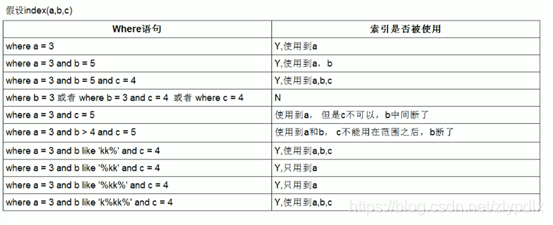
- 最佳左前缀原则(但是skip scan例外)–带头大哥不能少,中间兄弟不能断(只能用到部分的索引)
- 不要再索引上进行任何计算
- 索引不能使用范围右边的列
- 尽量使用覆盖索引(只访问索引的查询(索引列包含查询列)),减少select *语句
- mysql在使用不等于(!=或者<>)的时候无法使用索引会导致全表扫描(如果覆盖索引则可以显示出来)
- is null,is not null 也无法使用索引
- like以通配符开头(’%abc…’)mysql索引失效会变成全表扫描操作
- 字符串不加单引号索引失效
- 少用or,用它连接时很多情况下索引会失效
mysql> -- 最佳左前缀法则(job_id,name)mysql> explain select job_id from emp where job_id = 1;+----+-------------+-------+------+-----------------+-----------------+---------+-------+------+-------------+| id | select_type | table | type | possible_keys | key | key_len | ref | rows | Extra |+----+-------------+-------+------+-----------------+-----------------+---------+-------+------+-------------+| 1 | SIMPLE | emp | ref | idx_job_id_name | idx_job_id_name | 9 | const | 3 | Using index |+----+-------------+-------+------+-----------------+-----------------+---------+-------+------+-------------+1 row in set (0.00 sec)mysql> explain select job_id from emp where name = 'frank';+----+-------------+-------+-------+---------------+-----------------+---------+------+------+--------------------------+| id | select_type | table | type | possible_keys | key | key_len | ref | rows | Extra |+----+-------------+-------+-------+---------------+-----------------+---------+------+------+--------------------------+| 1 | SIMPLE | emp | index | NULL | idx_job_id_name | 139 | NULL | 8 | Using where; Using index |+----+-------------+-------+-------+---------------+-----------------+---------+------+------+--------------------------+1 row in set (0.00 sec)mysql> -- 不在索引列上做任何操作(计算、函数、(自动or手动)类型转换),会导致索引失效而转向全表扫描mysql> explain select * from emp where job_id + 1 = 3;+----+-------------+-------+------+---------------+------+---------+------+------+-------------+| id | select_type | table | type | possible_keys | key | key_len | ref | rows | Extra |+----+-------------+-------+------+---------------+------+---------+------+------+-------------+| 1 | SIMPLE | emp | ALL | NULL | NULL | NULL | NULL | 8 | Using where |+----+-------------+-------+------+---------------+------+---------+------+------+-------------+1 row in set (0.00 sec)mysql> -- 存储引擎不能使用索引中范围条件右边的列mysql> explain select * from emp where job_id > 100 and name = 'frank';+----+-------------+-------+-------+-----------------+-----------------+---------+------+------+-----------------------+| id | select_type | table | type | possible_keys | key | key_len | ref | rows | Extra |+----+-------------+-------+-------+-----------------+-----------------+---------+------+------+-----------------------+| 1 | SIMPLE | emp | range | idx_job_id_name | idx_job_id_name | 9 | NULL | 1 | Using index condition |+----+-------------+-------+-------+-----------------+-----------------+---------+------+------+-----------------------+1 row in set (0.00 sec)mysql> -- 尽量使用覆盖索引(只访问索引的查询(索引列包含查询列)),减少select *语句mysql> explain select id, name, job_id,salary, dept_id from emp where job_id > 100;+----+-------------+-------+-------+-----------------+-----------------+---------+------+------+-----------------------+| id | select_type | table | type | possible_keys | key | key_len | ref | rows | Extra |+----+-------------+-------+-------+-----------------+-----------------+---------+------+------+-----------------------+| 1 | SIMPLE | emp | range | idx_job_id_name | idx_job_id_name | 9 | NULL | 1 | Using index condition |+----+-------------+-------+-------+-----------------+-----------------+---------+------+------+-----------------------+1 row in set (0.00 sec)mysql> explain select job_id from emp where job_id > 100;+----+-------------+-------+-------+-----------------+-----------------+---------+------+------+--------------------------+| id | select_type | table | type | possible_keys | key | key_len | ref | rows | Extra |+----+-------------+-------+-------+-----------------+-----------------+---------+------+------+--------------------------+| 1 | SIMPLE | emp | range | idx_job_id_name | idx_job_id_name | 9 | NULL | 1 | Using where; Using index |+----+-------------+-------+-------+-----------------+-----------------+---------+------+------+--------------------------+1 row in set (0.00 sec)mysql> -- mysql在使用不等于(!=或者<>)的时候无法使用索引会导致全表扫描(如果覆盖索引则可以显示出来)mysql> explain select name,emp.salary from emp where job_id != 1;+----+-------------+-------+------+-----------------+------+---------+------+------+-------------+| id | select_type | table | type | possible_keys | key | key_len | ref | rows | Extra |+----+-------------+-------+------+-----------------+------+---------+------+------+-------------+| 1 | SIMPLE | emp | ALL | idx_job_id_name | NULL | NULL | NULL | 8 | Using where |+----+-------------+-------+------+-----------------+------+---------+------+------+-------------+1 row in set (0.00 sec)mysql> -- is null,is not null 也无法使用索引mysql> explain select emp.salary,job_id,name from emp where job_id is not null;+----+-------------+-------+------+-----------------+------+---------+------+------+-------------+| id | select_type | table | type | possible_keys | key | key_len | ref | rows | Extra |+----+-------------+-------+------+-----------------+------+---------+------+------+-------------+| 1 | SIMPLE | emp | ALL | idx_job_id_name | NULL | NULL | NULL | 8 | Using where |+----+-------------+-------+------+-----------------+------+---------+------+------+-------------+1 row in set (0.00 sec)mysql> -- like以通配符开头('%abc...')mysql索引失效会变成全表扫描操作mysql> explain select name from emp where name like 'frank%';+----+-------------+-------+-------+---------------+-----------------+---------+------+------+--------------------------+| id | select_type | table | type | possible_keys | key | key_len | ref | rows | Extra |+----+-------------+-------+-------+---------------+-----------------+---------+------+------+--------------------------+| 1 | SIMPLE | emp | index | NULL | idx_job_id_name | 139 | NULL | 8 | Using where; Using index |+----+-------------+-------+-------+---------------+-----------------+---------+------+------+--------------------------+1 row in set (0.00 sec)--下面两个比较简单mysql> -- 字符串不加单引号索引失效mysql> -- 少用or,用它连接时很多情况下索引会失效123456789101112131415161718192021222324252627282930313233343536373839404142434445464748495051525354555657585960616263646566676869707172737475767778798081
- 最后借用一张图来表示联合索引的最佳实践
总结
- 索引(index)跟新华字典的索引目录类似,提高了检索的效率,在实践过程中也有很多需要注意的地方。平常大家可以多多的通过执行
Explain来查看执行计划,分析SQL,写出高效的SQL,当然如果只是上面的内容还不够大家在日常工作中使用的,接下来还有多篇关于MySQL优化,欢迎关注!
来自 “ ITPUB博客 ” ,链接:https://blog.itpub.net/29797838/viewspace-2758500/
,如需转载,请注明出处,否则将追究法律责任。

