如何用一条命令,为代码生成“华丽”的注释?
一 :生成注释示例
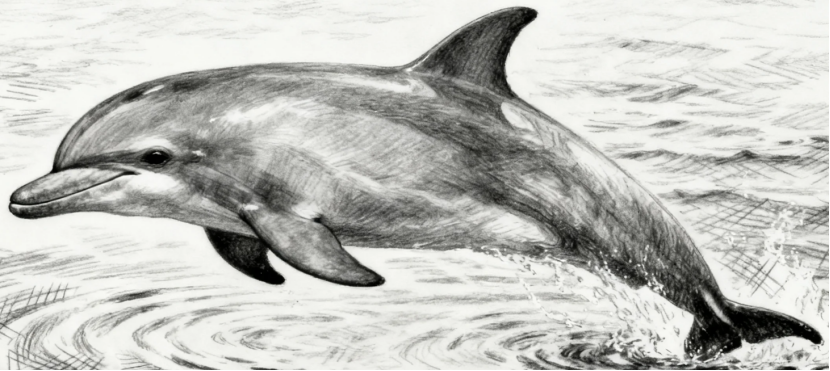
第一步,准备一张图片 :1.png

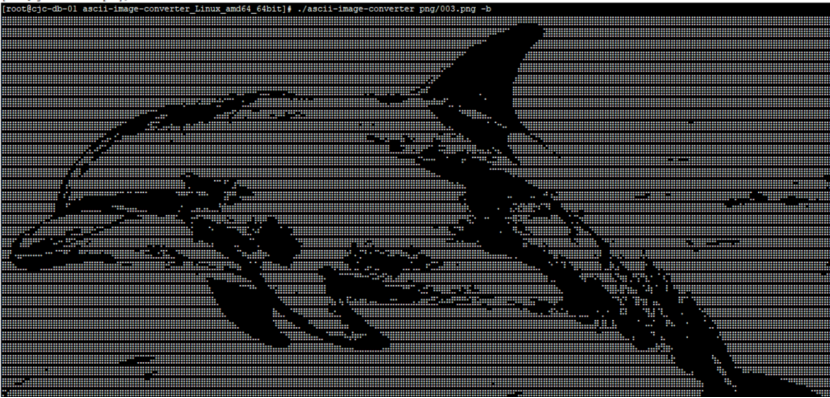
第二步,一条命令,生成 “美女”注释 :
[root@cjc-db-01 ascii-image-converter_Linux_amd64_64bit]# ./ascii-image-converter png/001.png -b

第三步 : 将注释加入你的运维脚本里 :

运行脚本,输出如下 :
[root@cjc-db-01 scripts]# sh 03.sh

其他图片

生成的代码

[root@cjc-db-01 scripts]# sh 02.sh

二 :下载工具 ascii-image-converter
https://github.com/TheZoraiz/ascii-image-converter/releases/tag/v1.13.1

三 :ascii-image-converter工具的使用
[root@cjc-db-01 image]# ls -lrth ascii-image-converter_Linux_amd64_64bit.tar.gz
-rw-r--r-- 1 root root 4.0M Sep 27 03:50 ascii-image-converter_Linux_amd64_64bit.tar.gz

[root@cjc-db-01 image]# md5sum ascii-image-converter_Linux_amd64_64bit.tar.gz
2e72df2c3459daad150bb2cc525d8945  ascii-image-converter_Linux_amd64_64bit.tar.gz
[root@cjc-db-01 image]#
[root@cjc-db-01 image]# tar -zxvf ascii-image-converter_Linux_amd64_64bit.tar.gz
ascii-image-converter_Linux_amd64_64bit/LICENSE.txt
ascii-image-converter_Linux_amd64_64bit/README.md
ascii-image-converter_Linux_amd64_64bit/ascii-image-converter

[root@cjc-db-01 ascii-image-converter_Linux_amd64_64bit]# ls -lrth
total 9.3M
-rw-rw-r-- 1 cjc cjc  10K Nov 13  2022 LICENSE.txt
-rw-rw-r-- 1 cjc cjc  16K Nov 23  2022 README.md
-rwxrwxr-x 1 cjc cjc 9.3M Nov 23  2022 ascii-image-converter
帮助信息
[root@cjc-db-01 ascii-image-converter_Linux_amd64_64bit]# ./ascii-image-converter --help
This tool converts images into ascii art and prints them on the terminal.
Further configuration can be managed with flags.

Usage:
  ascii-image-converter [image paths/urls or piped stdin] [flags]

Flags:
  -C, --color             Display ascii art with original colors
                          If 24-bit colors aren't supported, uses 8-bit
                          (Inverts with --negative flag)
                          (Overrides --grayscale and --font-color flags)

      --color-bg          If some color flag is passed, use that color
                          on character background instead of foreground
                          (Inverts with --negative flag)
                          (Only applicable for terminal display)

  -d, --dimensions ints   Set width and height for ascii art in CHARACTER length
                          e.g. -d 60,30 (defaults to terminal height)
                          (Overrides --width and --height flags)

  -W, --width int         Set width for ascii art in CHARACTER length
                          Height is kept to aspect ratio
                          e.g. -W 60

  -H, --height int        Set height for ascii art in CHARACTER length
                          Width is kept to aspect ratio
                          e.g. -H 60

  -m, --map string        Give custom ascii characters to map against
                          Ordered from darkest to lightest
                          e.g. -m " .-+#@" (Quotation marks excluded from map)
                          (Overrides --complex flag)

  -b, --braille           Use braille characters instead of ascii
                          Terminal must support braille patterns properly
                          (Overrides --complex and --map flags)

      --threshold int     Threshold for braille art
                          Value between 0-255 is accepted
                          e.g. --threshold 170
                          (Defaults to 128)

      --dither            Apply dithering on image for braille
                          art conversion
                          (Only applicable with --braille flag)
                          (Negates --threshold flag)

  -g, --grayscale         Display grayscale ascii art
                          (Inverts with --negative flag)
                          (Overrides --font-color flag)

  -c, --complex           Display ascii characters in a larger range
                          May result in higher quality

  -f, --full              Use largest dimensions for ascii art
                          that fill the terminal width
                          (Overrides --dimensions, --width and --height flags)

  -n, --negative          Display ascii art in negative colors

  -x, --flipX             Flip ascii art horizontally

  -y, --flipY             Flip ascii art vertically

  -s, --save-img string   Save ascii art as a .png file
                          Format: <image-name>-ascii-art.png
                          Image will be saved in passed path
                          (pass . for current directory)

      --save-txt string   Save ascii art as a .txt file
                          Format: <image-name>-ascii-art.txt
                          File will be saved in passed path
                          (pass . for current directory)

      --save-gif string   If input is a gif, save it as a .gif file
                          Format: <gif-name>-ascii-art.gif
                          Gif will be saved in passed path
                          (pass . for current directory)

      --save-bg ints      Set background color for --save-img
                          and --save-gif flags
                          Pass an RGBA value
                          e.g. --save-bg 255,255,255,100
                          (Defaults to 0,0,0,100)

      --font string       Set font for --save-img and --save-gif flags
                          Pass file path to font .ttf file
                          e.g. --font ./RobotoMono-Regular.ttf
                          (Defaults to Hack-Regular for ascii and
                           DejaVuSans-Oblique for braille)

      --font-color ints   Set font color for terminal as well as
                          --save-img and --save-gif flags
                          Pass an RGB value
                          e.g. --font-color 0,0,0
                          (Defaults to 255,255,255)

      --only-save         Don't print ascii art on terminal
                          if some saving flag is passed

      --formats           Display supported input formats

  -h, --help              Help for ascii-image-converter

  -v, --version           Version for ascii-image-converter

Copyright © 2021 Zoraiz Hassan <hzoraiz8@gmail.com>
Distributed under the Apache License Version 2.0 (Apache-2.0)
For further details, visit https://github.com/TheZoraiz/ascii-image-converter
根据图片,生成注释代码
[./ascii-image-converter png/001.png -b
参考:
https://github.com/TheZoraiz/ascii-image-converter/releases/tag/v1.13.1
欢迎关注我的公众号《 IT小 Chen》
来自 “ ITPUB博客 ” ,链接:https://blog.itpub.net/29785807/viewspace-3096680/ ,如需转载,请注明出处,否则将追究法律责任。

