构建一个sharded cluster需要至少三个组件:
〇 shard: 每一个shard包括了切片数据的子集,也可以被部署为“副本集”
〇 mongos: 作为一个“查询路由”,在客户端和shard cluster之间作为一个中间接口,类似于MySQL的一些中间proxy。
可以通过mongo shell或者mongodb driver直连mongos
〇 config server: 一个存储了sharded cluster的元数据和配置信息的server,同样也可以被部署为“副本集”(mongodb 3.2)
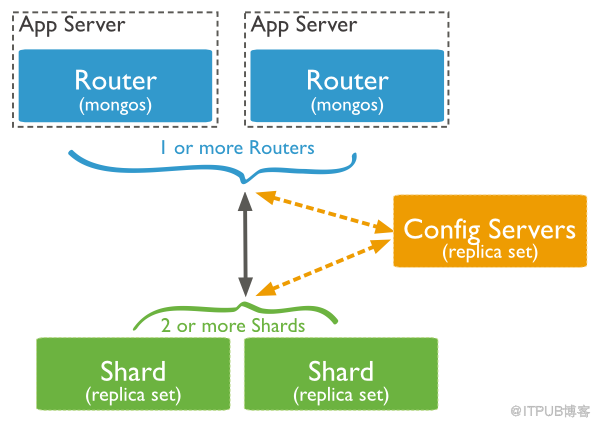
此处用了四台服务器实践,资源分配如下:

config server(186):
mongos(185):
此处先给两个shard节点做副本集,此处将通过端口区分不同实例:
shard1(187):
通过mongo shell进入任意一个实例,此处选择的是27017实例,配置副本集并初始化
以下为mongo shell操作:
可以检查一下副本集状态
再给shard2做三个副本集
shard2(188):
和shard1一样,通过mongo shell进入任意一个实例,此处选择的是27017实例,配置副本集并初始化
最后在mongos(185)的机器上添加shard节点:
进入mongo shell,通过addshard来加入shard节点,多个副本集用逗号分隔:
此处对sano1y库的testtb使用hash策略:
目前为止,已经对sano1y库的testtb集合进行了shard配置。
测试:
稍等片刻,等待插入完毕:
进入shard1(187)的PRIMARY实例检查
另外如果到shard2可以看到shard1这些不连续的id。
可发现shard1和2中的document数量,还是比较均匀的。
shard1: 49983
shard2: 50017
至此,分片集群搭建基本完成。
当然,config server现在存在着单点的问题,同样也可以将config server配置成一组replSet,其本质是mongod服务器。
参考文档:
http://www.lanceyan.com/tech/arch/mongodb_shard1.html
https://docs.mongodb.com/manual/sharding/sharded-cluster
〇 shard: 每一个shard包括了切片数据的子集,也可以被部署为“副本集”
〇 mongos: 作为一个“查询路由”,在客户端和shard cluster之间作为一个中间接口,类似于MySQL的一些中间proxy。
可以通过mongo shell或者mongodb driver直连mongos
〇 config server: 一个存储了sharded cluster的元数据和配置信息的server,同样也可以被部署为“副本集”(mongodb 3.2)
此处用了四台服务器实践,资源分配如下:

config server(186):
-
mkdir -p /data/config/data
-
mkdir -p /data/config/log
- mongod --dbpath=/data/config/data --logpath=/data/config/log/config.log --port=30000 --fork --configsvr
mongos(185):
-
mkdir -p /data/mongos/log
- mongos --logpath=/data/mongos/log/mongos.log --port=27017 --fork --configdb=192.168.1.186:30000
此处先给两个shard节点做副本集,此处将通过端口区分不同实例:
shard1(187):
-
mkdir -p /data/shard1/data/set1
-
mkdir -p /data/shard1/data/set2
-
mkdir -p /data/shard1/data/set3
-
mkdir -p /data/shard1/logs
-
mongod --dbpath=/data/shard1/data/set1 --logpath=/data/shard1/logs/set1.log --port=27017 --fork --shardsvr --replSet=shard1
-
mongod --dbpath=/data/shard1/data/set2 --logpath=/data/shard1/logs/set2.log --port=27018 --fork --shardsvr --replSet=shard1
- mongod --dbpath=/data/shard1/data/set3 --logpath=/data/shard1/logs/set3.log --port=27019 --fork --shardsvr --replSet=shard1
通过mongo shell进入任意一个实例,此处选择的是27017实例,配置副本集并初始化
- # mongo 127.0.0.1:27017/admin
以下为mongo shell操作:
-
> cnf = {_id:"shard1", members:[
-
{_id:1, host:"192.168.1.187:27017"},
-
{_id:2, host:"192.168.1.187:27018"},
-
{_id:3, host:"192.168.1.187:27019"},
-
]
-
}
-
-
-
> rs.initiate(cnf);
- { "ok" : 1 }
可以检查一下副本集状态
- > rs.status()
再给shard2做三个副本集
shard2(188):
-
mkdir -p /data/shard2/data/set1
-
mkdir -p /data/shard2/data/set2
-
mkdir -p /data/shard2/data/set3
-
mkdir -p /data/shard2/logs
-
mongod --dbpath=/data/shard2/data/set1 --logpath=/data/shard2/logs/set1.log --port=27017 --fork --shardsvr --replSet=shard2
-
mongod --dbpath=/data/shard2/data/set2 --logpath=/data/shard2/logs/set2.log --port=27018 --fork --shardsvr --replSet=shard2
- mongod --dbpath=/data/shard2/data/set3 --logpath=/data/shard2/logs/set3.log --port=27019 --fork --shardsvr --replSet=shard2
和shard1一样,通过mongo shell进入任意一个实例,此处选择的是27017实例,配置副本集并初始化
-
> cnf = {_id:"shard2", members:[
-
{_id:1, host:"192.168.1.188:27017"},
-
{_id:2, host:"192.168.1.188:27018"},
-
{_id:3, host:"192.168.1.188:27019"},
-
]
-
}
-
-
-
> rs.initiate(cnf);
- { "ok" : 1 }
最后在mongos(185)的机器上添加shard节点:
- # mongo 127.0.0.1:27017/admin
进入mongo shell,通过addshard来加入shard节点,多个副本集用逗号分隔:
-
mongos> db.runCommand( { addshard : "shard1/192.168.1.187:27017,192.168.1.187:27018,192.168.1.187:27019"});
-
{ "shardAdded" : "shard1", "ok" : 1 }
-
mongos> db.runCommand( { addshard : "shard2/192.168.1.188:27017,192.168.1.188:27018,192.168.1.188:27019"});
-
{ "shardAdded" : "shard2", "ok" : 1 }
-
mongos> db.runCommand( { listshards : 1 } );
-
{
-
"shards" : [
-
{
-
"_id" : "shard1",
-
"host" : "shard1/192.168.1.187:27017,192.168.1.187:27018,192.168.1.187:27019"
-
},
-
{
-
"_id" : "shard2",
-
"host" : "shard2/192.168.1.188:27017,192.168.1.188:27018,192.168.1.188:27019"
-
}
-
],
-
"ok" : 1
- }
此处对sano1y库的testtb使用hash策略:
-
mongos> use admin
-
switched to db admin
-
-
mongos> db.runCommand({"enablesharding":"sano1y"})
-
{ "ok" : 1 }
-
-
mongos> db.runCommand({"shardcollection":"sano1y.testtb","key":{"_id":"hashed"}})
- { "collectionsharded" : "sano1y.testtb", "ok" : 1 }
目前为止,已经对sano1y库的testtb集合进行了shard配置。
测试:
-
mongos> use sano1y
-
switched to db sano1y
- mongos> for(i=0;i<100000;i++) {db.testtb.insert({"id":i,"name":"test_hash"});}
稍等片刻,等待插入完毕:
- WriteResult({ "nInserted" : 1 })
进入shard1(187)的PRIMARY实例检查
-
shard1:PRIMARY> use sano1y
-
switched to db sano1y
-
shard1:PRIMARY> db.testtb.find().count()
-
49983
-
shard1:PRIMARY> db.testtb.find()
-
{ "_id" : ObjectId("5837ef1dea1fd54fb38d845c"), "id" : 0, "name" : "test_hash" }
-
{ "_id" : ObjectId("5837ef1dea1fd54fb38d845d"), "id" : 1, "name" : "test_hash" }
-
{ "_id" : ObjectId("5837ef1dea1fd54fb38d845e"), "id" : 2, "name" : "test_hash" }
-
{ "_id" : ObjectId("5837ef1dea1fd54fb38d8460"), "id" : 4, "name" : "test_hash" }
-
{ "_id" : ObjectId("5837ef1dea1fd54fb38d8461"), "id" : 5, "name" : "test_hash" }
-
{ "_id" : ObjectId("5837ef1dea1fd54fb38d8465"), "id" : 9, "name" : "test_hash" }
-
{ "_id" : ObjectId("5837ef1dea1fd54fb38d8468"), "id" : 12, "name" : "test_hash" }
-
{ "_id" : ObjectId("5837ef1dea1fd54fb38d846f"), "id" : 19, "name" : "test_hash" }
-
{ "_id" : ObjectId("5837ef1dea1fd54fb38d8471"), "id" : 21, "name" : "test_hash" }
-
{ "_id" : ObjectId("5837ef1dea1fd54fb38d8475"), "id" : 25, "name" : "test_hash" }
-
{ "_id" : ObjectId("5837ef1dea1fd54fb38d8476"), "id" : 26, "name" : "test_hash" }
-
{ "_id" : ObjectId("5837ef1dea1fd54fb38d8479"), "id" : 29, "name" : "test_hash" }
-
{ "_id" : ObjectId("5837ef1dea1fd54fb38d847d"), "id" : 33, "name" : "test_hash" }
-
{ "_id" : ObjectId("5837ef1dea1fd54fb38d847e"), "id" : 34, "name" : "test_hash" }
-
{ "_id" : ObjectId("5837ef1dea1fd54fb38d8480"), "id" : 36, "name" : "test_hash" }
-
{ "_id" : ObjectId("5837ef1dea1fd54fb38d8481"), "id" : 37, "name" : "test_hash" }
-
{ "_id" : ObjectId("5837ef1dea1fd54fb38d8483"), "id" : 39, "name" : "test_hash" }
-
{ "_id" : ObjectId("5837ef1dea1fd54fb38d8486"), "id" : 42, "name" : "test_hash" }
-
{ "_id" : ObjectId("5837ef1dea1fd54fb38d848b"), "id" : 47, "name" : "test_hash" }
- { "_id" : ObjectId("5837ef1dea1fd54fb38d848d"), "id" : 49, "name" : "test_hash" }
另外如果到shard2可以看到shard1这些不连续的id。
可发现shard1和2中的document数量,还是比较均匀的。
shard1: 49983
shard2: 50017
至此,分片集群搭建基本完成。
当然,config server现在存在着单点的问题,同样也可以将config server配置成一组replSet,其本质是mongod服务器。
参考文档:
http://www.lanceyan.com/tech/arch/mongodb_shard1.html
https://docs.mongodb.com/manual/sharding/sharded-cluster
来自 “ ITPUB博客 ” ,链接:https://blog.itpub.net/29773961/viewspace-2129100/ ,如需转载,请注明出处,否则将追究法律责任。

请登录后发表评论
登录
全部评论
最新文章
- MySQL#复制 - 原生复制的一致性探讨
- gh-ost核心原理:数据一致性和cut-over
- mydumper使用及原理浅析
- MySQL主从复制延迟原因及处理思路
- 【Redis】slaveof 报错 Background transfer error
- 【MySQL】重放binlog故障一则 ERROR 1050 (42S01) : Table '' already exists
- 【MySQL】mysqldump备份失败与解决方案合集
- MySQL大小写敏感问题lower_case_table_names & lower_case_file_system
- 【MySQL】mysqldump Error 3024: Query execution was interrupted
- 【MySQL】部分5.6版本罕见复制报错 ERROR 1837
